DLL Hijacking when performing operations in Acronis Secure Zone partition leading to Privilege Escalation
The Acronis Secure Zone helper process loads a DLL from a user-writable folder in the user PATH, allowing a normal user to place a malicious DLL that executes with administrative privileges. The attacker can then escalate to NT AUTHORITY\SYSTEM by creating and running a scheduled task.

- Triaged in 3 days
- Fixed in 4 months
- Paid in 3 days
- Disclosed after 3.9 years
Summary
Acronis True Image 2021 lets user create a special protected partition for storing backups. aszbrowsehelper.exe process enables browsing contents of the Acronis Secure Zone partition but every time any kind of operation gets performed in Secure Zone, aszbrowsehelper.exe looks for for tcmalloc.dll (Google's custom implementation of dynamic memory allocation) DLL file according to the untrusted search order.
- C:\Program Files (x86)\Acronis\TrueImageHome
- Application's current working directory
- System directory
- 16-bit System directory
- Windows directory
- Directories in System PATH environment variable
- Directories in User PATH environment variable
Every Windows system contains %USERPROFILE%\AppData\Local\Microsoft\WindowsApps folder as a value in the User PATH environment variable where aszbrowsehelper.exe will search for the DLL if not found in other Search order folders.
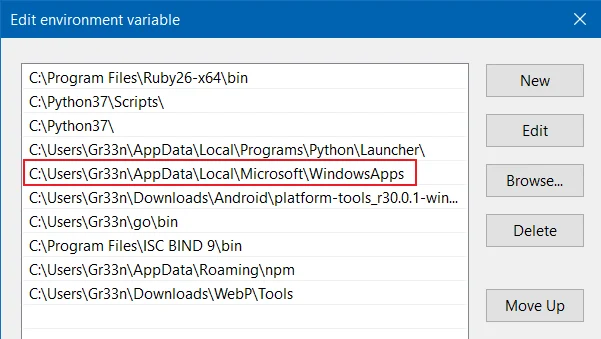
Normal user has Full control over WindowsApps folder so anyone can place a malicious DLL file in the folder and aszbrowsehelper.exe will load that malicious DLL file resulting in its execution with Administrative privileges which can be escalated to NT/AUTHORITY SYSTEM privileges resulting in Privilege Escalation.
Even if %USERPROFILE%\AppData\Local\Microsoft\WindowsApps folder is not in User PATH environment variable, attacker can add any folder of his choice to the User PATH environment variable as this does not require Administrative permissions.
Steps To Reproduce
An Acronis Secure Zone partition is required for this vulnerability to work. To create a secure partition,
- Open Acronis Secure Zone tool from Tools tab.
- Select a partition from the disk of your choice and click Next.
- Select how much size you want to give the secure partition and click Next.
- Click Proceed and True Image will prompt you to reboot the system to complete the operation.
After rebooting, the Secure Zone partition will be created.
I'm assuming the partition is already created in this example.
I created a DLL file which when loaded spawns cmd.exe while giving information as to which application loaded the DLL, path from where the file was loaded, and user privilege. I have attached the DLL file as well as the C++ code to build the DLL below if any necessary changes are to be made.
[ 1 ] - Copy or write the DLL file named tcmalloc.dll in %USERPROFILE%\AppData\Local\Microsoft\WindowsApps folder.
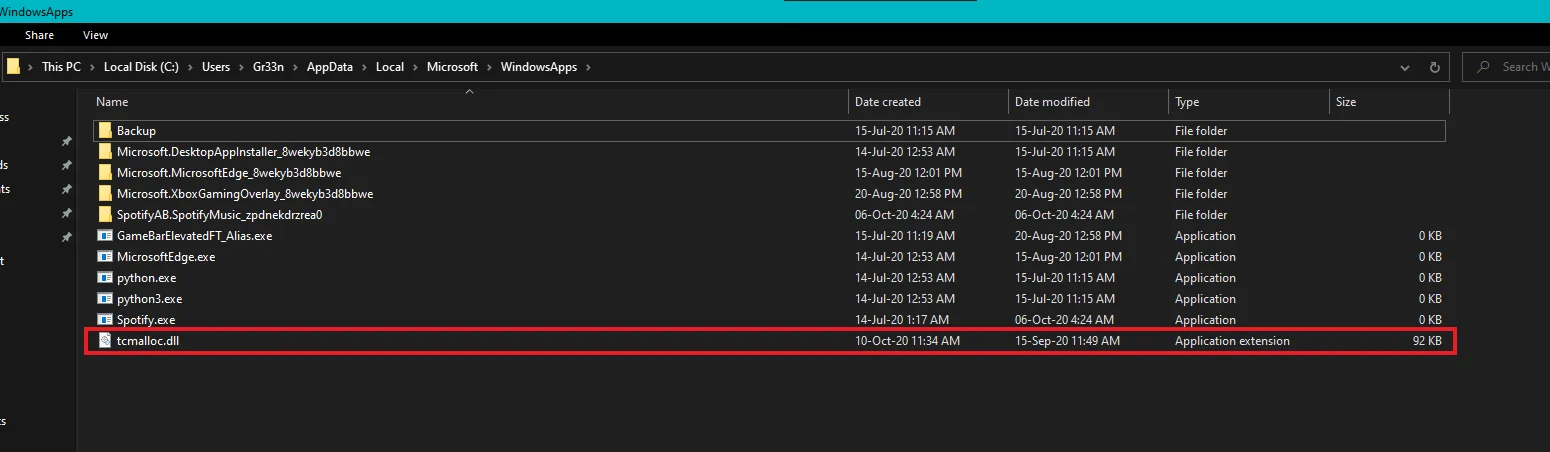
[ 2 ] - In this example, I chose to execute the DLL by opening the Manage Acronis Secure Zone Wizard from Tools tab in Acronis True Image but the DLL will also get loaded when browsing the secure partition in Windows Explorer.
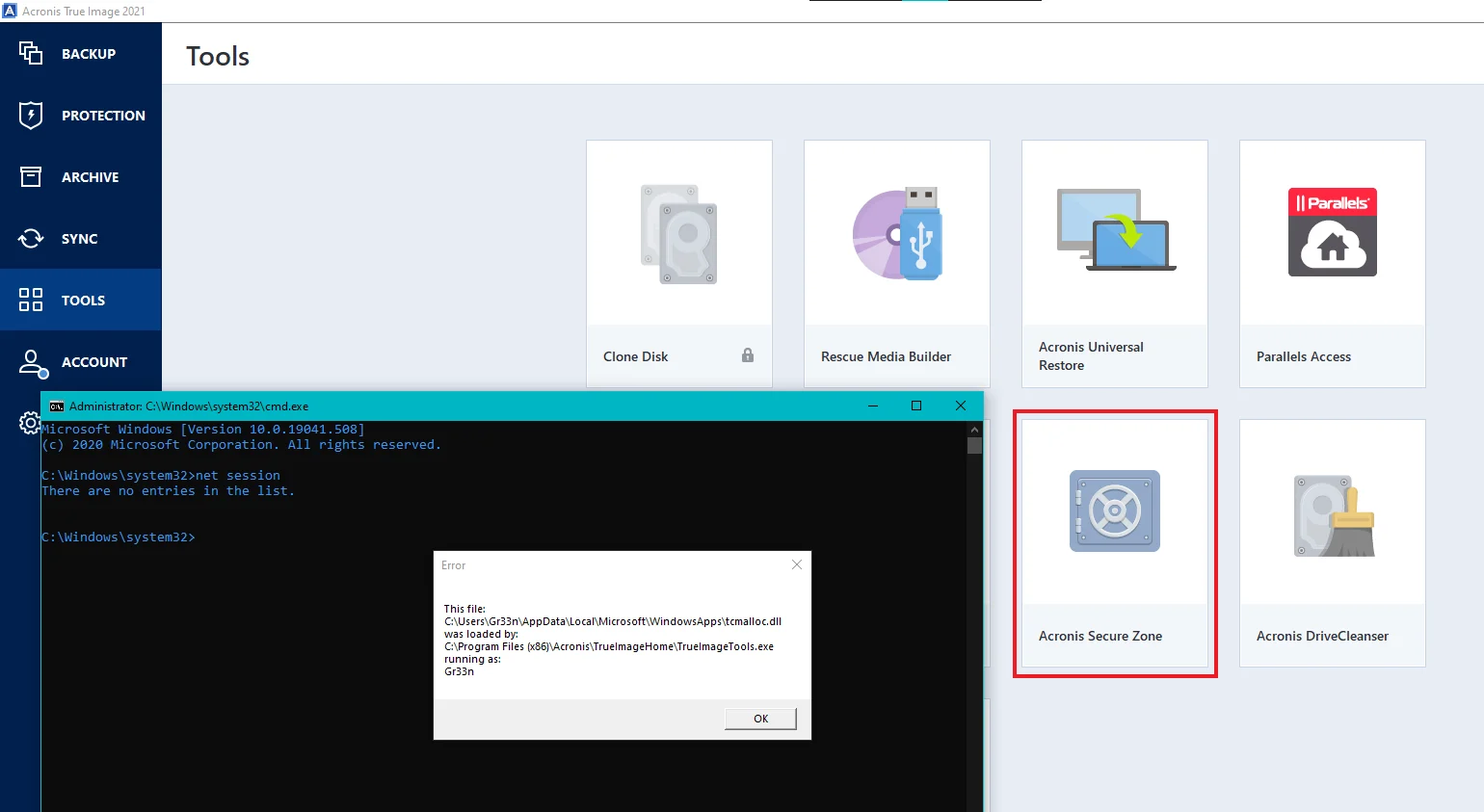
We can see in the title of the cmd.exe window that it was started with Administrator privileges. To confirm, I ran net session command which gives There are no entries in this list output if executed with Administrator privileges and Access denied if executed as a normal user.
Escalating from Administrator privileges to NT AUTHORITY\SYSTEM.
[ 1 ] - From the Command Prompt that was executed after the DLL was loaded, create a scheduled task by using the Windows built-in schtasks.exe utility.
schtasks /create /SC WEEKLY /RU "NT AUTHORITY\SYSTEM" /TN EOP /TR C:\Windows\System32\winver.exe /IT /RL HIGHEST

[ 2 ] - Run the task created in above step from the elevated Command Prompt.
schtasks /run /I /TN EOP
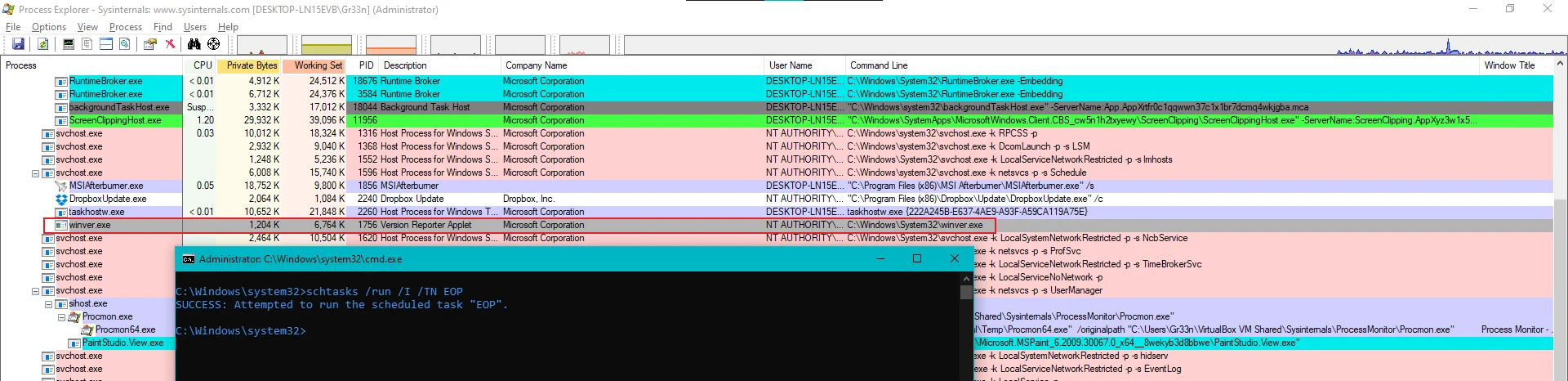
winver.exe can be seen executed as NT AUTHORITY\SYSTEM after the task is started thus resulting in SYSTEM privileged code execution.
Impact
Granting attackers privilege to execute commands as Administrator or NT AUTHORITY\SYSTEM.
Context
Acronis True Image 2021 (now sold as Acronis Cyber Protect Home Office) lets a user create a special protected partition, the Acronis Secure Zone, for storing backups. Browsing the contents of that partition is handled by a process called aszbrowsehelper.exe.
The bug is a DLL search order hijack in that helper. Every time any kind of operation is performed in the Secure Zone, aszbrowsehelper.exe looks for tcmalloc.dll, Google's custom implementation of dynamic memory allocation, and it resolves that name through the standard Windows search order rather than from a trusted, fully qualified location. Because one of the directories in that search order is writable by a normal user, a low privileged user can plant a DLL that the helper then loads with Administrative privileges, and from there reach NT AUTHORITY\SYSTEM.
Setup
The precondition is an Acronis Secure Zone partition. The report describes creating one as follows:
- Open the Acronis Secure Zone tool from the Tools tab.
- Select a partition from the disk of your choice and click Next.
- Select how much size you want to give the secure partition and click Next.
- Click Proceed and True Image will prompt you to reboot the system to complete the operation.
After rebooting, the Secure Zone partition exists. The researcher assumes the partition is already created for the rest of the walkthrough.
For the payload, the researcher built a DLL that, when loaded, spawns cmd.exe and prints which application loaded the DLL, the path it was loaded from, and the user privilege. The DLL and its C++ source were attached to the report so that anyone reproducing it could rebuild with changes; the source itself is not reproduced here.
Finding it
The researcher observed that aszbrowsehelper.exe resolves tcmalloc.dll according to the untrusted search order. The directories it consults, in order, are:
C:\Program Files (x86)\Acronis\TrueImageHome- Application's current working directory
- System directory
- 16-bit System directory
- Windows directory
- Directories in System PATH environment variable
- Directories in User PATH environment variable
The last entry is the problem. Every Windows system contains %USERPROFILE%\AppData\Local\Microsoft\WindowsApps as a value in the User PATH environment variable, so if the DLL is not found in any of the earlier folders, aszbrowsehelper.exe will search there.
A normal user has Full control over the WindowsApps folder. Anyone can therefore place a malicious DLL with that name in the folder, and aszbrowsehelper.exe will load it, executing the attacker's code with Administrative privileges. From there the code can be escalated to NT AUTHORITY\SYSTEM.
The researcher also notes a second route to the same condition: even if %USERPROFILE%\AppData\Local\Microsoft\WindowsApps is not in the User PATH environment variable, an attacker can add any folder of their choice to the User PATH environment variable, because that does not require Administrative permissions.
Exploitation
Step 1: plant the DLL
Copy or write the DLL file named tcmalloc.dll into the %USERPROFILE%\AppData\Local\Microsoft\WindowsApps folder.
Step 2: trigger the load
In the example, the researcher chose to execute the DLL by opening the Manage Acronis Secure Zone Wizard from the Tools tab in Acronis True Image. The same DLL also gets loaded when browsing the secure partition in Windows Explorer.
The title of the resulting cmd.exe window shows that it was started with Administrator privileges. To confirm, the researcher ran net session, which prints There are no entries in this list when executed with Administrator privileges and Access denied when executed as a normal user.
Step 3: escalate to NT AUTHORITY\SYSTEM
From the Command Prompt that was executed after the DLL was loaded, create a scheduled task using the Windows built-in schtasks.exe utility:
schtasks /create /SC WEEKLY /RU "NT AUTHORITY\SYSTEM" /TN EOP /TR C:\Windows\System32\winver.exe /IT /RL HIGHEST
This creates a weekly task named EOP that runs winver.exe as NT AUTHORITY\SYSTEM at the highest run level.
Then run the task created in the previous step from the elevated Command Prompt:
schtasks /run /I /TN EOP
After the task is started, winver.exe can be seen executed as NT AUTHORITY\SYSTEM, which means code execution at SYSTEM privilege.
Root cause
aszbrowsehelper.exe loads tcmalloc.dll by name and lets the Windows loader resolve it through the default search order, which includes the application's current working directory and the directories in the User PATH environment variable. The User PATH entry %USERPROFILE%\AppData\Local\Microsoft\WindowsApps is writable by the unprivileged user, so a name that should resolve to a trusted library resolves to attacker supplied code instead. The helper runs elevated, so the planted DLL inherits that privilege.
Existing defences did not stop it because the search order itself is the weakness: the loader is doing exactly what it is configured to do, and the writable directory is a legitimate part of the user's environment.
Impact
An attacker can execute commands as Administrator or as NT AUTHORITY\SYSTEM. The condition is that an Acronis Secure Zone partition exists and that the attacker can write to a directory that appears in the search order, which a normal user can do in WindowsApps or by adding a folder to the User PATH environment variable. The report frames this as privilege escalation from a normal user account.
Fix
The report does not describe a fix or a vendor change.
- Other Acronis components that run elevated and load DLLs by bare name. A positive result is a DLL of the same name placed in a user writable directory being loaded by the elevated process.
- The same helper triggered through different entry points, such as browsing the Secure Zone in Windows Explorer rather than opening the Manage Acronis Secure Zone Wizard. A positive result is the payload executing from either path.
- Environments where
%USERPROFILE%\AppData\Local\Microsoft\WindowsAppsis absent from the User PATH. A positive result is the same load after adding an attacker controlled folder to the User PATH environment variable, which requires no Administrative permissions. - Other backup and imaging products that expose a helper for a protected partition or archive. A positive result is a missing DLL resolved from a user writable directory while the helper runs elevated.
This class of bug hides in privileged helper processes that load libraries by name, especially helpers launched on demand from a management UI or from Explorer integration. During recon, look for services and helpers that run elevated and for DLL names that are resolved relative to the working directory or PATH; the presence of a user writable directory such as WindowsApps in the User PATH is the signal that the last search step is reachable without admin rights.
The researcher demonstrated impact in two stages: first showing that the loaded DLL produced an Administrator shell, confirmed with net session, and then using that shell to create and run a scheduled task as NT AUTHORITY\SYSTEM, confirmed by winver.exe running under that account. That chain, from a normal user to SYSTEM, is what makes the finding concrete for the program.
What happened, in plain words
Acronis True Image 2021 (now sold as Acronis Cyber Protect Home Office) is a backup program. It lets you create a special protected area on your disk, called the Acronis Secure Zone, where backups are stored. When you look inside that area, a small helper program called aszbrowsehelper.exe does the work of showing you what is there.
That helper needs a piece of code called tcmalloc.dll to run. A DLL is a file full of ready-made code that a program can load and use, a bit like a spare part that a machine picks up when it needs it. The problem is how the helper looks for that file. Windows has a fixed routine for finding a DLL when a program only gives a name and not a full location: it checks a list of folders one after another. One of the folders on that list is a place where an ordinary user, with no special rights, is allowed to put files. So a normal user can drop a fake tcmalloc.dll there, and the helper, which runs with high privileges, will pick it up and run it. The attacker's code then runs with the same high privileges as the helper, and can be pushed further to the highest level on Windows, NT AUTHORITY\SYSTEM.
This kind of bug is called a DLL search order hijack. The program asks for a file by name, Windows searches folders in a set order, and an attacker puts a file with that name in a folder that comes up early enough in the search. The program gets the attacker's file instead of the real one.
Context
Acronis True Image 2021 (now sold as Acronis Cyber Protect Home Office) lets a user create a special protected partition, the Acronis Secure Zone, for storing backups. A partition is a section of a disk that the operating system treats as a separate drive. Browsing the contents of that partition is handled by a process called aszbrowsehelper.exe. A process is a running program; a helper is a small program that a bigger program starts to do one job for it.
The bug is a DLL search order hijack in that helper. Every time any kind of operation is performed in the Secure Zone, aszbrowsehelper.exe looks for tcmalloc.dll, Google's custom implementation of dynamic memory allocation, and it resolves that name through the standard Windows search order rather than from a trusted, fully qualified location. Dynamic memory allocation is how a program asks the operating system for memory while it runs; tcmalloc is one implementation of that job. A fully qualified location means the full path, such as C:\Program Files\...\tcmalloc.dll, which leaves no room for guessing. Because one of the directories in that search order is writable by a normal user, a low privileged user can plant a DLL that the helper then loads with Administrative privileges, and from there reach NT AUTHORITY\SYSTEM.
Two privilege levels matter here. An Administrator account can change most things on a computer. NT AUTHORITY\SYSTEM is the account Windows itself uses for its own core services; it is more powerful than an Administrator and is normally not reachable by a person logging in. Privilege escalation means going from a lower level of rights to a higher one, which is exactly what this report demonstrates.
Setup
The precondition is an Acronis Secure Zone partition. The report describes creating one as follows:
- Open the Acronis Secure Zone tool from the Tools tab.
- Select a partition from the disk of your choice and click Next.
- Select how much size you want to give the secure partition and click Next.
- Click Proceed and True Image will prompt you to reboot the system to complete the operation.
Why each step: the Secure Zone is a separate partition, so it has to be carved out of existing disk space. The wizard asks which disk area to take the space from and how large the new partition should be.
After rebooting, the Secure Zone partition exists. The researcher assumes the partition is already created for the rest of the walkthrough.
For the payload, the researcher built a DLL that, when loaded, spawns cmd.exe and prints which application loaded the DLL, the path it was loaded from, and the user privilege. A payload here means the code the attacker wants to run. cmd.exe is the Windows Command Prompt, a text window where you type commands. Printing which application loaded the DLL and from where is useful for proving the trick worked and for understanding which program was fooled. The DLL and its C++ source were attached to the report so that anyone reproducing it could rebuild with changes; the source itself is not reproduced here.
Finding it
The researcher observed that aszbrowsehelper.exe resolves tcmalloc.dll according to the untrusted search order. The directories it consults, in order, are:
C:\Program Files (x86)\Acronis\TrueImageHome- Application's current working directory
- System directory
- 16-bit System directory
- Windows directory
- Directories in System PATH environment variable
- Directories in User PATH environment variable
What this list means, item by item:
- The first entry is the folder where Acronis itself is installed. That is the sensible place to find the real DLL, and it is not writable by a normal user.
- The current working directory is the folder the program considers itself to be "in" at that moment. It can change depending on how the program was started, which makes it a risky place to trust.
- The System directory is where core Windows files live, normally
C:\Windows\System32. - The 16-bit System directory is a legacy folder kept for very old software.
- The Windows directory is
C:\Windowsitself. - The System PATH environment variable is a list of folders that Windows keeps for all users. An environment variable is a named setting the operating system stores and programs can read, like a sticky note with a list on it.
- The User PATH environment variable is the same kind of list, but for the current user only, and a normal user is allowed to edit it.
The last entry is the problem. Every Windows system contains %USERPROFILE%\AppData\Local\Microsoft\WindowsApps as a value in the User PATH environment variable, so if the DLL is not found in any of the earlier folders, aszbrowsehelper.exe will search there. %USERPROFILE% is a placeholder that Windows replaces with the path of the current user's home folder, so this is a folder inside the user's own profile.
A normal user has Full control over the WindowsApps folder. Anyone can therefore place a malicious DLL with that name in the folder, and aszbrowsehelper.exe will load it, executing the attacker's code with Administrative privileges. From there the code can be escalated to NT AUTHORITY\SYSTEM.
The researcher also notes a second route to the same condition: even if %USERPROFILE%\AppData\Local\Microsoft\WindowsApps is not in the User PATH environment variable, an attacker can add any folder of their choice to the User PATH environment variable, because that does not require Administrative permissions. In other words, the attacker does not depend on that one folder being present; they can put a folder of their own on the list.
Exploitation
Step 1: plant the DLL
Copy or write the DLL file named tcmalloc.dll into the %USERPROFILE%\AppData\Local\Microsoft\WindowsApps folder.
Why: the helper will look for a file with exactly that name. Putting the attacker's file in a folder the helper searches, and that the attacker can write to, means the helper will find the attacker's file instead of the real one. The name has to match exactly, because that is the name the program asks for.
Step 2: trigger the load
In the example, the researcher chose to execute the DLL by opening the Manage Acronis Secure Zone Wizard from the Tools tab in Acronis True Image. The same DLL also gets loaded when browsing the secure partition in Windows Explorer.
Why: the DLL is only loaded when the helper actually runs. Opening the wizard, or browsing the Secure Zone in Explorer, is what starts the helper and makes it go looking for tcmalloc.dll. Nothing happens until one of those actions is taken.
The title of the resulting cmd.exe window shows that it was started with Administrator privileges. To confirm, the researcher ran net session, which prints There are no entries in this list when executed with Administrator privileges and Access denied when executed as a normal user.
Why this check: the window title alone is a weak signal. net session is a built-in Windows command that lists connections to the computer; it only works for accounts with enough rights. So the output is a simple test of privilege: the "no entries" message means the command was allowed to run, and "Access denied" means it was not.
Step 3: escalate to NT AUTHORITY\SYSTEM
From the Command Prompt that was executed after the DLL was loaded, create a scheduled task using the Windows built-in schtasks.exe utility:
schtasks /create /SC WEEKLY /RU "NT AUTHORITY\SYSTEM" /TN EOP /TR C:\Windows\System32\winver.exe /IT /RL HIGHEST
Line by line:
schtasksis the Windows tool for managing scheduled tasks, which are jobs Windows runs automatically at set times or on request./createsays a new task should be made./SC WEEKLYsets the schedule to weekly./RU "NT AUTHORITY\SYSTEM"sets the account the task runs as, here the SYSTEM account./TN EOPgives the task a name,EOP./TR C:\Windows\System32\winver.exesets the program the task runs, herewinver.exe, the small Windows dialog that shows the version of Windows./ITmakes the task run interactively, only when the named user is logged on./RL HIGHESTasks for the highest run level available, which is what allows the SYSTEM account to be used.
This creates a weekly task named EOP that runs winver.exe as NT AUTHORITY\SYSTEM at the highest run level. The point of the step is that the attacker now has an Administrator shell, and an Administrator is allowed to create a task that runs as SYSTEM. The task becomes the vehicle for reaching the higher account.
Then run the task created in the previous step from the elevated Command Prompt:
schtasks /run /I /TN EOP
Line by line:
schtasksis the same tool as before./runtells it to start an existing task now rather than wait for the schedule./TN EOPnames the task to run, the one created in the previous step.
Why: creating a task does not run it. This command starts it on demand, so the SYSTEM-level program runs straight away instead of waiting for the weekly schedule.
After the task is started, winver.exe can be seen executed as NT AUTHORITY\SYSTEM, which means code execution at SYSTEM privilege. The dialog itself is harmless; what matters is the account it is running under, because that proves the higher privilege was reached.
Root cause
aszbrowsehelper.exe loads tcmalloc.dll by name and lets the Windows loader resolve it through the default search order, which includes the application's current working directory and the directories in the User PATH environment variable. The User PATH entry %USERPROFILE%\AppData\Local\Microsoft\WindowsApps is writable by the unprivileged user, so a name that should resolve to a trusted library resolves to attacker supplied code instead. The helper runs elevated, so the planted DLL inherits that privilege.
A useful comparison: imagine a courier told to deliver a parcel to "the workshop" without a street address. The courier checks a list of places in order and stops at the first one called "the workshop". If someone sets up a fake workshop earlier on the list, the parcel goes there. The program did nothing wrong by its own rules; the rules themselves allow the wrong place to win.
Impact
An attacker can execute commands as Administrator or as NT AUTHORITY\SYSTEM. The condition is that an Acronis Secure Zone partition exists and that the attacker can write to a directory that appears in the search order, which a normal user can do in WindowsApps or by adding a folder to the User PATH environment variable. The report frames this as privilege escalation from a normal user account.
In everyday terms: someone who can already use the computer as an ordinary user, with no administrator password, can end up running their own code with the highest rights on the machine. That is a serious step up, because those rights can be used to change the system in ways a normal user cannot.
Fix
The report does not describe a fix or a vendor change.
In plain words: the helper should be told the exact full address of the real DLL, in a folder only administrators can write to, instead of asking Windows to go looking by name.
- Other Acronis components that run elevated and load DLLs by bare name. A positive result is a DLL of the same name placed in a user writable directory being loaded by the elevated process.
- The same helper triggered through different entry points, such as browsing the Secure Zone in Windows Explorer rather than opening the Manage Acronis Secure Zone Wizard. A positive result is the payload executing from either path.
- Environments where
%USERPROFILE%\AppData\Local\Microsoft\WindowsAppsis absent from the User PATH. A positive result is the same load after adding an attacker controlled folder to the User PATH environment variable, which requires no Administrative permissions. - Other backup and imaging products that expose a helper for a protected partition or archive. A positive result is a missing DLL resolved from a user writable directory while the helper runs elevated.
Why test variants: if one program makes this mistake, the same pattern often appears in sibling programs or in the same program reached a different way. Each variant above is a way of asking the same question: does an elevated program pick up a file from a place a normal user controls?
This class of bug hides in privileged helper processes that load libraries by name, especially helpers launched on demand from a management UI or from Explorer integration. During recon, look for services and helpers that run elevated and for DLL names that are resolved relative to the working directory or PATH; the presence of a user writable directory such as WindowsApps in the User PATH is the signal that the last search step is reachable without admin rights. Recon here means the early looking-around phase, before trying anything: noticing which programs run with high rights and what files they go looking for.
The researcher demonstrated impact in two stages: first showing that the loaded DLL produced an Administrator shell, confirmed with net session, and then using that shell to create and run a scheduled task as NT AUTHORITY\SYSTEM, confirmed by winver.exe running under that account. That chain, from a normal user to SYSTEM, is what makes the finding concrete for the program. Showing each stage separately matters, because each one is a claim that needs its own evidence: first that the planted file really was loaded by the elevated helper, then that the resulting rights really were enough to reach SYSTEM.
Glossary
- DLL: a file containing ready-made code that programs can load and use, rather than each program carrying its own copy.
- DLL search order hijack: a bug where a program asks for a DLL by name only, Windows searches a list of folders in order, and an attacker puts a file with that name in a folder the search reaches.
- Search order: the fixed sequence of folders Windows checks when looking for a DLL that was named without a full path.
- Fully qualified path: the complete address of a file, including drive and every folder, leaving nothing to guess.
- Partition: a section of a disk that the operating system treats as a separate drive.
- Acronis Secure Zone: a protected partition that Acronis True Image creates for storing backups.
- Process: a running program.
- Helper: a small program that a larger program starts to carry out one job for it.
- Privilege: a permission to do something on a computer, such as changing system settings.
- Privilege escalation: moving from a lower level of rights to a higher one.
- Administrator: a Windows account that can change most settings on the computer.
- NT AUTHORITY\SYSTEM: the account Windows uses for its own core services, more powerful than an Administrator.
- Payload: the code an attacker wants to run.
cmd.exe: the Windows Command Prompt, a text window where commands are typed.- Environment variable: a named setting stored by the operating system that programs can read, such as a list of folders.
- PATH: an environment variable holding a list of folders that Windows searches for programs and libraries.
- System PATH / User PATH: the PATH list that applies to all users, and the one that applies to the current user and that the user can edit.
%USERPROFILE%: a placeholder Windows replaces with the path of the current user's home folder.WindowsApps: the folder%USERPROFILE%\AppData\Local\Microsoft\WindowsApps, which a normal user can write to.tcmalloc.dll: the DLL the helper looks for, an implementation of dynamic memory allocation.- Dynamic memory allocation: how a program asks the operating system for memory while it is running.
aszbrowsehelper.exe: the Acronis helper that browses the Secure Zone and loadstcmalloc.dll.net session: a built-in Windows command that only works with sufficient rights, used here to confirm Administrator privilege.- Scheduled task: a job Windows runs automatically at a set time or on request.
schtasks: the built-in Windows tool for creating and running scheduled tasks.winver.exe: the small Windows dialog that shows the version of Windows, used here as a harmless program to run under SYSTEM.- Recon: the early looking-around phase of a security test, before trying anything.
- Mitigation: a defence or safeguard that reduces the chance or impact of an attack.



