an xss issue
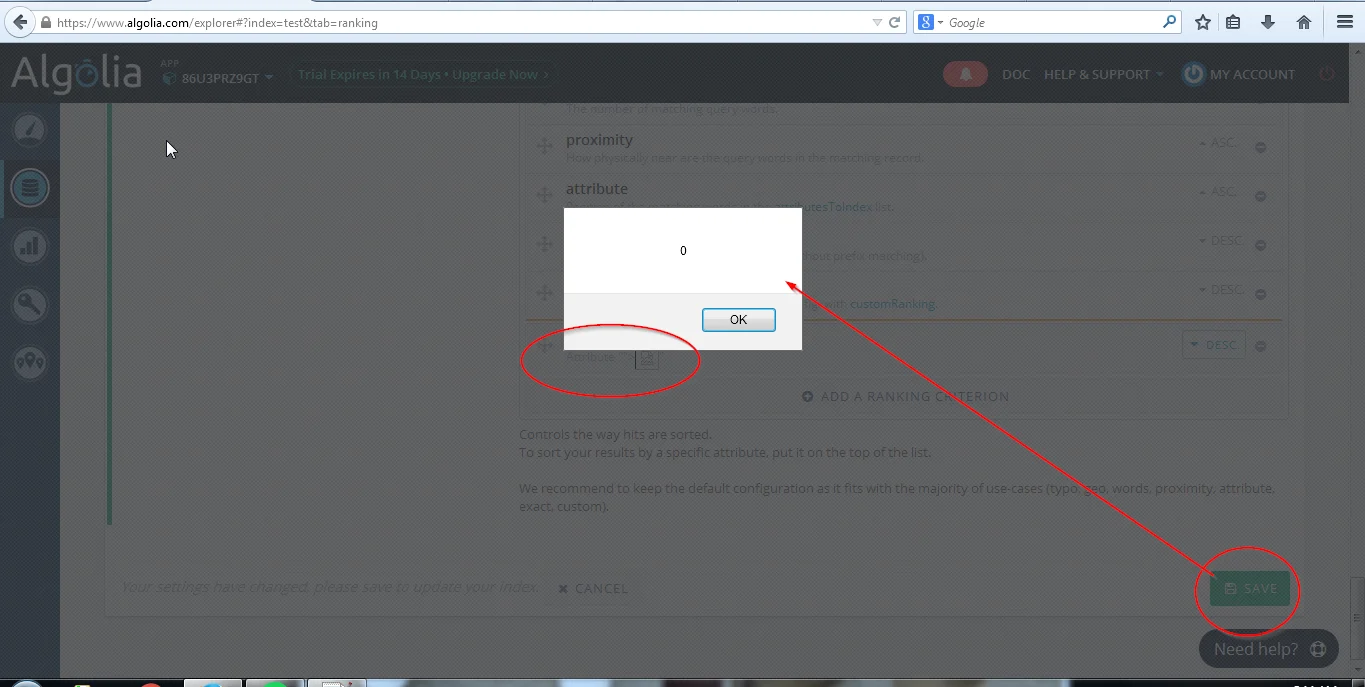
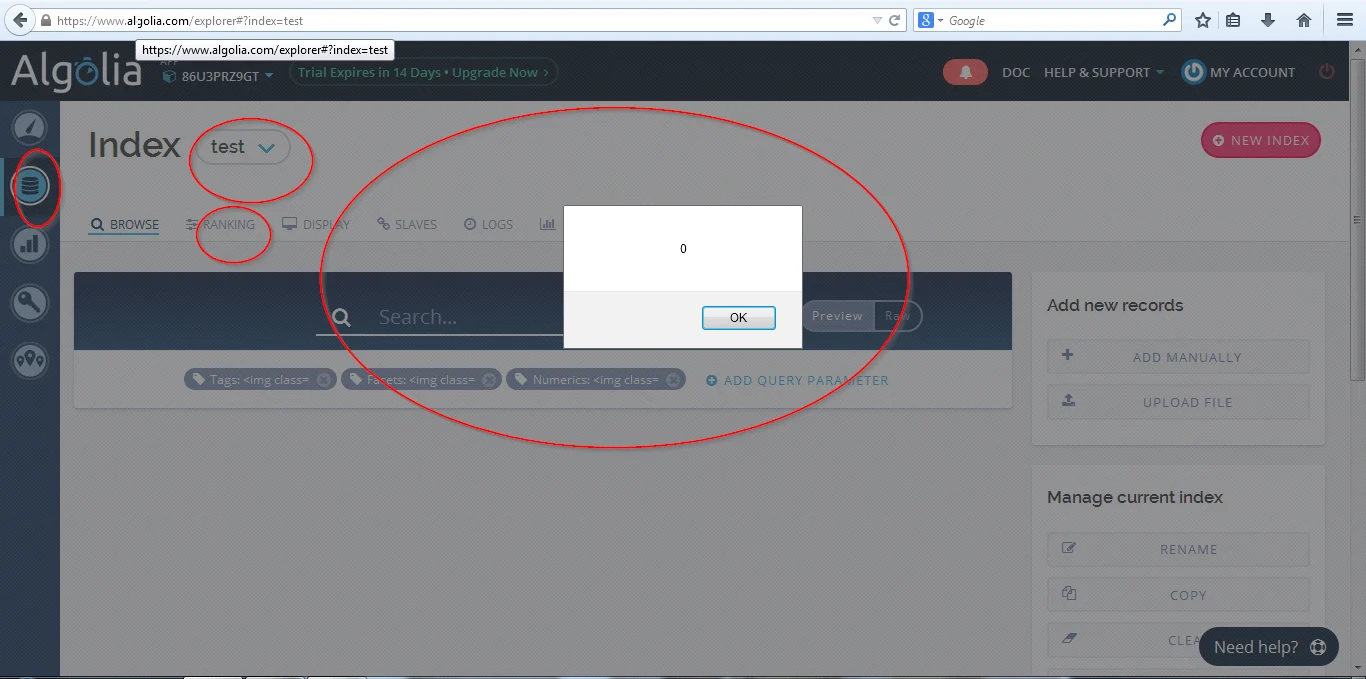
A stored XSS issue was reported in the Algolia explorer ranking formula field, where a payload executed when the index was saved.
 Originally disclosed on HackerOne
- Triaged in 4 days
- Fixed in 11 days
- Paid in 11 days
- Disclosed after 6 months
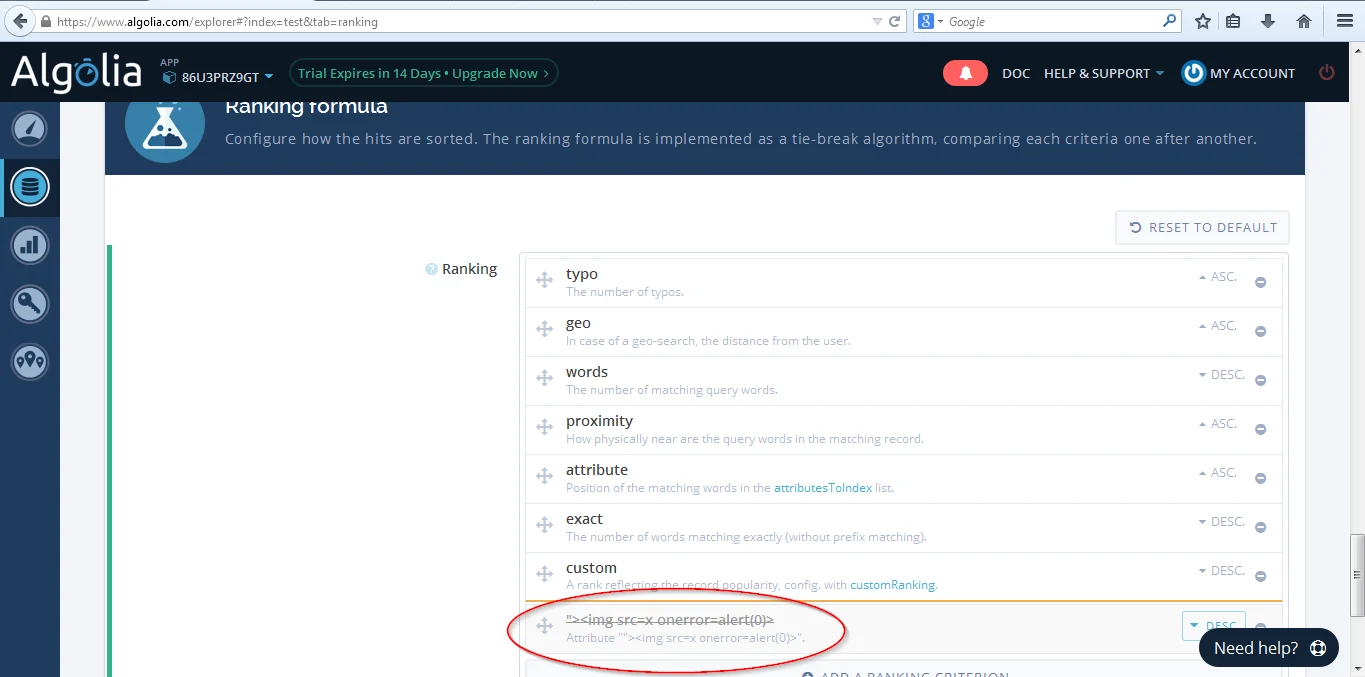
i found an xss issue here : https://www.algolia.com/explorer#?index=test&tab=ranking i tried to put an xss payload ("><img src=x onerror=alert(0)>) in index > ranking> so i put the xss payload in Ranking formula then hit save ...when it is being saved the xss payload is being stored that upon Indices xss payload executed p.s please screen shot
Attachments
What the report shows
The target is the Algolia web application, specifically the explorer interface at the following URL:
https://www.algolia.com/explorer#?index=test&tab=ranking
The researcher identified a cross-site scripting issue in the ranking configuration of an index. The URL selects an index and opens the ranking tab, where a ranking formula can be edited and saved.
The steps described in the report are:
- Open the explorer with an index selected and the ranking tab active.
- Enter an XSS payload into the ranking formula field:
"><img src=x onerror=alert(0)>
- Save the ranking formula.
- The payload is stored when the formula is saved, and it executes when the index is viewed, in the Indices view.
The researcher's summary is that the payload is persisted on save and then runs on the Indices page. The report includes three screenshots as attachments.
It does not state a severity rating, a CVSS score, or a fix, and the text stops after the short description and the attachments.
Root cause
The report points to a stored cross-site scripting flaw in the ranking formula handling. The report does not describe the code responsible, so the exact cause is not confirmed.
Impact
The report shows script execution in the context of the Algolia explorer after a ranking formula is saved. The report says the payload executes when the index is viewed in the Indices view. In the researcher's demonstration the payload only calls alert(0).
How this kind of bug works
Stored cross-site scripting happens when user-controlled input is persisted by an application and later included in a page without context-appropriate encoding. The browser cannot tell application data from application code, so any markup in the stored value is parsed as part of the page. When the value lands inside an HTML attribute, a payload that closes the attribute and the tag can introduce new elements; event handlers such as onerror then run when the injected element fails to load its source.
The bug class persists because the same value often passes through several layers: a form, an API, a database, and one or more rendering paths. Encoding applied at input time is fragile, because the correct encoding depends on where the value is finally placed. The reliable defence is output encoding at the point of rendering, matched to the context (HTML text, attribute, URL, script, CSS), combined with a Content Security Policy that restricts inline script and event handlers, and framework features that escape by default.
How to test for it
A general method for this class:
- Map every field whose value is saved and later displayed: configuration forms, names, labels, formulas, templates, and settings pages.
- For each field, submit a harmless marker first (for example a unique string) and find every page, panel, export, and notification where it appears.
- Identify the rendering context of each appearance: HTML text, an attribute value, a URL, a script block, or a style block. The context determines which characters matter.
- Send a payload appropriate to the context. For attribute contexts, try breaking out of the attribute with a quote and closing bracket before adding an element with an event handler. For text contexts, try tag injection. Keep the payload benign, such as an alert or a call to a controlled endpoint.
- Reload the page and revisit the display location to confirm the value was stored and executes on a fresh load, not only in the response to the save request.
- Check whether the value is reflected into other users' views, which turns reflected execution into stored execution.
A positive result is script execution on a page load that does not depend on the original submission request. Common false positives include payloads that appear only in the raw response but are neutralised by the browser, values that are escaped correctly in one view but not another, and execution that only occurs in the submitter's own browser session through client-side state rather than server-side storage. Test in more than one browser and confirm the stored value survives a new session.
How it is fixed
Standard fixes for stored XSS:
- Encode output at render time according to context, using the templating or UI framework's escaping rather than manual string building.
- Avoid inserting user-controlled values into inline event handlers, inline scripts, or unquoted attributes.
- Apply a Content Security Policy that disallows inline script and inline event handlers, so injected handlers do not run even if markup is injected.
- Validate and normalise input where a strict format is expected, as a defence in depth rather than the primary control.
- Review every rendering path for a stored value, since a single unescaped view is enough to reintroduce the bug.
Hunting notes
Stored XSS tends to hide in places where values are saved once and rendered in many places: admin and configuration panels, ranking and search settings, saved filters, display names, and template or formula fields. These fields are often treated as trusted because only some users can edit them.
Recon signals include settings pages with free-text fields, values that reappear in dashboards, exports, or preview panes, and applications that render configuration through client-side templates. Watching for values that are reflected into attributes, such as value=, data- attributes, or inline handlers, points to likely breakout contexts.
To make a report accepted, demonstrate storage and execution on a fresh page load, show which view triggers it and who would see it, and keep the payload benign. Note any privilege boundary the payload crosses, and describe the realistic consequence rather than only the alert.
What happened, in plain words
Algolia is a service that helps websites add search. Its web app includes an "explorer" where a user can look at a search index (the stored collection of searchable data) and adjust how results are ranked. The researcher opened the explorer at this address:
https://www.algolia.com/explorer#?index=test&tab=ranking
The address selects an index and opens the ranking tab. The ranking tab contains a ranking formula field. The researcher typed a small piece of HTML into that formula and saved it:
"><img src=x onerror=alert(0)>
This is a cross-site scripting (XSS) payload. XSS means getting a website to run code that the site's owners did not intend. The browser cannot tell the difference between text the site meant to show and text an attacker slipped in; if the text looks like HTML, the browser treats it as HTML. Here is what each part does:
"closes an HTML attribute that the page was already inside, so the following text is no longer treated as a plain value.>closes the surrounding HTML tag.<img src=x onerror=alert(0)>adds a new image element.src=xpoints at an address that does not exist, so the image fails to load.onerror=alert(0)is an event handler: a snippet of JavaScript that the browser runs when the image fails.alert(0)opens a pop-up box showing0, a harmless way to prove that code ran.
In other words, the value was not just echoed back once; it was kept by the application and executed later, on a different page. That is what makes it stored XSS rather than a one-off reflection.
The report includes three screenshots as attachments.
It does not give a severity rating, a CVSS score, or a fix, and the text ends after the short description and the attachments.
Why it matters
The demonstration only shows a pop-up. The point is not the pop-up itself but where the code runs: inside the Algolia explorer, in the browser of whoever opens the affected index. The report says the payload runs when the index is viewed in the Indices view. The report does not describe what a more harmful payload could reach, so the practical consequences beyond script execution in the viewer's session are not established here.
In general, how this kind of bug works
Stored XSS happens when an application saves something a user typed and later puts it into a page without encoding it for the place where it lands. Encoding means converting characters that have special meaning in HTML (such as <, > and ") into harmless equivalents, so the browser shows them as text instead of treating them as markup. Think of a comment box on a noticeboard: if someone writes "ignore the rules above" and the board prints it as an instruction rather than as a comment, the board is at fault, not the writer.
The tricky part is that the right encoding depends on context. A value placed between tags (HTML text), inside an attribute, inside a URL, inside a script block or inside a style block each needs different treatment. Encoding at the moment of input is fragile for this reason; the reliable defence is encoding at the moment of output, matched to the context. A Content Security Policy (a set of browser rules a site can send that restricts what scripts may run) adds a second layer, and modern frameworks escape values by default.
In general, how to test for it
A simple method for this class of bug:
- List every field whose value is saved and later shown: settings forms, names, labels, formulas, templates.
- Put a harmless unique marker (a distinctive word) in each field, then find every page, panel, export and notification where it appears.
- Work out the context of each appearance: plain text, an attribute value, a URL, a script block or a style block. The context decides which characters matter.
- Send a payload suited to that context. In an attribute, try closing the attribute with a quote and the tag with
>, then add an element with an event handler. In plain text, try adding a tag. Keep the payload benign, such as an alert. - Reload the page and revisit the display location, to confirm the value was stored and runs on a fresh load, not only in the response to the save request.
- Check whether the value appears in other users' views, which turns a one-off reflection into stored execution.
A real finding is script execution on a page load that does not depend on the original save request. Common false positives are payloads that appear in the raw response but are neutralised by the browser, values escaped correctly in one view but not another, and execution that only happens in the submitter's own browser through client-side state rather than server-side storage. Test in more than one browser and confirm the stored value survives a new session.
In general, how it is fixed
- Encode output at render time according to context, using the templating or UI framework's escaping rather than building strings by hand.
- Avoid putting user-controlled values into inline event handlers, inline scripts or unquoted attributes.
- Apply a Content Security Policy that disallows inline script and inline event handlers, so injected handlers do not run even if markup gets in.
- Validate and normalise input where a strict format is expected, as an extra layer rather than the main control.
- Review every rendering path for a stored value, since one unescaped view is enough to bring the bug back.
In general, where to look
Stored XSS tends to hide where a value is saved once and shown in many places: admin and configuration panels, ranking and search settings, saved filters, display names, and template or formula fields. Such fields are often treated as trusted because only some users can edit them. Signals worth watching are settings pages with free-text fields, values that reappear in dashboards, exports or preview panes, and applications that render configuration through client-side templates. Values reflected into attributes such as value=, data- attributes or inline handlers point to likely breakout contexts.
To get a report accepted, show storage and execution on a fresh page load, say which view triggers it and who would see it, and keep the payload benign. Note any privilege boundary the payload crosses, and describe the realistic consequence rather than only the alert.
Glossary
- Algolia: a service that adds search to websites and apps.
- Index: the stored, searchable collection of data that a search runs against.
- Explorer: the part of the Algolia web app used to inspect an index and change its settings.
- Ranking formula: a setting that decides the order in which search results are returned.
- Cross-site scripting (XSS): getting a website to run code the site's owners did not intend, by slipping markup or script into content the site displays.
- Stored XSS: XSS where the malicious value is saved by the application and runs later, for anyone who views the affected page.
- Payload: the piece of input crafted to trigger a bug.
- HTML: the markup language browsers use to structure web pages.
- Attribute: a name/value pair inside an HTML tag, such as
srcoronerror. - Event handler: a snippet of JavaScript attached to an element that runs when something happens, such as an image failing to load.
- JavaScript: the programming language browsers run to make pages interactive.
- Encoding (escaping): converting characters with special meaning into harmless equivalents so they display as text.
- Context: the place in a page where a value lands (text, attribute, URL, script, style), which decides the right encoding.
- Content Security Policy (CSP): browser rules a site can send that restrict which scripts may run.
- Bounty: a payment a company makes to a researcher who reports a valid security bug.
- Severity / CVSS: a rating of how serious a bug is; CVSS is a standard scoring system for it.
- False positive: a result that looks like a bug but is not, for example because the browser neutralises the payload.




