"a stored xss issue in share post menu"
A stored XSS issue existed in the share-post menu: a team name containing an XSS payload would execute when a post was shared to that team.
 Originally disclosed on HackerOne
- Triaged in 3 days
- Fixed in 4 days
- Paid in 4 days
- Disclosed after 12 months
good day:
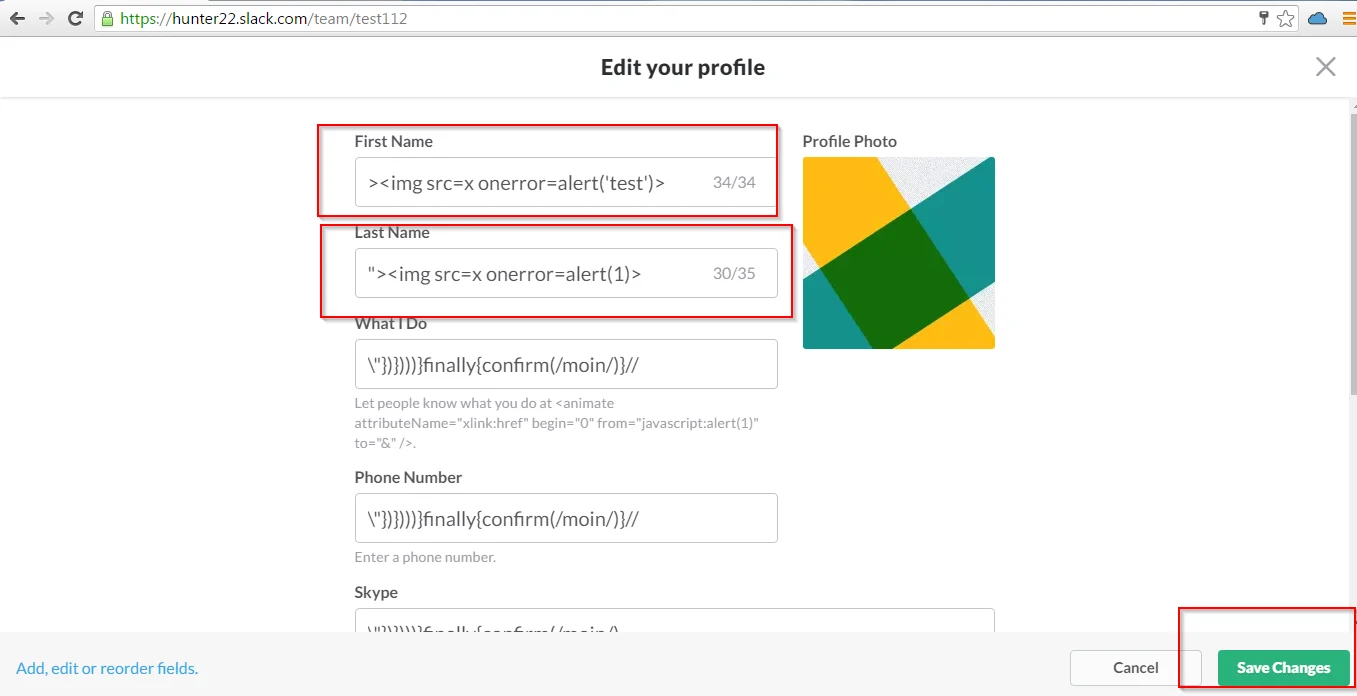
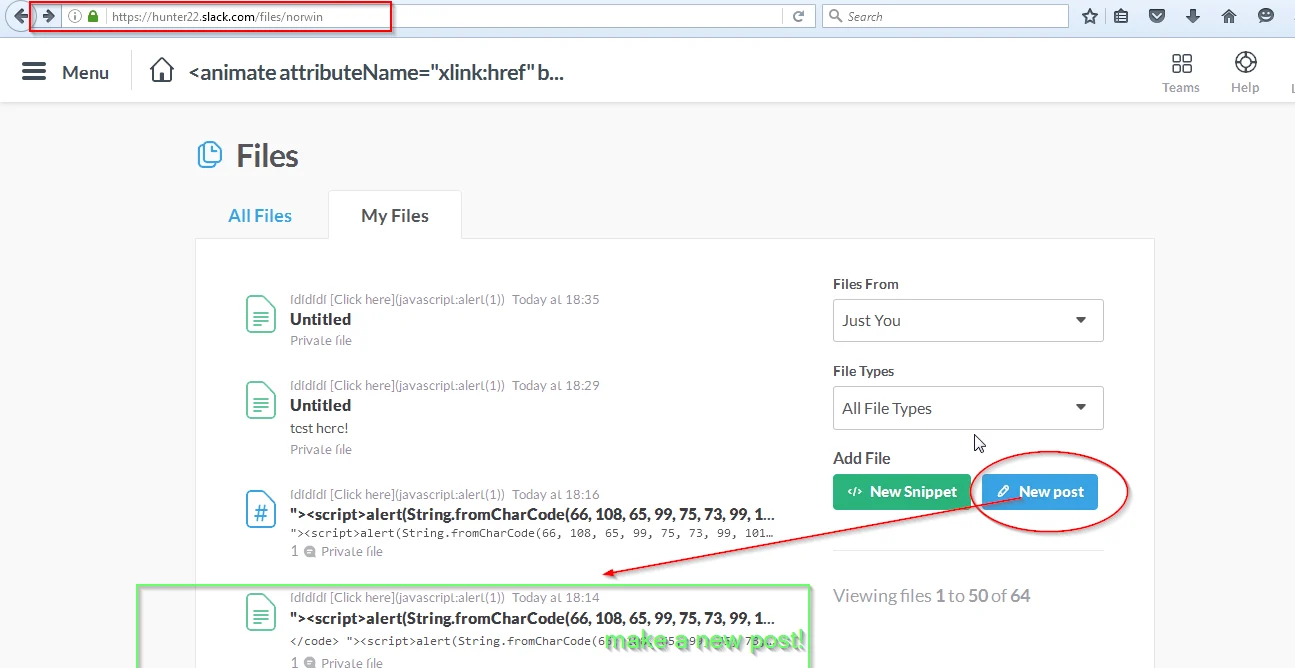
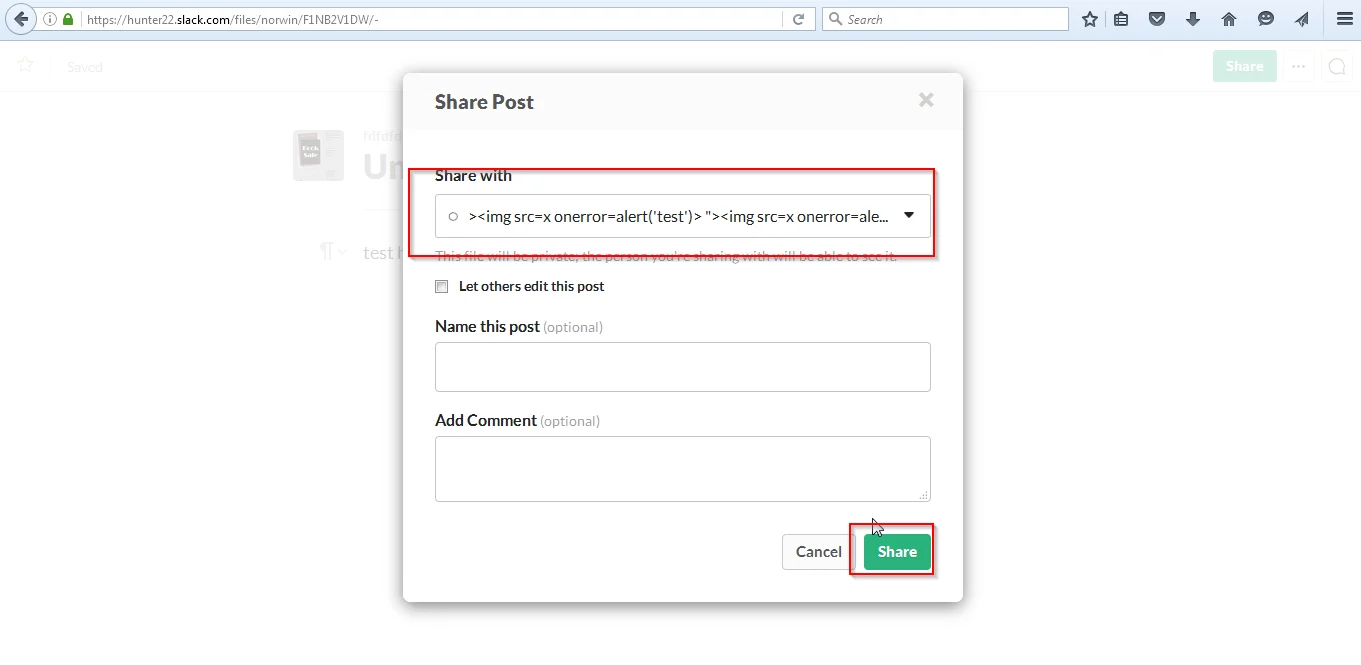
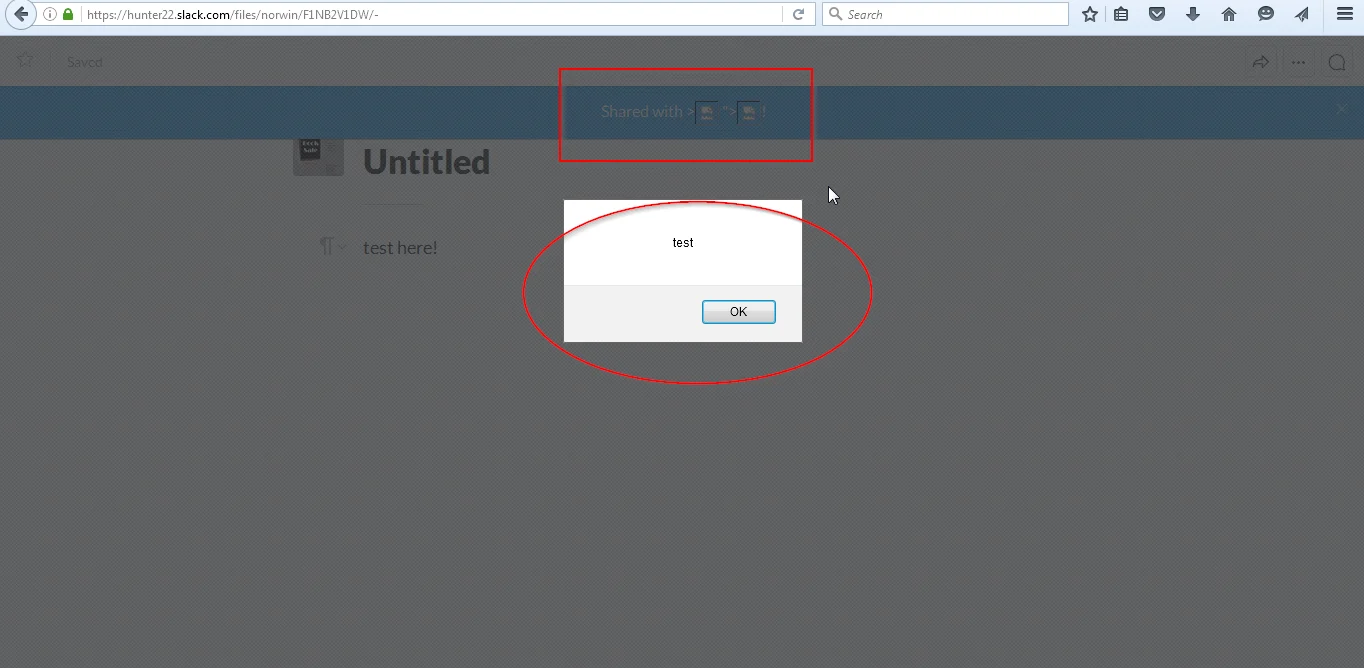
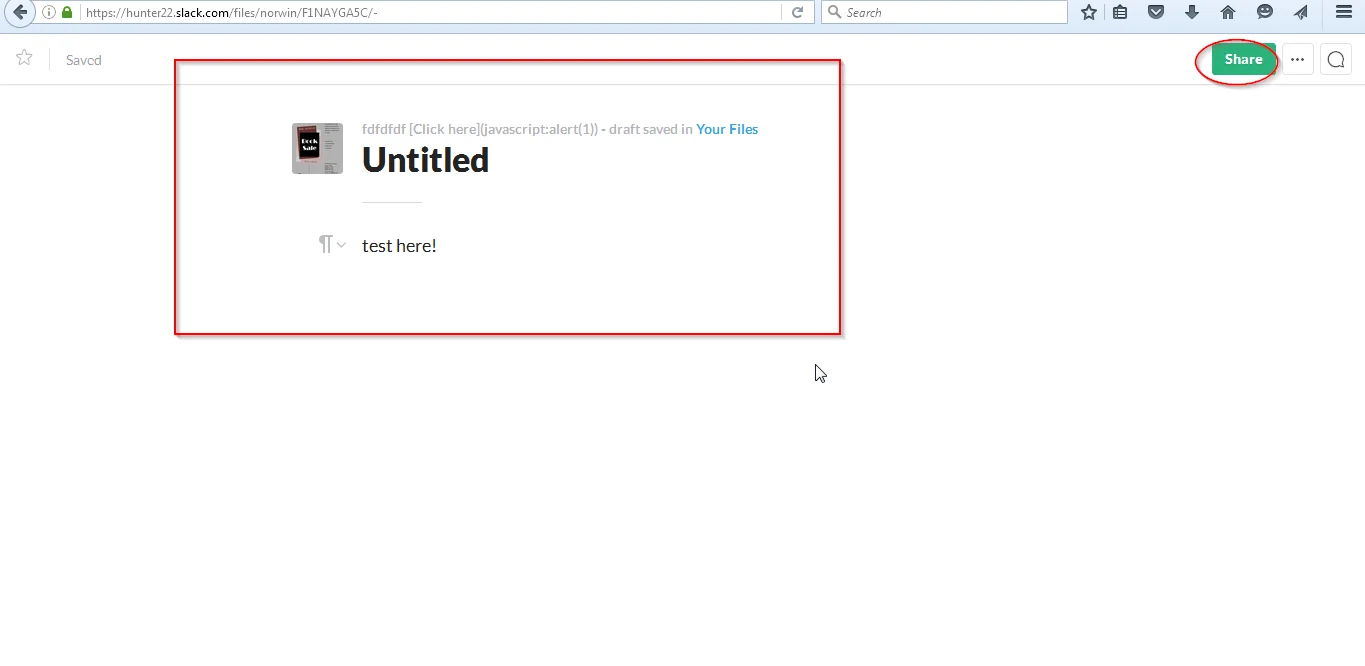
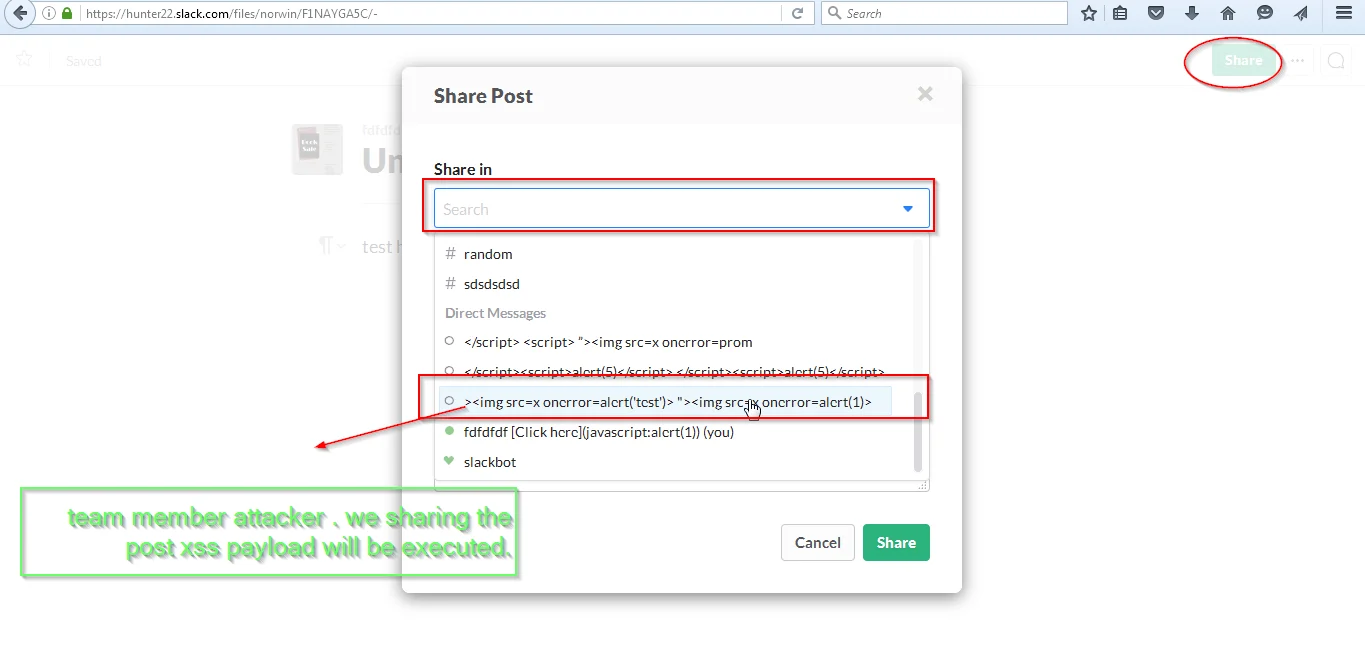
when a team mate named an xss payload: ex: "><img src=x onerror=alert(1)> "><img src=x onerror=alert(1)> that xss payload will execute when making a post then share it, to a team that has an xss payload named. that shared as a direct message please see screenshot
when making post here: https://hunter22.slack.com/files/create/space
Attachments
What the report shows
The target is Slack, and the feature involved is the post and share flow. The researcher reports a stored cross-site scripting issue that triggers when a post is shared as a direct message with a team that has a teammate whose name is an XSS payload.
The payload the researcher used is:
"><img src=x onerror=alert(1)>
     "><img src=x onerror=alert(1)>
According to the report, when a teammate is named with that payload, the payload executes when you make a post and then share it to a team that has a teammate named with the payload. The report says the post is shared as a direct message, and points to the attached screenshots for the result.
The post is created at this URL:
https://hunter22.slack.com/files/create/space
The report does not describe the individual HTTP requests, parameters or headers involved, and it does not give a fix, a severity rating or a CVSS score. The platform records the weakness as generic cross-site scripting and a bounty of 500.00 USD, disclosed on 2017-06-25.
The attachments show the sequence. The report includes six attached screenshots but does not describe them in the text.
Root cause
The report points to the teammate name as the field carrying the payload. A likely explanation, not stated in the report, is that the name is inserted into the shared post's HTML without escaping. The report describes the issue as stored, since the payload lives in the teammate name.
Impact
The report's own framing is that the payload executes when a post is shared as a direct message to a team that has a teammate named with the payload. The report demonstrates only the alert(1) proof and does not describe any concrete consequence. The report does not describe data theft, account takeover or any other concrete consequence.
How this kind of bug works
Stored XSS happens when user-controlled data is saved by the application and later rendered into a page without context-appropriate encoding. The browser cannot tell developer-authored markup from injected markup, so any <, >, quote or event handler attribute that survives into the response is interpreted as HTML or JavaScript. The classic trigger is a value that is placed inside an attribute: a leading "> closes the attribute and the tag, and the following <img src=x onerror=...> supplies a new element whose handler fires when the image fails to load.
Names, titles, labels and other short free-text fields are frequent carriers because developers assume they are harmless and skip escaping. The bug becomes stored when the value is persisted and re-rendered on other pages or in other users' views, which is what turns a single reflection into a persistent problem.
The defences are output encoding matched to the rendering context (HTML entity encoding for element content, attribute encoding for attribute values, JavaScript encoding inside script blocks), a Content Security Policy that blocks inline handlers, and treating all stored fields as untrusted at render time regardless of where they were entered.
How to test for it
- Identify every field that is stored and later displayed to other users: display names, team names, post titles, file names, comments.
- Enter a benign marker first, such as a distinctive string, and confirm where it reappears: in the post composer, in the shared message, in notifications, in the DM view.
- Replace the marker with a context probe. A plain
<b>test</b>shows whether HTML is interpreted; a quote-based probe such as"><img src=x onerror=alert(1)>tests attribute contexts. Use a unique value per test so you can attribute the result. - Walk the full share flow, because the vulnerable render may only occur on the recipient's view or in the shared copy, not in the composer.
- A positive result is your probe executing as script in the page, visible as an alert or a callback to a listener you control, in a view that another user would see.
Common false positives: the payload appearing HTML-encoded in the page source (safe), the payload rendering only in your own preview but not in the stored or shared view, or the browser blocking execution because of a restrictive CSP. Check the raw response and the rendered DOM before claiming execution.
How it is fixed
Encode all stored values on output using the encoding appropriate to the context, and never concatenate raw user data into HTML strings. Apply a strict Content Security Policy that disallows inline event handlers and inline script. Validate and normalise names and similar fields on input as defence in depth, but rely on output encoding as the primary control. Add regression tests that render stored fields containing quotes and angle brackets.
Hunting notes
This class hides in secondary render paths: share dialogs, DM previews, notification emails, activity feeds and export views, where the same stored value is rendered by different templates. Recon signals include features that echo a display name into a message or card, and any place where a name is shown alongside user-generated content. To make a report land, show the full flow from storage to execution in another user's view, keep the proof minimal, and state clearly which stored field and which render path are involved.
What happened, in plain words
Slack is a messaging app for teams. You can create posts (like notes or files) and share them with teammates, including as a direct message (DM). Each teammate has a display name. The researcher found that if a teammate's name is set to a piece of code that a browser will run, that code runs when someone makes a post and shares it with a team that includes that teammate. The report calls this a stored cross-site scripting (XSS) issue.
The payload (the code) the researcher used is:
"><img src=x onerror=alert(1)>
     "><img src=x onerror=alert(1)>
This is HTML. The "> part tries to close an attribute and a tag early. Then <img src=x onerror=alert(1)> creates an image element whose source is x (which will fail to load), and the onerror attribute tells the browser to run alert(1) when that failure happens. alert(1) shows a pop-up box with the number 1. It is a harmless way to prove that code ran.
The report says the payload executes when you make a post and then share it to a team that has a teammate named with the payload. The post is shared as a direct message. The report points to screenshots for the result.
The post is created at this URL:
https://hunter22.slack.com/files/create/space
That is a Slack workspace address for creating a file or post. The report does not describe the individual HTTP requests, parameters or headers involved, and it does not give a fix, a severity rating or a CVSS score. The platform records the weakness as generic cross-site scripting and a bounty of 500.00 USD, disclosed on 2017-06-25.
The attachments show the sequence. The report includes six attached screenshots but does not describe them in the text.
Root cause
The report points to the teammate name as the field carrying the payload. A likely explanation, not stated in the report, is that the name is inserted into the shared post's HTML without escaping. The report describes the issue as stored, since the payload lives in the teammate name.
Impact
The report's own framing is that the payload executes when a post is shared as a direct message to a team that has a teammate named with the payload. The report demonstrates only the alert(1) proof and does not describe any concrete consequence. The report does not describe data theft, account takeover or any other concrete consequence.
How this kind of bug works
Stored XSS happens when user-controlled data is saved by the application and later rendered into a page without context-appropriate encoding. The browser cannot tell developer-authored markup from injected markup, so any <, >, quote or event handler attribute that survives into the response is interpreted as HTML or JavaScript. The classic trigger is a value that is placed inside an attribute: a leading "> closes the attribute and the tag, and the following <img src=x onerror=...> supplies a new element whose handler fires when the image fails to load.
Names, titles, labels and other short free-text fields are frequent carriers because developers assume they are harmless and skip escaping. The bug becomes stored when the value is persisted and re-rendered on other pages or in other users' views, which is what turns a single reflection into a persistent problem.
The defences are output encoding matched to the rendering context (HTML entity encoding for element content, attribute encoding for attribute values, JavaScript encoding inside script blocks), a Content Security Policy that blocks inline handlers, and treating all stored fields as untrusted at render time regardless of where they were entered.
How to test for it
- Identify every field that is stored and later displayed to other users: display names, team names, post titles, file names, comments.
- Enter a benign marker first, such as a distinctive string, and confirm where it reappears: in the post composer, in the shared message, in notifications, in the DM view.
- Replace the marker with a context probe. A plain
<b>test</b>shows whether HTML is interpreted; a quote-based probe such as"><img src=x onerror=alert(1)>tests attribute contexts. Use a unique value per test so you can attribute the result. - Walk the full share flow, because the vulnerable render may only occur on the recipient's view or in the shared copy, not in the composer.
- A positive result is your probe executing as script in the page, visible as an alert or a callback to a listener you control, in a view that another user would see.
Common false positives: the payload appearing HTML-encoded in the page source (safe), the payload rendering only in your own preview but not in the stored or shared view, or the browser blocking execution because of a restrictive CSP. Check the raw response and the rendered DOM before claiming execution.
How it is fixed
Encode all stored values on output using the encoding appropriate to the context, and never concatenate raw user data into HTML strings. Apply a strict Content Security Policy that disallows inline event handlers and inline script. Validate and normalise names and similar fields on input as defence in depth, but rely on output encoding as the primary control. Add regression tests that render stored fields containing quotes and angle brackets.
Hunting notes
This class hides in secondary render paths: share dialogs, DM previews, notification emails, activity feeds and export views, where the same stored value is rendered by different templates. Recon signals include features that echo a display name into a message or card, and any place where a name is shown alongside user-generated content. To make a report land, show the full flow from storage to execution in another user's view, keep the proof minimal, and state clearly which stored field and which render path are involved.
Glossary
- XSS (cross-site scripting): a bug where an attacker's code runs in another user's browser as part of a trusted website.
- Stored XSS: XSS where the malicious input is saved by the site and later shown to other users.
- Payload: the piece of code or input an attacker uses to trigger a bug.
- HTML: the language browsers use to structure web pages.
- Attribute: extra information inside an HTML tag, such as
srcoronerror. - Tag: an HTML building block like
<img>or<div>. onerror: an HTML attribute that runs code when an image fails to load.alert(1): a browser function that shows a pop-up; used here only to prove code ran.- Output encoding: converting special characters so they are shown as text, not interpreted as code.
- Escaping: another word for encoding special characters.
- Content Security Policy (CSP): a browser rule set that can block inline scripts and event handlers.
- DOM: the browser's in-memory model of the page.
- Direct message (DM): a private message between users.
- Session: the logged-in state of a user in a browser.
- CVSS: a scoring system for the severity of a vulnerability.
- Bounty: a reward paid for reporting a valid security bug.
- Regression test: a test that checks a fixed bug does not come back.





