a stored xss issue in https://files.slack.com
A stored cross-site scripting flaw existed in Slack's BoxNote snippet viewer: a crafted BoxNote containing an XSS payload executed when a teammate used the 'view raw' option. An attacker could run script in the context of the victim's Slack session.
 Originally disclosed on HackerOne
- Triaged in 2 days
- Fixed in 3 days
- Paid in 3 days
- Disclosed after 12 months
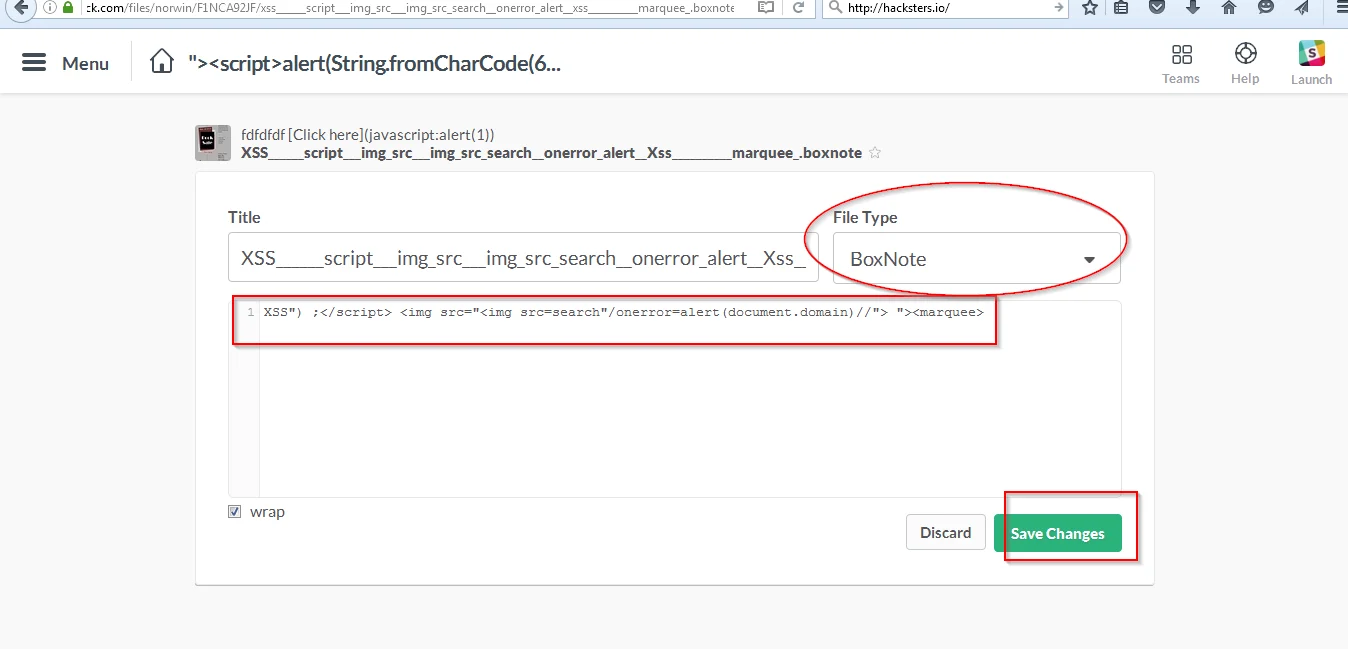
when making a BoxNote snippet with this xss payload: XSS") ;</script> "><marquee>
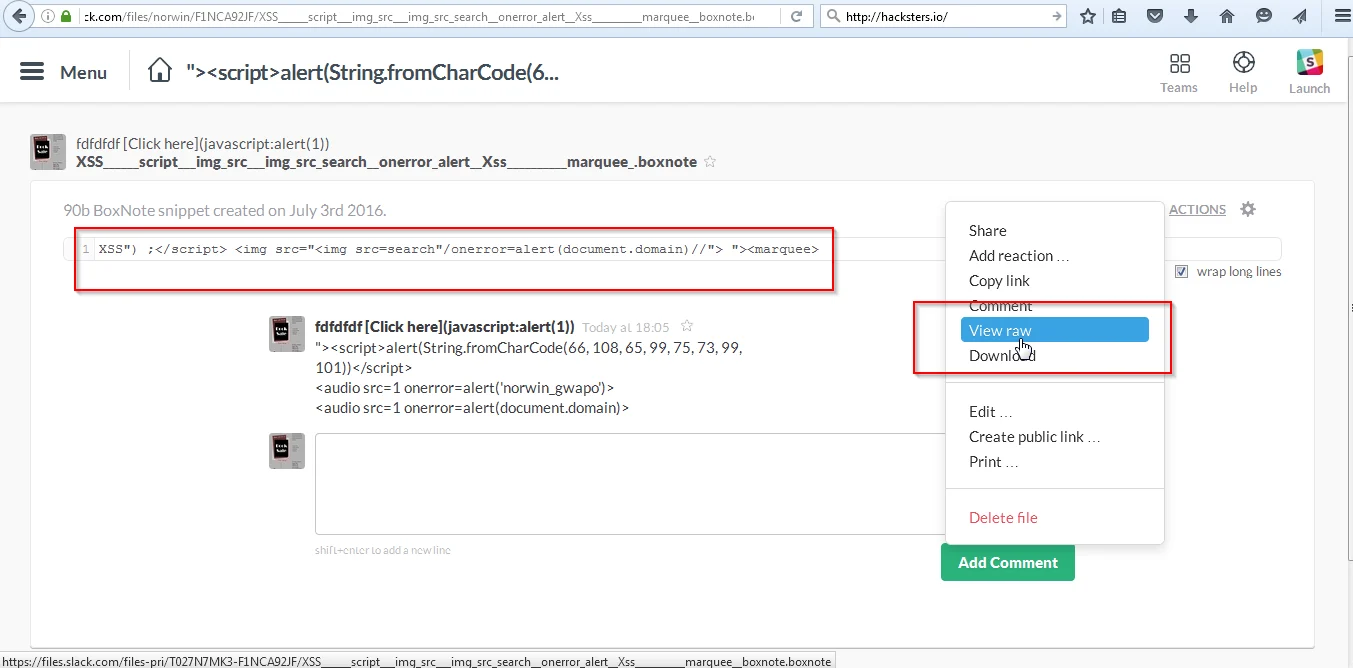
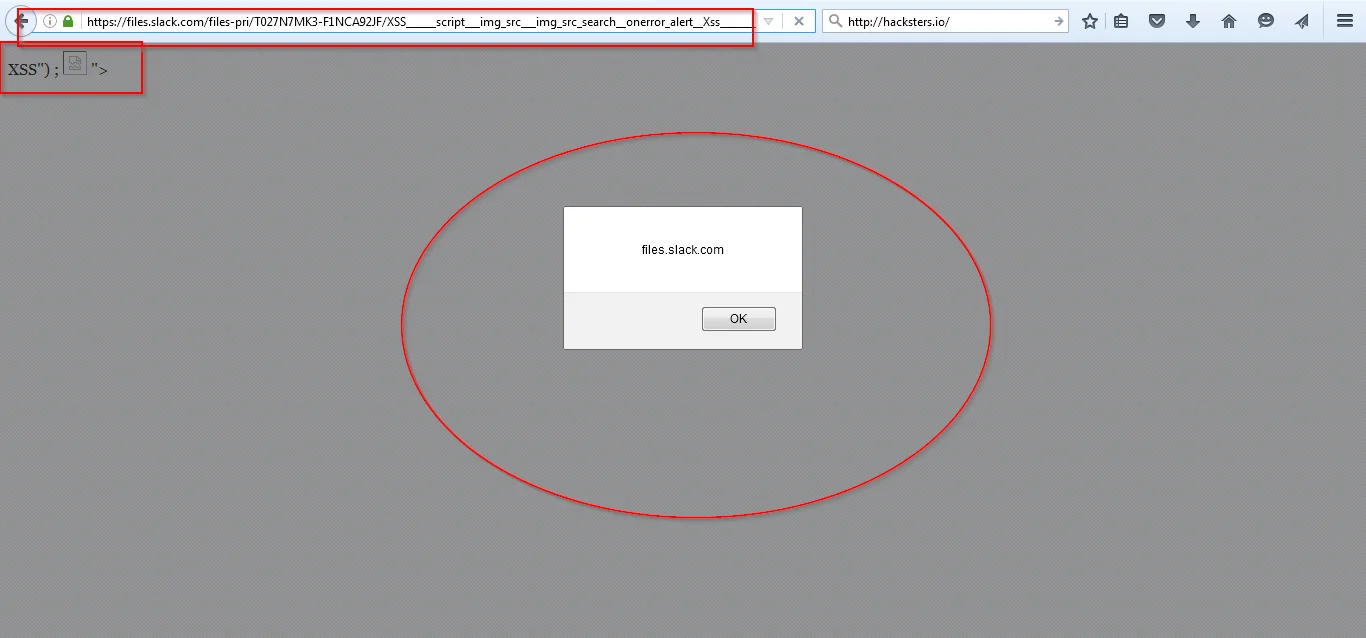
when snippet made: and use the "view raw" xss payload will be executed
my ex: link where xss payload executed: https://files.slack.com/files-pri/T027N7MK3-F1NCA92JF/XSS______script___img_src___img_src_search__onerror_alert__Xss__________marquee__boxnote.boxnote
that link will be executed in entire team mate that could probably used in exploitation.
Attachments
What the report shows
The target is the Slack file hosting host https://files.slack.com, and the feature involved is BoxNote snippets, with a "view raw" option. The researcher reported a stored cross-site scripting issue in that rendering path.
The payload the researcher used to build the snippet was:
XSS") ;</script> {{media:0}} "><marquee>
According to the report, once the snippet had been created, using the "view raw" action caused the payload to execute. The researcher gave one example link where execution occurred:
https://files.slack.com/files-pri/T027N7MK3-F1NCA92JF/XSS______script___img_src___img_src_search__onerror_alert__Xss__________marquee__boxnote.boxnote
The report states that the link executes for every teammate, which is what makes it useful for exploitation: the payload is stored with the file and runs in the browser of anyone who opens it, not only in the session of the person who created it.
The report includes three screenshots as attachments.
The platform records the report as a generic cross-site scripting weakness, disclosed on 25 June 2017, with a bounty of 500.00 USD. No severity rating or CVSS score is given, and the report does not describe a fix.
Root cause
The report does not analyse the code, so the root cause is only implied. The likely mistake is that the BoxNote snippet content is written into the file page without adequate output encoding, and the "view raw" view renders that stored content in a context where markup and script are interpreted rather than displayed as text. The payload mixes a closing script tag, a quote breakout and a marquee element. Because the content is stored server-side and served to other users, the flaw is persistent rather than reflected.
Impact
As described, an attacker who can create a BoxNote with a crafted snippet can cause script to run in the browser of any teammate who opens the resulting link. The report says the link executes for every teammate, which could probably be used in exploitation. It does not demonstrate any specific action taken with the executed script, such as reading data or performing actions on behalf of a victim, so the concrete consequences beyond script execution in a teammate's session are not shown.
How this kind of bug works
Stored cross-site scripting happens when an application accepts data from one user, saves it, and later places it into an HTML page served to other users without encoding it for the context in which it lands. The browser cannot tell developer-authored markup from attacker-supplied markup, so any element or attribute that can carry script, such as an event handler on an image, a script element, or a javascript: URL, will run with the origin of the page that served it.
The hard part is context. The same string is safe in one place and dangerous in another: inside a text node, inside an attribute value, inside a JavaScript string, inside a URL, or inside a raw HTML fragment. A payload that breaks out of a quoted attribute needs a different shape from one that closes a script block. This is why payloads often combine several break-out attempts, as the one in this report does. Defences are correspondingly layered: context-aware output encoding at the point of rendering, a strict Content Security Policy that blocks inline script, sanitising any HTML that must be accepted (for example with an allow-list based library), and treating file preview and "raw" views as rendering surfaces that need the same care as the main application.
How to test for it
- Identify features where one user's content is stored and later shown to others: file previews, snippets, comments, profile fields, shared documents, and any "view raw", "source" or "download as text" mode.
- For each, submit a benign marker that is distinctive but harmless, such as a unique string wrapped in a tag that would be visible if interpreted, and note every place the value is rendered.
- Inspect the rendered HTML to see the exact context: is the value inside an attribute, a script block, a text node or a URL? Craft the test string for that context rather than reusing a generic payload.
- Check the raw and preview views separately. A value that is encoded in the normal view is often not encoded in the raw view, and vice versa.
- Confirm execution with a harmless proof, such as an alert or a request to a host you control, and record which user roles and which views trigger it.
- Test the second-user path: create the content as one account and open it as another, since stored issues only matter when they reach someone else.
A positive result is script executing in the origin of the target application when the stored content is viewed by a different user. Common false positives are payloads that are reflected only in your own session, values that appear in the response but are encoded when rendered, execution inside a sandboxed iframe or a separate origin that does not carry the target's cookies, and self-XSS where the input is only ever shown back to the person who typed it.
How it is fixed
Apply context-aware output encoding wherever stored content is rendered, including preview and raw views. Where rich content must be preserved, sanitise it server-side with an allow-list based HTML sanitiser and re-sanitise on output. Serve a Content Security Policy that disallows inline script and restricts script sources, which limits the damage of any encoding gap that remains. Serve user-supplied files from a separate origin so that any script that does run cannot reach the main application's session, and set appropriate content type and download disposition headers on file responses.
Hunting notes
Stored XSS tends to hide in secondary rendering surfaces: previews, thumbnails, export and raw views, notification emails, admin panels and mobile views of the same data. These paths are often built later than the main page and miss the encoding applied elsewhere. Recon signals worth watching are features that accept rich text or file uploads, endpoints that return stored content as HTML rather than as a download, and any parameter that reappears in a different view from the one where it was entered.
To get a report accepted, show the full path from storage to execution for a second user, keep the proof harmless, and state clearly which views and roles are affected. If the program cares about impact beyond an alert, describe what the script could reach in the victim's session, but only claim what you have actually observed.
What happened, in plain words
Slack lets teams share files, and one of the file types involved here is a BoxNote. Slack shows a short preview of it, called a snippet. There is also a "view raw" option that shows the underlying content of the file instead of the formatted preview.
The researcher found that a BoxNote snippet could be made to carry a piece of code, and that this code ran in the browser when someone used "view raw". This is called stored cross-site scripting: "stored" because the dangerous content is saved on the server, and "cross-site scripting" because a browser is tricked into running code that the site's own developers did not write.
A useful comparison is a noticeboard in an office. If anyone can pin a note and everyone else reads it, then someone who pins a note saying "please do X" can make every reader do X. Here the noticeboard is the file page, the note is the BoxNote snippet, and "doing X" is running script in the reader's browser.
The payload the researcher used to build the snippet was:
XSS") ;</script> {{media:0}} "><marquee>
This is not a program in the usual sense. It is a string of text that mixes several attempts to break out of the surrounding HTML. The </script> part tries to close a script block that the page may have opened. The ") and "> parts try to close a quoted attribute and start a new one. The <marquee> element is a visible marker: if the page interprets it as HTML, the text inside it scrolls across the screen, which makes it easy to see that the text was treated as markup rather than shown as plain text. The report does not explain which of these break-out attempts actually succeeded.
According to the report, once the snippet had been created, using the "view raw" action caused the payload to execute. The researcher gave one example link where execution occurred:
https://files.slack.com/files-pri/T027N7MK3-F1NCA92JF/XSS______script___img_src___img_src_search__onerror_alert__Xss__________marquee__boxnote.boxnote
The report states that the link executes for every teammate, which is what makes it useful for exploitation. The payload is stored with the file and runs in the browser of anyone who opens it, not only in the session of the person who created it.
The report includes three attachments.
The platform records the report as a generic cross-site scripting weakness, disclosed on 25 June 2017, with a bounty of 500.00 USD. No severity rating or CVSS score is given, and the report does not describe a fix.
Why it works
The report does not analyse the code, so the cause is only implied. The likely mistake is that the BoxNote snippet content is written into the file page without adequate output encoding, and the "view raw" view renders that stored content in a context where markup and script are interpreted rather than displayed as text. Because the content is stored on the server and served to other users, the flaw is persistent rather than reflected.
What it means in practice
As described, an attacker who can create a BoxNote with a crafted snippet can cause script to run in the browser of any teammate who opens the resulting link. The report says the link executes for every teammate, which could probably be used in exploitation. It does not demonstrate any specific action taken with the executed script, such as reading data or performing actions on behalf of a victim, so the concrete consequences beyond script execution in a teammate's session are not shown.
In general, how this kind of bug works
Stored cross-site scripting happens when an application accepts data from one user, saves it, and later places it into an HTML page served to other users without encoding it for the context in which it lands. A browser cannot tell developer-authored markup from attacker-supplied markup, so any element or attribute that can carry script, such as an event handler on an image, a script element, or a javascript: URL, will run with the origin of the page that served it. "Origin" here means the combination of scheme, host and port, for example https://files.slack.com; script running in that origin can act as the logged-in user on that origin.
The hard part is context. The same string is safe in one place and dangerous in another: inside a text node, inside an attribute value, inside a JavaScript string, inside a URL, or inside a raw HTML fragment. A payload that breaks out of a quoted attribute needs a different shape from one that closes a script block. This is why payloads often combine several break-out attempts, as the one in this report does. Defences are correspondingly layered: context-aware output encoding at the point of rendering, a strict Content Security Policy that blocks inline script, sanitising any HTML that must be accepted (for example with an allow-list based library), and treating file preview and "raw" views as rendering surfaces that need the same care as the main application.
How to test for it
- Identify features where one user's content is stored and later shown to others: file previews, snippets, comments, profile fields, shared documents, and any "view raw", "source" or "download as text" mode.
- For each, submit a benign marker that is distinctive but harmless, such as a unique string wrapped in a tag that would be visible if interpreted, and note every place the value is rendered.
- Inspect the rendered HTML to see the exact context: is the value inside an attribute, a script block, a text node or a URL? Craft the test string for that context rather than reusing a generic payload.
- Check the raw and preview views separately. A value that is encoded in the normal view is often not encoded in the raw view, and vice versa.
- Confirm execution with a harmless proof, such as an alert or a request to a host you control, and record which user roles and which views trigger it.
- Test the second-user path: create the content as one account and open it as another, since stored issues only matter when they reach someone else.
A positive result is script executing in the origin of the target application when the stored content is viewed by a different user. Common false positives are payloads that are reflected only in your own session, values that appear in the response but are encoded when rendered, execution inside a sandboxed iframe or a separate origin that does not carry the target's cookies, and self-XSS where the input is only ever shown back to the person who typed it.
How it is fixed
Apply context-aware output encoding wherever stored content is rendered, including preview and raw views. Where rich content must be preserved, sanitise it server-side with an allow-list based HTML sanitiser and re-sanitise on output. Serve a Content Security Policy that disallows inline script and restricts script sources, which limits the damage of any encoding gap that remains. Serve user-supplied files from a separate origin so that any script that does run cannot reach the main application's session, and set appropriate content type and download disposition headers on file responses.
Where to look
Stored XSS tends to hide in secondary rendering surfaces: previews, thumbnails, export and raw views, notification emails, admin panels and mobile views of the same data. These paths are often built later than the main page and miss the encoding applied elsewhere. Recon signals worth watching are features that accept rich text or file uploads, endpoints that return stored content as HTML rather than as a download, and any parameter that reappears in a different view from the one where it was entered.
To get a report accepted, show the full path from storage to execution for a second user, keep the proof harmless, and state clearly which views and roles are affected. If the program cares about impact beyond an alert, describe what the script could reach in the victim's session, but only claim what you have actually observed.
Glossary
- Stored cross-site scripting (XSS): a bug where dangerous content is saved by the application and later shown to other users, causing their browsers to run it.
- Payload: the piece of text or code an attacker submits in order to trigger a bug.
- Snippet: a short preview of a file's content shown on its page.
- BoxNote: a document format from the Box service, which Slack can display.
- View raw: an option that shows the underlying content of a file instead of its formatted preview.
- HTML: the language browsers use to describe the structure of a page, including tags such as
<script>and<marquee>. - Output encoding: converting stored text so that a browser displays it as text rather than interpreting it as markup.
- Context: the place in the HTML where a value lands (text, attribute, script, URL), which determines what encoding is needed.
- Origin: the combination of scheme, host and port that a browser uses to decide which site a page belongs to.
- Session: the logged-in state a browser holds for a user, usually carried by a cookie.
- Cookie: a small piece of data a site stores in the browser and sends back with each request, often used to identify a logged-in user.
- Content Security Policy (CSP): a set of rules a site sends to the browser saying which scripts and sources are allowed.
- Sanitiser: a tool that removes dangerous parts from HTML while keeping the safe parts.
- Allow-list: a list of things that are permitted, with everything else rejected.
- Iframe: an embedded page inside another page, which can be sandboxed to limit what it can do.
- Self-XSS: a case where the input is only ever shown back to the person who typed it, so no other user is affected.
- CVSS: a standard scoring system for rating the severity of a vulnerability.





