Add <a href=> into our name and bypass "//" being used in URL to create a valid URL + custom image on snippets
GitLab allowed certain HTML tags in a user's name, which were rendered when viewing a snippet. An attacker could set a name containing a link and image to trick users into visiting a malicious site or a rogue OAuth application.

GitLab
Originally disclosed on GitLab
- Fixed in 19 months
- Disclosed after 19 months
HackerOne report #460224 by zseano on 2018-12-11:
Summary: For some reason GitLab allow for certain HTML tags in our name which renders when we visit a snippet. Using this we can actually trick the user into visiting our URL when they click our username.
Description: When setting your name, using <a href=x> will render a valid link, except using <a href=https://www.evilsite.com/>hi</a> will not work. However if we use <a href=https:\evilsite.com>notsean</a>, it allows it through and we get this result. The use of \ is important since / is filtered.
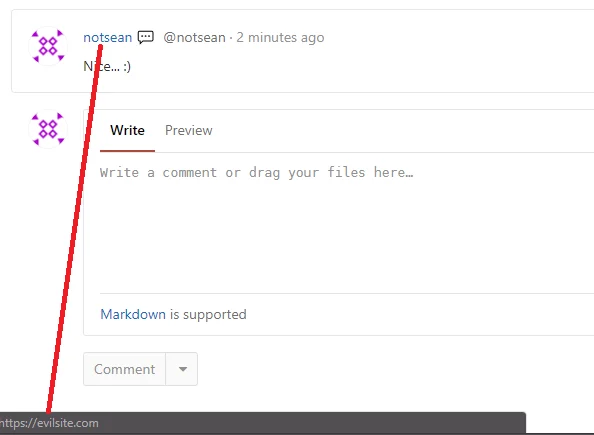
If a user is to click onto my name to visit my profile, they will actually be redirected to my site instead. To see it in action, visit https://gitlab.com/snippets/1788795 and check out my comment from my account @notsean, hover over my profile and you'll see it redirects to evilsite.com
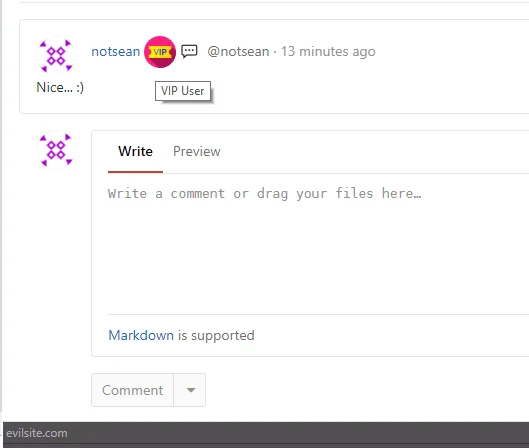
We can then be a bit more clever and add an image icon, add the "title" attribute, and we can build a perfect phisher to either harvest their credentials, OR redirect to a GitLab Oauth application and gain access via that (users are more likely to just click ALLOW, especially if they think they will get some VIP upgrade.. :D)
Steps To Reproduce:
(Add details for how we can reproduce the issue)
- Visit your GitLab account settings and set your name to
<a href=http:\\evilsite.com>notsean <img src="https:\\www.bugbountynotes.com\assets\img\vip.png" title="VIP User"></a>- Replace notsean with your username to look real. - Go comment on a snippet and people will see a 'VIP' badge next to your name, hover over it will show 'VIP User', and clicking it will redirect to our site. The perfect scenario for an attacker! :)
Impact
Add custom HTML to our name and trick user into handing over their credentials or giving us access to their gitlab account via a rogue application designed to look like it will get them a "VIP" upgrade (this is jsut an example)
Attachments
Warning: Attachments received through HackerOne, please exercise caution!
Testing Activity
@fjsanpedro
- Test that the user name is rendering the html name but as text and not as html
Security Testing Activity
@vij
- Test that names are rendered safely
MR Breakdown
@fjsanpedro
- In https://gitlab.com/gitlab-org/gitlab/blob/master/app/views/shared/notes/_note.html.haml#L35 we call the method
sanitizeto clean the user name. Nevertheless, that method ends up callinghtml_safe. Therefore, if theaattribute is allowed, the user name will be rendered as html.
We can easily fix by replacing the method sanitize with simple_sanitize. Nevertheless, this method removes all html tags from the name. To be compliant with other parts of the platform, we shouldn't do this. In other features, we just render the user name without removing any data, just showing it as text instead of as HTML.
- The fix will pass by removing the call to
sanitizein that line, and just show the user name directly as text.
@vij
- The rendering of the user's name can be modified to not call html_safe, which will fix the rendering of any existing malicious user names
Not written yet. The AI write-up for this report has not been written yet. The Original tab links to the source.
How it worked
Root cause
The application used a sanitisation method that marked the output as safe HTML, allowing certain tags like links to be rendered.
Impact
An attacker could trick users into visiting a malicious site to harvest credentials or into granting access to a rogue OAuth application.
What the attacker needed
A GitLab account; victim views a snippet with the attacker's comment; victim clicks the attacker's name
The fix
The fix was to remove the call to `sanitize` and render the user name directly as text, preventing HTML from being interpreted.
How it was found
- Set your GitLab name to a value containing an anchor tag with a backslash-based URL and an image tag.
- Comment on a snippet so other users see your name with the crafted link and image.
- When a user clicks your name, they are redirected to the attacker's site.
Explained by bugbounty.wiki with AI from the original and checked against quotes from it; it can still be wrong. Read the original before relying on a detail.
Not written yet. The AI write-up for this report has not been written yet. The Original tab links to the source.
A user's display name was not properly cleaned before being shown on a page. This meant someone could put a clickable link and an image in their name, so when other people clicked the name they were sent to a bad website. The fix was to show the name as plain text instead of interpreting it as HTML.
What is XSS?
Script an attacker supplies runs in another user's browser, on the target's origin, with that user's session.




