Arbitrary GFM references rendered in Incident Timeline Events leak private/confidential resources
The incident timeline event description pipeline expanded GFM references without redacting private or confidential resources, so an attacker could reference such resources and see their titles. This allowed scanning issue numbers to leak titles of private or confidential issues and merge requests.

GitLab
Originally disclosed on GitLab
- Fixed in 29 days
- Disclosed after 29 days
HackerOne report #1652853 by yvvdwf on 2022-07-28, assigned to @ngeorge1:
Report | Attachments | How To Reproduce
Report
Hi,
Gitlab recently introduced Incident Timeline events feature. The events' description is generated using TimelineEventPipeline pipeline which allows the following filters:
def self.filters
  [@]filters ||= FilterArray[
    *super,
    Filter::SanitizationFilter,
    *Banzai::Pipeline::GfmPipeline.reference_filters,
    Filter::EmojiFilter,
    Filter::ExternalLinkFilter,
    Filter::ImageLinkFilter
  ]
end
The reference_filters filters expand any references. Consequently when the description of a timeline event references to private or confidential resources, it will render their titles.
Normally these private/confidential resources are redacted when rendering to non-permission users. Somehow this redaction is not used in the incident timeline event.
Steps to reproduce:
As a normal user (victim):
- create a private project, let's call
victim/project-a, then create a confidential issue inside. It's GFM reference is nowvictim/project-a#1
As an attacker:
- In an existing project or create a new one
- Go to
Monitor/Incidentsand create an incident - Open
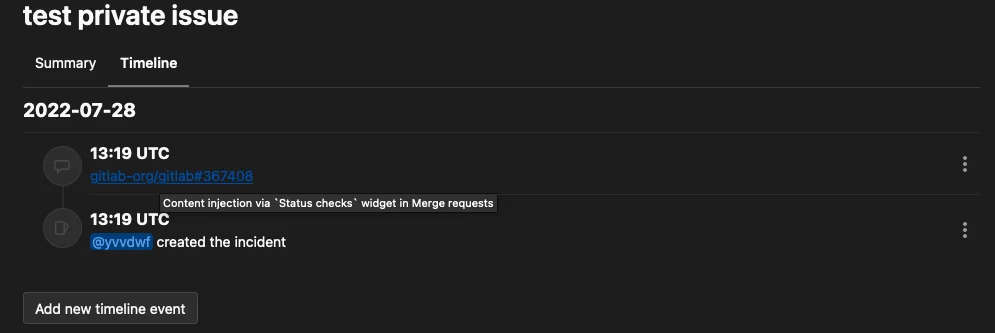
Timelinetab of the incident you've created. Then create a new timeline event and reference the issue above: fillvictim/project-a#1in theTimeline text - You should see now the issue's title is rendered in the description of the event
Example
I tested on gitlab.com. I used gitlab-org/gitlab#367408 as payload which is used to track one my previous H1 report.
The example is available in this private project: https://gitlab.com/yvvdwf/xss/-/issues/12
Impact
This vulnerability allows to renders all GFM references, such as, merged requests, issues, etc, even if they are private or confidential.
For example, attackers can simply scan through all issue numbers (starting from 1) of the gitlab-org/gitlab project, and thus leaking their titles.
Best regards,
yvvdwf
Impact
This vulnerability allows attacker to access to all private or confidential GFM references, such as, merged requests, issues, etc.
For example, attackers can simply scan through all issue numbers (starting from 1) of the gitlab-org/gitlab project, and thus leaking their titles.
Attachments
Warning: Attachments received through HackerOne, please exercise caution!
How To Reproduce
Please add reproducibility information to this section:
Not written yet. The AI write-up for this report has not been written yet. The Original tab links to the source.
How it worked
Root cause
Likely the timeline event rendering pipeline included reference filters but omitted the redaction filter that normally hides titles of inaccessible resources.
Impact
This vulnerability allows rendering all GFM references, such as merge requests and issues, even if they are private or confidential, enabling attackers to scan issue numbers and leak their titles.
What the attacker needed
Attacker has an account; victim has a private project with issues
How it was found
- As a normal user, create a private project and a confidential issue inside it.
- As an attacker, create or use an existing project and create an incident.
- Open the Timeline tab of the incident and create a new timeline event.
- In the Timeline text, reference the confidential issue using its GFM reference.
- Observe that the issue's title is rendered in the event description.
Explained by bugbounty.wiki with AI from the original and checked against quotes from it; it can still be wrong. Read the original before relying on a detail.
Not written yet. The AI write-up for this report has not been written yet. The Original tab links to the source.
GitLab uses special text like 'project#1' to link to issues. Normally, if you don't have permission to see an issue, GitLab hides its title. But in a new feature called incident timeline events, GitLab forgot to hide titles of private issues, so anyone could see them by creating an event that references the issue.
What is Info disclosure?
Data the application should keep private (personal data, internal details, other users' records) reaches someone it should not.




