Arbitrary HTML injection possible when :soft_email_confirmation feature flag is enabled in the latest release
A user could set an email address containing HTML tags, which were rendered unsafely in a flash warning when the soft email confirmation feature flag was enabled. An administrator impersonating that user would trigger the injected script, leading to XSS in the administrator's session.

GitLab
Originally disclosed on GitLab
- Fixed in 2 months
- Disclosed after 2 months
HackerOne report #1842867 by cryptopone on 2023-01-22, assigned to GitLab Team:
Report | Attachments | How To Reproduce
Report
Summary
In the GitLab 15.8.0 release, changes have been made to https://gitlab.com/gitlab-org/gitlab/-/blob/01cc3a3b45cafda62ea8bc82d5c52278890d8ec8/app/controllers/concerns/confirm_email_warning.rb that includes adding .html_safe to the flash warning. This code is vulnerable on self-managed instances when the :soft_email_confirmation feature flag is enabled on the instance. (GitLab team: Note the .html_safe was part of the original implementation so this issue persists in releases prior to 15.8 and the fixes should be backported to 15.7 and 15.6 accordingly)
  def set_confirm_warning
    return unless current_user
    return if current_user.confirmed?

    email = current_user.unconfirmed_email || current_user.email

    flash.now[:warning] = format(
      confirm_warning_message,
      email: email,
      resend_link: view_context.link_to(_('Resend it'), user_confirmation_path(user: { email: email }), method: :post),
      update_link: view_context.link_to(_('Update it'), profile_path)
    ).html_safe
  end
A malicious user could register an account using an email containing html tags, and these tags will now render in the flash message once the user logs into their account.
Normally this would be considered a self-xss. But if an administrator impersonates the attacker's account, the html/payload will be rendered for the administrator as well. It's also worth noting the additional HTML tags are not visible on the administrator page for the attacker user, so the admin will be unaware of the potential danger of impersonating the account.
Note: This appears to only affect self-managed instances as GitLab.com does not use this feature flag. No CSP bypass is provided at the time this report is filed as GDK is using 'strict-dynamic' which I have been unable to bypass thus far. I found a bypass for source code installs of GitLab with the default CSP set (doesn't use 'strict-dynamic') but I assume GDK is the CSP policy to be testing against.
Steps to reproduce
Prerequisites:
- Enable the feature flag :soft_email_confirmation on the GitLab instance. (ex. Run
gitlab-rails consolethen executeFeature.enable(:soft_email_confirmation)inside the rails console). - Go to the Admin general settings page (http://gitlab.example.com/admin/application_settings/general).
- Expand sign-up restrictions and set "Email confirmation settings" to "Hard".
- Save the changes.
Reproduction Steps (Attacker):
- Register an account on the instance. (ex. Username: AttackerSoftEmail, Email: [email protected])
- Log into the account. You should now see a message at the top of the screen stating "Please check your email ([email protected]) to verify that you own this address and unlock the power of CI/CD. Didn't receive it? Resend it. Wrong email address? Update it."
- Go to the user's profile (http://gitlab.example.com/-/profile)
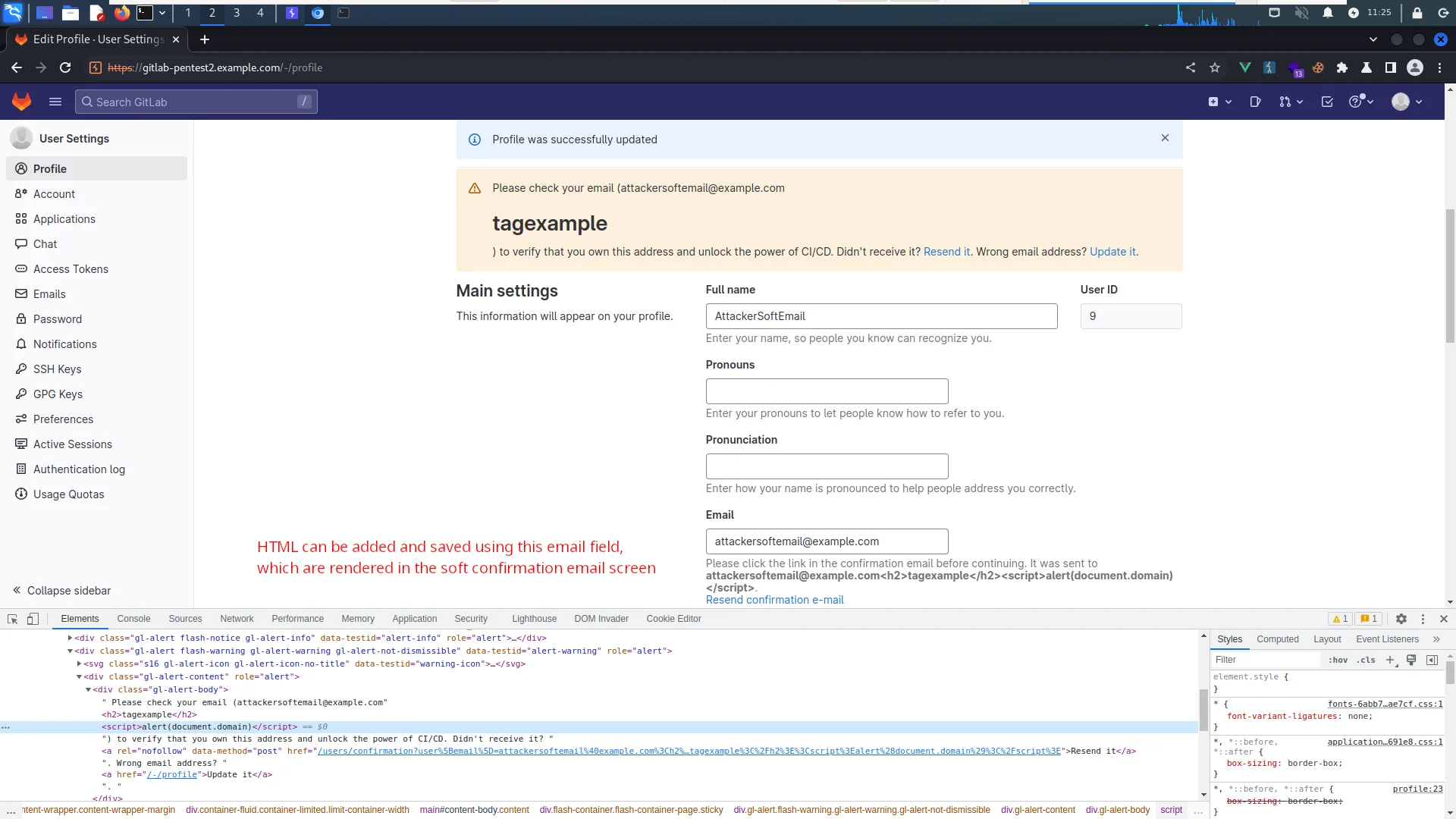
- Change your e-mail by appending
<h2>testing</h2><script>alert(document.domain)</script>to the end of the address. - Save the changes.
- Each time the page reloads, you will see a javascript alert fire.
Reproduction Steps (Victim Administrator):
- Log into GitLab as root.
- Navigate to the Admin users panel and select the AttackerSoftEmail user (http://gitlab.example.com/admin/users/AttackerSoftEmail).
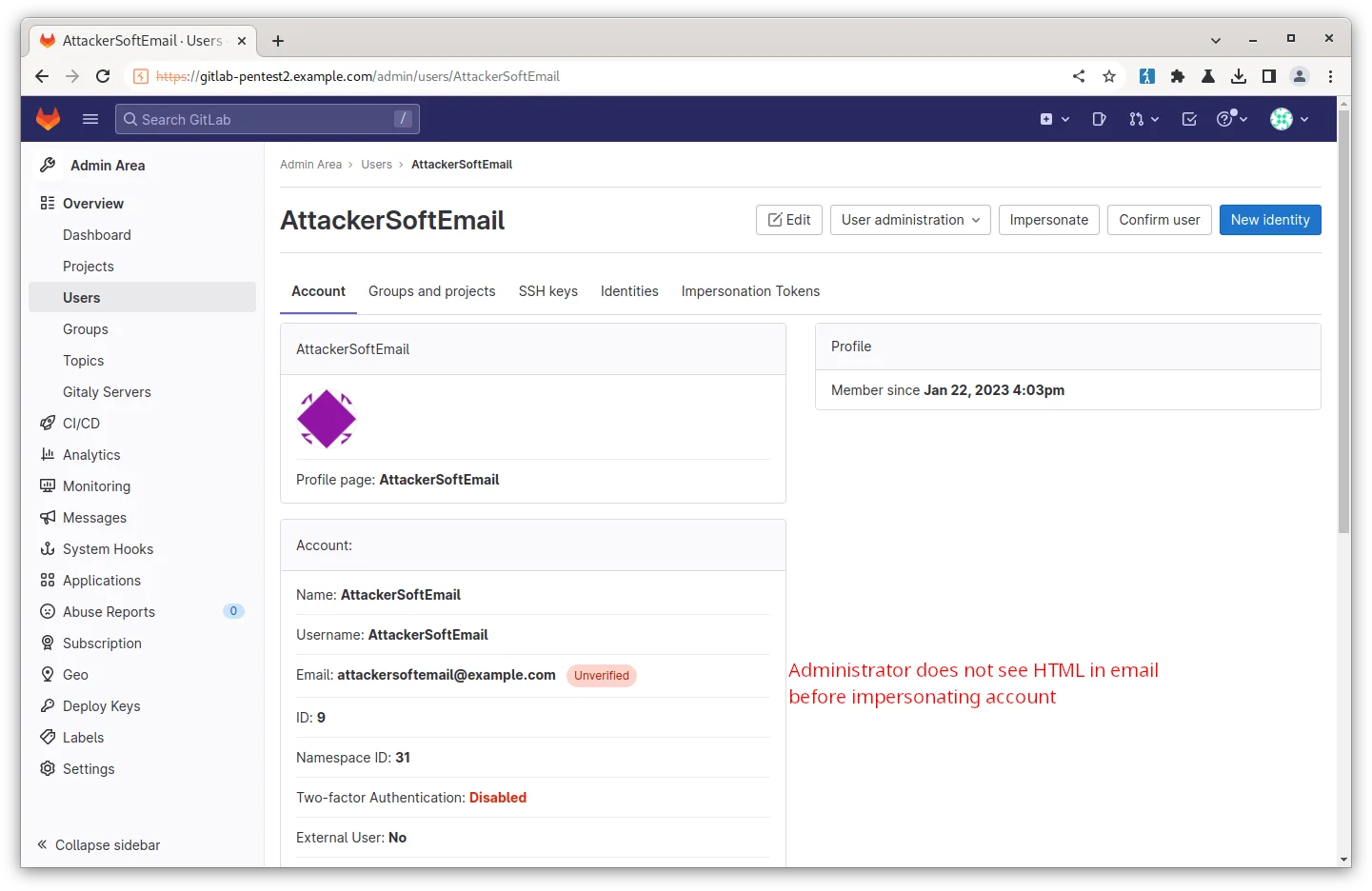
- Note the email address for AttackerSoftEmail does not contain HTML.
- Click the "Impersonate" button to begin impersonating the user.
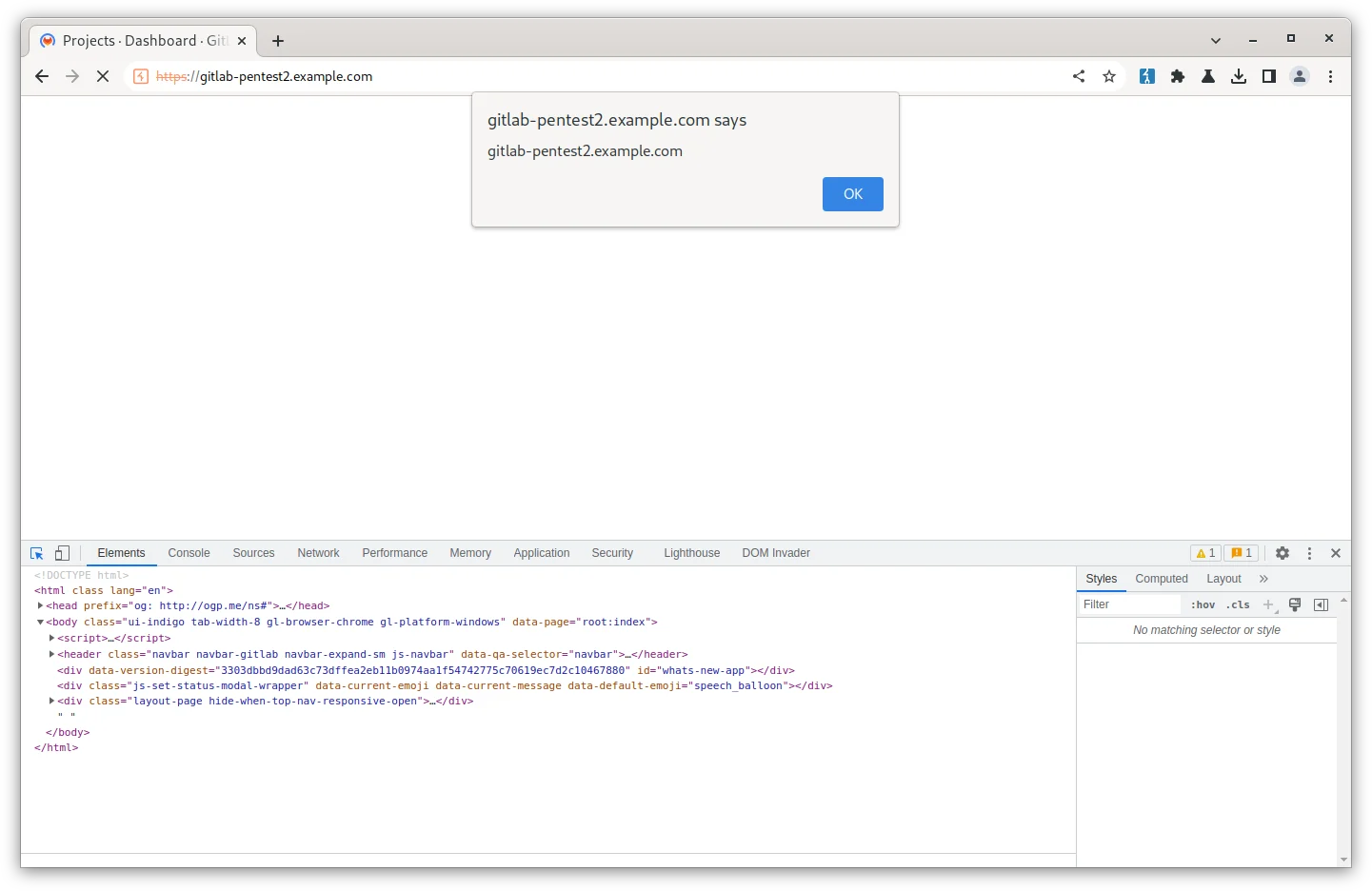
- Note the javascript fires as the page is loaded.
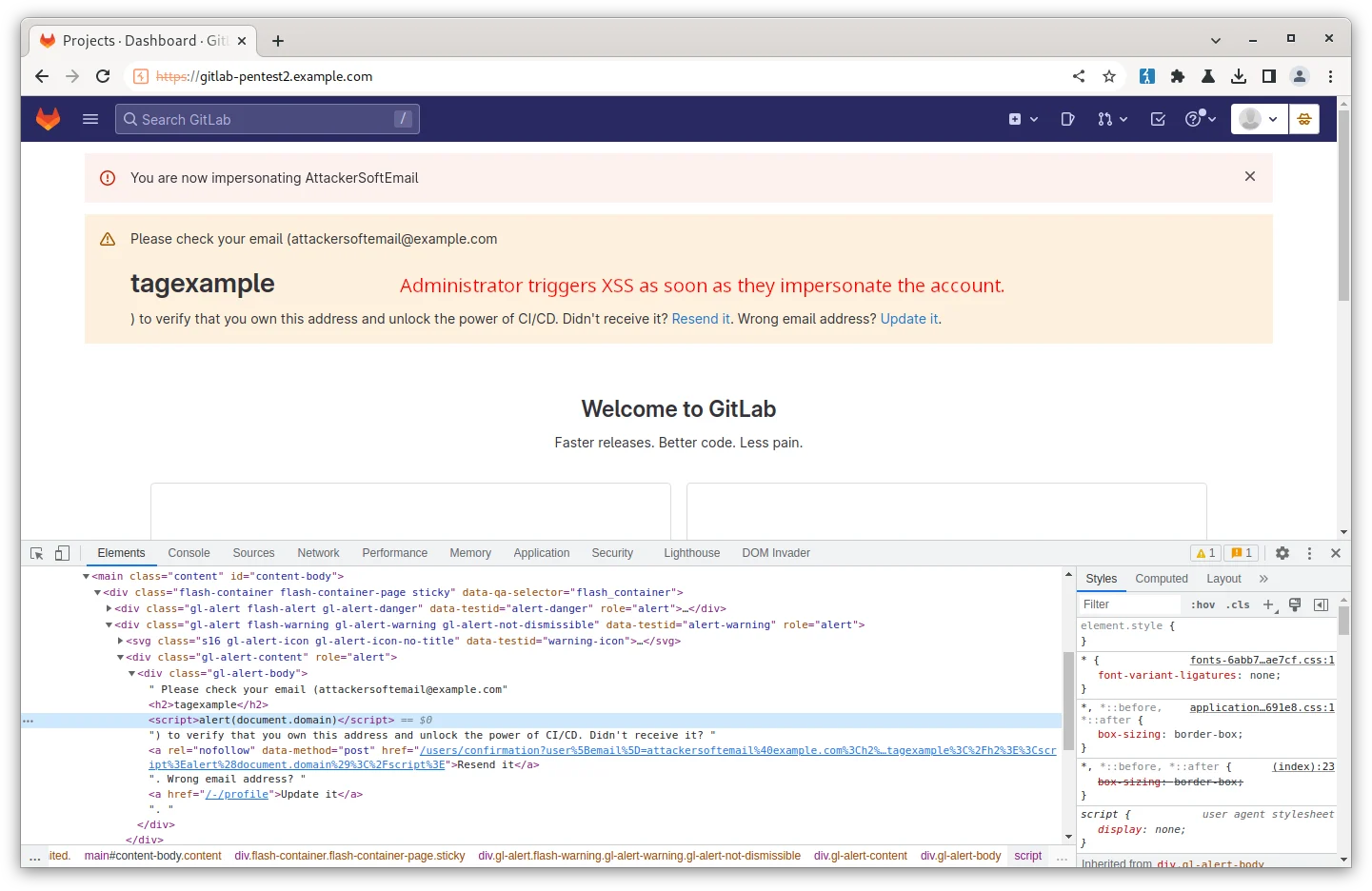
- Close the alert box, and see the HTML header tag rendered as the page loads.
Impact
Administrators on self-managed instances impersonating the attacker's account will inadvertently trigger XSS if the attacker has not validated their email and :soft_email_confirmation feature flag is enabled on an instance that requires email confirmations upon registration.
The Administrator is not made aware of the HTML payload contained in the attacker's email address when viewing the attacker's profile from the administrator user page.
Examples
N/A
What is the current bug behavior?
XSS is triggered within context of the self-hosted GitLab instance.
What is the expected correct behavior?
HTML code appended to the email address should not be rendered by the browser when users are presented with the soft email confirmation alert.
Relevant logs and/or screenshots
Attacker updates email address containing HTML payload.
Administrator views the attacker's account in the admin user menu. Note the page does not display the HTML included in the attacker email.
As soon as the administrator impersonates the user they trigger the XSS payload.
Administrator impersonates the attacker account, triggering the attacker's payload as soon as the account is impersonated.
Finally, a video demonstrating the attack and victim triggering the XSS payload
Output of checks
Results of GitLab environment info
System information
System:		Ubuntu 20.04
Proxy:		no
Current User:	git
Using RVM:	no
Ruby Version:	2.7.7p221
Gem Version:	3.1.6
Bundler Version:2.3.15
Rake Version:	13.0.6
Redis Version:	6.2.8
Sidekiq Version:6.5.7
Go Version:	unknown

GitLab information
Version:	15.8.0-ee
Revision:	1d89c23c9f9
Directory:	/opt/gitlab/embedded/service/gitlab-rails
DB Adapter:	PostgreSQL
DB Version:	12.12
URL:		https://gitlab-pentest2.example.com
HTTP Clone URL:	https://gitlab-pentest2.example.com/some-group/some-project.git
SSH Clone URL:	[email protected]:some-group/some-project.git
Elasticsearch:	no
Geo:		no
Using LDAP:	no
Using Omniauth:	yes
Omniauth Providers:

GitLab Shell
Version:	14.15.0
Repository storages:
- default: 	unix:/var/opt/gitlab/gitaly/gitaly.socket
GitLab Shell path:		/opt/gitlab/embedded/service/gitlab-shell
Impact
Administrators on self-managed instances impersonating the attacker's account will inadvertently trigger XSS if the attacker has not validated their email and :soft_email_confirmation feature flag is enabled on an instance that requires email confirmations upon registration.
The Administrator is not made aware of the HTML payload contained in the attacker's email address when viewing the attacker's profile from the administrator user page.
Attachments
Warning: Attachments received through HackerOne, please exercise caution!
- AttackerWithHTMLTagsInUpdatedEmail.png
- AdministratorViewingUserProfileWithoutSeeingEmailTags.png
- AdministratorImpersonatingAttackerAccount.png
- AdministratorImpersonatingUserTriggeringXSS.png
- SoftEmailConfirmation_repro.mp4
How To Reproduce
Please add reproducibility information to this section:
Not written yet. The AI write-up for this report has not been written yet. The Original tab links to the source.
How it worked
Impact
An administrator on a self-managed instance could inadvertently trigger XSS when impersonating an attacker's account; no CSP bypass was provided for the default GDK environment.
What the attacker needed
Self-managed GitLab instance; :soft_email_confirmation feature flag enabled; email confirmation set to 'Hard'; attacker has an unconfirmed account
The fix
The application should escape the email address before inserting it into the flash message, rather than marking the entire message as HTML-safe.
How it was found
- Enable the :soft_email_confirmation feature flag on the GitLab instance.
- Set email confirmation settings to 'Hard' in admin settings.
- Register an account and log in.
- Change the email address to include HTML tags.
- Save the changes and observe the script executing on page reload.
- As an administrator, impersonate the attacker's account to trigger the script.
Explained by bugbounty.wiki with AI from the original and checked against quotes from it; it can still be wrong. Read the original before relying on a detail.
Not written yet. The AI write-up for this report has not been written yet. The Original tab links to the source.
When you sign up, the site shows a warning with your email address. The site put that email into the page without cleaning it, so if the email contained HTML code, the browser would run it as part of the page. An attacker could use this to run their own code in an administrator's browser when the admin impersonated the attacker's account.
What is XSS?
Script an attacker supplies runs in another user's browser, on the target's origin, with that user's session.




