Asset Proxy Bypass using non-ASCII character in asset URI
GitLab's asset proxy feature, which rewrites remote image URLs to protect user privacy, could be bypassed by including a non-ASCII character in an image URL within an HTML img tag. This allowed an attacker to embed images that load directly from a remote server, potentially tracking visitors' IP addresses and other information.

GitLab
Originally disclosed on GitLab
- Fixed in 2 months
- Disclosed after 2 months
⚠️ Please read the process on how to fix security issues before starting to work on the issue. Vulnerabilities must be fixed in a security mirror.
HackerOne report #2071411 by afewgoats on 2023-07-16, assigned to @nmalcolm:
Report | Attachments | How To Reproduce
Report
Summary
Gitlab EE has an Asset Proxying feature. This feature is active on gitlab.com.
Without this feature, attackers can steal a user’s IP address by referencing images in issues and comments that the victim browses. The image hosting server can also see referer headers identifying the Gitlab instance and the user's cookies for that remote site.
Banzai::Filter::AssetProxyFilter has the following code:
          begin
            uri = URI.parse(original_src)
          rescue StandardError
            next
          end
          ...
          element['src'] = asset_proxy_url(original_src)
Which states that if URI.parse raises an exception, we do not proxy the URL but use it as-is (next). This is a fail-open check that is easy to satisfy with a valid URL. URI.parse is much stricter than Addressable::URI.parse. URI.parse raises an exception on any URI containing a non-ASCII character anywhere.
> URI.parse("https://example.com/x?$")
=> #<URI::HTTPS https://example.com/x?$>
> URI.parse("https://example.com/x?`")
=> #<URI::HTTPS https://example.com/x?%60>
> URI.parse("https://example.com/x?¬")
    /opt/gitlab/embedded/lib/ruby/gems/3.0.0/gems/uri-0.12.1/lib/uri/rfc3986_parser.rb:20:in `split': URI must be ascii only "https://example.com/x?\u00AC" (URI::InvalidURIError)
> URI.parse("https://example.com/x#£")
    /opt/gitlab/embedded/lib/ruby/gems/3.0.0/gems/uri-0.12.1/lib/uri/rfc3986_parser.rb:20:in `split': URI must be ascii only "https://example.com/x#\u00A3" (URI::InvalidURIError)
> URI.parse("https://example.com/笨蛋")
    /opt/gitlab/embedded/lib/ruby/gems/3.0.0/gems/uri-0.12.1/lib/uri/rfc3986_parser.rb:20:in `split': URI must be ascii only "https://example.com/\u7B28\u86CB" (URI::InvalidURIError)
> URI.parse("https://㏊ckerone.com/")
    /opt/gitlab/embedded/lib/ruby/gems/3.0.0/gems/uri-0.12.1/lib/uri/rfc3986_parser.rb:20:in `split': URI must be ascii only "https://\u33CAckerone.com/" (URI::InvalidURIError)
When adding an image using the ![]() markdown tags, the URL appears to be URL-encoded before hitting AssetProxyFilter, so there is no bypass.
When adding an image using <img> HTML tags, however, the URL appears to go directly to AssetProxyFilter, allowing the asset proxy to be bypassed.
Steps to reproduce
- Turn on Asset Proxying by making the curl request at https://docs.gitlab.com/ee/security/asset_proxy.html). Installing camo is not required here, we just need Gitlab to rewrite images sources to some domain. Alternatively, just use gitlab.com as that has asset proxying.
- Write markdown somewhere in Gitlab e.g. an issue comment. The following 3 markdown images load (or fail to load) via the asset proxy. Verify that they do not load directly from giphy.
{{media:0}}
{{media:1}}
{{media:7}}
- Now try the following Markdown to bypass the asset proxy: an IMG tag where the URL contains a non-ASCII character
¬.
{{media:8}}
The browser loads the URL directly from the remote server.
The request (view it in dev tools or a proxy):
- Will reveal the user's IP address
- Contains a referer header identifying the Gitlab instance
- Contains cookies for the remote URL, identifying me to the remote server if I have cookies for it. As I have visited giphy.com, it sent
didomi_accept_cookie=1; euconsent-v2=...; didomi_token=.... If the image URL was Google, then Google cookies would be sent along with the request to Google (this was tested in Chrome).
Note that gitlab.com CSP allows all remote images img-src * data: blob:;.
Impact
The Asset Proxy is a privacy and security feature to prevent visitors to pages on the Gitlab instance from being tracked by malicious users and malicious remote servers. This bug allows a malicious user to bypass this feature and add non-proxied image tags wherever markdown is accepted on Gitlab and track visitors.
What is the current bug behavior?
Entering {{media:9}} in a Markdown field results in Asset Proxy being bypassed.
<a class="no-attachment-icon" href="https://i.giphy.com/media/3oKIPnAiaMCws8nOsE/giphy.webp?%C2%AC" target="_blank" rel="nofollow noreferrer noopener"></a>
(lazy-loaded but directly from source)
What is the expected correct behavior?
<a class="no-attachment-icon" href="https://proxy-gitlab.example.com/c5adcab7ef96e3081000c51459e8c1483863d751/68747470733a2f2f692e67697068792e636f6d2f6d656469612f336f4b49506e4169614d437773386e4f73452f67697068792e77656270" target="_blank" rel="nofollow noreferrer noopener" data-canonical-src="https://i.giphy.com/media/3oKIPnAiaMCws8nOsE/giphy.webp"></a>
(via proxy-gitlab.example.com)
Relevant logs and/or screenshots
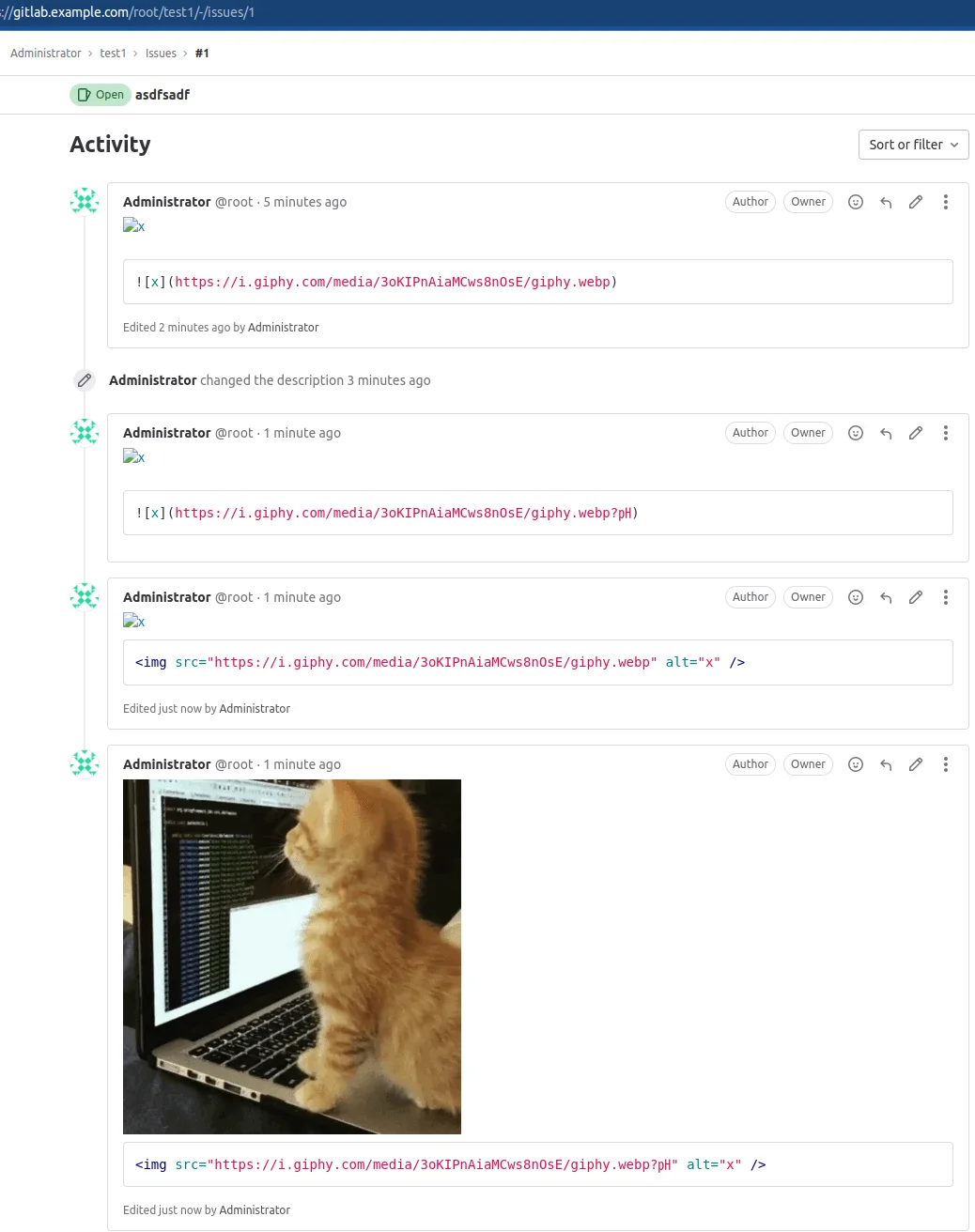
Comments showing proxied images (failed to load as no camo set up) and one image loaded bypassing the proxy.
Network tab showing three (failed) image requests to proxy and one to the remote server.

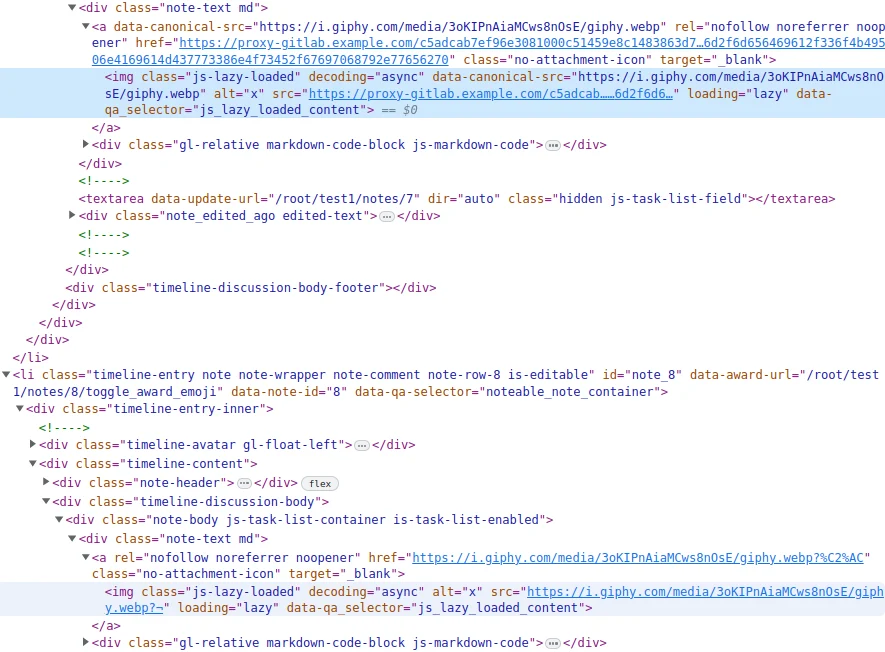
HTML of proxied (above) and unproxied (below) comments.
Output of checks
This bug happens on GitLab.com
Results of GitLab environment info
root@gitlab:/# gitlab-rake gitlab:env:info

System information
System:
Proxy:          no
Current User:   git
Using RVM:      no
Ruby Version:   3.0.6p216
Gem Version:    3.4.13
Bundler Version:2.4.14
Rake Version:   13.0.6
Redis Version:  6.2.11
Sidekiq Version:6.5.7
Go Version:     unknown

GitLab information
Version:        16.1.2-ee
Revision:       0642e8c5c91
Directory:      /opt/gitlab/embedded/service/gitlab-rails
DB Adapter:     PostgreSQL
DB Version:     13.11
URL:            https://gitlab.example.com
HTTP Clone URL: https://gitlab.example.com/some-group/some-project.git
SSH Clone URL:  [email protected]:some-group/some-project.git
Elasticsearch:  no
Geo:            no
Using LDAP:     no
Using Omniauth: yes
Omniauth Providers:

GitLab Shell
Version:        14.23.0
Repository storages:
- default:      unix:/var/opt/gitlab/gitaly/gitaly.socket
GitLab Shell path:              /opt/gitlab/embedded/service/gitlab-shell
Impact
The Asset Proxy is a privacy and security feature to prevent visitors to pages on the Gitlab instance from being tracked by malicious users and malicious remote servers. This bug allows a malicious user to bypass this feature and add non-proxied image tags wherever markdown is accepted on Gitlab and track visitors.
Impact depends on how much importance people place on privacy and the asset proxy.
Attachments
Warning: Attachments received through HackerOne, please exercise caution!
</details>How To Reproduce on GitLab.com
Please add [reproducibility information] to this section:
- Create an Issue on GitLab.com
- Enter the following markdown:
# Markdown

{{media:5}}

# HTML

{{media:10}}

# HTML plus ascii

{{media:11}}
- Observe that the first two images are requested via
user-content.gitlab-static.net(Good) - Observe that the third image, with the
¬, is requested direct toi.imgur.comwhich is bypassing the asset proxy.
Not written yet. The AI write-up for this report has not been written yet. The Original tab links to the source.
How it worked
Root cause
The asset proxy filter uses URI.parse, which raises an exception for non-ASCII characters, and the code fails open by skipping proxying when parsing fails.
What the attacker needed
GitLab instance with asset proxying enabled; Ability to post markdown with HTML img tags
How it was found
- Create an issue on GitLab.com.
- Enter markdown containing an HTML img tag with a non-ASCII character in the URL.
- Observe that the image is requested directly from the remote server, bypassing the asset proxy.
Explained by bugbounty.wiki with AI from the original and checked against quotes from it; it can still be wrong. Read the original before relying on a detail.
Not written yet. The AI write-up for this report has not been written yet. The Original tab links to the source.
GitLab has a feature that hides your IP address when you view images in issues by loading them through a proxy. The report found that if an image URL contains a special character like '¬', GitLab fails to proxy it, so your browser loads the image directly from the external site, which can then see your IP address and other details.
What is Info disclosure?
Data the application should keep private (personal data, internal details, other users' records) reaches someone it should not.




