DAST API scanner exposes Authorization headers in vulnerability report evidence
The DAST API scanner's vulnerability report evidence field exposed the configured authentication header in plain text, including base64-encoded credentials. An attacker could read this evidence in job artifacts, potentially gaining access to the tested API service.

GitLab
Originally disclosed on GitLab
- Fixed in 18 days
- Disclosed after 18 days
HackerOne report #1826896 by joaxcar on 2023-01-09, assigned to @ngeorge1:
Report | Attachments | How To Reproduce
Report
Summary
Issue
The vulnerability report for Identifiers: Authentication Token after running a DAST API Scanner contains the configured authentication header in plain text. On a default-configured public repo this is accessible by unauthenticated users.
Description
Users can configure "On-demand DAST scans" and pipeline DAST scans specifically targeted on API testing using the "GitLab DAST API scanner" (see docs). The user can configure multiple ways to authenticate to the API, but all of them will use the "Authentication header" (see documentation). In the latest security release 15.6.1 there was a fix for this token being exposed in vulnerability reports. Even after this fix the authentication header is exposed in one particular vulnerability report.
One of the API test cases includes checking if authentication is handled properly. If a request to an endpoint that is supposed to only allow authenticated users also allows requests without the authentication header a vulnerability report will get created like this
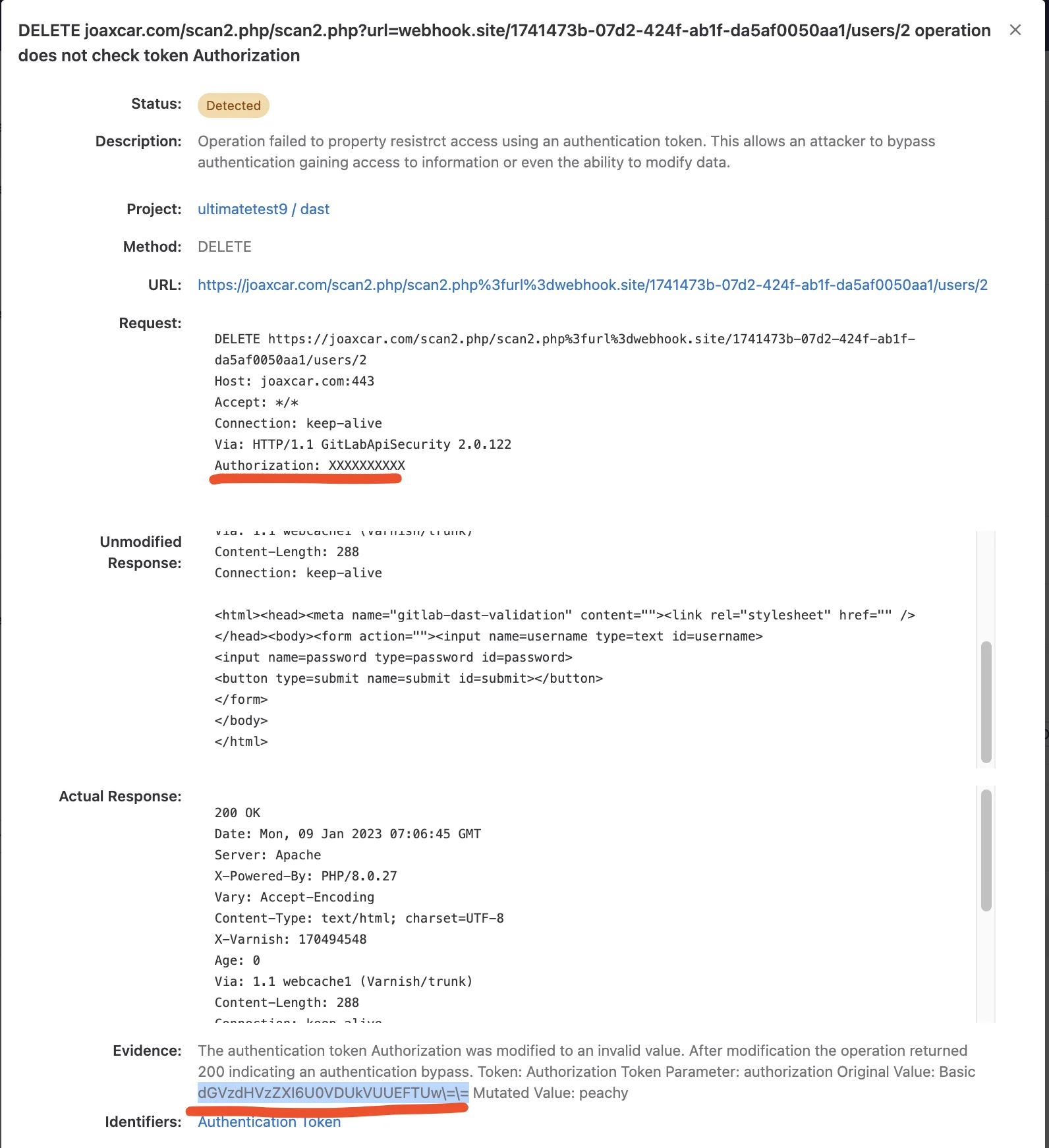
As you can see the header is masked in the report (as of 15.6.1) but the information regarding auth bypassing the token is exposed in the "Evidence" field like this
The authentication token Authorization was modified to an invalid value. After modification, the operation returned 200 indicating an authentication bypass. Token: Authorization Token Parameter: authorization Original Value: Basic dGVzdHVzZXI6U0VDUkVUUEFTUw== Mutated Value: peachy
This value dGVzdHVzZXI6U0VDUkVUUEFTUw\=\= is base64 of this testuser:SECRETPASS which is my configured username and password.
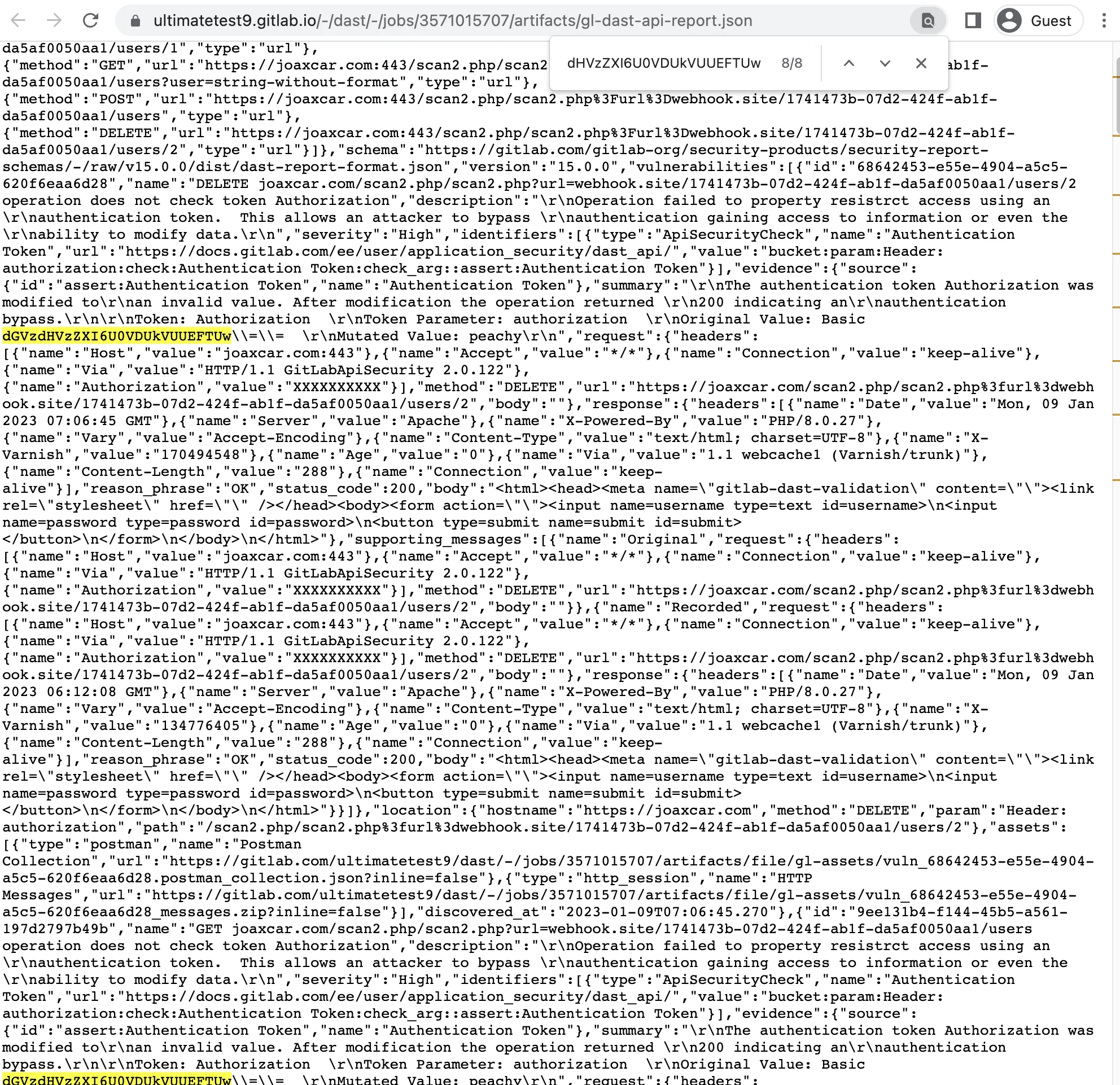
This "Evidence" information is also accessible in the job artifacts from the DAST pipeline. These artifacts are accessible to users with much lower access levels than the security page (where my screenshot is from). On a standard config public project these artifacts are accessible even for unauthenticated requests.
In the log file, the data looks like this
Example
View the artifact file here https://gitlab.com/ultimatetest9/dast/-/jobs/3572931792/artifacts/external_file/gl-dast-api-report.json to see that it contains the auth header dGVzdHVzZXI6U0VDUkVUUEFTUw\=\=
Steps to reproduce
I made a scan of my own site. But the API scanner is quite noisy so I think it is best to test it on your own local server. Just make sure it answers with a 200 OK on any request. I have created a configuration that you can test against my server if you need to. It will only make 4 requests and find 1 vulnerability which is enough for the PoC.
- Log in to GitLab
- Fork (or clone) this project https://gitlab.com/ultimatetest9/dast
- If you want, open the
.gitlab-ci.ymlfile and change target and secrets. But it is fine to run as it is. - Go to https://gitlab.com/GROUPNAME/PROJECTNAME/-/pipelines/new and run the pipeline on main
- Wait for the pipeline to finish and navigate to the pipeline logs https://gitlab.com/GROUPNAME/PROJECTNAME/-/jobs/JOB_ID/artifacts/browse
- Open the gl-dast-api-report.json file and see that the logs contain the auth header.
This project uses a basic pipeline config like this
stages:
  - dast

include:
  - template: DAST-API.gitlab-ci.yml

variables:
  DAST_API_PROFILE: Quick
  DAST_API_POSTMAN_COLLECTION: https://joaxcar.com/gitlab/postman.json
  DAST_API_TARGET_URL: https://joaxcar.com/scan2.php
  DAST_API_HTTP_USERNAME: testuser
  DAST_API_HTTP_PASSWORD_BASE64: U0VDUkVUUEFTUw==
and a config file in the path .gitlab/gitlab-dast-api-config.yml which is a copy of the default config but I have modified the Quick profile to only do one check
Profiles:
  - Name: Quick
    DefaultProfile: Empty
    Routes:
      - Route: *Route0
        Checks:
          - Name: TokenCheck
Impact
The authentication header is leaked in plain text to users who shall not have access to them (can include unauthenticated users if the project is public). This might allow the attacker to gain access to the tested API service.
What is the current bug behavior?
Vulnerability report evidence contains plain text secret headers
What is the expected correct behavior?
The evidence should not contain the real token
Output of checks
This bug happens on GitLab.com
Impact
The authentication header is leaked in plain text to users who shall not have access to them (can include unauthenticated users if the project is public). This might allow the attacker to gain access to the tested API service.
Attachments
Warning: Attachments received through HackerOne, please exercise caution!
How To Reproduce
Please add reproducibility information to this section:
Not written yet. The AI write-up for this report has not been written yet. The Original tab links to the source.
How it worked
Root cause
Likely the scanner included the original authentication header value in the evidence text of a vulnerability report without masking it.
Impact
The authentication header is leaked in plain text to users who should not have access, potentially allowing an attacker to gain access to the tested API service.
What the attacker needed
A GitLab account; access to a project with DAST API scans; project is public (for unauthenticated access)
The fix
The evidence should not contain the real token.
How it was found
- Log in to GitLab
- Fork or clone the provided project
- Run the pipeline on the main branch
- Wait for the pipeline to finish and navigate to the job artifacts
- Open the gl-dast-api-report.json file and see that it contains the auth header
Explained by bugbounty.wiki with AI from the original and checked against quotes from it; it can still be wrong. Read the original before relying on a detail.
Not written yet. The AI write-up for this report has not been written yet. The Original tab links to the source.
When a security scanner tests an API, it sometimes records the exact request it sent, including any secret login details. Here, those details were saved in a report that other people could download, so anyone who could see the report could also see the secret.
What is Info disclosure?
Data the application should keep private (personal data, internal details, other users' records) reaches someone it should not.




