DAST job logs leak session cookies, accessible by unauthenticated users
The DAST scanner logs session cookies in plain text in pipeline logs, which are accessible to unauthenticated users. An attacker could use these cookies to access the victim's production systems.

GitLab
Originally disclosed on GitLab
- Fixed in 2 days
- Disclosed after 2 days
HackerOne report #1783521 by joaxcar on 2022-11-24, assigned to @greg:
Report | Attachments | How To Reproduce
Report
Summary
The DAST scanner can be configured to scan a server for vulnerabilities using ZAP scanner. To be able to access the target service a developer can configure a site profile containing an Authentication endpoint, username, and password. When the DAST scan is initialized it will visit the configured URL to sign in to the target service and retrieve a session state. A session can either be a session cookie or a local storage object. These session cookies are then used to authenticate in further requests.
There are no guarantee that these session tokens/cookies are invalidated after the scan, and except for active scans there are no warning against running the scanner against production builds. This means that leaking the session token/cookies to an attacker will give the attacker access to the service.
In the pipeline log the session information is initially masked. Right after successful login the logs show
2022-11-24T11:33:51.984 INF AUTH login attempt succeeded
2022-11-24T11:33:51.987 INF MAIN authentication success
2022-11-24T11:33:51.987 INF MAIN auth-session=; Domain=.joaxcar.com; Expires=2022-11-24 12:33:30 +0000 UTC; HttpOnly; Path=/; Secure, PHPSESSID=; Domain=joaxcar.com; Expires=2022-11-24 11:43:30 +0000 UTC; Path=/, token=********; Domain=.joaxcar.com; Expires=2022-11-24 12:33:39 +0000 UTC; HttpOnly; Path=/; Secure
But further down in the log file the same session information is used to initiate the ZAP scanner like this
[zap_server] 38467 [ZAP-ProxyThread-23] INFO org.zaproxy.zap.extension.httpsessions.HttpSessionsSite - Setting new active session for site 'joaxcar.com:443': HttpSession [name=auth-session, active=false, tokenValues='']
[zap_server] 38511 [ZAP-ProxyThread-27] INFO org.zaproxy.zap.extension.httpsessions.HttpSessionsSite - Setting new active session for site 'joaxcar.com:443': HttpSession [name=auth-session, active=true, tokenValues='auth-session=123-test-user;PHPSESSID=6b83124e751f25f1c687df291fb419ad;token=123-test-user']
Here you can see the values in plain text. Together with the first output an attacker can now easily recreate the cookies in his/her own browser and access the system.
When doing an active scan there is also an output like this
2022-11-24 10:23:13,030 Starting new HTTP connection (1): 127.0.0.1:53554
2022-11-24 10:23:13,034 http://127.0.0.1:53554 "GET http://zap/JSON/httpSessions/action/setSessionTokenValue/?site=https%3A%2F%2Fjoaxcar.com%2Fscan3.php%3Furl%3Dhttps%3A%2F%2Fwebhook.site%2Fda4bcb03-4cc2-4cbb-9aa0-99654c4faa60&session=auth-session&sessionToken=PHPSESSID&tokenValue=7215d642bc0438875ffeac66efbc8d7c&apikey= HTTP/1.1" 200 15
2022-11-24 10:23:13,035 Cookie found: PHPSESSID - Value: 7215d642bc0438875ffeac66efbc8d7c
Again leaking the session information.
Steps to reproduce
These steps here will use my site https://joaxcar.com/scan3.php which will allow a scan to be run against it and allow any username/password to authenticate. It will give the DAST scanner a cookie PHPSESSID as a session
- Log in as a victim user.
- Create a new public project (you need Ultimate subscription)
- Go to https://gitlab.com/GROUPNAME/PROJECTNAME/-/security/configuration/profile_library#site-profiles and start creating a new site profile name it
site1 - When you create the
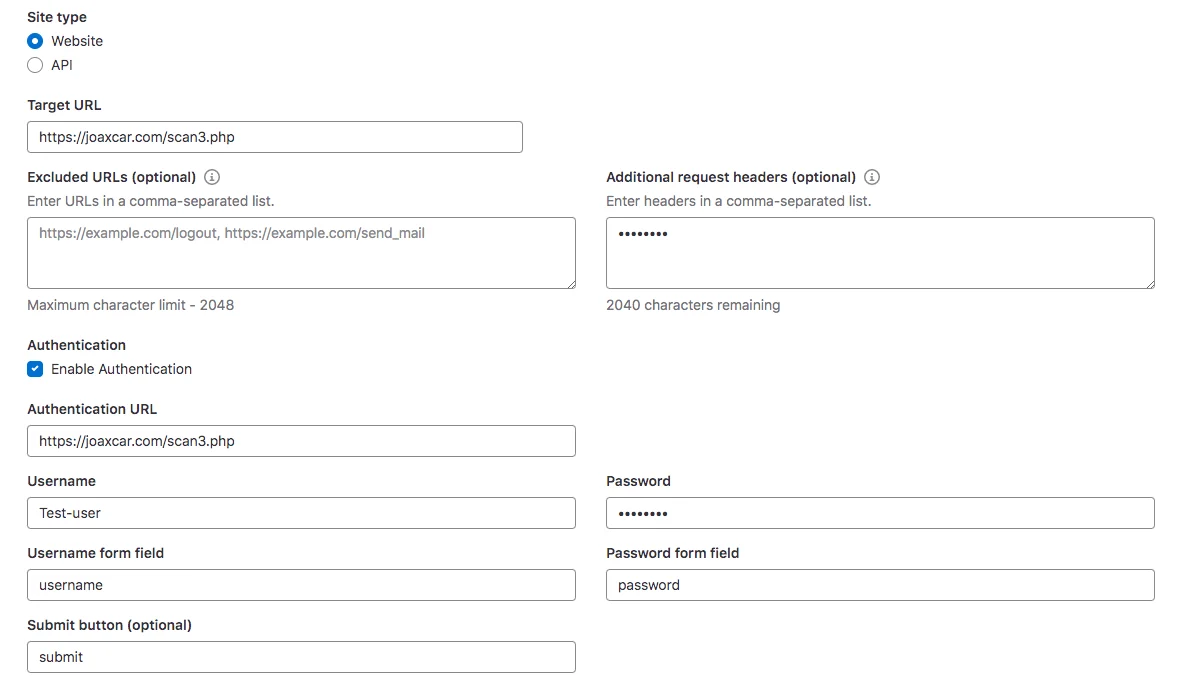
site profilemakes sure to switch to Website. Also make sure to add authorization in the site profile as it is needed for the job to run. - Set the Target URL and the Authorization URL to https://joaxcar.com/scan3.php , and the username and password to anything. Field names as shown in this image
- Go to https://gitlab.com/GROUPNAME/PROJECTNAME/-/security/configuration/profile_library#scanner-profiles and create a new scanner profile. Check "passive scan" as the mode. name it
scanner1 - Go to https://gitlab.com/GROUPNAME/PROJECTNAME/-/ci/editor?branch_name=main and make this your pipeline config
###  Add `dast` to your `stages:` configuration
stages:
  - dast

###  Include the DAST template
include:
  - template: DAST.gitlab-ci.yml

###  Your selected site and scanner profiles:
dast:
  stage: dast
  dast_configuration:
    site_profile: "site1"
    scanner_profile: " scanner1 "
- Click
Save - Go to https://gitlab.com/GROUP/PROJECT/-/pipelines
- Click the new pipeline
- When the pipeline finishes search in the log for PHPSESSID
- You should be able to see the plain text session cookie
- Visit the same page as an unauthenticated user (log out). You can still see the output
Impact
Log output leaks session information that can give an unauthenticated attacker access to production deploys of victims systems
Examples
active scan output: https://gitlab.com/ultimatetest7/hen/dast/-/jobs/3373938232
passive scan output: https://gitlab.com/ultimatetest7/hen/dast/-/jobs/3374371233
What is the current bug behavior?
The log is only masking the session information in one place
What is the expected correct behavior?
All occurrences of the session info should be redacted in the logs
Output of checks
This bug happens on GitLab.com
Impact
Log output leaks session information that can give an unauthenticated attacker access to production deploys of victims systems
Attachments
Warning: Attachments received through HackerOne, please exercise caution!
How To Reproduce
Please add reproducibility information to this section:
Not written yet. The AI write-up for this report has not been written yet. The Original tab links to the source.
How it worked
Root cause
The logging system only masks session information in one place, but other log entries (e.g., from the ZAP scanner) print the session tokens in plain text.
What the attacker needed
Victim has Ultimate subscription; Victim runs DAST scan with authentication; Attacker can view pipeline logs
The fix
All occurrences of session information should be redacted in the logs.
How it was found
- Log in as a victim user.
- Create a new public project (requires Ultimate subscription).
- Create a new site profile with authorization configured.
- Set the Target URL and Authorization URL to the test site and provide any username/password.
- Create a new scanner profile with passive scan mode.
- Configure the pipeline to use the site and scanner profiles, then run the pipeline.
Explained by bugbounty.wiki with AI from the original and checked against quotes from it; it can still be wrong. Read the original before relying on a detail.
Not written yet. The AI write-up for this report has not been written yet. The Original tab links to the source.
When a security scanner runs, it sometimes logs the session cookies it uses to log in. These logs are visible to anyone, so an attacker can read the cookies and use them to log in as the victim.
What is Info disclosure?
Data the application should keep private (personal data, internal details, other users' records) reaches someone it should not.




