Delete wrong branch bypassing user confirmation in protected branches leading to data loss.
A branch name containing an encoded slash (%2F) was treated as a literal name, so deleting it actually deleted a different branch with a real slash. This allowed bypassing the confirmation dialog for protected branches and could cause data loss.

GitLab
Originally disclosed on GitLab
- Fixed in 4 months
- Disclosed after 4 months
HackerOne report #1223852 by friyin on 2021-06-11, assigned to GitLab Team:
Report | Attachments | How To Reproduce
Report
Summary
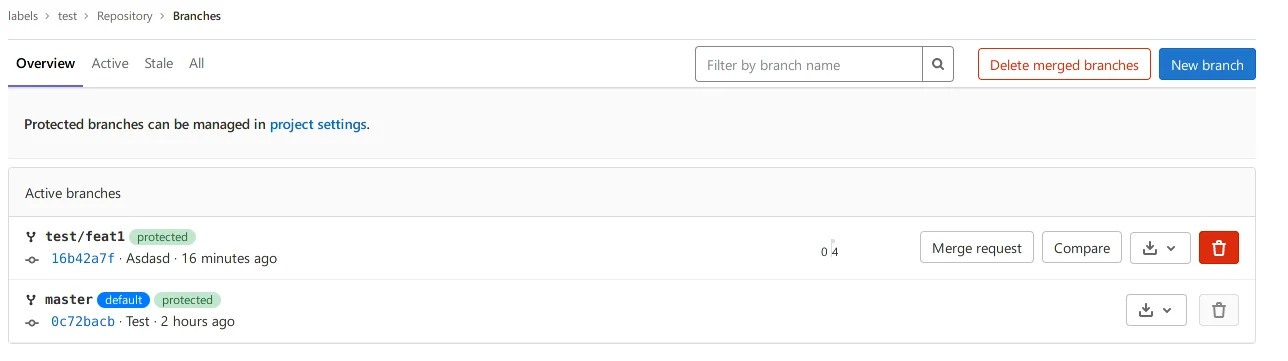
Using web interface I discovered that you if you try to delete a branch with %2F in its name you will really delete the another branch with the almost name but with / instead of %2F being able to bypass protected branch user confirmation modal dialog
Steps to reproduce
- Create a branch with a slash in its name, for example
test/feat1 - Protect the branch
test/feat1 - Create another branch with name
test%2Ffeat1
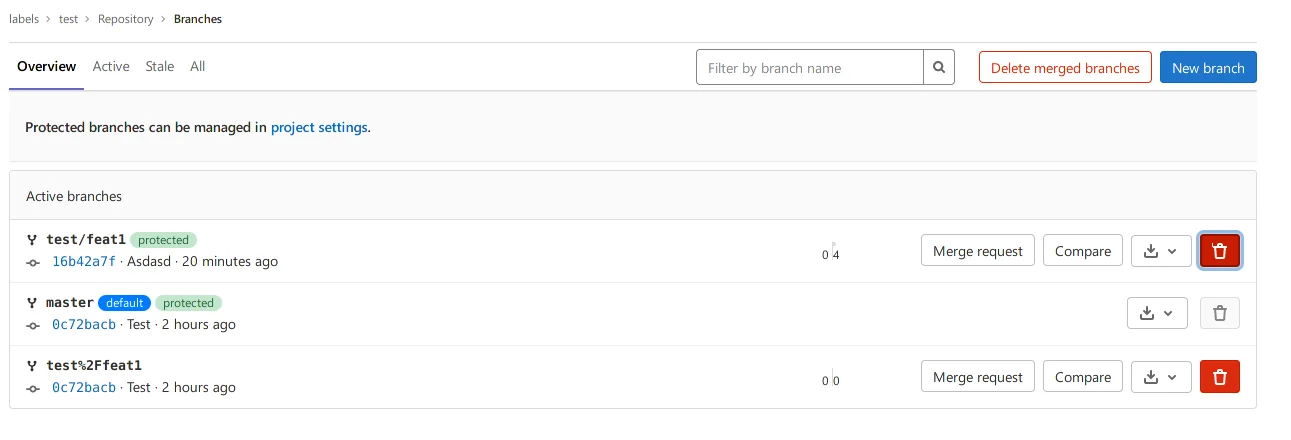
- Go to "Repository/branches" and try to delete
test%2Ffeat1
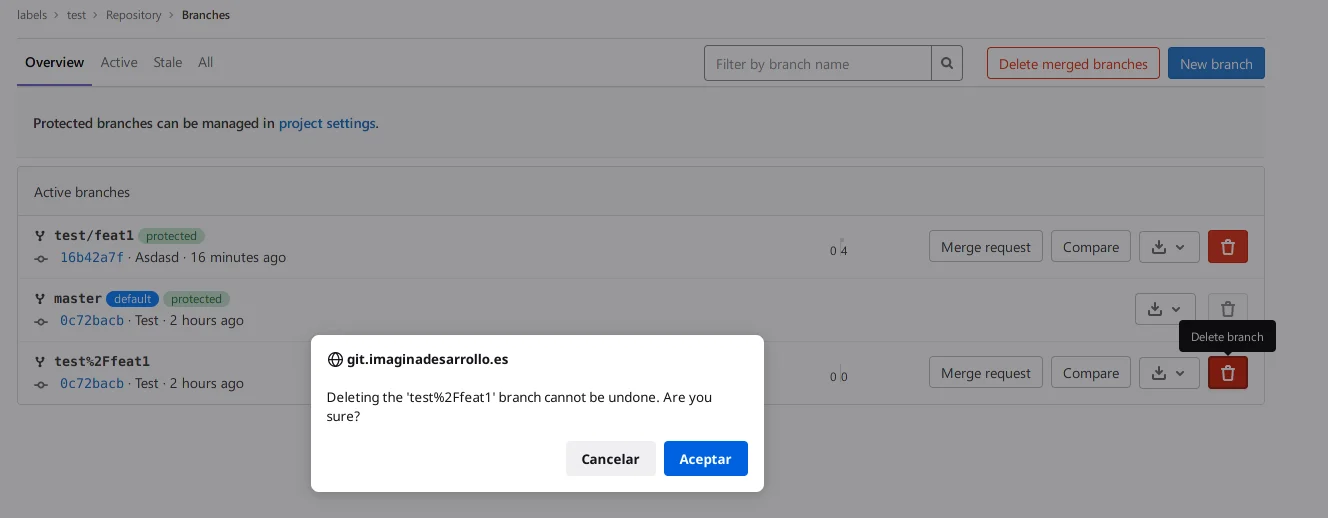
- You will notice that the branch it seems deleted
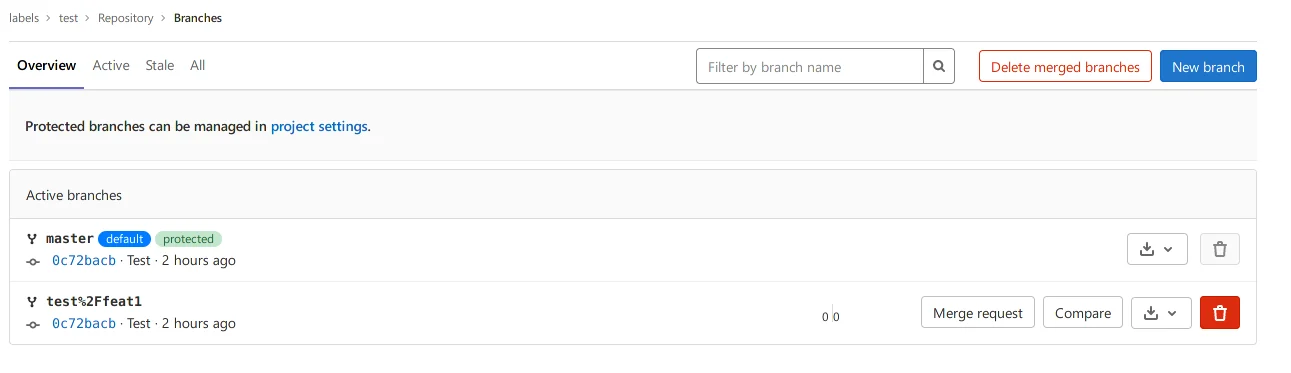
- Press F5 or refresh to see real branch list
What is the current bug behavior?
Delete a wrong branch, this can be a serious problem if the branch is protected because it is deleted without the special confirmation form.
What is the expected correct behavior?
Delete the correct branch you selected instead of another else.
Results of GitLab environment info
root@329409c303d3:/# gitlab-rake gitlab:env:info

System information
System:
Current User:   git
Using RVM:      no
Ruby Version:   2.7.2p137
Gem Version:    3.1.4
Bundler Version:2.1.4
Rake Version:   13.0.3
Redis Version:  6.0.12
Git Version:    2.31.1
Sidekiq Version:5.2.9
Go Version:     unknown

GitLab information
Version:        13.12.3
Revision:       757327a59bc
Directory:      /opt/gitlab/embedded/service/gitlab-rails
DB Adapter:     PostgreSQL
DB Version:     12.6
URL:            https://git.imaginadesarrollo.es
HTTP Clone URL: https://git.imaginadesarrollo.es/some-group/some-project.git
SSH Clone URL:  ssh://[email protected]:2222/some-group/some-project.git
Using LDAP:     yes
Using Omniauth: yes
Omniauth Providers:

GitLab Shell
Version:        13.18.0
Repository storage paths:
- default:      /var/opt/gitlab/git-data/repositories
GitLab Shell path:              /opt/gitlab/embedded/service/gitlab-shell
Git:            /opt/gitlab/embedded/bin/git
Impact
- Be able to delete a protected branch without confirmation.
- Delete wrong branch possibly leading to loss of information.
Attachments
Warning: Attachments received through HackerOne, please exercise caution!
How To Reproduce
Please add reproducibility information to this section:
Not written yet. The AI write-up for this report has not been written yet. The Original tab links to the source.
How it worked
What the attacker needed
Access to a GitLab project; ability to create branches; ability to delete branches
How it was found
- Create a branch with a slash in its name, for example test/feat1
- Protect the branch test/feat1
- Create another branch with name test%2Ffeat1
- Go to Repository/branches and try to delete test%2Ffeat1
- Notice that the branch seems deleted
- Refresh to see the real branch list
Explained by bugbounty.wiki with AI from the original and checked against quotes from it; it can still be wrong. Read the original before relying on a detail.
Not written yet. The AI write-up for this report has not been written yet. The Original tab links to the source.
In Git, branch names can contain slashes, like 'feature/login'. The web interface for deleting branches did not properly handle a branch name that contained the encoded form of a slash (%2F). So when a user tried to delete a branch named with %2F, the system deleted a different branch that had a real slash instead. This is dangerous because protected branches normally require extra confirmation before deletion, and that confirmation was skipped.
What is Business logic?
The application works as coded but not as intended: a negative price, a skipped payment step, a limit that can be crossed.




