developers can inject codes into proteced branch pipelines by using git replace command
GitLab does not filter pushes of git replace refs, allowing a developer to replace file content across branches. By obtaining a maintainer's job token, the developer can trigger a pipeline that fetches the replace refs and injects code into a protected branch.

GitLab
Originally disclosed on GitLab
- Fixed in 19 days
- Disclosed after 19 days
⚠️ Please read the process on how to fix security issues before starting to work on the issue. Vulnerabilities must be fixed in a security mirror.
HackerOne report #2793305 by xorz on 2024-10-20, assigned to GitLab Team:
Report | Attachments | How To Reproduce
Report
Summary
git replace is a git command to mapping an object to another, it also can be used across different branches.
A developer can use this cmd to replace a file content with another file and then this developer can push this replace ref to remote, the Gitlab server do NOT check the push action of replace refs.
The developer can get the job token of a maintainer user by using the steps in #2792703, the developer can get the job token when a maintainer creates a branch with a commit and no more actions is required, or just a merge click in #2786548.
The developer can use the job token to trigger a new pipeline with the maintainer token with parameter variables[GIT_FETCH_EXTRA_FLAGS]="-u refs/*:refs/*", then the code in main will be injected.
This report is focusing on showing the weakness of git refs push rules, please mark as requiring more info if you have concerns about the how to get job token.
Steps to reproduce
- create a project with ultimate plan
- invite
victimas maintainer - invite
attackeras developer - goto http://gitlab.test/test-git/project-a/-/settings/ci_cd
- click on
General pipelinesand set theGit strategytogit clone - goto
http://gitlab.test/victim/project-a/-/settings/merge_requests - enable
Enable merged results pipelinesand save the config
Login as Victim
- unzip the
project-a.zip - push the
mainto remote asvictim
Login as Attacker
- push the
attacker-branchto remote asattacker - push the
replace refto remote asattackerusinggit push origin refs/replace/bfb0b4cd8258d7aa5d9b85083edc1b91eb7ddce5:refs/replace/bfb0b4cd8258d7aa5d9b85083edc1b91eb7ddce5. You can usegit replace -lto get this hash. - get the
maintainer job tokenfollowing the steps in the #2792703 or check the video to see the details - run
trigger-pipeline.shto trigger a pipeline onmainusing the job token - then you should see the keywords
injectedinmainbranch pipeline
Impact
- Codes can be injected into protected branches
- Protected tokens like
project access tokencan be leaked - The attacker can
remove usersfrom current project if there areproject/group access tokensin the environment variables for protected branches - The attacker can also
push codes to other private projectsif there arepersonal/group access tokensin the environment variables for protected branches
Examples
What is the current bug behavior?
- git replace refs not filtered
What is the expected correct behavior?
- git replace refs can be filtered
Relevant logs and/or screenshots
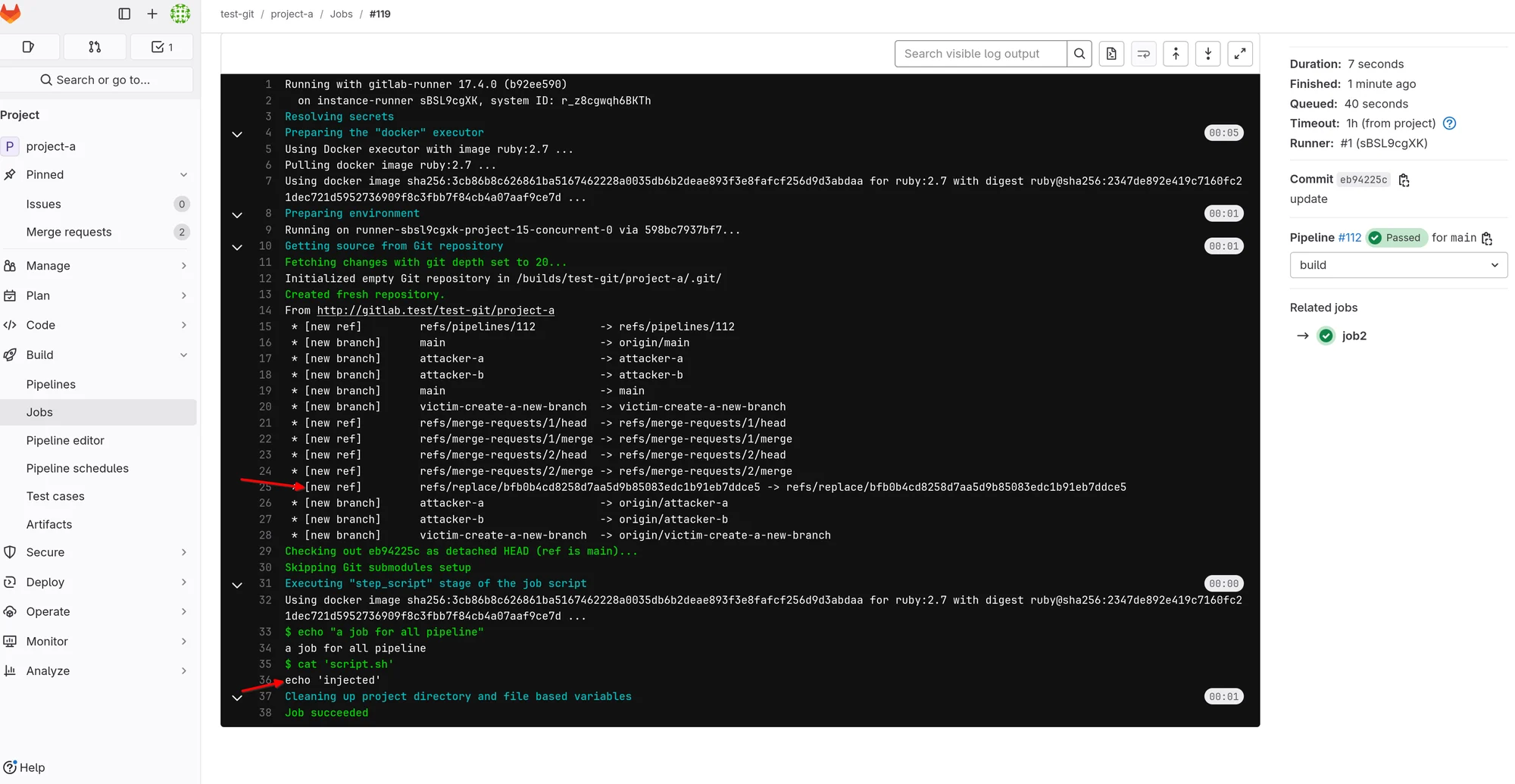
Output of checks
Results of GitLab environment info
System information
System:
Proxy:          no
Current User:   git
Using RVM:      no
Ruby Version:   3.1.5p253
Gem Version:    3.5.17
Bundler Version:2.5.11
Rake Version:   13.0.6
Redis Version:  7.0.15
Sidekiq Version:7.2.4
Go Version:     unknown

GitLab information
Version:        17.4.2-ee
Revision:       e85e7bae1a9
Directory:      /opt/gitlab/embedded/service/gitlab-rails
DB Adapter:     PostgreSQL
DB Version:     14.11
URL:            http://gitlab.test
HTTP Clone URL: http://gitlab.test/some-group/some-project.git
SSH Clone URL:  [email protected]:some-group/some-project.git
Elasticsearch:  no
Geo:            no
Using LDAP:     no
Using Omniauth: yes
Omniauth Providers:

GitLab Shell
Version:        14.39.0
Repository storages:
- default:      unix:/var/opt/gitlab/gitaly/gitaly.socket
GitLab Shell path:              /opt/gitlab/embedded/service/gitlab-shell

Gitaly
- default Address:      unix:/var/opt/gitlab/gitaly/gitaly.socket
- default Version:      17.4.2
- default Git Version:  2.46.0
Impact
- Codes can be injected into
mainbranch - Protected tokens like project access token can be leaked
-
- The attacker can also
access other private projectsorremove usersfrom current project if there areproject/group access tokensin the environment variables for protected branches
- The attacker can also
Attachments
Warning: Attachments received through HackerOne, please exercise caution!
- job-detail.png
- pipeline-code-injection-git-replace.mp4
- project-a.zip
- show-remote-refs.sh
- trigger-pipeline.sh
How To Reproduce
Please add reproducibility information to this section:
Not written yet. The AI write-up for this report has not been written yet. The Original tab links to the source.
How it worked
Root cause
Likely GitLab does not validate or filter pushes of git replace refs, allowing them to be used in pipelines.
Impact
An attacker could inject code into protected branches and leak protected tokens, potentially removing users or pushing code to other private projects if access tokens are present in environment variables.
What the attacker needed
Ultimate plan project; Attacker has developer role; Victim has maintainer role; Attacker obtains maintainer job token
The fix
GitLab should filter git replace refs to prevent their use in pipelines.
How it was found
- Create a project with ultimate plan and invite a victim as maintainer and an attacker as developer.
- Set the Git strategy to git clone and enable merged results pipelines.
- As victim, push the main branch to remote.
- As attacker, push the attacker-branch and the replace ref to remote.
- Obtain the maintainer job token following steps in another report.
- Run trigger-pipeline.sh to trigger a pipeline on main using the job token, then see 'injected' in the pipeline.
Explained by bugbounty.wiki with AI from the original and checked against quotes from it; it can still be wrong. Read the original before relying on a detail.
Not written yet. The AI write-up for this report has not been written yet. The Original tab links to the source.
Git replace refs let you swap one Git object for another, even across branches. GitLab didn't block developers from pushing these refs, so a developer could make a protected branch's pipeline use different code. With a maintainer's job token, they could trigger a pipeline that fetches the malicious refs and runs injected code.
What is RCE?
Running the attacker's code on the target's servers: through command or code injection, unsafe deserialisation or template injection.