Disclosure of timing of contributions to confidential Issue of Public/Internal Project
The user's profile setting to hide private contributions was not respected in the calendar activities, so an attacker could see the timing of contributions to confidential issues. This allowed the attacker to infer when a user contributed to a confidential issue of a public project.

GitLab
Originally disclosed on GitLab
- Fixed in 13 months
- Disclosed after 13 months
HackerOne report #789163 by ryhmnlfj on 2020-02-05, assigned to @dcouture:
Summary
I found the disclosure of timing of specific User's contributions to confidential Issue of Public/Internal Project.
These are disclosed via calendar activities on User's profile pages.
Steps to reproduce
-
Prepare two accounts on your GitLab instance (or GitLab.com).
- Victim User
- Attacker User
-
Sign in to GitLab as Victim User.
-
Move to 'User Settings > Profile' page.
-
Uncheck "Include private contributions on my profile" and click "Update profile settings". (Please see "Private_contributions_checkbox_on_Profile_Setting.png")
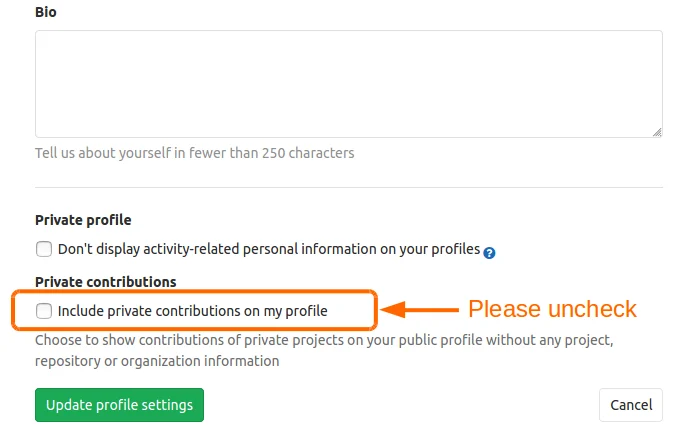
Private_contributions_checkbox_on_Profile_Setting.png From the original on GitLab Note: "Include private contributions on my profile" will be unchecked as the default setting.
-
Create new Public/Internal Project.
-
Create new confidential Issue in Project created at step 5. (Please see "Create_confidential_issue.png")
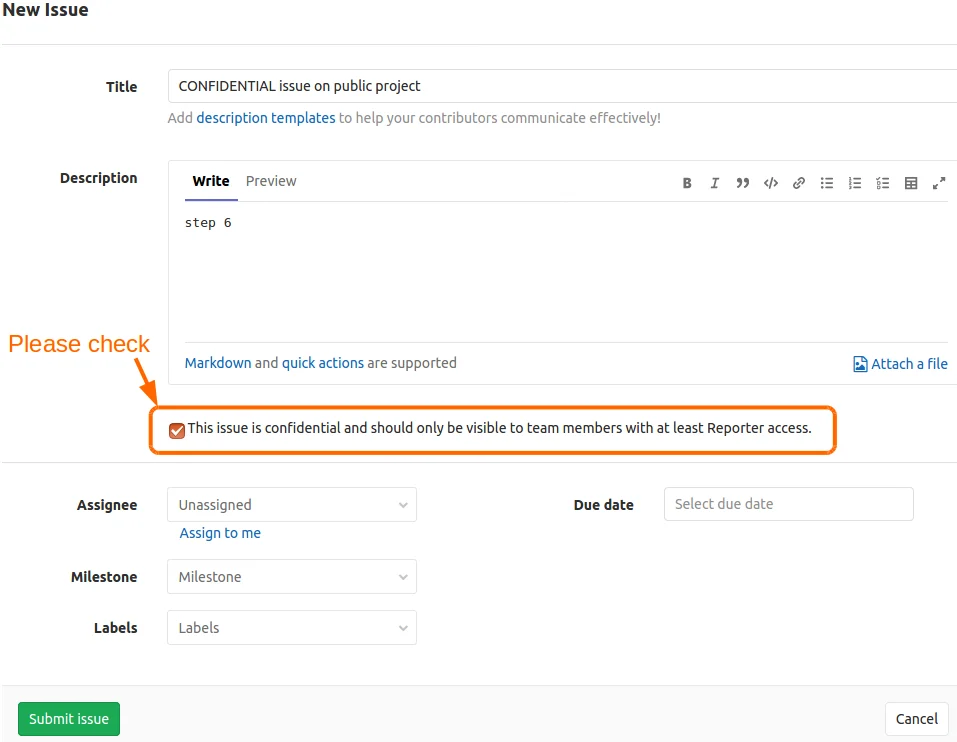
Create_confidential_issue.png From the original on GitLab -
Add comment on confidential Issue which created at step 6.
-
Sign out from Victim User's account.
-
Sign in to GitLab as Attacker User.
-
Move to Victim User's profile page.
-
Click the colored block pointing to latest date on calendar. (Please see "Colored_block_on_calendar.png")
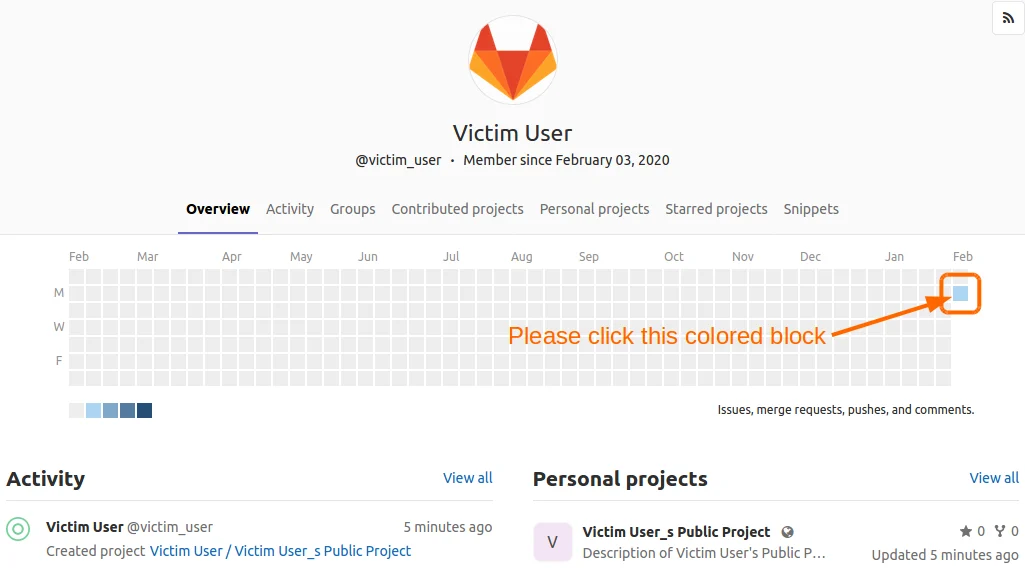
Colored_block_on_calendar.png From the original on GitLab
What is the current bug behavior?
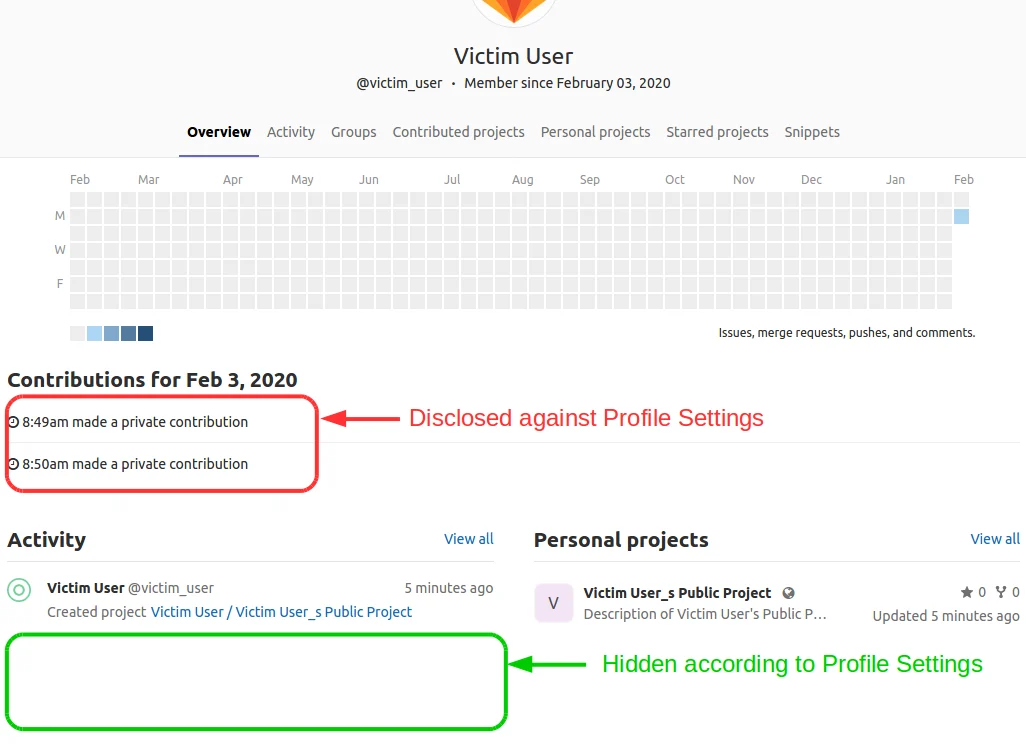
Timing of Victim User's contributions to confidential Issue of Public/Internal Project are disclosed as "made a private contribution" in the calendar activities.
In the Activity list, these are hidden according to 'Profile settings'. On the other hand, in the calendar activities, they are displayed against the setting. (Please see "Result_after_clicking_colored_block.png")
What is the expected correct behavior?
Even in the calendar activities, timing of Victim User's contributions to confidential Issue of Public/Internal Project should be hidden according to 'Profile settings'.
Additional Informations:
Only timing of contributions to confidential Issue of Public Project can be seen by unauthorized users.
This allows Attacker User to distinguish whether Victim User contributed to Public Project or Internal Project.
Relevant logs and/or screenshots
- "Private_contributions_checkbox_on_Profile_Setting.png" : Screenshot of reproduction step 4 with explanation
- "Create_confidential_issue.png" : Screenshot of reproduction step 6 with explanation
- "Colored_block_on_calendar.png" : Screenshot of reproduction step 11 with explanation
- "Result_after_clicking_colored_block.png" : Screenshot of reproduced result with explanation
Output of checks
This bug happens on the official Docker installation of GitLab Enterprise Edition 12.7.5-ee.
Results of GitLab environment info
Output of sudo gitlab-rake gitlab:env:info:
System information
System:
Proxy:		no
Current User:	git
Using RVM:	no
Ruby Version:	2.6.5p114
Gem Version:	2.7.10
Bundler Version:1.17.3
Rake Version:	12.3.3
Redis Version:	5.0.7
Git Version:	2.24.1
Sidekiq Version:5.2.7
Go Version:	unknown

GitLab information
Version:	12.7.5-ee
Revision:	19edff260da
Directory:	/opt/gitlab/embedded/service/gitlab-rails
DB Adapter:	PostgreSQL
DB Version:	10.9
URL:		http://gitlab.example.com
HTTP Clone URL:	http://gitlab.example.com/some-group/some-project.git
SSH Clone URL:	[email protected]:some-group/some-project.git
Elasticsearch:	no
Geo:		no
Using LDAP:	no
Using Omniauth:	yes
Omniauth Providers:

GitLab Shell
Version:	11.0.0
Repository storage paths:
- default: 	/var/opt/gitlab/git-data/repositories
GitLab Shell path:		/opt/gitlab/embedded/service/gitlab-shell
Git:		/opt/gitlab/embedded/bin/git
Impact
This vulnerability will affect many users because these timings are disclosed with default 'Profile settings'.
Of course, this current situation is not desirable for protecting user's privacy.
As an example, the following abuse scenario is possible:
In public OSS projects hosted by GitLab.com, the confidential Issue feature is often used to handle security issues. Each User's contribution to confidential Issue likely points to their contribution to the security issues of OSS projects.
Now suppose the attacker has a way to attack each User (e.g. Client-side vulnerability such as XSS).
In order to get more vulnerability informations efficiently using this way, attacker will use this timing disclosure to narrow down the Users contributed to the security issues.
From the above, it seems reasonable to treat this as a vulnerability. However, since the information disclosed directly is small, I submit this report as Low severity.
Attachments
Warning: Attachments received through HackerOne, please exercise caution!
Not written yet. The AI write-up for this report has not been written yet. The Original tab links to the source.
How it worked
Root cause
Likely the calendar activity feed did not check the user's 'Include private contributions on my profile' setting before displaying contribution timings.
Impact
An attacker could learn when a user contributed to confidential issues, which could help narrow down users involved in security issues, though the directly disclosed information is small.
What the attacker needed
Two accounts on GitLab; victim has private contributions disabled (default); attacker knows victim's username
The fix
The calendar activities should respect the user's profile setting and hide contribution timings for confidential issues.
How it was found
- Create two accounts: a victim and an attacker.
- As the victim, go to profile settings and uncheck 'Include private contributions on my profile'.
- Create a public or internal project and a confidential issue in it.
- Add a comment to the confidential issue.
- Sign in as the attacker and visit the victim's profile page.
- Click the colored block on the calendar to see the contribution timing.
Explained by bugbounty.wiki with AI from the original and checked against quotes from it; it can still be wrong. Read the original before relying on a detail.
Not written yet. The AI write-up for this report has not been written yet. The Original tab links to the source.
A user can choose to hide their private contributions from their profile. However, the calendar on the profile still showed when they made contributions to confidential issues, which are supposed to be private. This let anyone see when the user was working on secret issues.
What is Info disclosure?
Data the application should keep private (personal data, internal details, other users' records) reaches someone it should not.




