Grafana token leaked in plain to other maintainers
The GitLab project settings page displayed the Grafana API token in plaintext to any project maintainer. A maintainer could copy the token and continue using it even after being removed from the project.

GitLab
Originally disclosed on GitLab
- Fixed in 2 months
- Disclosed after 2 months
dev.gitlab.org development issue https://dev.gitlab.org/gitlab/gitlabhq/issues/2966
HackerOne report #737049 by xanbanx on 2019-11-13, assigned to @jeremymatos:
Hi GitLab Security Team,
Summary
GitLab added Grafana support on project level. This means, the Grafana settings also can be configured on project level.
When going to the settings, the owner or maintainer of a project has to enter the Grafana URL and the Grafana API token.
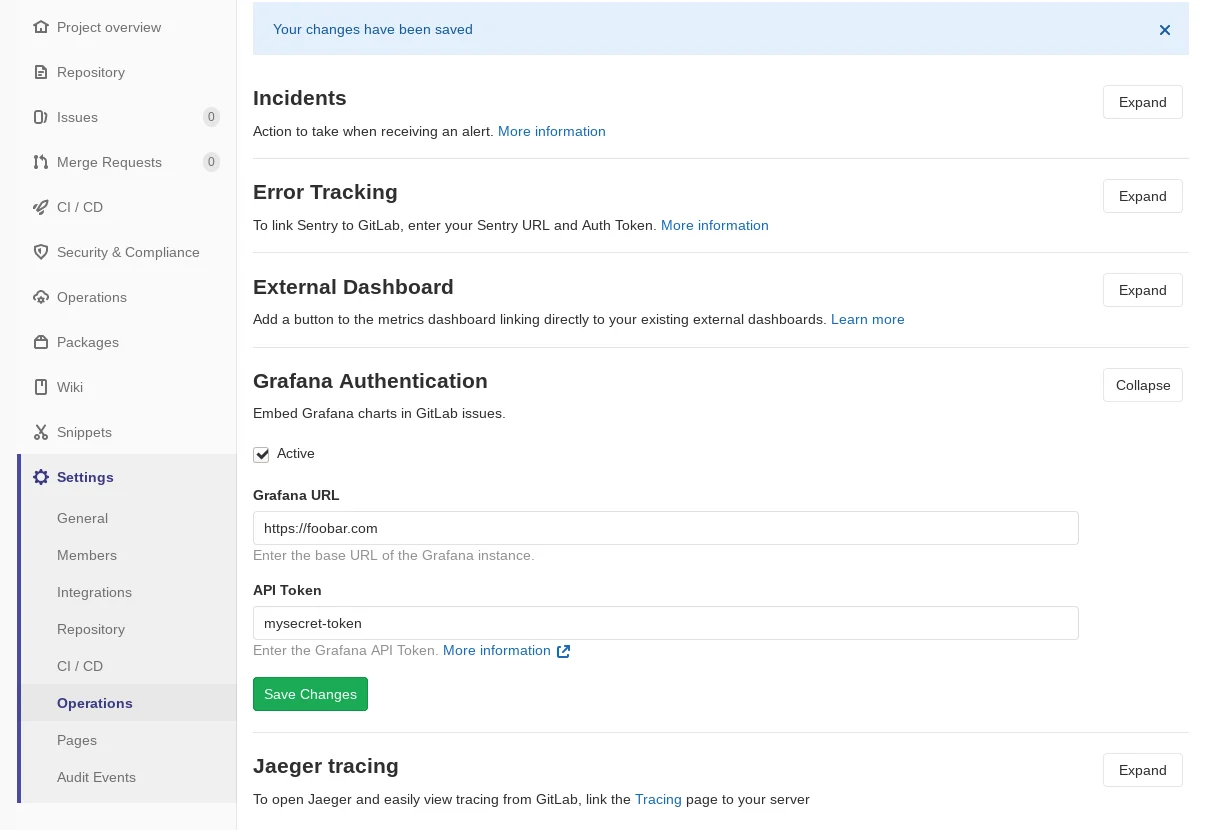
When visiting the settings page again, the API token is presented again. Thus any other maintainer can grab the Grafana token and possibly abuse it.
Steps to reproduce
- Create a new project.
- Go to
https://example.gitlab.com/<namespace>/<project>/-/settings/operations - Activate Grafana by adding an URL, and add a token
- Add another maintainer to the project and as this user, revisit
https://example.gitlab.com/<namespace>/<project>/-/settings/operationsand see the leaking token
Also view the attached screenshot showing this:
Impact
The Grafana API key is leaked to other maintainers. This is problematic because a different maintainer can simply copy this token.
When this maintainer is removed from the project, this user is still in possession of the API key. Grafana even only shows the token once (as it should be), but GitLab renders them unmasked.
What is the current bug behavior?
The GitLab settings page leaks the Grafana API token to other maintainers by showing them in plaintext.
What is the expected correct behavior?
When using tokens, do not present them in plain. Use a masked version of it.
Output of checks
This bug happens on GitLab.com
Best regards,
Xanbanx
Impact
See above.
Attachments
Warning: Attachments received through HackerOne, please exercise caution!
Not written yet. The AI write-up for this report has not been written yet. The Original tab links to the source.
How it worked
Root cause
Likely the settings page rendered the stored Grafana API token in plaintext instead of masking it.
Impact
A maintainer could copy the Grafana API token and still use it after being removed from the project.
What the attacker needed
Maintainer access to a project; Grafana integration enabled
The fix
The settings page should mask the token instead of showing it in plaintext.
How it was found
- Create a new project.
- Go to the project's operations settings page.
- Activate Grafana by adding a URL and a token.
- Add another maintainer to the project.
- As the new maintainer, revisit the operations settings page and see the leaked token.
Explained by bugbounty.wiki with AI from the original and checked against quotes from it; it can still be wrong. Read the original before relying on a detail.
Not written yet. The AI write-up for this report has not been written yet. The Original tab links to the source.
An API token is like a password that lets a program access another service. Here, GitLab showed this secret token to every project maintainer, not just the person who set it up. So anyone with maintainer rights could copy it and keep using it later, even if they were removed from the project.
What is Info disclosure?
Data the application should keep private (personal data, internal details, other users' records) reaches someone it should not.




