Instant open redirect on Live preview WEB Ide opening
The Web IDE preview embeds a CodeSandbox iframe without a sandbox attribute, so code in the previewed project can navigate the top-level window. An attacker could craft a project whose preview redirects the victim to an arbitrary external site on load.

- Triaged in 29 hours
- Fixed in 7 months
- Paid in 7 months
- Disclosed after 24 months
Hello Gitlab team! Asset is my own gitlab installation for Ubuntu.
The issue I want to report is lack of sandbox attribute in iframe pointing to codesandbox. This results content inside iframe redirect top level window on load.
How to reproduce:
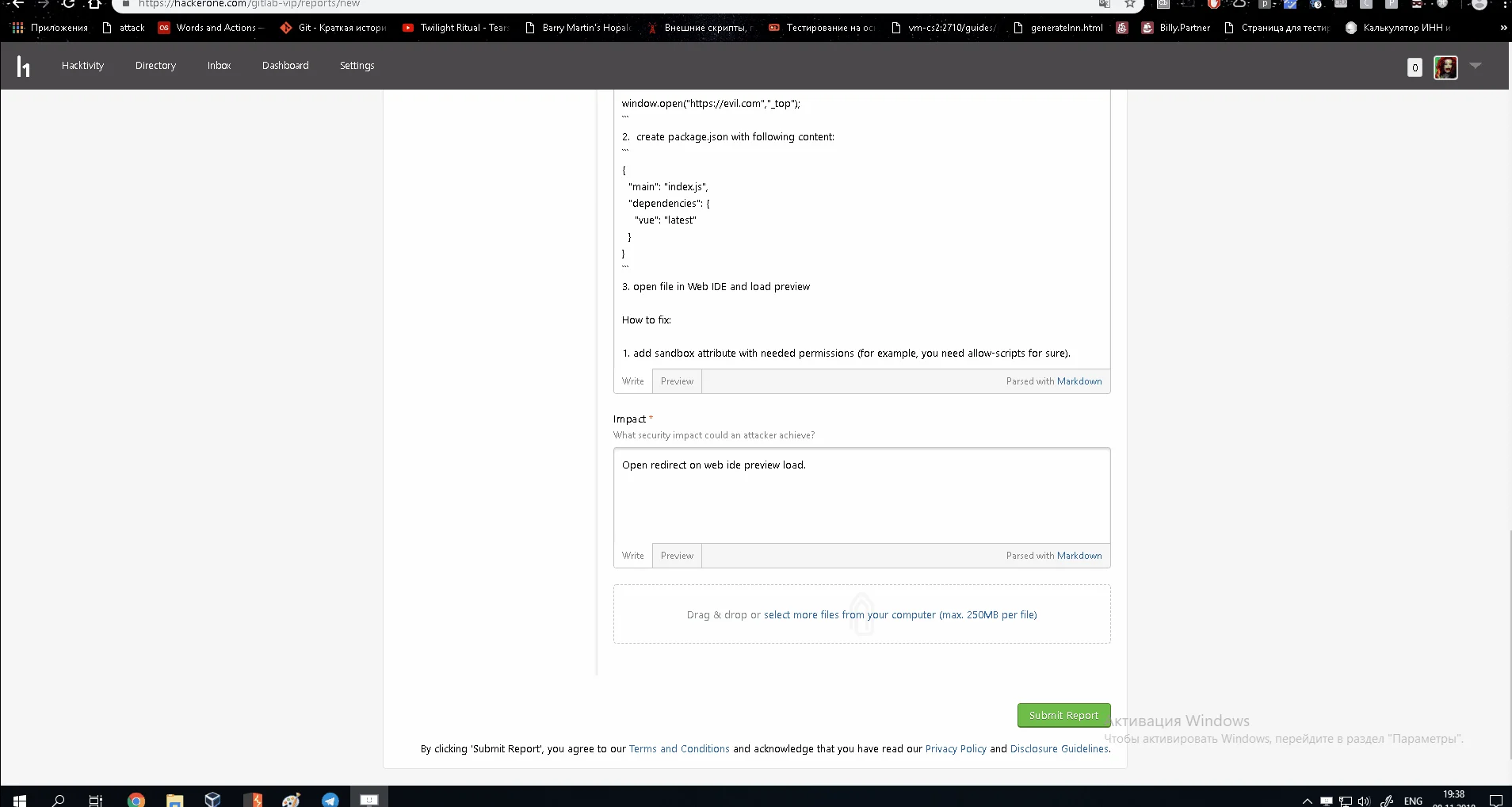
- create index.js with following content:
window.open("https://evil.com","_top");
- create package.json with following content:
{
  "main": "index.js",
  "dependencies": {
    "vue": "latest"
  }
}
- open file in Web IDE and load preview
How to fix:
- add sandbox attribute with needed permissions (for example, you need allow-scripts for sure) on codesandbox iframe.
Impact
Open redirect on web ide preview load.
Attachments
What the report shows
The target is a self-hosted GitLab installation on Ubuntu, which the researcher states is their own asset. The feature under examination is the Web IDE live preview, which renders project content inside an iframe served by CodeSandbox.
The researcher found that this iframe is created without a sandbox attribute. Because the embedded content is not sandboxed, script running inside the preview can navigate the top-level window. The report frames the issue as an open redirect that fires as soon as the preview loads.
To reproduce, the researcher created two files in a project. The first is index.js, containing a call that opens an arbitrary external site in the top-level browsing context:
window.open("https://evil.com","_top");
The second is package.json, which marks index.js as the entry point and pulls in a dependency:
{
  "main": "index.js",
  "dependencies": {
    "vue": "latest"
  }
}
The steps are:
- Create
index.jswith the content above. - Create
package.jsonwith the content above. - Open the file in the Web IDE and load the preview.
On load, the preview content executes and redirects the top-level window away from GitLab. The report includes an attached recording:
The report's proposed fix is to add a sandbox attribute to the CodeSandbox iframe, granting only the permissions the preview genuinely needs. The researcher notes that allow-scripts is certainly required for the preview to function.
The stated impact is an open redirect triggered on Web IDE preview load.
Root cause
The root cause is that the preview iframe is embedded without a sandbox attribute, so the framed document keeps its normal ability to navigate the top-level window. Without sandboxing, a script inside the frame can call window.open with the _top target and move the whole tab to an attacker-chosen URL. The report does not describe any origin checks or other controls that might have been expected to prevent this.
Impact
The consequence described is an open redirect: a crafted project, when its preview is loaded in the Web IDE, sends the user's browser to an arbitrary external site. The report does not describe any theft of credentials, session data or other data, and does not claim chaining with other issues.
How this kind of bug works
An iframe without a sandbox attribute runs its content with the privileges its origin allows. Navigation of the top-level browsing context is one of those privileges: script in a frame can set window.top.location or call window.open with _top, and the browser will follow it. The framed document does not need to be same-origin with the parent for this to work; top-level navigation is generally permitted unless the frame is sandboxed without allow-top-navigation, or the embedding page applies other restrictions.
This matters wherever a product renders user-supplied or third-party content in a frame: previews, embedded editors, rendered notebooks, HTML email views, documentation viewers. If the framed content can run script and the frame is not sandboxed, the content controls where the parent tab goes. The defences are the sandbox attribute with a minimal permission set, a Content-Security-Policy frame-sandbox directive or a restrictive frame-ancestors/sandbox combination on the framed response, and serving untrusted content from a separate origin so that even unsandboxed script cannot reach privileged state.
How to test for it
- Identify features that render user-controlled content in an iframe: previews, embedded editors, HTML renderers, third-party embed widgets.
- Inspect the iframe element in the DOM and note whether a
sandboxattribute is present and which tokens it carries. Pay particular attention toallow-scriptscombined withallow-top-navigationorallow-top-navigation-by-user-activation, and to the absence ofsandboxentirely. - Create content that attempts a top-level navigation on load, for example a script that assigns to the top window's location or opens a URL with the
_toptarget, and load it through the feature. - A positive result is the whole tab leaving the application and landing on your chosen URL without any further user interaction beyond loading the preview.
- Common false positives: the navigation only happens after an explicit click (which may be intended behaviour under
allow-top-navigation-by-user-activation), the redirect is blocked by a Content-Security-Policy on the parent, the frame is cross-origin and the browser blocks the access, or the preview is only reachable by the project owner, which limits who can be attacked.
How it is fixed
Add a sandbox attribute to the iframe with the smallest set of tokens the feature needs. Scripts usually require allow-scripts; top-level navigation should be withheld unless there is a clear product reason, and if it is needed, allow-top-navigation-by-user-activation is safer than allow-top-navigation. Avoid combining allow-scripts with allow-same-origin for untrusted content, since that lets the frame remove its own sandbox. Where the platform supports it, enforce sandboxing through response headers or CSP so that a missing attribute in the markup cannot silently disable it.
Hunting notes
This class of bug tends to hide in features that were built for convenience rather than security: live previews, markdown and HTML renderers, template editors, notebook viewers, and any place where a third-party embed is dropped into the page. Recon signals include iframes pointing at separate preview or sandbox domains, iframe markup generated client-side, and features that advertise "live preview" or "run in browser".
To make a report land, show the full path from attacker-controlled input to the top-level navigation, include a recording of the tab leaving the site, and state clearly what the victim has to do. If the preview is only visible to the project owner, say so, because that shapes severity. Where the program accepts it, demonstrate a realistic lure, such as a shared project whose preview redirects to a lookalike login page, but keep the claim to what you actually observed.
What happened, in plain words
GitLab is a website where teams keep and edit code. One of its features is the Web IDE, a code editor that runs in your browser, and that editor has a live preview: a small window inside the page that shows what the code you are editing would look like when it runs. The researcher was testing their own GitLab installation on Ubuntu, so they were free to break things.
The preview is shown in an iframe that points to CodeSandbox. GitLab puts that result inside an iframe. An iframe is a rectangular area of a web page that displays another web page, like a picture frame hanging on a wall: the frame belongs to the room, the picture inside belongs to someone else. The browser treats the framed page as a separate document with its own rules.
Those rules can be tightened with an attribute called sandbox. Think of it as a list of permissions handed to the framed page, the way a visitor to an office might be given a badge that opens only certain doors. If the attribute is missing, the framed page keeps its normal abilities. One of those abilities is to change the address of the whole browser tab, not just its own little frame. That is what the researcher found: the CodeSandbox iframe had no sandbox attribute, so code running inside the preview could send the entire tab somewhere else.
The report calls this an open redirect: a situation where a site can be made to forward a visitor to any address an attacker chooses. The redirect fires as soon as the preview loads, with no click needed.
How it was reproduced
The researcher created a small project with two files. The first is index.js, the code that the preview will run:
window.open("https://evil.com","_top");
Line by line: window.open is a browser function that opens a page. The first argument, "https://evil.com", is the address to open. The second argument, "_top", is the name of the place to open it in, and _top means the outermost window, the whole tab, rather than the small frame the code is running in. So the line says: take the entire tab to evil.com.
The second file is package.json, which tells the preview tooling which file to start with and what libraries the project uses:
{
  "main": "index.js",
  "dependencies": {
    "vue": "latest"
  }
}
main points at index.js, so that is the file that runs first. dependencies lists libraries the project needs; here it asks for the vue library at its latest version.
The steps were:
- Create
index.jswith the content above. - Create
package.jsonwith the content above. - Open the file in the Web IDE and load the preview.
On load, the preview ran the code and the browser left GitLab for the external site. The report includes an attached recording:
The suggested fix is to add a sandbox attribute to the CodeSandbox iframe and grant only the permissions the preview really needs. The researcher notes that allow-scripts is certainly required, because the preview has to run code to be useful.
Why it works
A framed page is normally allowed to navigate the top-level window. The browser does not require the frame and the page around it to come from the same site for this; top-level navigation is simply one of the things a page can do unless something stops it. Sandboxing is that something. Without it, a script inside the frame can call window.open with the _top target, or set the top window's location, and the whole tab follows.
The report does not describe any other control that was expected to block this.
What the impact is
The consequence is an open redirect: a crafted project, when its preview is loaded in the Web IDE, sends the visitor's browser to an arbitrary external site. The report does not describe theft of credentials, session data or other data, and does not claim that this was combined with another issue.
In general, how this kind of bug works
Any product that shows content from users or third parties inside a frame has this risk: previews, embedded editors, rendered notebooks, HTML email views, documentation viewers. If the framed content can run script and the frame is not sandboxed, that content decides where the parent tab goes.
The defences are:
- the
sandboxattribute with the smallest set of permissions the feature needs; - a Content-Security-Policy
frame-sandboxdirective, or a restrictiveframe-ancestors/sandboxcombination on the framed response; - serving untrusted content from a separate origin, so that even unsandboxed script cannot reach anything privileged.
When testing, look for features that render user-controlled content in an iframe. Inspect the iframe in the browser's developer tools and note whether sandbox is present and which permissions it lists. Pay attention to allow-scripts together with allow-top-navigation or allow-top-navigation-by-user-activation, and to the attribute being absent altogether. Then create content that tries to navigate the top window on load and open it through the feature. A positive result is the whole tab leaving the application for your chosen address with no further interaction beyond loading the preview.
Common false positives: the navigation only happens after an explicit click, which may be intended under allow-top-navigation-by-user-activation; a Content-Security-Policy on the parent blocks it; the frame is cross-origin and the browser refuses the access; or the preview is only reachable by the project owner, which limits who can be attacked.
To fix it, add sandbox with the minimum permissions. Scripts usually need allow-scripts; top-level navigation should be withheld unless there is a clear product reason, and if it is needed, allow-top-navigation-by-user-activation is safer than allow-top-navigation. Avoid combining allow-scripts with allow-same-origin for untrusted content, because that lets the frame remove its own sandbox. Where the platform supports it, enforce sandboxing through response headers or CSP so that a missing attribute in the markup cannot silently switch it off.
This class of bug tends to hide in features built for convenience rather than security: live previews, markdown and HTML renderers, template editors, notebook viewers, and any place where a third-party embed is dropped into the page. Signals worth watching for are iframes pointing at separate preview or sandbox domains, iframe markup generated in the browser, and features advertised as "live preview" or "run in browser".
To make a report land, show the full path from attacker-controlled input to the top-level navigation, include a recording of the tab leaving the site, and state clearly what the victim has to do. If the preview is only visible to the project owner, say so, because that shapes severity. Where the program accepts it, demonstrate a realistic lure, such as a shared project whose preview redirects to a lookalike login page, but keep the claim to what you actually observed.
Glossary
- GitLab: a website and tool for hosting and editing code, with features such as a browser-based editor.
- Web IDE: the code editor that runs inside the browser on GitLab, including a live preview of the project.
- Live preview: a panel that runs the project's code and shows the result without leaving the editor.
- CodeSandbox: a third-party service that runs code and returns the rendered result for display.
- iframe: an area of a web page that displays another web page inside it.
- sandbox attribute: a list of permissions attached to an iframe that limits what the framed page may do.
- allow-scripts: a sandbox permission that lets the framed page run JavaScript.
- allow-same-origin: a sandbox permission that lets the framed page keep its normal origin, which for untrusted content can let it escape the sandbox.
- allow-top-navigation: a sandbox permission that lets the framed page change the address of the whole tab.
- allow-top-navigation-by-user-activation: the same, but only after the user clicks or otherwise acts.
- window.open: a browser function that opens a page in a named window or frame.
_top: the name that refers to the outermost window, the whole browser tab.- Top-level window / browsing context: the outermost page the user sees, as opposed to a frame inside it.
- Open redirect: a flaw where a site can be made to forward a visitor to any address an attacker chooses.
- JavaScript: the programming language that web pages run in the browser.
- JSON: a text format for structured data, used here for
package.json. package.json: a file that describes a JavaScript project, including its entry file and its libraries.- Dependency: a library a project relies on.
- Origin: the combination of scheme, host and port that identifies where a page came from; pages from different origins are kept apart by the browser.
- Content-Security-Policy (CSP): a set of rules a site sends to the browser to restrict what pages may load or do.
- frame-ancestors: a CSP rule saying which sites may embed a page in a frame.
- frame-sandbox: a CSP directive that applies sandbox restrictions through a header rather than an attribute.
- DOM: the browser's in-memory model of a page, which developer tools let you inspect.
- Severity: a rating of how serious a bug is, here low.
- Bounty: a payment a company makes to a researcher for a valid report, here 1,000 USD.
- False positive: a test result that looks like a bug but is not one.