Issue ID visible for security vulnerabilities despite Only Project Members settings
A public GitLab project had issues set to 'Only Project Members', but the pipeline security tab still displayed the issue ID linked to each security vulnerability. An unauthenticated visitor could therefore learn the existence and numeric ID of issues that should have been hidden.

GitLab
Originally disclosed on GitLab
- Fixed in 4 months
- Disclosed after 4 months
HackerOne report #617341 by ashish_r_padelkar on 2019-06-17, assigned to jmatos_bgtvf:
Summary
Hello,
When below settings are in place for the issues, none of the issue related information should be visible publicly.
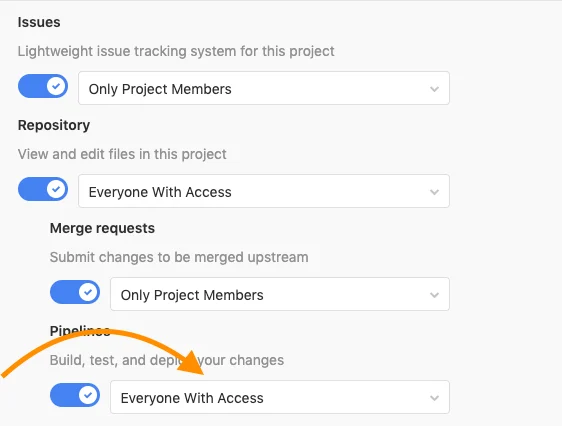
However, despite above settings, anyone can see issue ID associated with security vulnerabilities in pipelines.
Steps to reproduce
-
Set the public project with above settings i.e issues as
Only Project Membersand Pipelines asEveryone With Access -
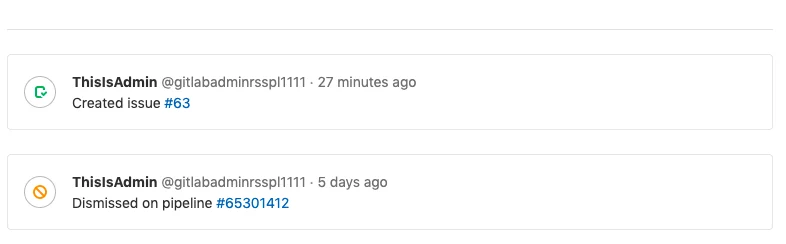
Create an issue for a security issue using
Create issuebutton available from security vulnerability popup. -
Now as any user(non member) visit the pipeline security tab and click on the available security issues. The popup will show the Issue ID for that security issue despite settings are in place.
Examples POC
You can visit my project here at https://gitlab.com/gitlabadminrsspl1111/thisispublicproject/pipelines/66301859/security and click on the available 2 vulnerabilities there. You should see the issue ID associated with it although you cant see the issues menu there!
What is the current bug behavior?
Issue ID visible which are associated with security vulnerabilities in pipelines
What is the expected correct behavior?
The issue ID should not be visible when issues are set as Only Project Members
Output of checks
This bug happens on GitLab.com and might be omnibus installations too!
Regards,
Ashish
Impact
Issue ID visible despite issues are set as Only Project Members in public projects in security vulnerabilities
Attachments
Warning: Attachments received through HackerOne, please exercise caution!
Not written yet. The AI write-up for this report has not been written yet. The Original tab links to the source.
How it worked
Root cause
Likely the pipeline security view did not apply the project's issue visibility setting when rendering the linked issue ID.
Impact
A non-member could see the issue ID of security vulnerabilities in a public project even when issues were restricted to project members, revealing that hidden issues exist and their identifiers.
What the attacker needed
Public project; issues set to Only Project Members; pipelines visible to Everyone With Access; attacker is a non-member
How it was found
- Set a public project so issues are visible only to project members and pipelines are visible to everyone with access.
- Create an issue for a security vulnerability using the button in the security vulnerability popup.
- As a non-member, open the pipeline security tab and click a security issue.
- Observe that the popup shows the issue ID despite the restricted issue visibility.
Explained by bugbounty.wiki with AI from the original and checked against quotes from it; it can still be wrong. Read the original before relying on a detail.
Not written yet. The AI write-up for this report has not been written yet. The Original tab links to the source.
A public project can hide its issue tracker from non-members. However, a separate security page still showed the ID number of each issue linked to a vulnerability. This let outsiders confirm that hidden issues existed and learn their numbers.
What is Info disclosure?
Data the application should keep private (personal data, internal details, other users' records) reaches someone it should not.




