Maintainer can leak masked webhook secrets by changing target URL of the webhook
A masked secret in a webhook URL was not cleared when the URL was changed, allowing a maintainer to redirect the webhook to an attacker-controlled server and receive the secret in a test request. This let a maintainer leak a secret that should have been inaccessible after configuration.

GitLab
Originally disclosed on GitLab
- Fixed in 33 days
- Disclosed after 33 days
HackerOne report #1791331 by joaxcar on 2022-12-03, assigned to @greg:
Report | Attachments | How To Reproduce
Report
Summary
This is related to the fix for my reports https://hackerone.com/reports/1758126 and https://hackerone.com/reports/1757999 fixed in patch 15.6.1. After the 15.6 release there is an option to mask parts of a webhook URL to treat it as a secret value. See documentation link.
When this feature is used any secret string in the configured URL will be masked in the UI and in any logs in the UI. The values work the same as other tokens in that they are not even accessible by the user configuring it after it is first configured. It should not be possible for the initial user or any other users to retrieve these values. (see https://hackerone.com/reports/1758126)
The problem with this new feature of masked values is that they have reintroduced the issue of leaking secrets by changing the URL. The masked secret fields are not cleared if a user changes the configured hook URL. Thus, any attacker controlled new URL will be able to retrieve the secret values.
Similar token fields on webhooks andintegrations are reset if the URL is changed, forcing the user editing the integration to resend any token. This should probably also happen here.
The docs states this about the secret
Sensitive portions do not get logged and are encrypted at rest in the database.
This change to the input field of the UI was made intentionally to hide the secret from other maintainers (as they do not necessarily have access to the receiving service). The leaked token (LOW confidentiality) gives an unauthorized other maintainer the ability to spoof requests to the receiving server (LOW integrity). And the impacted service is the receiving service (Scope changed). This was my rating of this, feel free to edit it as see fit!
Steps to reproduce
- Log in to gitlab
- Create a new project
- Go to https://gitlab.com/GROUP/PROJECT/-/hooks and configure a webhook. Put the URL like this
https://example.com?token=secret-token - Click to add a mask, add the value
secret-tokenwith the replacementTOKEN. Click save for the webhook - Scroll to the bottom of the page to the list of configured hooks.
- Click edit on the new hook
- You can now see that the token is hidden in the UI. both in the config URL and in the mask field, there is no way to retrieve it
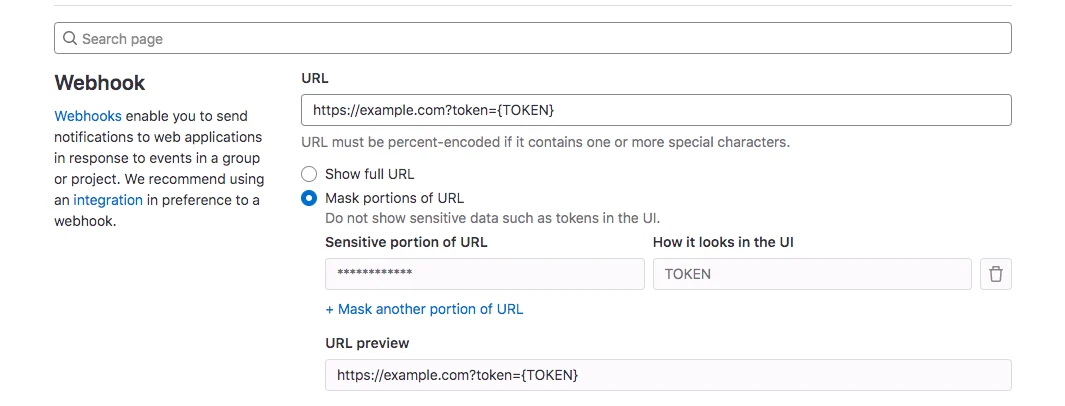
- (this step can be done by another "attacker maintainer") Edit the URL to an "attacker controlled server" (i used https://webhook.site to catch the request). Keep the token={TOKEN} part. Like this `https://WEBHOOK.SITE?token={TOKEN}
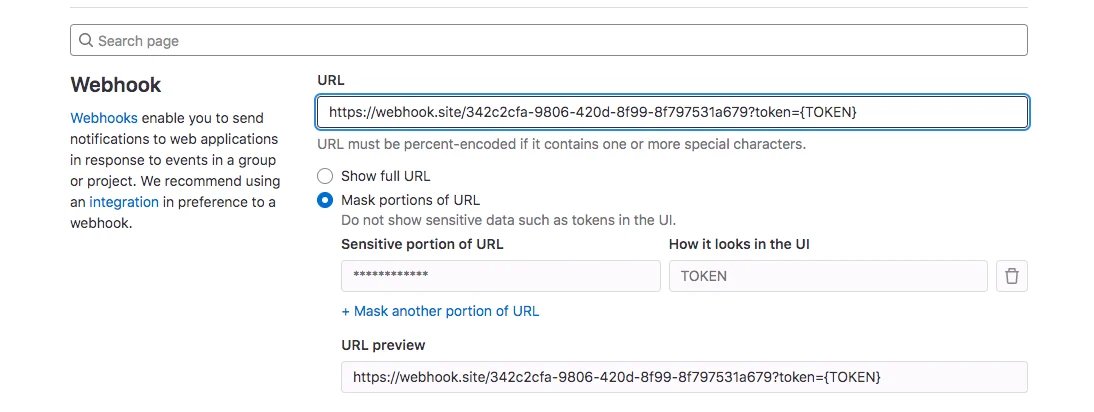
- Scroll down to the bottom of the page and click save (you can not send a test request before saving)
- Scroll to the bottom of the page again and click edit again on the hook
- Now click "test" to send a test request
- Check your server to see that the request is sent to the new URL and containing the secret token
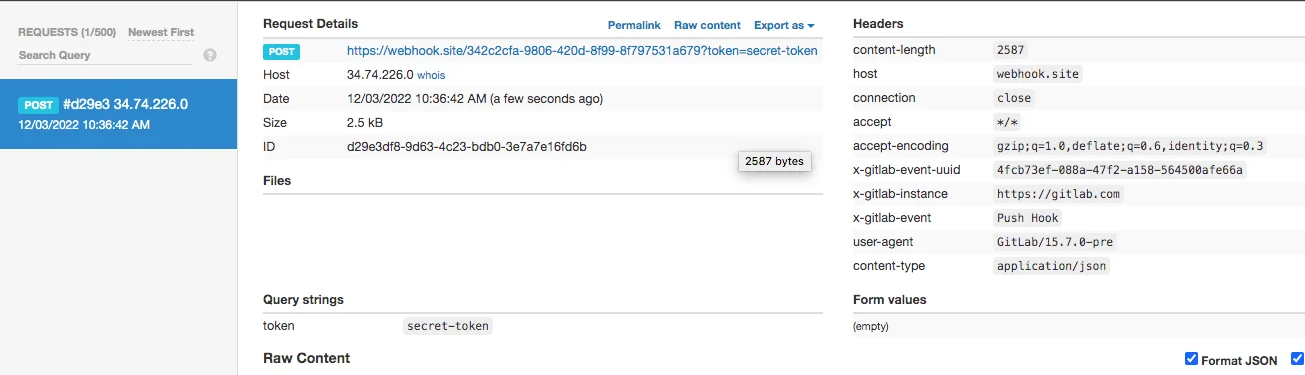
(13. If you are an attacker now change back the URL to the original URL)
Impact
Maintainers can leak secret masked values that should not be accessible after configuration
What is the current bug behavior?
Masked values are kept after changing the domain in the hook URL
What is the expected correct behavior?
Changing the origin/domain of the webhook should invalidate secrets, as is done for all other secrets in GitLab at the moment.
Output of checks
This bug happens on GitLab.com
Impact
Maintainers can leak secret masked values that should not be accessible after configuration
Attachments
Warning: Attachments received through HackerOne, please exercise caution!
How To Reproduce
Please add reproducibility information to this section:
Not written yet. The AI write-up for this report has not been written yet. The Original tab links to the source.
How it worked
Impact
A maintainer could leak a masked secret value that should not be accessible after configuration, potentially allowing spoofing of requests to the receiving server.
What the attacker needed
Maintainer access to a GitLab project; webhook with masked secret configured; ability to change webhook URL
The fix
Changing the origin or domain of the webhook should invalidate the masked secrets, as is done for other secrets in GitLab.
How it was found
- Log in to GitLab and create a new project.
- Configure a webhook with a URL containing a secret token and add a mask for that token.
- Save the webhook and edit it again to confirm the token is hidden.
- Change the webhook URL to an attacker-controlled server, keeping the masked token placeholder.
- Save the webhook, edit it again, and send a test request.
- Observe the request sent to the new URL containing the secret token.
Explained by bugbounty.wiki with AI from the original and checked against quotes from it; it can still be wrong. Read the original before relying on a detail.
Not written yet. The AI write-up for this report has not been written yet. The Original tab links to the source.
A webhook is a way for one service to send automatic messages to another. GitLab lets you hide parts of the webhook address as a secret, but if someone changes the address, the hidden part stays. So a person with edit rights can point the webhook to their own server and see the secret.
What is Info disclosure?
Data the application should keep private (personal data, internal details, other users' records) reaches someone it should not.




