Maintainer can leak masked webhook secrets by manipulating URL masking
A maintainer could leak masked webhook secrets by manipulating URL masking to bypass validation logic. The attacker could then send a test request to an attacker-controlled URL containing the secret token.

GitLab
Originally disclosed on GitLab
- Fixed in 51 days
- Disclosed after 51 days
⚠️ Please read the process on how to fix security issues before starting to work on the issue. Vulnerabilities must be fixed in a security mirror.
HackerOne report #1976206 by theluci on 2023-05-07, assigned to @nmalcolm:
Report | Attachments | How To Reproduce
Report
Hello,
I recently submitted a report #1915507 which was closed as duplicate of https://gitlab.com/gitlab-org/gitlab/-/issues/391685.
The fix to https://gitlab.com/gitlab-org/gitlab/-/issues/391685 can be bypassed.
Summary
There is an option to mask parts of a webhook URL to treat it as a secret value.
https://docs.gitlab.com/ee/user/project/integrations/webhooks.html#mask-sensitive-portions-of-webhook-urls
When this feature is used any secret string in the configured URL will be masked in the UI and in any logs in the UI. The values work the same as other tokens in that they are not even accessible by the user configuring it after it is first configured. It should not be possible for the initial user or any other users to retrieve these values.
The docs states this about the secret
Sensitive portions do not get logged and are encrypted at rest in the database.
However, there is a way to leak masked webhook secrets by bypassing the validation logic. (See Vulnerability)
Vulnerability
The fix changed validation logic as following,
  def reset_url_variables
    interpolated_url_was = interpolated_url(decrypt_url_was, url_variables_were)

    return if url_variables_were.empty? || interpolated_url_was == interpolated_url

    self.url_variables = {} if url_changed? && url_variables_were.to_a.intersection(url_variables.to_a).any?
  end
To bypass the validation logic
attackermask the victim-url such ashttps://victim-url?token={TOKEN}becomes{masked-url}?token={TOKEN}and clicks save.
This will not reset url_variables as url_changed? returns false.
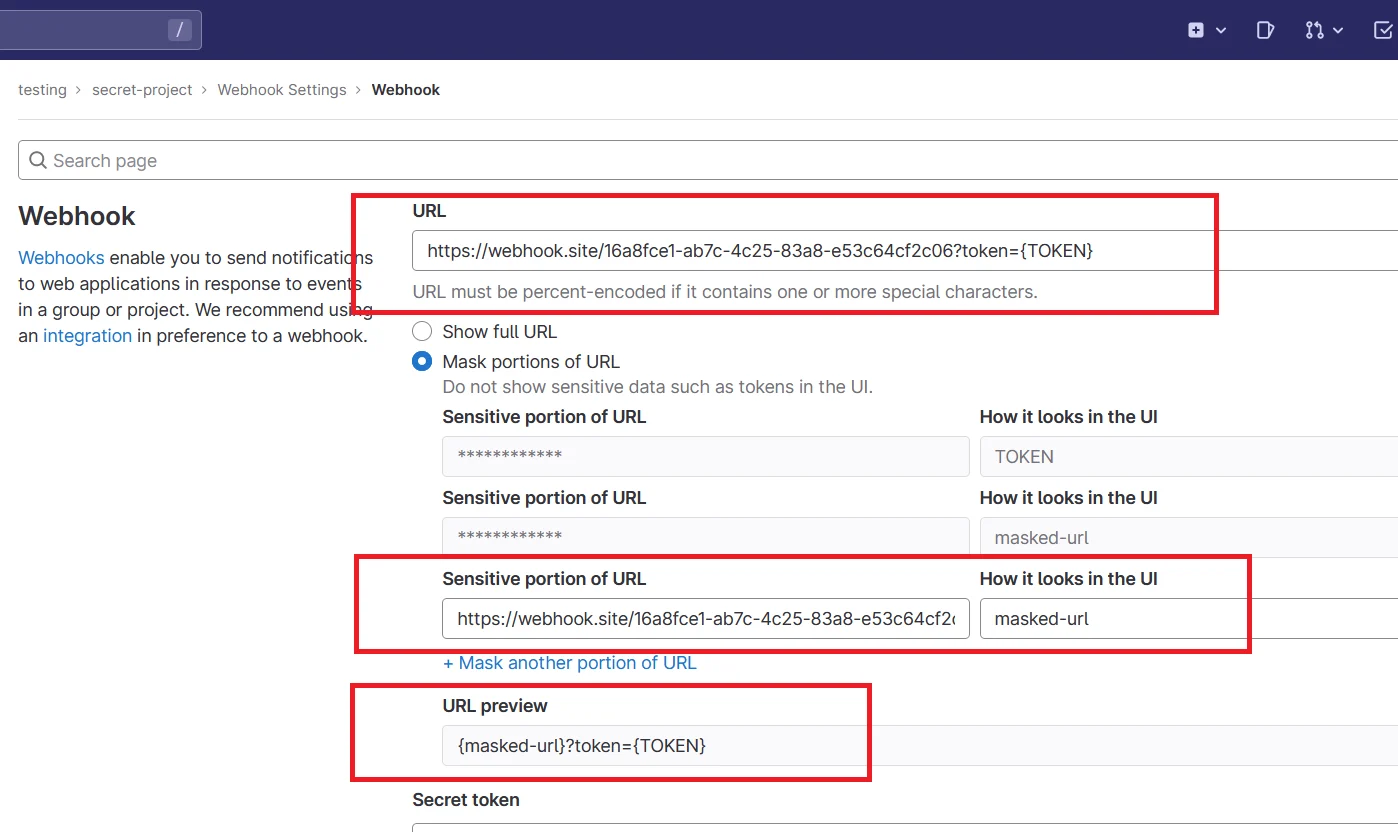
attackernow changes the url such as{masked-url}?token={TOKEN}becomeshttps://attacker-url?token={TOKEN}attackermasks the attacker-url with the same mask {masked-url}. So, that url finally becomes{masked-url}?token={TOKEN}and clicks save.
This will not reset url_variables as interpolated_url_was == interpolated_url condition is satisfied.
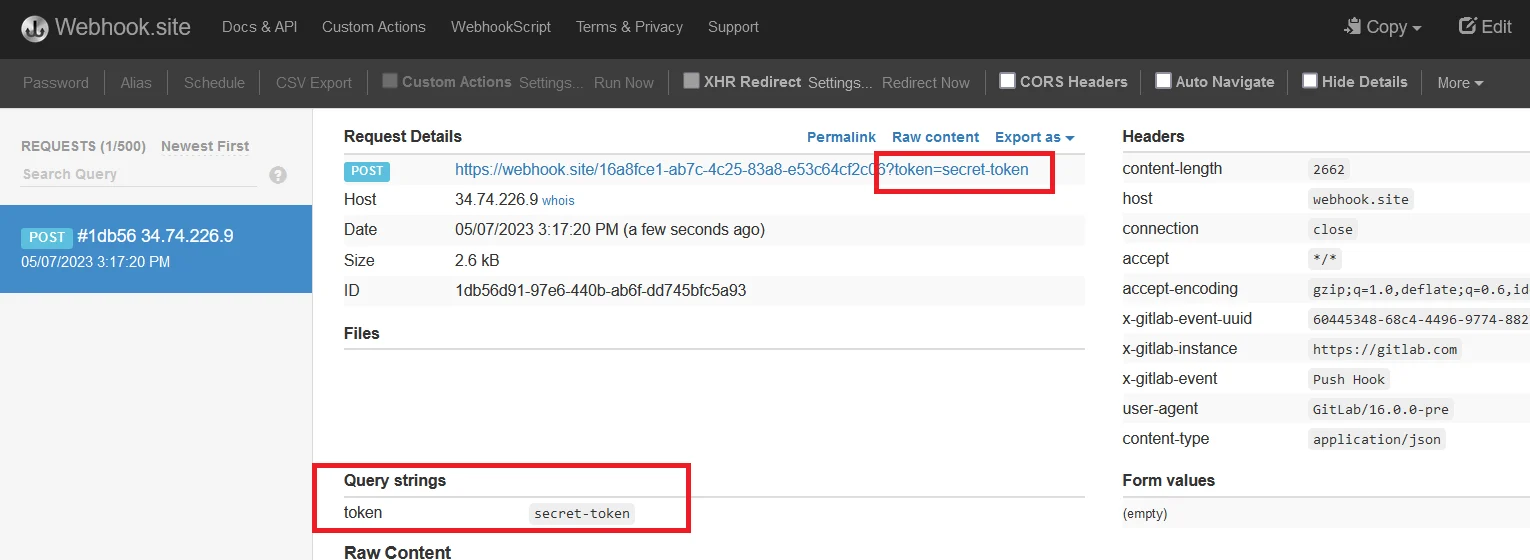
attackercan now click test to receive masked webhook secrets.
Steps to reproduce
victim is the owner of a project victim-project
attacker is a maintainer in victim-project
As victim,
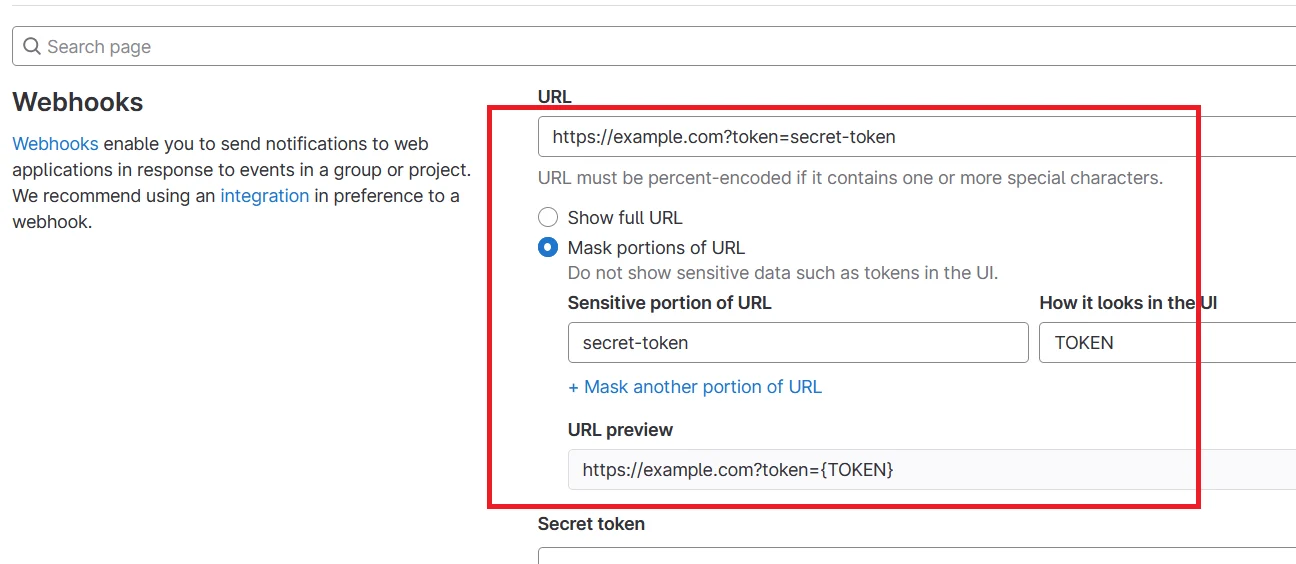
victimgoes to hisvictim-projectwebhook settings,https://gitlab.com/<victim-group>/<victim-project>/-/hooksvictimconfigures a webhook with a secret token and mask the secret token. For example, Put the URL like thishttps://example.com?token=secret-token- Click to add a mask, add the value
secret-tokenwith the replacement TOKEN. Click save for the webhook
As attacker
attackergoes tovictim-projectwebhook settings,https://gitlab.com/<victim-group>/<victim-project>/-/hooks- Scroll to the bottom of the page to the list of configured hooks and edit the webhook.
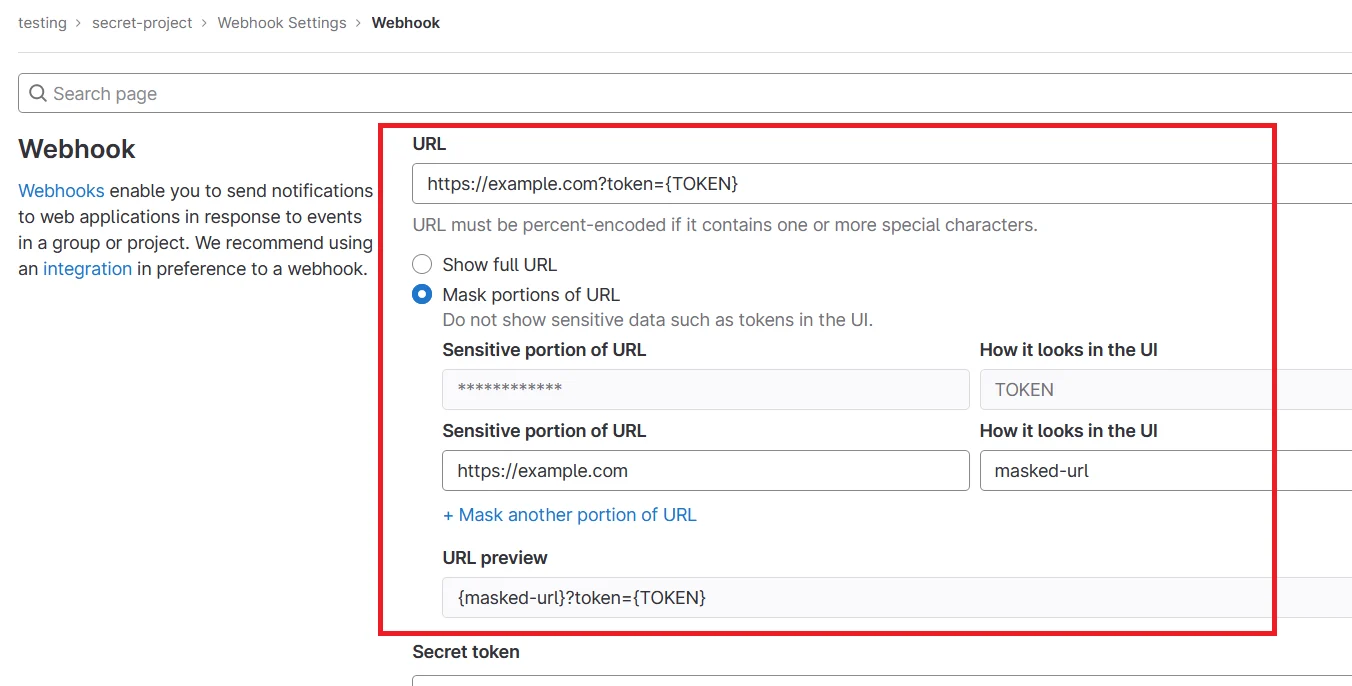
attackermask the victim-url as {masked-url}. Keep the token={TOKEN} part. Like this,{masked-url}?token={TOKEN}and clicks save
attackeradd the attacker-url (i used https://webhook.site to catch the request). Keep the token={TOKEN} part. Like this,https://attacker-url?token={TOKEN}and mask the attacker-url using the same mask, {masked-url} as shown below
attackerclick saveattackerclick test- Request is sent to the attacker-url and containing the secret token.
POC
Impact
Maintainers can leak secret masked values that should not be accessible after configuration.
Output of checks
This bug happens on GitLab.com (Probably on instance too)
Impact
Maintainers can leak secret masked values that should not be accessible after configuration.
Attachments
Warning: Attachments received through HackerOne, please exercise caution!
How To Reproduce
Please add reproducibility information to this section:
Not written yet. The AI write-up for this report has not been written yet. The Original tab links to the source.
How it worked
Root cause
Likely the validation logic that resets URL variables when the URL changes can be bypassed by masking the new URL with the same mask as the old URL, so the interpolated URLs appear equal and the variables are not reset.
What the attacker needed
Attacker is a maintainer in the project; victim has configured a webhook with a masked secret
How it was found
- As victim, configure a webhook with a secret token and mask the secret token.
- As attacker, edit the webhook and mask the victim URL as {masked-url}, keeping the [redacted] part, then save.
- Add the attacker URL with the same [redacted] part and mask the attacker URL using the same mask {masked-url}, then save.
- Click test to send a request to the attacker URL containing the secret token.
Explained by bugbounty.wiki with AI from the original and checked against quotes from it; it can still be wrong. Read the original before relying on a detail.
Not written yet. The AI write-up for this report has not been written yet. The Original tab links to the source.
Webhooks are automatic messages sent from a website to another URL when something happens. GitLab lets you hide parts of the webhook URL as secrets, but a bug allowed a project maintainer to trick the system into revealing those hidden secrets by changing the URL and its mask in a specific order.
What is Info disclosure?
Data the application should keep private (personal data, internal details, other users' records) reaches someone it should not.




