Maintainer can leak sentry token by changing the configured URL
A maintainer could leak the configured Sentry authentication token by changing the Sentry URL and clicking the connect button, which sent the old token to the new URL. An attacker with maintainer access could obtain the token and gain read and write access to the Sentry instance.

GitLab
Originally disclosed on GitLab
- Fixed in 33 days
- Disclosed after 33 days
HackerOne report #1792626 by joaxcar on 2022-12-04, assigned to @cmaxim:
Report | Attachments | How To Reproduce
Report
Summary
At the same time as other fixes regarding integration tokens leakage by modifying the configured URL, there were also a fix for the same behaviour in the error tracking Sentry configuration. All fixes were part of the patch
https://about.gitlab.com/releases/2022/07/28/security-release-gitlab-15-2-1-released/#maintainer-can-leak-packagist-and-other-integration-access-tokens-by-changing-integration-url
This made the following change to Sentry token configuration: When a user tries to modify the current sentry URL, the token field will be reset and the user needs to enter a new token. This fix is in place and trying to modify the existing token and clicking save will throw an error telling us the token field can not be empty.
This is made to block other maintainers to leak the configured token.
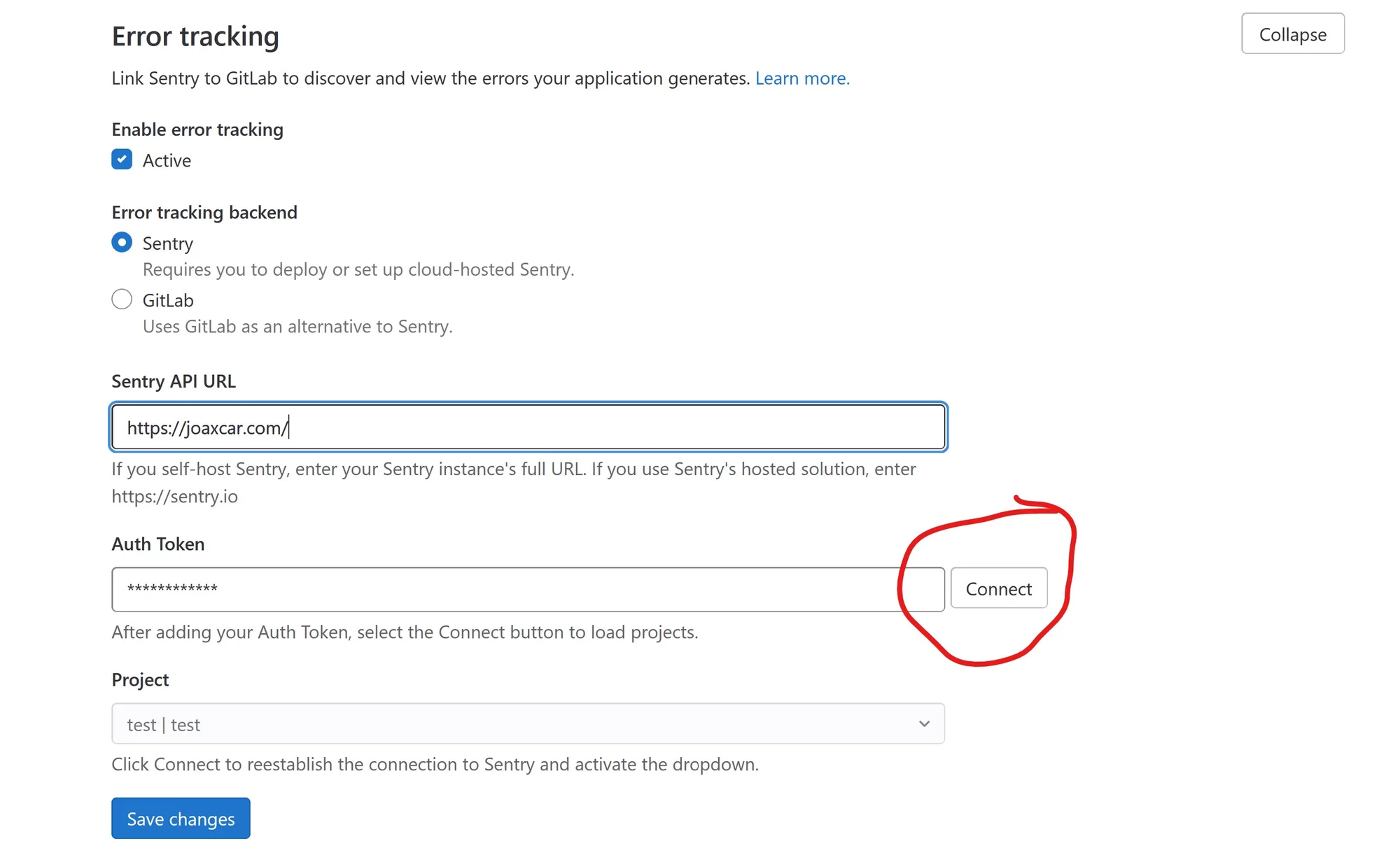
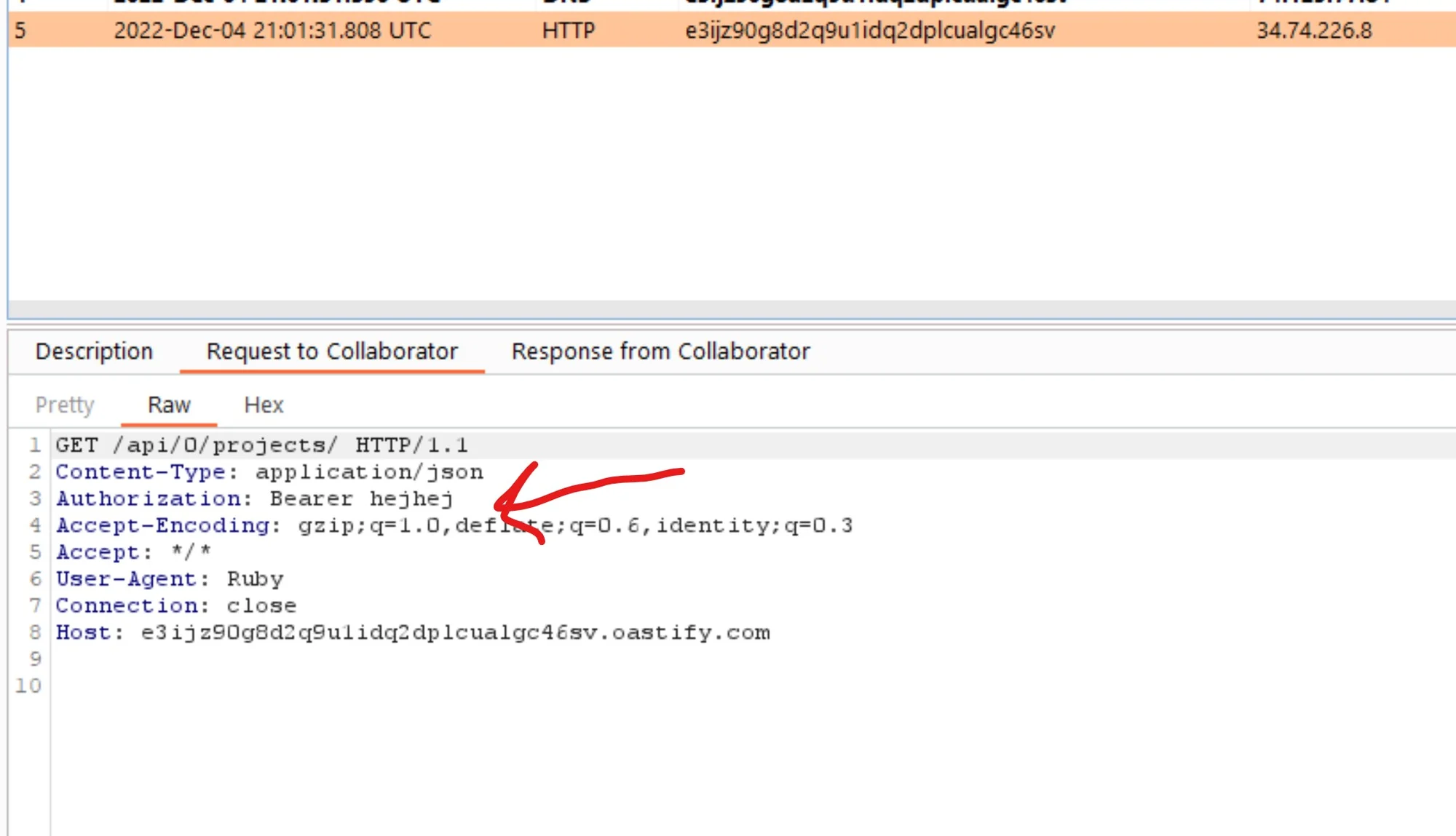
But revisiting the settings page for Sentry error tracking made me realize that there is another way to leak the token. If the attacker modifies the configured URL and click the connect button (to retrieve the sentry projects) without first clicking save, a call will be issued to the new URL together with the old token.
CVSS
The documentation for adding Sentry tokens to GitLab states
Make sure to give the token at least the following scopes: project:read, event:read, and event:write (for resolving events).
The last time I reported an issue regarding these tokens this was enough to give the impact of confidentiality High and Integrity Low as the token will have both read and write access. As well as scope changed. The fact that the user needs to be a maintainer makes access required High but is still a leak as previous patches show.
Steps to reproduce
- Log in to Gitlab.com
- Create a project
- Go to https://gitlab.com/GROUPNAME/PROJECTNAME/-/settings/operations
- Expand ´Error trackin` and click Sentry
- Configure with the server
https://joaxcar.com(this is a fake server that will let you add it with any token) - Add a random token, and click connect. My server will respond with a
projectyou can pick in the dropdown. Do it and click save - Now the token should be hidden. The next step should be made by an attacker. But doing it with the same user still proves the point.
- Now change the URL to a catch server. Burp collaborator for example.
- Click "save" to get a message telling you you need to add a new token (DONT change the token) this step is to show that the patch is in place and a leak can not be made like this).
- instead click "connect"
- Check your server and you should see a request containing the token
Impact
Other users can leak the configured Sentry token, getting access to the sentry server. The token gives read and write access to the Sentry instance
What is the current bug behavior?
The old token is sent with a connect request even if the URL has changed
What is the expected correct behavior?
Changing the URL should require adding a new token even for connect requests
Output of checks
This bug happens on GitLab.com
Impact
Other users can leak the configured Sentry token, getting access to the sentry server. The token gives read and write access to the Sentry instance
Attachments
Warning: Attachments received through HackerOne, please exercise caution!
How To Reproduce
Please add reproducibility information to this section:
Not written yet. The AI write-up for this report has not been written yet. The Original tab links to the source.
How it worked
Root cause
Likely the connect action sends the stored token to the newly entered URL without first requiring the token to be re-entered or validated against the new URL.
Impact
Other users with maintainer access could leak the configured Sentry token, gaining read and write access to the Sentry instance.
What the attacker needed
Maintainer access to a GitLab project; ability to configure Sentry integration
The fix
Changing the URL should require adding a new token even for connect requests.
How it was found
- Log in to GitLab.com and create a project.
- Go to the project's settings, operations, and expand Error tracking, then click Sentry.
- Configure with a fake server URL and add a random token, then click connect and pick a project from the dropdown, then save.
- Change the URL to a catch server (e.g., Burp Collaborator).
- Click 'save' to see the message that a new token is required (showing the patch is in place).
- Instead click 'connect' and check the catch server for a request containing the token.
Explained by bugbounty.wiki with AI from the original and checked against quotes from it; it can still be wrong. Read the original before relying on a detail.
Not written yet. The AI write-up for this report has not been written yet. The Original tab links to the source.
A Sentry token is like a password that lets GitLab talk to an error-tracking service. The report shows that if someone with maintainer rights changes the Sentry address and clicks 'connect' instead of 'save', the old token is sent to the new address, so the person controlling that address can steal it.
What is Info disclosure?
Data the application should keep private (personal data, internal details, other users' records) reaches someone it should not.




