Maintainer can leak webhook secret token by changing the webhook URL
A project maintainer could change a webhook's URL to an attacker-controlled server, send a test request, and receive the webhook's secret token in the request header. This allowed the maintainer to leak a token that was intended to be hidden after configuration, enabling spoofed requests to the legitimate receiving server.

GitLab
Originally disclosed on GitLab
- Fixed in under an hour
- Disclosed after under an hour
HackerOne report #1758126 by joaxcar on 2022-11-01, assigned to @greg:
Report | Attachments | How To Reproduce
Report
Summary
This is similar to my other report (hence the reused intro) but the attack vector and leak differs, thus the separate report.
Since this issue https://gitlab.com/gitlab-org/gitlab/-/issues/359989 was merged webhook secrets are hidden for maintainers of a project after they are saved. The UI and API gives no way of retrieving the secret after configuration. Just like hidden tokens in integrations. The issue states
Use type="password" for the Secret token field input. We also have to make sure that the values are not exposed to the frontend
After the fix the input field only show a line of dots when trying to edit a webhook. But other maintainers can get the token by simply changing the URL of the configured webhook to an attacker controlled server, make a test request to get the token and then switch back to the original URL.
Similar token fields on integrations are reset if the URL is changed, forcing the user edeting the integration to resend any token. This should probably also happen here.
The docs states this about the secret
You can specify a secret token to validate received payloads. The token is sent with the hook request in the X-Gitlab-Token HTTP header. Your webhook endpoint can check the token to verify that the request is legitimate.
This change to the input field of the UI was made intentionally to hide the secret from other maintainers (as they do not necessarily have access to the receiving service). The leaked token (LOW confidentiality) gives an unauthorized other maintainer the ability to spoof requests to the receiving server (LOW integrity). And the impacted service is the receiving service (Scope changed). This was my rating of this, feel free to edit it as see fit!
Steps to reproduce
- Log in to gitlab
- Create a new project
- Go to https://gitlab.com/GROUP/PROJECT/-/hooks and configure a webhook. Make sure to add a secret
- Click save
- Scroll to the bottom of the page to the list of configured hooks.
- Click edit on the new hook
- You can now see that the secret is hidden
- Edit the URL to an "attacker controlled server" (i used https://webhook.site to catch the request)
- Scroll down to the bottom of the page and click save (you can not send a test request before saving)
- Scroll to the bottom of the page again and click edit again on the hook
- Now click "test" to send a test request
- Check your server to see that the request is sent to the new URL and containing the secret token
(13. If you are an attacker now change back the URL to the original URL)
Impact
Maintainers can leak secret tokens that should not be accessible after configuration
What is the current bug behavior?
Secret token are kept even if the URL is changed
What is the expected correct behavior?
The secret token should be reset if the URL is changed (as on integrations)
Relevant logs and/or screenshots
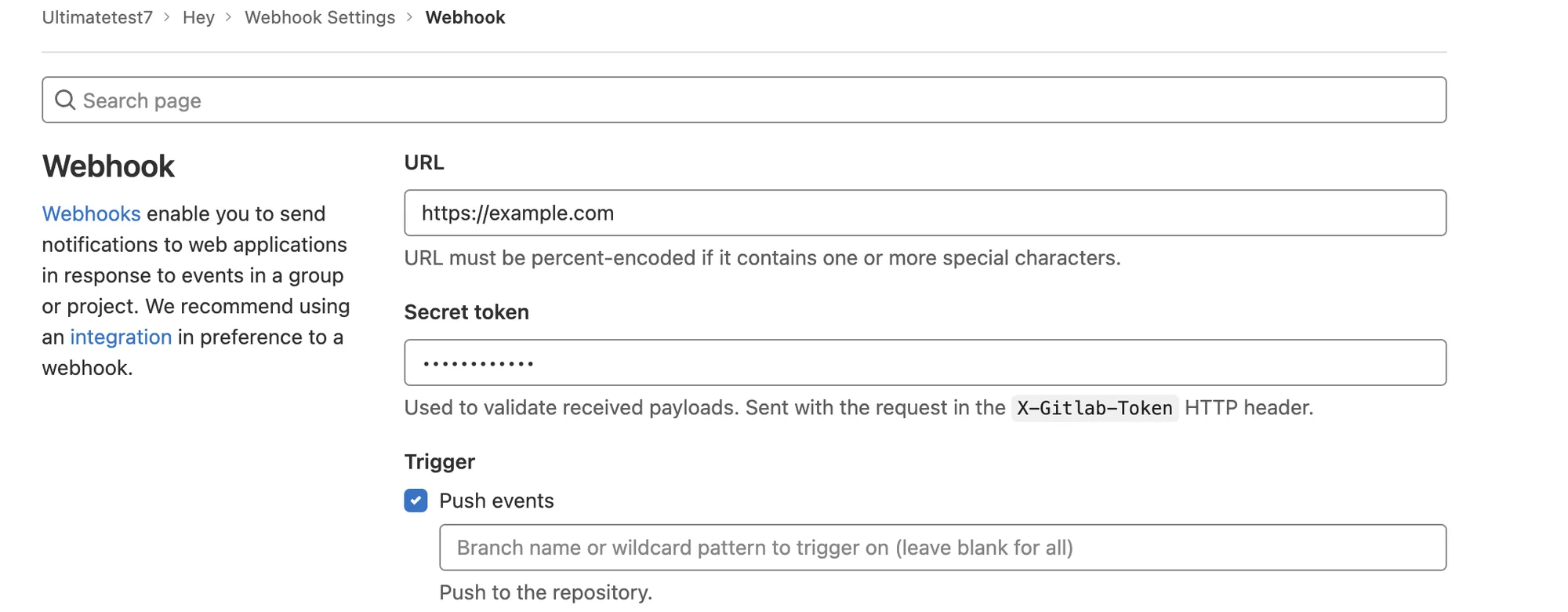
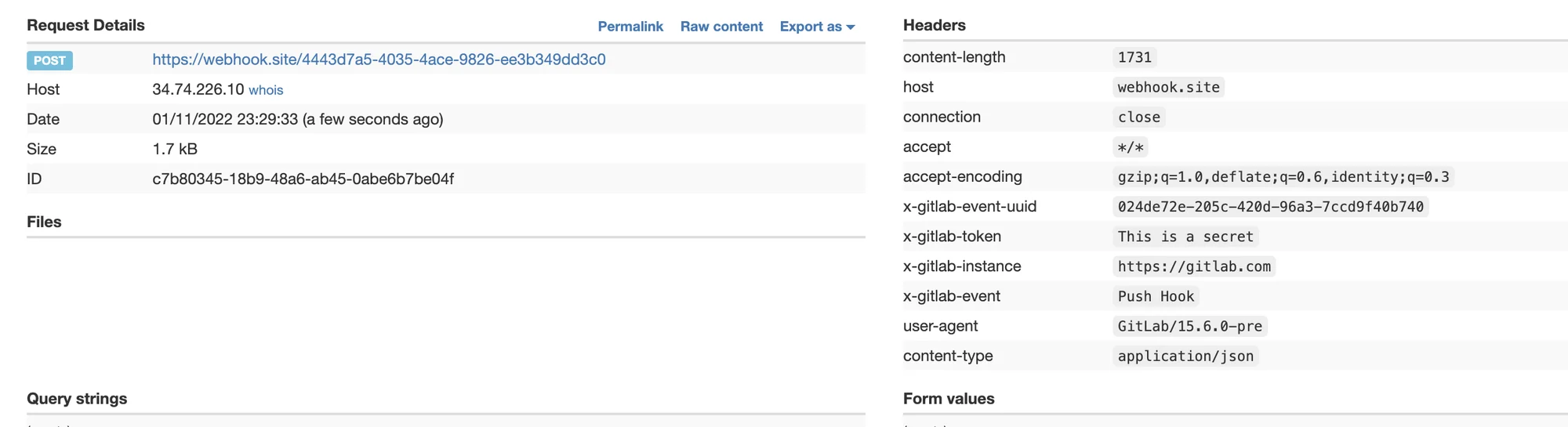
Output of checks
This bug happens on GitLab.com
Impact
Maintainers can leak secret tokens that should not be accessible after configuration, the user can use this token to send spoofed requests to the receiving server
Attachments
Warning: Attachments received through HackerOne, please exercise caution!
How To Reproduce
Please add reproducibility information to this section:
Not written yet. The AI write-up for this report has not been written yet. The Original tab links to the source.
How it worked
Root cause
The application did not reset the webhook secret token when the webhook URL was changed, unlike similar token fields in integrations.
Impact
A maintainer could leak the webhook secret token and use it to send spoofed requests to the legitimate receiving server, potentially compromising its integrity.
What the attacker needed
Maintainer access to a project; ability to configure webhooks
The fix
The secret token should be reset when the webhook URL is changed, as is done for integrations.
How it was found
- Log in to GitLab and create a new project.
- Go to the project's hooks page and configure a webhook with a secret token.
- Save the webhook and then edit it to confirm the secret is hidden.
- Change the webhook URL to an attacker-controlled server and save.
- Edit the webhook again and click 'test' to send a test request.
- Observe that the request to the new URL contains the secret token.
Explained by bugbounty.wiki with AI from the original and checked against quotes from it; it can still be wrong. Read the original before relying on a detail.
Not written yet. The AI write-up for this report has not been written yet. The Original tab links to the source.
A webhook is a way for one service to notify another by sending an HTTP request. A secret token is included in that request so the receiver can verify it really came from the expected source. The bug meant that someone with edit rights on the project could redirect the webhook to their own server and capture that secret token, even though the interface was supposed to hide it.
What is Info disclosure?
Data the application should keep private (personal data, internal details, other users' records) reaches someone it should not.




