Pipeline script injection by adding arbitrary command in post checkout hook & changing hook path to run command in future pipeline on target runner
A developer could inject code into future pipelines on the same runner by setting a custom git hooks path in a branch, which persisted in the reused local working copy. This allowed the attacker to execute arbitrary commands in the context of another user's pipeline, potentially accessing CI job tokens and environment variables.

GitLab
Originally disclosed on GitLab
- Fixed in 10 months
- Disclosed after 10 months
⚠️ Please read the process on how to fix security issues before starting to work on the issue. Vulnerabilities must be fixed in a security mirror.
HackerOne report #2525777 by xorz on 2024-05-30, assigned to GitLab Team:
Report | Attachments | How To Reproduce
Report
Summary
An attacker who has permissions to push code can inject code for any pipelines within a project with docker executor runner.
Steps to reproduce
-
sign in as user_a
-
create a new project
project_a -
register and keep only one runner (docker) for the project. https://docs.gitlab.com/runner/executors/docker.html
-
invite the
user_bas a developer -
goto
project_a > Build -> Pipeline Editor -
paste the content of and commit
-
the
user_ashould see the pipeline is green -
sign in as
user_b -
goto the project
project_a > Code >Repository -
create a branch
test -
paste the content of and commit
-
wait for the pipeline is done
-
sign in as
user_a -
goto the project
project_a > Build > Pipelines -
trigger a new pipeline on branch
main -
wait for the pipeline is done
-
then the
user_ashould see the text likeCI_JOB_TOKENoutputted by the inject code in job logs
Impact
- Get all the environment variables and access other projects. As it says on Gitlab Docs
You can use a job token to authenticate with GitLab to access another group or project’s resources (the target project). By default, the job token’s group or project must be added to the target project’s allowlist. - Inject code to release without touch the protected branches if the project using pipeline to build and release code.
Examples
without user interaction
- two cases listed in Impact above
with user interaction
- the injected code can be run on any user's laptop after running the app downloaded from the injected releases.
- the attacker can down all the projects via stealing the ssh key if the group owner runs the released app on local.
What is the current bug behavior?
According to Choose the default Git strategy, pipelines re-use the local working copy and the customized git hooks path won't be purged for the sequential jobs.
What is the expected correct behavior?
Get the hooks path by git config core.hooksPath.
Relevant logs and/or screenshots
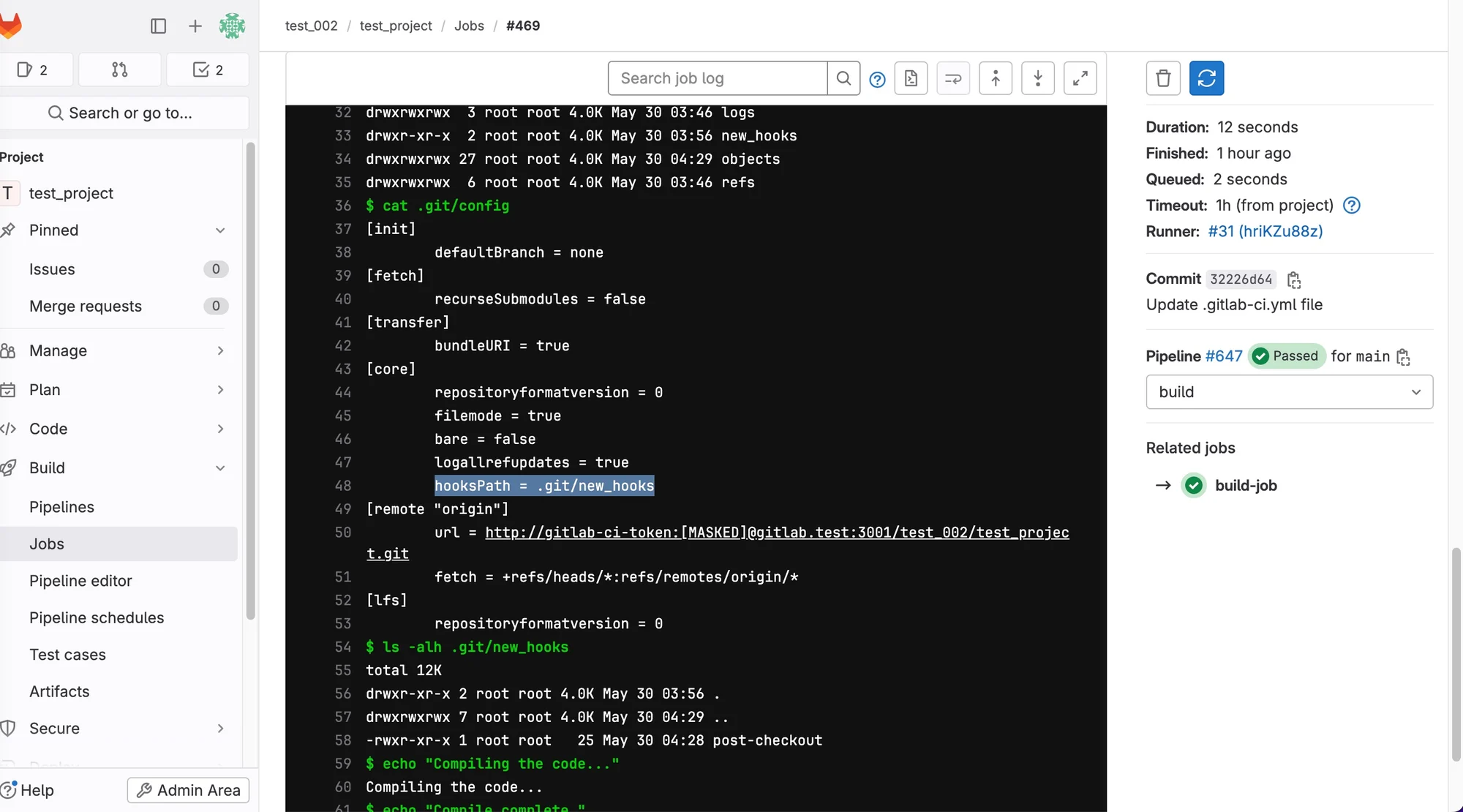
Output of checks
(If you are reporting a bug on GitLab.com, write: This bug happens on GitLab.com)
Results of GitLab environment info
Gitlab
System information
System:         Ubuntu 22.04
Proxy:          no
Current User:   user
Using RVM:      no
Ruby Version:   3.2.3
Gem Version:    3.5.10
Bundler Version:2.5.10
Rake Version:   13.0.6
Redis Version:  7.0.14
Sidekiq Version:7.1.6
Go Version:     go1.22.3 linux/amd64

GitLab information
Version:        17.1.0-pre
Revision:       7a6a65965a1
Directory:      /home/user/dev/gitlab-development-kit/gitlab
DB Adapter:     PostgreSQL
DB Version:     14.9
URL:            http://gitlab.test:3001
HTTP Clone URL: http://gitlab.test:3001/some-group/some-project.git
SSH Clone URL:  ssh://[email protected]:2222/some-group/some-project.git
Elasticsearch:  no
Geo:            no
Using LDAP:     no
Using Omniauth: yes
Omniauth Providers: google_oauth2

GitLab Shell
Version:        14.35.0
Repository storages:
- default:      unix:/home/user/dev/gitlab-development-kit/praefect.socket
GitLab Shell path:              /home/user/dev/gitlab-development-kit/gitlab-shell

Gitaly
- default Address:      unix:/home/user/dev/gitlab-development-kit/praefect.socket
- default Version:      17.0.0-rc2-230-g23975a577
- default Git Version:  2.45.1
Gitlab Runner
 gitlab-runner --version
Version:      17.0.0
Git revision: 44feccdf
Git branch:   17-0-stable
GO version:   go1.21.9
Built:        2024-05-16T13:46:14+0000
OS/Arch:      linux/amd64
Impact
-
Get all the environment variables and access other projects. As it says on Gitlab Docs
You can use a job token to authenticate with GitLab to access another group or project’s resources (the target project). By default, the job token’s group or project must be added to the target project’s allowlist. -
Inject code to release without touch the protected branches if the project using pipeline to build and release code.
Attachments
Warning: Attachments received through HackerOne, please exercise caution!
How To Reproduce
Please add reproducibility information to this section:
Proposed fix
-
Option 1 - Add additional documentation describing using the
FF_ENABLE_JOB_CLEANUPflag to prevent this scenario. -
Option 2 - implement the recreate git template directory on each run merge request
Not written yet. The AI write-up for this report has not been written yet. The Original tab links to the source.
How it worked
Root cause
Likely the runner reuses the local working copy without resetting the Git hooks path, so a malicious configuration persists across jobs.
Impact
The attacker could obtain CI job tokens and environment variables, potentially accessing other projects, and inject code into releases without touching protected branches.
What the attacker needed
Attacker has developer role; project uses docker executor runner; runner reuses local working copy
The fix
The report suggests either documenting the FF_ENABLE_JOB_CLEANUP flag or implementing a fix to recreate the git template directory on each run.
How it was found
- Sign in as user_a and create a new project.
- Register a single docker runner for the project.
- Invite user_b as a developer.
- As user_a, add a pipeline configuration and commit it; the pipeline runs successfully.
- As user_a, trigger a new pipeline on the main branch; the injected code runs and outputs the CI job token in the job logs.
Explained by bugbounty.wiki with AI from the original and checked against quotes from it; it can still be wrong. Read the original before relying on a detail.
Not written yet. The AI write-up for this report has not been written yet. The Original tab links to the source.
In GitLab, a pipeline runs jobs on a runner, which reuses the same local copy of the code between jobs. A developer could change a Git setting that tells Git where to look for hooks (scripts that run automatically at certain times). Because the runner didn't reset this setting, the attacker's hook script ran during the next pipeline triggered by someone else, letting the attacker run their own commands on the runner.
What is RCE?
Running the attacker's code on the target's servers: through command or code injection, unsafe deserialisation or template injection.