The documentation suggests macOS users to place runner config files in a public folder shared between multiple users
The GitLab Runner documentation for Docker installation on macOS recommends placing the runner configuration file in /Users/Shared, a folder accessible to all local users. An attacker with a local account on the same Mac could read the runner token from that file.

GitLab
Originally disclosed on GitLab
- Fixed in 41 days
- Disclosed after 41 days
⚠️ Please read the process on how to fix security issues before starting to work on the issue. Vulnerabilities must be fixed in a security mirror.
HackerOne report #2189299 by ricardobrito on 2023-10-02, assigned to GitLab Team:
Report | Attachments | How To Reproduce
Report
Hi team
Summary
The following documentation section contains instructions for users installing a gitlab runner in a docker container using local system volume mounts to start the runer container. However it suggests Mac os users to use a puclib folder to place the runner's configuration file, which is a bad idea in a multi-user environment
Problem Description
According to the documentation:
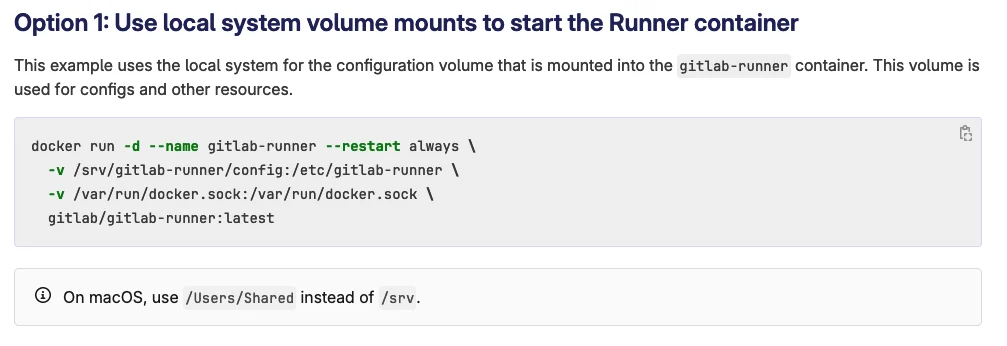
The problem here is this note:
On macOS, use /Users/Shared instead of /srv.
On macOS systems, the /Users/Shared folder is used for placing files that can be shared across multiple users of the system, and the documentation is suggesting macOS users to place the runner config file in this folder. This is a problem because if the guest user on macOS is enabled (or there are any other user accounts in the macOS system), he could also access this file and since this file contains the runner token it would be leaked to that user.
On macOS systems to make a file available to all users of the Mac, all we need to do is place it in the /Users/Shared folder.
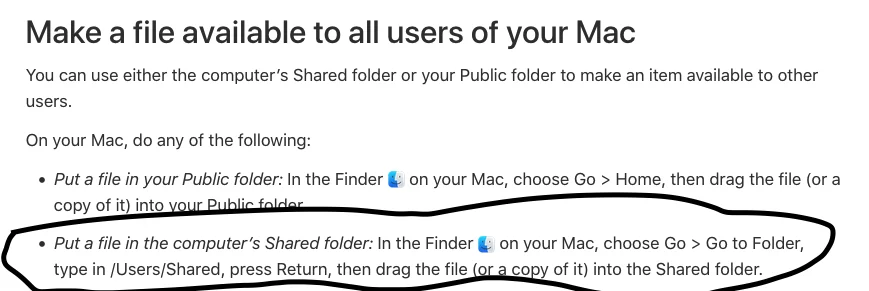
After I follow the suggestion in the documentation, my runner config file is located in /Users/Shared/gitlab-runner/config/config.toml folder, and as you can see, the file contains the token:
[REDACTED]
In a multi-user environment, another user could navigate to this folder, open the configuration file and access my runner token.
Possible Solutions
I suggest a documentation update to suggest a different folder rather than the /Users/Shared folder to store runner configuration files.
Impact
The documentation suggests macOS users to place runner config files in a public folder, but this is bad since the folder is shared across all users of the macOS system, which would cause the runner token to be leaked to other users.
Attachments
Warning: Attachments received through HackerOne, please exercise caution!
[REDACTED]
How To Reproduce
Please add reproducibility information to this section:
Not written yet. The AI write-up for this report has not been written yet. The Original tab links to the source.
How it worked
Root cause
The documentation recommends a world-readable shared directory for storing a file that contains a sensitive runner token.
Impact
In a multi-user macOS environment, another local user could read the runner token from the configuration file.
What the attacker needed
MacOS system with multiple user accounts or guest user…; GitLab Runner installed via Docker following the…
The fix
The documentation should be updated to recommend a different folder instead of /Users/Shared for storing runner configuration files.
How it was found
- Follow the documentation to install GitLab Runner in Docker on macOS using local system volume mounts.
- Place the runner configuration file in /Users/Shared as instructed.
- Log in as another user on the same macOS system and open the configuration file to read the runner token.
Explained by bugbounty.wiki with AI from the original and checked against quotes from it; it can still be wrong. Read the original before relying on a detail.
Not written yet. The AI write-up for this report has not been written yet. The Original tab links to the source.
The setup guide told Mac users to keep a secret file in a folder every user can open. If someone else can log in to that Mac, they can read the runner token.
What is Info disclosure?
Data the application should keep private (personal data, internal details, other users' records) reaches someone it should not.




