The inaccurate information displayed through the Gitlab.com web interface, allows the execution of arbitrary commands by the victim

GitLab
Originally disclosed on GitLab
- Fixed in 58 days
- Disclosed after 58 days
See existing examples of reproducing for snippet, repo, and wiki below: https://gitlab.com/gitlab-org/gitlab/-/issues/349382#examples-of-reproducing-on-snippet-repo-and-wiki
HackerOne report #1420660 by st4nly0n on 2021-12-08, assigned to @dcouture:
Report | Attachments | How To Reproduce
Report
Summary
The inaccurate information displayed through the Gitlab.com web interface, causes a victim to execute arbitrary system commands that in principle do not represent a security risk.
A non-printable ASCII character in the file name of a snippet, will make such files not be displayed in the web interface of Gitlab.com, in this context integrity is the guarantee that the information presented through the web interface of Gitlab.com is reliable and accurate.
The non-printable ASCII character in the file name can be created using (on Linux) the following command:
touch $'\x90'
###  OR
touch `echo -e '\x90'`
Let's see the following image:
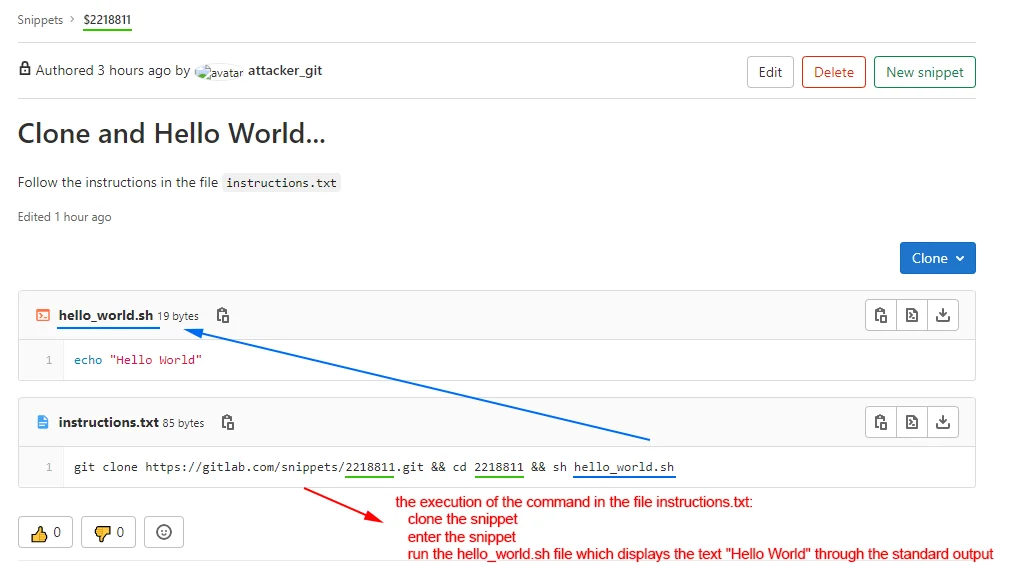
The image above shows a snippet containing two files hello_world.sh and instructions.txt, the file instructions.txt contains a command that will do the following:
- clone the current snippet.
- you will enter the cloned repository.
- it will execute the file
hello_world.shwhich all it does is display the textHello Worldthrough the standard output.
This is totally valid, that is to say, theoretically if you create those two files and execute the above commands you will get the text Hello World through the standard output.
However, through the same steps, an attacker would cause you to execute an arbitrary system command, since the hello_world.sh file is a symbolic link to the \x90echo "Hello World" file that contains a command arbitrary system.
Steps to reproduce
[PREPARATION/ATTACKER]
1. Go to https://gitlab.com/-/snippets/new
2. Create a private snippet with any file.
3. Clone the snippet via the git clone command.
4. Go to the directory where you have cloned the snippet.
5. Delete the file created in step 2.
6. Make a note of the ID of the snippet.
7. Create the instructions.txt file with the commands to clone and run the hello_world.sh file.
###  Replace <SNIPPET ID> with the id of the snippet copied in step 6
echo 'git clone https://gitlab.com/snippets/<SNIPPET ID>.git && cd <SNIPPET ID> && sh hello_world.sh' > instructions.txt
8. Create the file named \x90echo "Hello World" which contains a system command.
echo 'cat /etc/passwd' > $'\x90echo "Hello World"'
9. Create a symbolic link to the previously created file, name this symbolic link hello_world.sh
ln -s $'\x90echo "Hello World"' hello_world.sh
10. Push the changes to the remote.
git add .
git commit
git push origin HEAD -f
As a result of this behavior, executing the commands in the instructions.txt file will not display the text Hello World, but instead will display the content of the /etc/passwd command that you added in step 8.
What is the current bug behavior?
A non-printable ASCII character in the file name of a snippet will prevent such files from being displayed on the Gitlab.com web interface, as a result of this behavior an attacker could make the victim execute arbitrary system commands.
What is the expected correct behavior?
The names of the files that contain non-printable characters should be able to display their content through the Gitlab.com web interface, this is to ensure that the information presented to the user is reliable and accurate.
Relevant logs and/or screenshots
The following videos show how the victim executed arbitrary system commands by following instructions in a snippet that did not initially appear to represent a security risk.
Poc in Linux
Poc in WSL Windows
Output of checks
This bug happens on GitLab.com
Impact
A victim could execute arbitrary system commands through an attacker-created snippet, as the information presented through the Gitlab.com web interface is not accurate when displaying the files from a snippet.
Attachments
Warning: Attachments received through HackerOne, please exercise caution!
Examples of reproducing on snippet, repo, and wiki
Note that this cannot be reproduced on macOS (it does not allow a filename with the special character)
I (@cwoolley-gitlab) have reproduced this. This exploit applies to anything backed by a clonable repo, including snippets, wiki, and repos. See more details in comments.
Here are examples of the same exploit pushed to snippets, repo, and wiki:
- snippets: https://gitlab.com/cwoolley-gitlab/snippet-test-project/-/snippets/2231765
- repo: https://gitlab.com/cwoolley-gitlab/snippet-test-project/-/tree/master
- wiki: https://gitlab.com/cwoolley-gitlab/snippet-test-project/-/wikis/home (unable to view, causes a 500 error when attempting to render page).
You can see that:
- Snippets will still render the instructions with the special-char file hidden, and not indicate any errors or problems. This is arguably the most misleading attack vector.
- Repos will render the special file, but it isn't clickable. It also fails to render the metadata and shows the loading state. This is arguably less severe because you can see the special char file, and it's obvious from the broken loading state that "somethings wrong". But you still can't see the contents on the web UI to tell that it's got exploit code in it.
- The whole wiki starts failing with a 500 once you push the hidden file. So, this is arguably not an exploit (any more than any other possibly malicious git repo) or "misleading" at all.
Not written yet. The AI write-up for this report has not been written yet. The Original tab links to the source.
What is known
A medium-severity info disclosure bug in gitlab.com. GitLab made it public on 26 February 2022. Fixed in version 14.8.
About Info disclosure
Data the application should keep private (personal data, internal details, other users' records) reaches someone it should not.
Not written yet. The AI write-up for this report has not been written yet. The Original tab links to the source.
What is Info disclosure?
Data the application should keep private (personal data, internal details, other users' records) reaches someone it should not.




