Un-verified email in bio field can look like it is a verified email
GitLab blocked users from showing an unverified email through the public email setting, but the bio field still rendered email addresses as clickable mailto links. An attacker could therefore make an unverified address look like a verified public email and use it to impersonate a domain during project invitations.

GitLab
Originally disclosed on GitLab
- Fixed in 11 months
- Disclosed after 11 months
HackerOne report #996526 by xenx on 2020-10-02, assigned to @ngeorge1:
Report | Attachments | How To Reproduce
Report
Summary
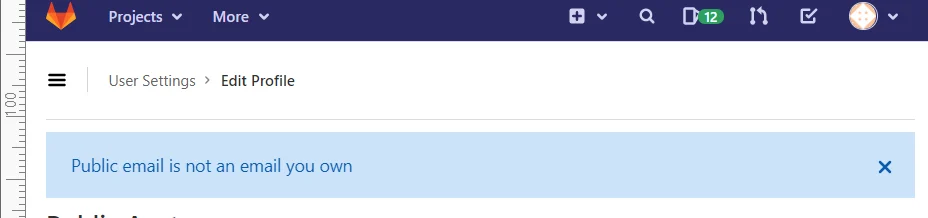
In gitlab , an unverified email id of an account can't be displayed publicly through Public email option it just gives an error like public email is not an email you own which is definitely understandable (since a unverified user can get into a private project by impersonating)
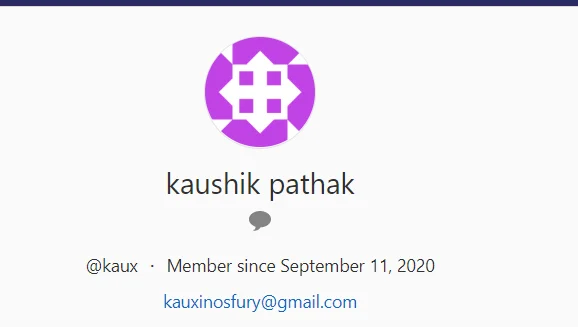
Case1: For a verified user, the public profile look like this when public email is enabled
Case2: But the Public email option for a unverified email can be bypassed to show the email publicly using the bio. Updating the bio with the unverified email look like this
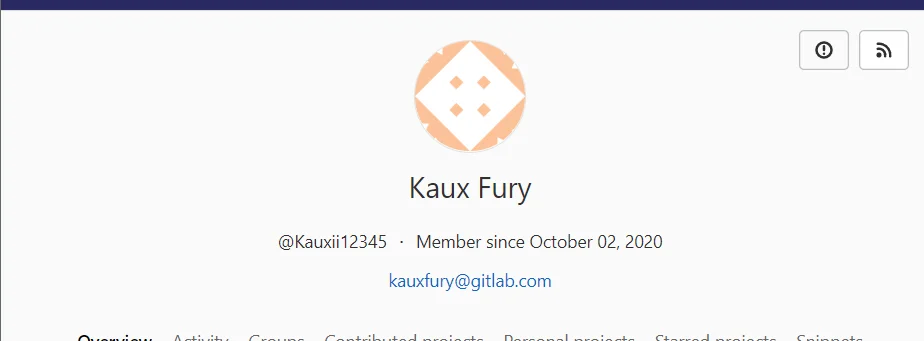
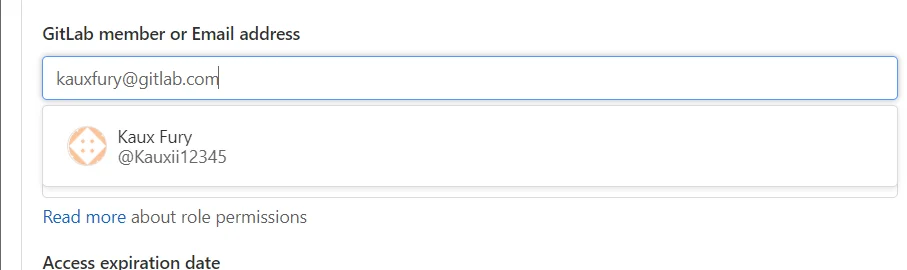
So by using this an attacker can bypass the public profile option for a unverified email id(See both case1 and case2 is same) and get into a private project by impersonating through invitation or by requesting access.
.
Steps to reproduce
- Create an account but don't verify it.
2)Go to https://gitlab.com/profile and try to make the email display as public
3) You will see public email is not an email you own
4) Now the update the bio with the email . You will see the profile looks just same to same like a verified email with mailto:.
What is the current bug behavior?
Actually when bio is updated mailto: is added to email link ,hence it acts just like a publicly displayed verified email
What is the expected correct behavior?
In bio , mailto: should not included. Also it would be better if unverified email can't be searchable through project member invitation.
PS
I added the account with ==[@]gitlab.com== just to show how a malicious user can use [@]domain.com to impersonate to get into a target private project.
Impact
A malicious user can bypass the inability to display the unverified email publicly through public email option and improve the odds of a social engineering attack/infiltration being successful.
Attachments
Warning: Attachments received through HackerOne, please exercise caution!
Problem to solve
Currently the "bio" field allows users to enter emails in multiple ways that look like "verified" emails when displayed.
Proposals considered
- Prohibit email addresses in the bio field. Problematic because a migration is required and it will partially delete user input data, neither of which we want to do. Would only impact approximately 0.05% of SaaS Users, based on a sample of 100K users.
- Add a "Bio" prefix when displaying. Problematic because the user can enter a line break then "Verified email: [EMAIL]".
- Display raw
bio_html(usinghtml_escape). Problematic because this "breaks" the display of any bios that include HTML or Markdown.
Proposal
TBD
Related links
- Markdown parsing for
biowas introduced in https://gitlab.com/gitlab-org/gitlab/-/merge_requests/35604
Not written yet. The AI write-up for this report has not been written yet. The Original tab links to the source.
How it worked
Root cause
Likely the bio field was rendered as Markdown, which auto-links email addresses into mailto links, without applying the same ownership check used by the public email setting.
Impact
An attacker could make an unverified address appear verified and so improve the odds of a social engineering attack or infiltration of a private project.
What the attacker needed
A free GitLab account; email left unverified; victim views the attacker's profile
How it was found
- Create an account and leave the email unverified.
- Open the profile settings and try to set the address as the public email.
- Observe the error saying the public email is not an email you own.
- Put the same address into the bio field instead.
- View the profile and see it looks the same as a verified public email, with a mailto link.
Explained by bugbounty.wiki with AI from the original and checked against quotes from it; it can still be wrong. Read the original before relying on a detail.
Not written yet. The AI write-up for this report has not been written yet. The Original tab links to the source.
A profile page can show an email address in two places: a dedicated public email setting and a free-text bio. GitLab checked the first one and refused unverified addresses, but the bio was turned into formatted text where an address becomes a clickable link. That made an unverified address look just as trustworthy as a verified one.
What is Info disclosure?
Data the application should keep private (personal data, internal details, other users' records) reaches someone it should not.




