User with Admin access to integrated Grafana can steal GitLab session cookies through malicious data-source
A Grafana admin on a self-hosted GitLab instance could create a data source that whitelists the GitLab session cookie, causing any user visiting a dashboard to send their session cookie to an attacker-controlled server. The attacker could then use the stolen cookie to take over the victim's GitLab account.

GitLab
Originally disclosed on GitLab
- Fixed in 56 days
- Disclosed after 56 days
⚠️ Please read the process on how to fix security issues before starting to work on the issue. Vulnerabilities must be fixed in a security mirror.
HackerOne report #1888690 by joaxcar on 2023-02-27, assigned to GitLab Team:
Report | Attachments | How To Reproduce
Report
Summary
A user with Admin access to Grafana enabled on a self-hosted GitLab instance (note this user might not have any access to the actual GitLab instance, the admin right is only for org level in Grafana) can create a malicious data-source that when visited will leak other users GitLab session cookies. Leading to session takeover and full access to the victim's account (with no indications that this has happened)
That was a mouth full. Let's dig into this. The pieces needed
- When setting up a self-hosted GitLab instance there is the option to enable an integrated Grafana server. This server will run under the path https://gitlab.example.com/-/grafana. Note here that the Grafana server is running on the same origin as the actual GitLab instance.
- Users in Grafana can have three access levels (in an organization),
viewer,editor, andadmin. Being anadminonly gives you the right to handle the Grafana organization, inviting users and setting up data sources. It should not be confused with having any sort of access to the server, or to the actual GitLab instance. The Grafanaadmincan potentially lack all forms of access to GitLab. - When configuring a data source in Grafana you most often give the Grafana server the right to make requests to the configured third-party source (Prometheus or other servers) with the help of a proxy. The
adminusually adds some sort of authorization to the server which is used when Grafana requests data from the source. One available option is towhitelist cookies, here the user can add cookies that will be taken from the request to Grafana and forwarded to the data source. Effectively forwarding cookies from the user visiting Grafana to the external source.
The attack
By configuring a data source pointing to an attacker-controlled server and whitelisting the cookie _gitlab_session an attacker can create a situation where any user visiting a dashboard with the data source will now forward the user GitLab session cookie to the attacker's server. This only works because the two servers (GitLab and Grafana) share the same domain. So the GitLab session cookie will actually be sent to the Grafana server at every page request.
The attacker can then use the session cookie to take control of the victim's account and access GitLab with full access. At worst the victim is an admin account on the GitLab server giving the attacker admin access to the instance.
Feature or bug
Omnibus actually packages an older version of Grafana, which might also be susceptible to https://nvd.nist.gov/vuln/detail/CVE-2022-39201. This CVE details how Grafana used to be allowing the grafana_session cookie to be whitelisted allowing for a similar attack on the Grafana server. This is still possible on the Omnibus Grafana server as well but is way less impactful as the attacker already has high privileges on the Grafana server. Where things get worse for GitLab is where the two servers share origin. Usually, Grafana servers are hosted on their own subdomains, giving them no access to other session cookies.
The Grafana fix (https://github.com/grafana/grafana/commit/b571acc1dc130a33f24742c1f93b93216da6cf57) outlines how they added an option to restrict the Grafana session cookie from being added to the whitelist, but this patch does not look like it exists for Grafana v7.
Steps to reproduce
I will outline a quick way of proving this, there are many ways and configurations where a user would end up with access to a Grafana admin account. This is just a quick POC
- Spin up a new GitLab omnibus docker
sudo docker run --detach \
  --hostname gitlab.example.com \
  --publish 443:443 --publish 80:80 --publish 22:22 \
  --name gitlab \
  --restart always \
  --shm-size 256m \
  gitlab/gitlab-ee:latest
- Get hold of the
rootpassword
sudo docker exec -it gitlab grep 'Password:' /etc/gitlab/initial_root_password
- Now configure Grafana by running this command
sudo docker exec -it gitlab editor /etc/gitlab/gitlab.rb
to open the config file and make sure to enable these settings
grafana['enable'] = true
grafana['admin_password'] = 'admin'
grafana['allow_user_sign_up'] = true
grafana['disable_login_form'] = false
save the file
4. Restart the docker container
sudo docker restart gitlab
- Now log in to GitLab as
root - Go to https://gitlab.example.com/-/grafana
- Log in with
adminadmin - Go to /-/grafana/datasources/new and create a new
Prometheusdata source - Configure a catch server as the URL (Burp collaborator), leave
accessas server, and add_gitlab_sessionin thewhitelisted cookies
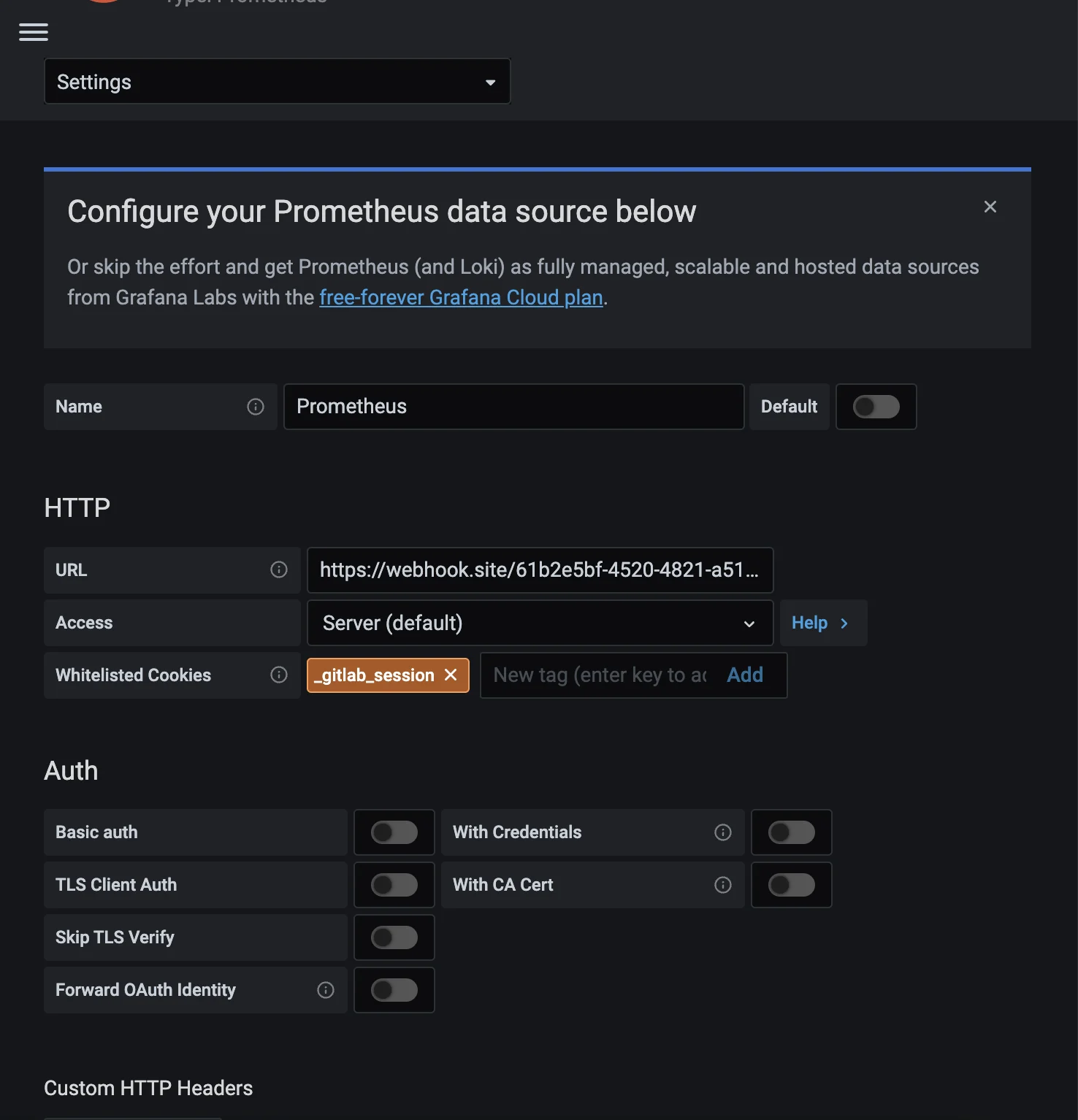
- Click
save and test - You will now have a call leaking your cookie in your catch server.
- Open a new browser
- Go to https://gitlab.example.com, do not log in
- Open devtools and go to the "Application" tab and the cookie part
- Replace the current
_gitlab_sessionwith the leaked one. - Refresh the page and you will now be logged in as root in this browser!
Note about a real attack. Here I only described using the same account, but now when the data source is configured you can send a link to any victim user to have them visit a dashboard that uses this data source. Any user visiting dashboards or interacting with Explore in Grafana will leak the cookie.
Impact
An attacker can leak victims' session cookies. This will result in a session takeover with full access to the victim's account.
What is the current bug behavior?
Grafana and GitLab are hosted on the same origin, thus sharing cookies. There is nothing stopping users from whitelisting GitLab session cookies in proxy requests.
What is the expected correct behavior?
Users should be stopped from whitelisting GitLab session cookies.
CVSS thoughts
I think it's hard to assess the severity here. The final outcome of an attack (session takeover) is highly severe, but I don't know how to score the Grafana admin access. It is a HIGH access level in Grafana, but a NONE access level to GitLab. And the same goes for Scope, Grafana is part of Omnibus, but the vulnerable service Grafana is giving an attacker access to GitLab. So the scope is changed. I will leave the math to you :)
Output of checks
Results of GitLab environment info
System information
System:
Current User:	git
Using RVM:	no
Ruby Version:	2.7.7p221
Gem Version:	3.1.6
Bundler Version:2.3.15
Rake Version:	13.0.6
Redis Version:	6.2.8
Sidekiq Version:6.5.7
Go Version:	unknown

GitLab information
Version:	15.9.1
Revision:	de8f6619031
Directory:	/opt/gitlab/embedded/service/gitlab-rails
DB Adapter:	PostgreSQL
DB Version:	13.8
URL:		http://gitlab.example.com
HTTP Clone URL:	http://gitlab.example.com/some-group/some-project.git
SSH Clone URL:	[email protected]:some-group/some-project.git
Using LDAP:	no
Using Omniauth:	yes
Omniauth Providers:

GitLab Shell
Version:	14.17.0
Repository storages:
- default: 	unix:/var/opt/gitlab/gitaly/gitaly.socket
GitLab Shell path:		/opt/gitlab/embedded/service/gitlab-shell
Impact
An attacker can leak victims' session cookies. This will result in a session takeover with full access to the victim's account.
Attachments
Warning: Attachments received through HackerOne, please exercise caution!
[readacted]
How To Reproduce
Please add reproducibility information to this section:
Not written yet. The AI write-up for this report has not been written yet. The Original tab links to the source.
How it worked
Root cause
Likely the Grafana data source proxy allows whitelisting the GitLab session cookie because Grafana and GitLab share the same origin, and the Grafana version in Omnibus lacks a restriction on whitelisting session cookies.
Impact
An attacker can leak victims' session cookies, resulting in a session takeover with full access to the victim's account, potentially including admin access if the victim is an admin.
What the attacker needed
Grafana enabled on self-hosted GitLab; Attacker has Grafana admin access; Victim visits a Grafana dashboard
The fix
Users should be prevented from whitelisting GitLab session cookies in Grafana data source configurations.
How it was found
- Set up a GitLab Omnibus Docker container with Grafana enabled and a known admin password.
- Log in to GitLab as root and access the integrated Grafana at /-/grafana.
- Log in to Grafana as admin and create a new Prometheus data source.
- Configure the data source to point to an attacker-controlled server and whitelist the _gitlab_session cookie.
- Save and test the data source, which sends the cookie to the attacker's server.
- Use the leaked cookie in a new browser to access GitLab as the victim.
Explained by bugbounty.wiki with AI from the original and checked against quotes from it; it can still be wrong. Read the original before relying on a detail.
Not written yet. The AI write-up for this report has not been written yet. The Original tab links to the source.
Grafana is a tool for making charts from data. On a GitLab server, Grafana can be set up so that it shares the same web address as GitLab. This means the browser sends GitLab's login cookie to Grafana too. A Grafana admin can tell Grafana to forward certain cookies to another server. If they choose the GitLab login cookie and point to their own server, anyone who views a Grafana dashboard will unknowingly send their GitLab login cookie to the attacker. The attacker can then use that cookie to log in as the victim.
What is Info disclosure?
Data the application should keep private (personal data, internal details, other users' records) reaches someone it should not.




