Username and password disclosed from mirror repository error message when mirroring failed
When a user sets up a repository mirror with Git credentials and the mirror fails, GitLab displays an error message that includes the username and password. Other manager-level users could see these credentials.

GitLab
Originally disclosed on GitLab
- Fixed in 4 months
- Disclosed after 4 months
⚠️ Please read the process on how to fix security issues before starting to work on the issue. Vulnerabilities must be fixed in a security mirror.
HackerOne report #2520722 by gudanggaramfilter on 2024-05-26, assigned to GitLab Team:
Report | Attachments | How To Reproduce
Report
Summary
When a user forces a push, Update now ( ) GitLab leaks the user's password when adding a mirror with GIT credentials. When you press in the Mirroring repositories section it displays username and password errors.
Steps to reproduce
- Create a Project
- Click Settings -> Repository
- Click expand on Mirroring repositories
- Enter the url
git://00000000.01020304.rbndr.us:1339/aaaa/aaaa - Fill in your username and password (your secret)
- Click mirror repository to create a mirror.
- Press the
update nowbutton
8 You can see your username and password in the error message.
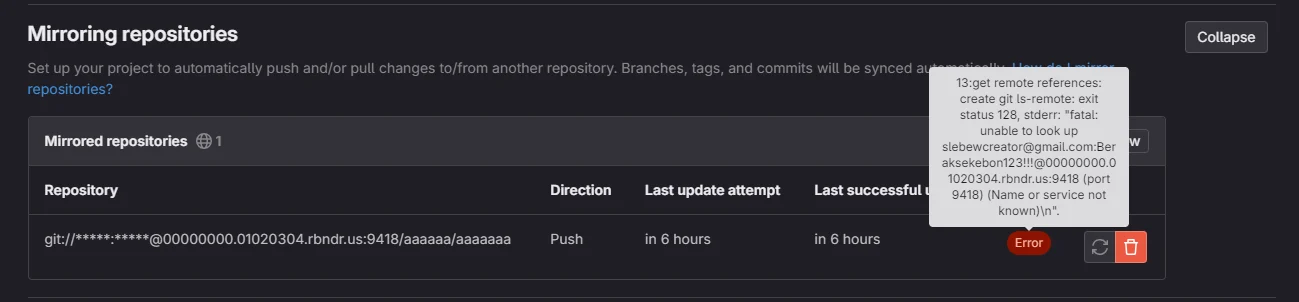
Additional: If you get the error message The remote mirror URL is invalid. please press update now again / recreate the URL from the first step.
Impact
Other manager-level users may see passwords from incorrect mirrors that may have been set by other managers.
Attachments
Warning: Attachments received through HackerOne, please exercise caution!
How To Reproduce
Please add reproducibility information to this section:
Not written yet. The AI write-up for this report has not been written yet. The Original tab links to the source.
How it worked
Root cause
Likely the error message includes the full remote URL with embedded credentials without redaction.
Impact
Other manager-level users may see passwords from incorrect mirrors that may have been set by other managers.
What the attacker needed
Ability to create a mirror with credentials
How it was found
- Create a project.
- Go to Settings -> Repository.
- Expand the Mirroring repositories section.
- Enter a git:// URL and fill in your username and password.
- Click 'Mirror repository' to create the mirror.
- Press the 'update now' button and observe the error message containing your credentials.
Explained by bugbounty.wiki with AI from the original and checked against quotes from it; it can still be wrong. Read the original before relying on a detail.
Not written yet. The AI write-up for this report has not been written yet. The Original tab links to the source.
A repository mirror is a copy of a project kept in sync with another location. When setting up a mirror, you provide a username and password so GitLab can access the remote repository. If the mirror fails, GitLab shows an error that accidentally includes those credentials, so other users with manager access can see them.
What is Info disclosure?
Data the application should keep private (personal data, internal details, other users' records) reaches someone it should not.




