Vulnerability Report request details contain secret custom request headers in plain text
The vulnerability report generated after a DAST scan includes custom request headers in plain text, exposing secret tokens to any project developer. An attacker with developer access could read these secrets and potentially use them to access external systems.

GitLab
Originally disclosed on GitLab
- Fixed in 2 months
- Disclosed after 2 months
HackerOne report #1783209 by joaxcar on 2022-11-24, assigned to @greg:
Report | Attachments | How To Reproduce
Report
Summary
Users can configure a DAST scanner to use custom headers to send together with requests to the tested webapp. As I have shown in other reports these headers are supposed to be hidden after configuration in for example a site profile. I have found another place where these tokens leak. I belive this is different than the other ones so I will report this separately. If it is fixed by the same fix as my other report, feel free to close this one.
When an active DAST scan is completed, there is a vulnerability report generated. This is a JSON file that is stored separately and used in multiple parts of the UI.
- under https://gitlab.com/GROUPNAME/PROJECTNAME/-/pipelines/ID/security
- under https://gitlab.com/GROUPNAME/PROJECTNAME/-/merge_requests/1
- under https://gitlab.com/GROUPNAME/PROJECTNAME/-/security/vulnerability_report
But they all use the same information. This report contains information on the vulnerability but also a log of the request and response made by the scanner. It can look like this
GET https://joaxcar.com
Authorization: ********
Cache-Control: no-cache
Cookie: PHPSESSID=********; auth-session=********; token=********
Host: joaxcar.com
Pragma: no-cache
User-Agent: Mozilla/5.0 (Windows NT 10.0; Win64; x64; rv:92.0) Gecko/20100101 Firefox/92.0
X-some-secret-header: secret-token3
X-token: secret-token2

<Message body is not provided>
This is using custom headers like this Authorization: Bearer token1, X-some-secret-header: secret-token3, X-token: secret-token2
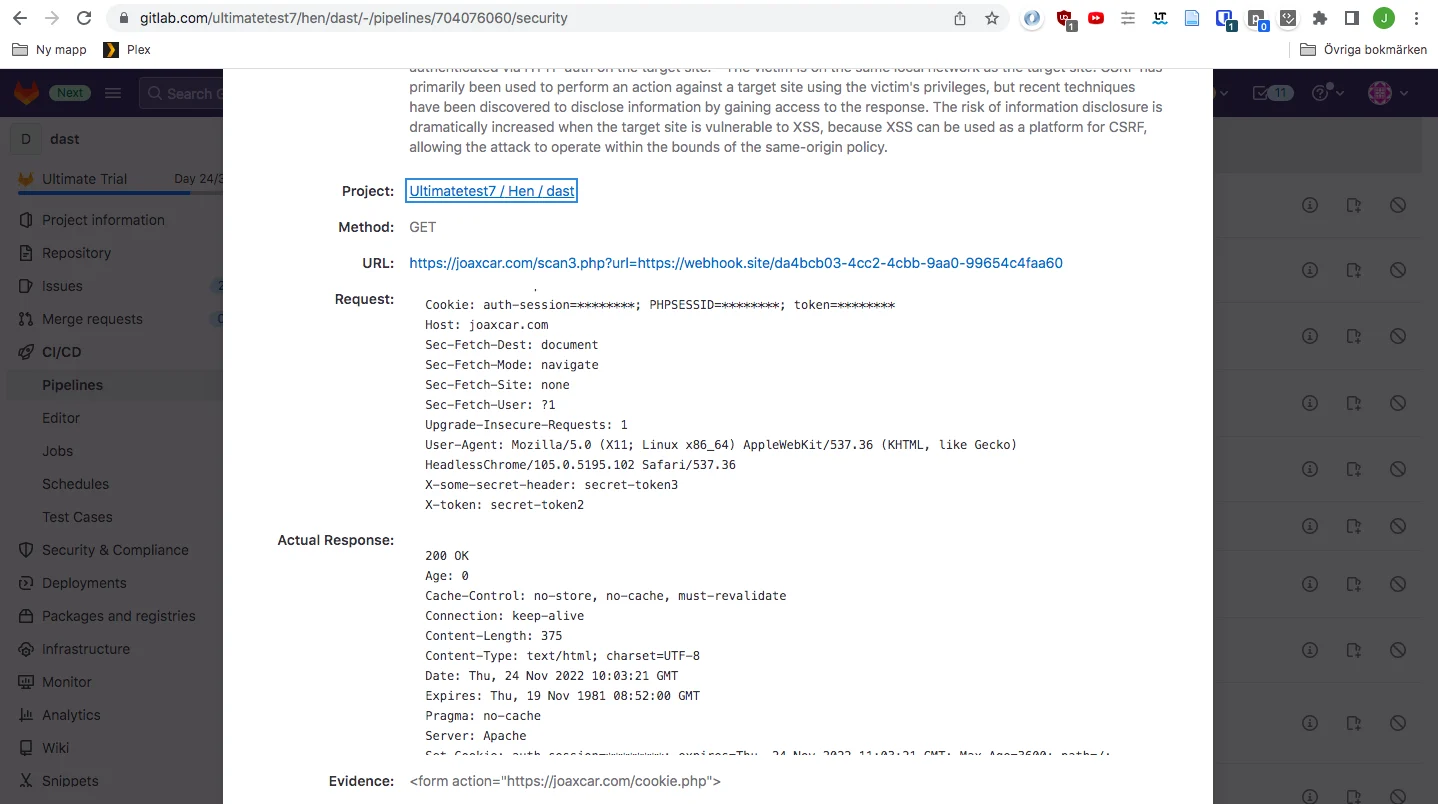
You can see that it have masked my Authorization header but not my two other custom headers. These headers are now visible by any developerin the project even if they are not accessible otherwise from the UI or API (not even by the user who configured them)
Steps to reproduce
These steps here will use my site https://joaxcar.com/scan3.php which will allow a scan to be run against it and allow any username/password to authenticate
- Log in as a victim user.
- Create a new public project (you need Ultimate subscription)
- Go to https://gitlab.com/GROUPNAME/PROJECTNAME/-/security/configuration/profile_library#site-profiles and start creating a new site profile name it
site1 - When you create the
site profilemakes sure to switch to Website.It is not important that it works out. It will leak anyway. Also make sure to add authorization in the site profile as it is needed for the job to run. Make sure to add some headers like this
Authorization: Bearer token1, X-some-secret-header: secret-token3, X-token: secret-token2
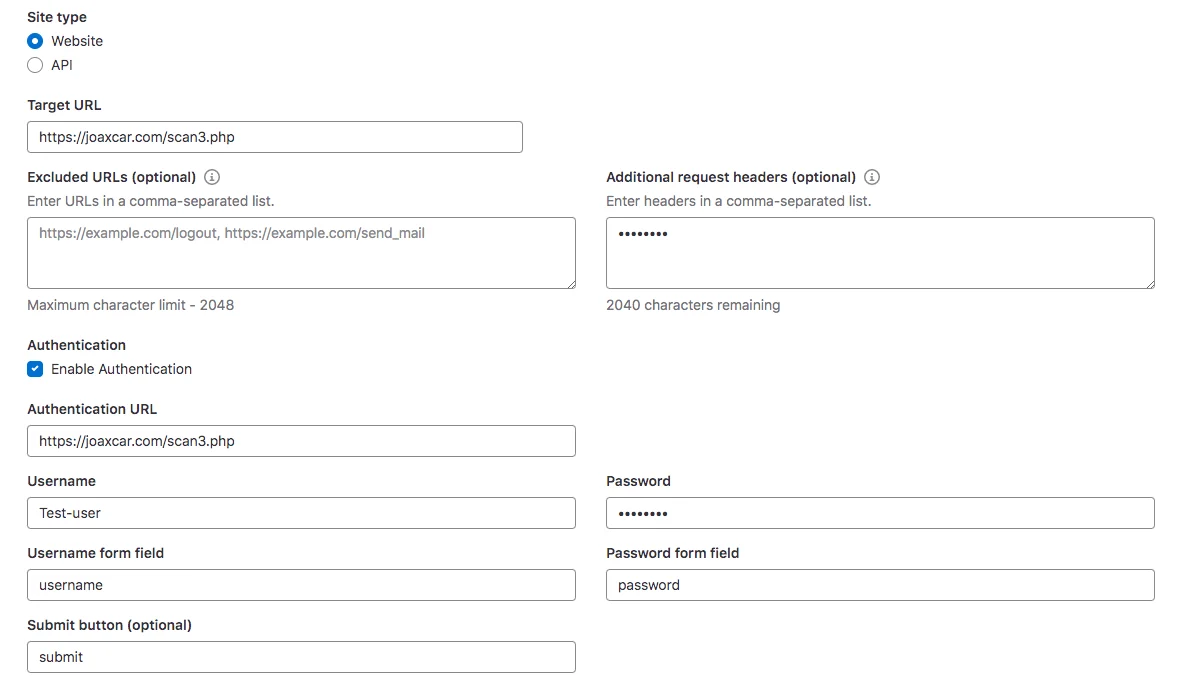
- Set the Target URL and the Authorization URL to https://joaxcar.com/scan3.php , and the username and password to anything. Field names as shown in this image
- Go to https://gitlab.com/GROUPNAME/PROJECTNAME/-/security/configuration/profile_library#scanner-profiles and create a new scanner profile. Check "active scan" as the mode. name it
scanner1 - Go to https://gitlab.com/GROUPNAME/PROJECTNAME/-/ci/editor?branch_name=main and make this your pipeline config
###  Add `dast` to your `stages:` configuration
stages:
  - dast

###  Include the DAST template
include:
  - template: DAST.gitlab-ci.yml

###  Your selected site and scanner profiles:
dast:
  stage: dast
  dast_configuration:
    site_profile: "site1"
    scanner_profile: " scanner1 "
- Click
Save - Go to https://gitlab.com/GROUP/PROJECT/-/pipelines
- Click the new pipeline
- When the pipeline finishes refresh and click on the security tab (or add /security to the URL)
- There should be a list of vulnerabilities , click the i (info button) on any of the rows to see the requests.
- Alternatively download the report with the "download" button and grep in the file for the headers.
Impact
Secret headers are leaked in plain text to users who shall not have access to them. This might allow the user to get access to systems where the user should not have access.
What is the current bug behavior?
Vulnerability reports contain plain text secret headers
What is the expected correct behavior?
All custom headers should be masked as in other parts of the application
Output of checks
This bug happens on GitLab.com
Impact
Secret headers are leaked in plain text to users who shall not have access to them. This might allow the user to get access to systems where the user should not have access.
Attachments
Warning: Attachments received through HackerOne, please exercise caution!
How To Reproduce
Please add reproducibility information to this section:
Not written yet. The AI write-up for this report has not been written yet. The Original tab links to the source.
How it worked
Root cause
Likely, the vulnerability report generation did not mask custom headers, unlike other parts of the application.
What the attacker needed
Ultimate subscription; Victim configures DAST with secret headers; Attacker has developer access to project
The fix
Custom headers should be masked as in other parts of the application.
How it was found
- Log in as a victim user.
- Create a new public project (requires Ultimate subscription).
- Create a new site profile with custom headers including secrets.
- Create a new scanner profile with active scan mode.
- Configure the pipeline to use the site and scanner profiles.
- Run the pipeline and view the security tab to see the leaked headers.
Explained by bugbounty.wiki with AI from the original and checked against quotes from it; it can still be wrong. Read the original before relying on a detail.
Not written yet. The AI write-up for this report has not been written yet. The Original tab links to the source.
When a security scanner tests a website, it can be configured to send special headers, like passwords or API keys, to authenticate. These headers are supposed to be hidden after setup, but in this case, they were saved in a report that any project member with developer access could view. This means someone who shouldn't have the secrets could see them and use them to break into other systems.
What is Info disclosure?
Data the application should keep private (personal data, internal details, other users' records) reaches someone it should not.




