Webhook logs leak integration access tokens to other maintainers
The webhook log details page for integrations displayed the full call URL, including the secret access token, to any project maintainer. An attacker with maintainer access could view the token and potentially gain full access to external systems.

GitLab
Originally disclosed on GitLab
- Fixed in 2 days
- Disclosed after 2 days
HackerOne report #1557472 by joaxcar on 2022-05-03, assigned to @rshambhuni:
Report | Attachments | How To Reproduce
Report
Summary
The latest patch 14.10.1 added masking to sensitive input fields to prevent leakage of access tokens through the UI. This prompted me to look a bit closer to those integrations.
It turns out that the integration settings page contains a worse leakage of these tokens, and is still present after the latest patch.
When a maintainer/owner configures integrations that adds a webhook event to the project (such as CI/CD integrations like Buildkite and Drone) the user is prompted to add an URL to the integration and an access token. The access token field is write only (and as of 14.10.1 also a password field) and will not display the present integration setting. So after saving the integration the token field will be empty to not leak this token.
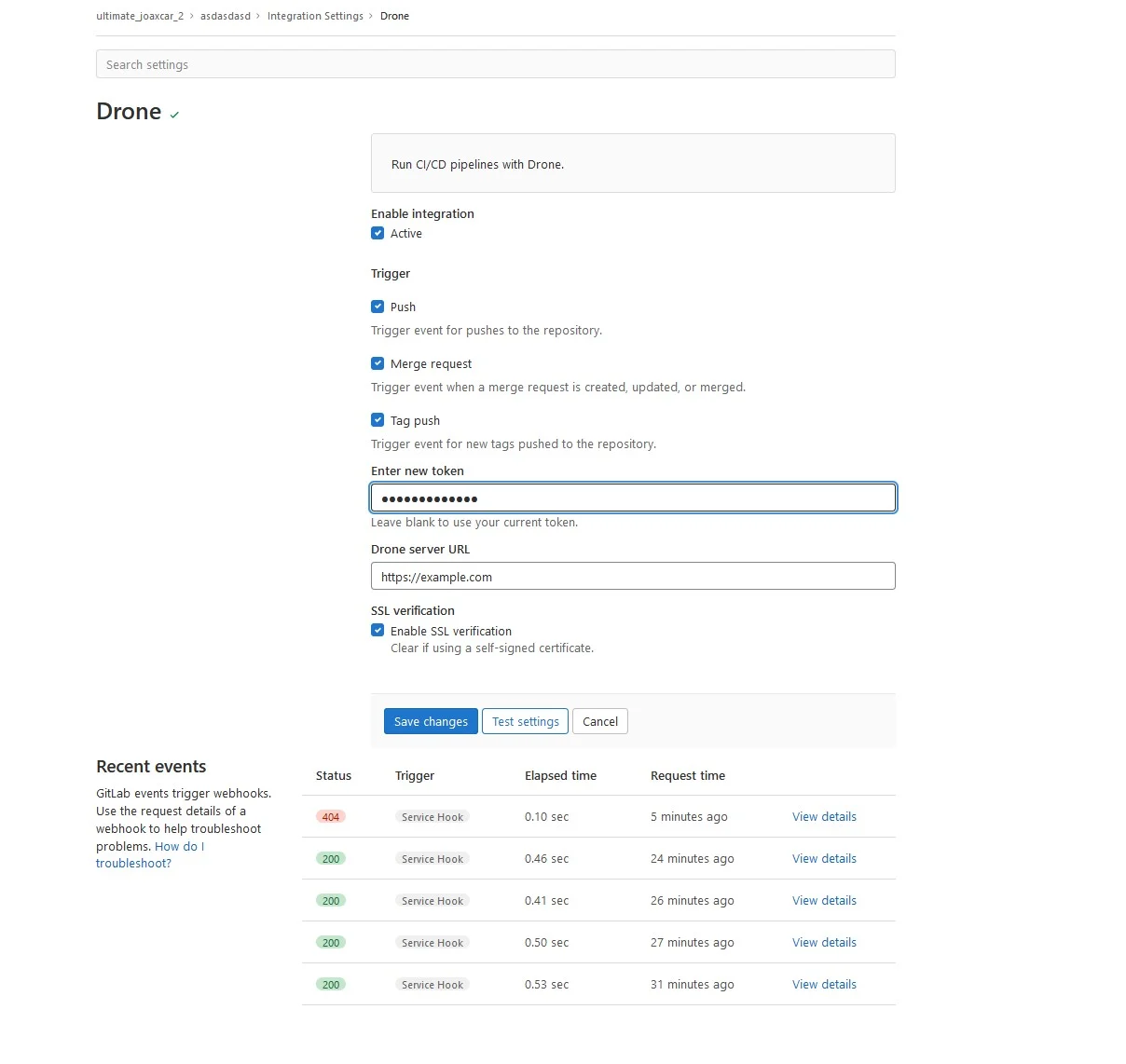
The problem is that after saving and activating the integration, a list is displayed in the bottom of the screen where the webhook log is displayed. If any maintainer of the project click to view details on any of these log entries the user will be presented with a page displaying the call that was made. Including the secret tokens!
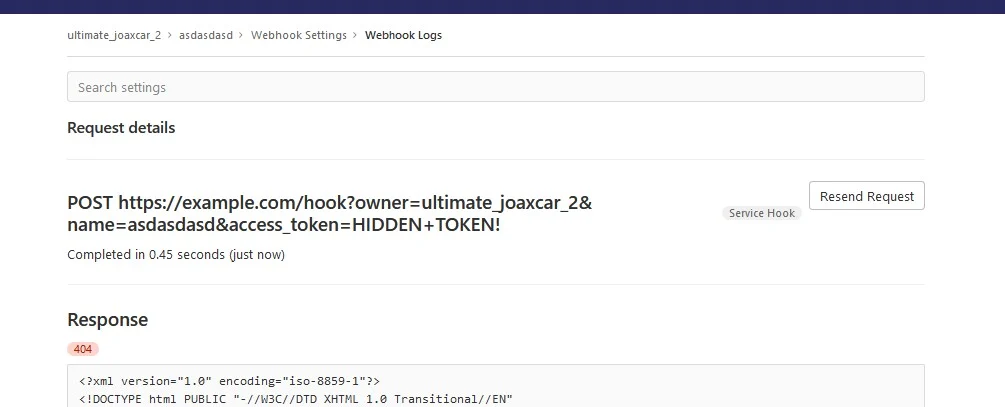
I will come back with a full list of affected integrations if needed. I have tested 4 which are affected at the moment
Steps to reproduce
- Create two users
victimandattacker - Log in as
victim - Create a new project and go to https://gitlab.com/GROUPNAME/PROJECTNAME/-/project_members
- Invite
attackeras a maintainer to the project - Go to https://gitlab.com/GROUPNAME/PROJECTNAME/-/integrations/drone_ci/edit
- fill in the url
https://example.com(this does not matter) and the access tokenHIDDEN_TOKEN - Click save
- Click
Test settings, a test hook call will be made - Refresh the page
- There will be a failed hook call in the logs. Click
view details - The page will display the access token in a
<h1>title - Copy the URL, log in with
attackerand go to the same page - Confirm that the
attackercan see the token
Impact
Leakage of sensitive tokens to other maintainers. Potentially giving the attacker full access to external systems
What is the current bug behavior?
Webhook log details pages display full call URL containing secret tokens
What is the expected correct behavior?
Tokens should not be shown in the details page
Output of checks
This bug happens on GitLab.com
Impact
Leakage of sensitive tokens to other maintainers. Potentially giving the attacker full access to external systems
Attachments
Warning: Attachments received through HackerOne, please exercise caution!
How To Reproduce
Please add reproducibility information to this section:
Not written yet. The AI write-up for this report has not been written yet. The Original tab links to the source.
How it worked
Impact
Leakage of sensitive tokens to other maintainers could give the attacker full access to external systems.
What the attacker needed
Attacker has maintainer access to the project; victim configures an integration with a token; a test hook call is made
The fix
Tokens should not be shown in the details page.
How it was found
- Create two users, victim and attacker.
- Log in as victim and create a new project.
- Invite attacker as a maintainer to the project.
- Go to the Drone CI integration edit page and fill in a URL and an access token.
- Click save, then click Test settings to make a test hook call.
- Refresh the page, click view details on the failed hook call, and confirm the token is displayed; then log in as attacker and verify the same page shows the token.
Explained by bugbounty.wiki with AI from the original and checked against quotes from it; it can still be wrong. Read the original before relying on a detail.
Not written yet. The AI write-up for this report has not been written yet. The Original tab links to the source.
When you set up an integration, you provide a secret token so the service can verify requests. The logs of test calls showed the full URL, which included that token, to anyone with maintainer rights. So another maintainer could see the secret and use it to access the external service.
What is Info disclosure?
Data the application should keep private (personal data, internal details, other users' records) reaches someone it should not.




