XSS by clicking Jira's link
The Jira Connect users page on GitLab used the return_to parameter directly as a link URL without validating its scheme. An attacker could craft a link with a javascript: scheme that, when clicked by a logged-in user in Safari on an instance without CSP, would execute arbitrary JavaScript.

- Triaged in 37 days
- Fixed in 5 months
- Paid in 5 months
- Disclosed after 13 months
Summary
Since the value of /-/jira_connect/users?return_to=xxx of xxx is used as a link as it is, it becomes XSS in some browsers.
Steps to reproduce
- Prepare a gitlab environment with no CSP configured (e.g.
localhost) - Logged in with safari browser
- Go to the
https://localhost/-/jira_connect/users?return_to=javascript:alert(location)URL - click
Return to GitLab for Jirabutton
Impact
XSS
Examples
Affects logged-in users regardless of project.
What is the current bug behavior?
class JiraConnect::UsersController < ApplicationController
  feature_category :integrations

  layout 'signup_onboarding'

  def show
    @jira_app_link = params.delete(:return_to)
  end
end
https://gitlab.com/gitlab-org/gitlab/-/blob/v13.11.3-ee/app/views/jira_connect/users/show.html.haml
  - if @jira_app_link
    %p= external_link s_('Integrations|Return to GitLab for Jira'), @jira_app_link, class: 'gl-button btn btn-confirm'
https://gitlab.com/gitlab-org/gitlab/-/blob/v13.11.3-ee/app/helpers/external_link_helper.rb
module ExternalLinkHelper
  def external_link(body, url, options = {})
    link_to url, { target: '_blank', rel: 'noopener noreferrer' }.merge(options) do
      "#{body}#{sprite_icon('external-link', css_class: 'gl-ml-1')}".html_safe
    end
  end
end
external_link has not verified the validity of the url.
What is the expected correct behavior?
If it is a link other than http and https, it will not work.
Relevant logs and/or screenshots
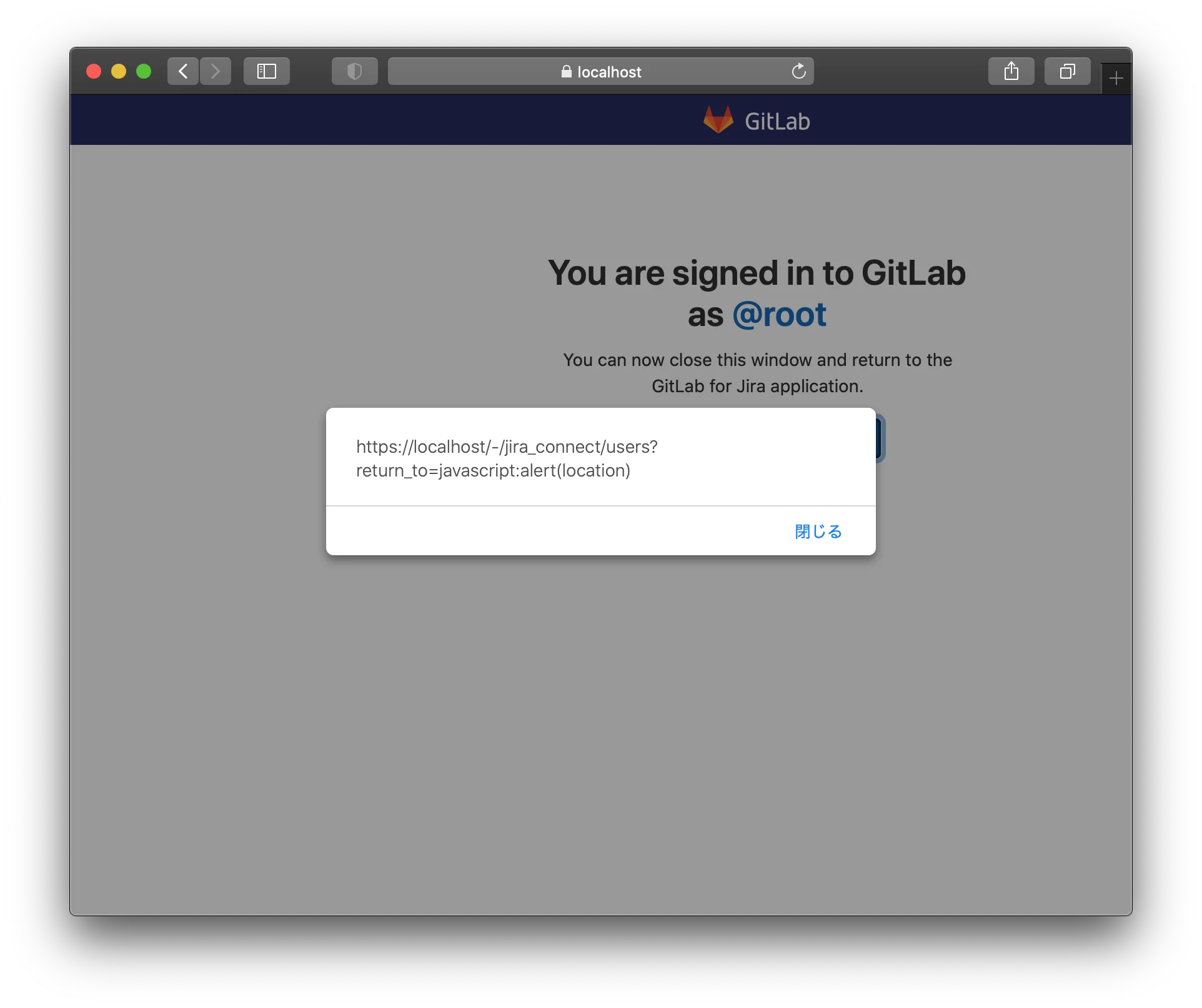
Output of checks
Blocked by CSP at GitLab.com
Results of GitLab environment info
# gitlab-rake gitlab:env:info

System information
System:
Current User:	git
Using RVM:	no
Ruby Version:	2.7.2p137
Gem Version:	3.1.4
Bundler Version:2.1.4
Rake Version:	13.0.3
Redis Version:	6.0.12
Git Version:	2.31.1
Sidekiq Version:5.2.9
Go Version:	unknown

GitLab information
Version:	13.11.3
Revision:	b321336e443
Directory:	/opt/gitlab/embedded/service/gitlab-rails
DB Adapter:	PostgreSQL
DB Version:	12.6
URL:		https://gitlab.example.com
HTTP Clone URL:	https://gitlab.example.com/some-group/some-project.git
SSH Clone URL:	[email protected]:some-group/some-project.git
Using LDAP:	no
Using Omniauth:	yes
Omniauth Providers:

GitLab Shell
Version:	13.17.0
Repository storage paths:
- default: 	/var/opt/gitlab/git-data/repositories
GitLab Shell path:		/opt/gitlab/embedded/service/gitlab-shell
Git:		/opt/gitlab/embedded/bin/git
Impact
It becomes XSS when the user is directed to the user who is logged in with the Safari browser to the instance where CSP is not set.
Chrome and Firefox showed other tabs and javascript was not executed.
Not written yet. The AI write-up for this report has not been written yet. The Original tab links to the source.
How it worked
Root cause
The external_link helper did not validate the URL scheme, allowing javascript: URLs to be used as link targets.
Impact
An attacker could execute JavaScript in the context of a logged-in user's session, but only in Safari and only on instances without a Content Security Policy; Chrome and Firefox did not execute the script, and GitLab.com was protected by CSP.
What the attacker needed
Victim uses Safari; GitLab instance without CSP; victim clicks a crafted link
The fix
The link helper should reject URLs whose scheme is not http or https.
How it was found
- Set up a GitLab instance without CSP configured.
- Log in using the Safari browser.
- Visit the Jira Connect users URL with a return_to parameter containing a javascript: payload.
- Click the 'Return to GitLab for Jira' button.
Explained by bugbounty.wiki with AI from the original and checked against quotes from it; it can still be wrong. Read the original before relying on a detail.
Not written yet. The AI write-up for this report has not been written yet. The Original tab links to the source.
A web page had a button that took users back to another site, and the destination address was taken directly from the URL without checking it was a normal web address. An attacker could put a special address starting with 'javascript:' that makes the browser run code instead of navigating. When a logged-in user clicked the button, that code ran in their browser, but only in Safari and only if the site had no extra security policy.
What is XSS?
Script an attacker supplies runs in another user's browser, on the target's origin, with that user's session.





