XSS in k8s proxy endpoint when serving response without content-type header
The Kubernetes proxy endpoint allowed responses without a Content-Type header, which browsers would MIME-sniff as HTML, enabling XSS. An attacker could bypass CSP and, on self-hosted instances, use caching to serve the malicious response without a CSRF token.

GitLab
Originally disclosed on GitLab
- Fixed in 44 days
- Disclosed after 44 days
⚠️ Please read the process on how to fix security issues before starting to work on the issue. Vulnerabilities must be fixed in a security mirror.
HackerOne report #2932309 by joaxcar on 2025-01-11, assigned to @kmorrison1:
Report | Attachments | How To Reproduce
Report
Summary
A while back the k8s proxy endpoint got some XSS protection (see issue) by checking that all content-type headers in the response match a certain whitelist
	allowedResponseContentTypes = []string{
		runtime.ContentTypeJSON,
		runtime.ContentTypeYAML,
		runtime.ContentTypeProtobuf,
		runtime.ContentTypeCBOR,
		"text/plain",
	}
using this function
func checkContentType(h http.Header, allowed ...string) error {
	// There should be at most one Content-Type header, but it's not our job to do something about it if there is more.
	// We just ensure thy are all allowed.
nextContentType:
	for _, ct := range h[httpz.ContentTypeHeader] {
		mediatype, _, err := mime.ParseMediaType(ct)
		if err != nil && err != mime.ErrInvalidMediaParameter {
			// Parsing error and not a MIME parameter parsing error, which we ignore.
			return fmt.Errorf("check Content-Type: %w", err)
		}
		for _, a := range allowed {
			if mediatype == a {
				// This one is allowed, onto the next Content-Type header
				continue nextContentType
			}
		}
		return fmt.Errorf("%s not allowed: %s", httpz.ContentTypeHeader, mediatype)
	}
	return nil
}
The issue is that this function does not take into consideration responses that lack any content-type header. When sending back a response without a content-type, the response will be sent through, and when ending up in a browser, the browser will mime sniff the content, and if it looks like HTML, it will render it accordingly.
Even if we now can server HTML on the endpoint the page is still protected by requiring a CSRF token in either a special header or in the URL. This makes regular exploitation hard. I did, however find a way to bypass this on self-hosted instances (there are probably more ways to do this)
If the proxied response also contains a Cache-Control: max-age=604800 header, the result from the server will get cached from the regular fetch made by Gitlab and subsequently served when visiting the endpoint directly, even without a CSRF token.
Steps to reproduce
- Set up a self-hosted Gitlab instance, I don't know if you need SSL configured but its probably good to set it up (my test setup has it)
- SSH into the server and open
/etc/gitlab/gitlab.rband enable CSP by adding these lines
gitlab_rails['content_security_policy'] = {
  'enabled' => true,
  'report_only' => false,
}
- Save the file and then run
sudo gitlab-ctl reconfigure
This will make the instance have ".com"-matching CSP
4. Now log in as a regular user
5. Create a new group mynewgroup
6. Create two projects in the group config and attack
7. In the project mynewgroup/config create a file with the name .gitlab/agents/test-agent/config.yaml and the content (replace groupname if you have another)
user_access:
  access_as:
    agent: {}
  groups:
    - id: mynewgroup
- Go to https://gitlab.example..com/mynewgroup/config/-/clusters and click
connect a cluster - In the popup under the heading
Register agentwith the UI click the dropdown and select thetest-agent, click Register - Copy the
Agent access token - In a terminal on your local computer, create a file called
glab-agentk-token-localand paste the token from step 10 in the file - Download the file
server.pyinto the same directory - Open another terminal tab in the same directory, in one of the tabs run
python3 server.pyand in the other tab run this command (this command is made to work on linux, if you use MacOS replace127.0.0.1:9999withhost.docker.internal:9999, and replacegitlab.example.comwith your server domain)
docker run \
--network host \
--rm \
-it \
-v ./glab-agentk-token-local:/etc/agentk/secrets/token \
-e POD_NAMESPACE=agentk-nsname \
-e POD_NAME=agent-podname registry.gitlab.com/gitlab-org/cluster-integration/gitlab-agent/agentk:latest  \
--kas-address=wss://gitlab.example.com/-/kubernetes-agent/ \
--token-file=/etc/agentk/secrets/token \
-s 127.0.0.1:9999
- You should now in the browser see the test-agent going to connected state (if not refresh the browers)
- Now go to the project https://gitlab.com/mynewgroup/attack/-/environments and click New Environment
- Give the environment a name, then add
https://example.comas the External URL, and select test-agent as the Gitlab Agent. And put this as thedescription(again replacegitlab.example.comwith your server host)
<h1><a href="https://gitlab.example.com/-/kubernetes-agent/k8s-proxy/api/v1/pods">click me</a></h1>
- Click Create and take a note of the ID
- If you now visit
https://gitlab.com/mynewgroup/attack/-/environments/ID_FROM_STEP_17and click theClick herelink the XSS should pop (Not blocked by the CSP from step 2)
Impact
Full unlimited XSS bypassing any CSP. No matter what CSP you put on the Gitlab config this endpoint is served without it
Some notes on CVSS
The XSS works on kas.gitlab.com as well, but the caching trick does not work on that environment. I guess it's a cross-domain issue.
I know that the CVSS calculator states that high impact is only given to
XSS with .com CSP bypass
in my opinion, this bug fits this description even if the full POC chain does not work on gitlab.com at the moment. The reason here is that the XSS will bypass any configured CSP, and my understanding of the intention of the rule for mid or high impact is to distinguish between XSS's that require:
- a self-hosted server without CSP configured
as opposed to this POC that shows that this attack works on
- self-hosted servers with .com equivalent CSP configuration given by GitLab best practices.
If you don't agree with this I am happy to have a longer discussion about it :)
Examples
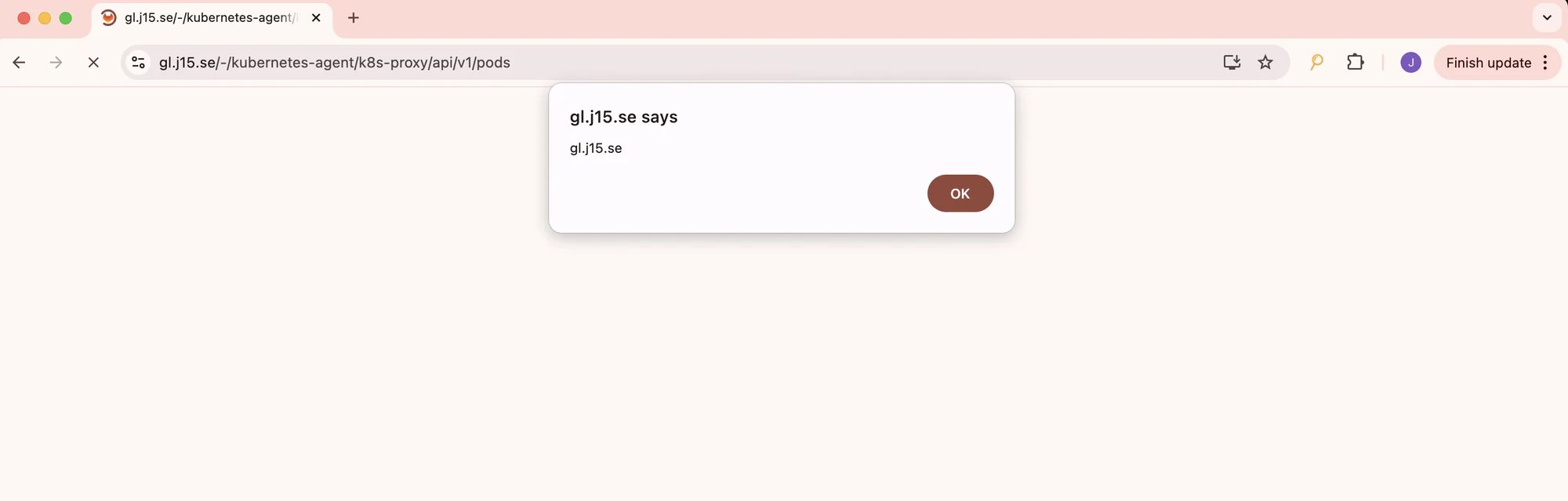
What is the current bug behavior?
The K8s proxy will only block responses that include bad content-type headers but will allow responses without any content-type at all, leading to XSS
What is the expected correct behavior?
Responses should get a default text/plain if content-type is missing
Impact
XSS with CSP bypass
Attachments
Warning: Attachments received through HackerOne, please exercise caution!
How To Reproduce
Please add reproducibility information to this section:
Not written yet. The AI write-up for this report has not been written yet. The Original tab links to the source.
How it worked
Impact
Full unlimited XSS bypassing any CSP, though the caching trick does not work on gitlab.com.
What the attacker needed
Self-hosted GitLab instance; regular user account; ability to create projects and groups; ability to register a Kubernetes agent
The fix
Responses should get a default `text/plain` if `content-type` is missing.
How it was found
- Set up a self-hosted GitLab instance with SSL and enable CSP.
- Log in as a regular user and create a group with two projects: config and attack.
- In the config project, create an agent configuration file granting access to the group.
- Register the agent and obtain an access token.
- Run a local server and connect the agent to it using the token.
- Create an environment in the attack project with a malicious HTML description containing a link to the Kubernetes proxy endpoint.
Explained by bugbounty.wiki with AI from the original and checked against quotes from it; it can still be wrong. Read the original before relying on a detail.
Not written yet. The AI write-up for this report has not been written yet. The Original tab links to the source.
When a web server sends a file without saying what type it is, browsers often guess the type by looking at the content. If the content looks like HTML, the browser will run any scripts in it. Here, the Kubernetes proxy endpoint let such responses through, so an attacker could make the browser run their script, even if the site had protections like CSP.
What is XSS?
Script an attacker supplies runs in another user's browser, on the target's origin, with that user's session.




