GKE Autopilot Node Compromise via SSH Metadata
GKE Autopilot nodes accepted project-wide SSH keys and allowed SSH tunnelling despite setting user shells to nologin. An attacker with permission to set project-wide SSH keys could use a SOCKS proxy to reach the node's metadata service, obtain kubelet credentials, and escalate to cluster admin.
 Published on lf.lc
GKE Autopilot provides many default security controls to protect the node, including protections against privileged pods and limitations on hostPath volume mounts.
The full write-up lives on its author's site
It belongs to its author, so we link to it rather than copy it. The other two tabs are our own rewrites, checked against it.
Context
GKE Autopilot is Google's managed Kubernetes mode in which the control plane and the nodes are managed for the customer. Autopilot ships with a set of default security controls intended to protect the nodes, including protections against privileged pods and limitations on hostPath volume mounts. The report opens by naming exactly those two controls as the things the attack has to get around.
The relevant piece of Google Cloud infrastructure is the compute metadata service. As the report notes, nodes are configured to pull SSH keys from the compute metadata SSH keys list. Google's own documentation (linked in the report) states that a user holding compute.projects.setCommonInstanceMetadata can set project-wide SSH keys. That permission is the precondition for everything that follows.
Setup
The attacker needs a Google Cloud project in which they hold compute.projects.setCommonInstanceMetadata, and an Autopilot cluster in that project. The report also uses a user with the "Kubernetes Engine Admin" role, because that user is needed to approve the certificate signing request at one stage. The tooling is a shell script, socks.sh, published alongside the write-up, invoked with a username and a node IP address.
Finding it
The observation is a chain of three small gaps rather than a single bug.
- Nodes trust project-wide SSH keys from the compute metadata service, so anyone who can write that metadata can add a key that the node's sshd will accept.
- To stop people logging in to the nodes directly, the nodes use an sshd configuration that sets all user shells to
/sbin/nologin. That blocks an interactive shell, but it does not restrict SSH tunnelling. - Because tunnelling still works, the attacker can build a SOCKS proxy through the node and use it to reach the compute metadata service on the node itself. That service is normally protected by the GKE metadata server, and the proxy sidesteps that protection.
With metadata access restored, the standard kubelet bootstrapping attack becomes available, with one difference described in the exploitation steps below.
Exploitation
Step 1: create the cluster and collect node IPs
Create an Autopilot cluster and list the nodes with their addresses:
kubectl get node -o wide
The wide output gives the node IP addresses that the later steps need.
Step 2: add a project-wide SSH key
Configure project-wide SSH keys in the console at the metadata SSH keys page:
https://console.cloud.google.com/compute/metadata/sshKeys
The username chosen here is the one passed to the script in step 4.
Step 3: download the helper script
The report provides socks.sh at the following address:
https://amlw.dev/assets/vrp/181521559b-socks.sh
Step 4: run the script against a node
socks.sh <username> <node IP>
Use the username from step 2 and one of the node IPs from step 1. The script automates the following sequence:
- Set up a SOCKS proxy to a given node.
- Download the
kube-envattribute from the metadata service on the node. - Extract the TPM key and certificate from
kube-env. - Create a CSR for
OU=system:masters CN=kubernetes-admin, which is exempt from the Autopilot gatekeeper policies. - Submit the CSR to the Kubernetes API using the TPM key and cert.
- Approve the CSR with a "Kubernetes Engine Admin" user. The report notes that the Autopilot gatekeeper policy prohibits this user from simply creating their own CSR.
- Use the newly signed cert to launch a privileged pod and compromise the node.
The report notes that the OU=system:masters CN=kubernetes-admin subject is exempt from the Autopilot gatekeeper policies. The approval step is what makes the CSR usable, and it is performed by a "Kubernetes Engine Admin" user, whom the Autopilot gatekeeper policy prohibits from simply creating their own CSR.
Screenshot of working exploit:
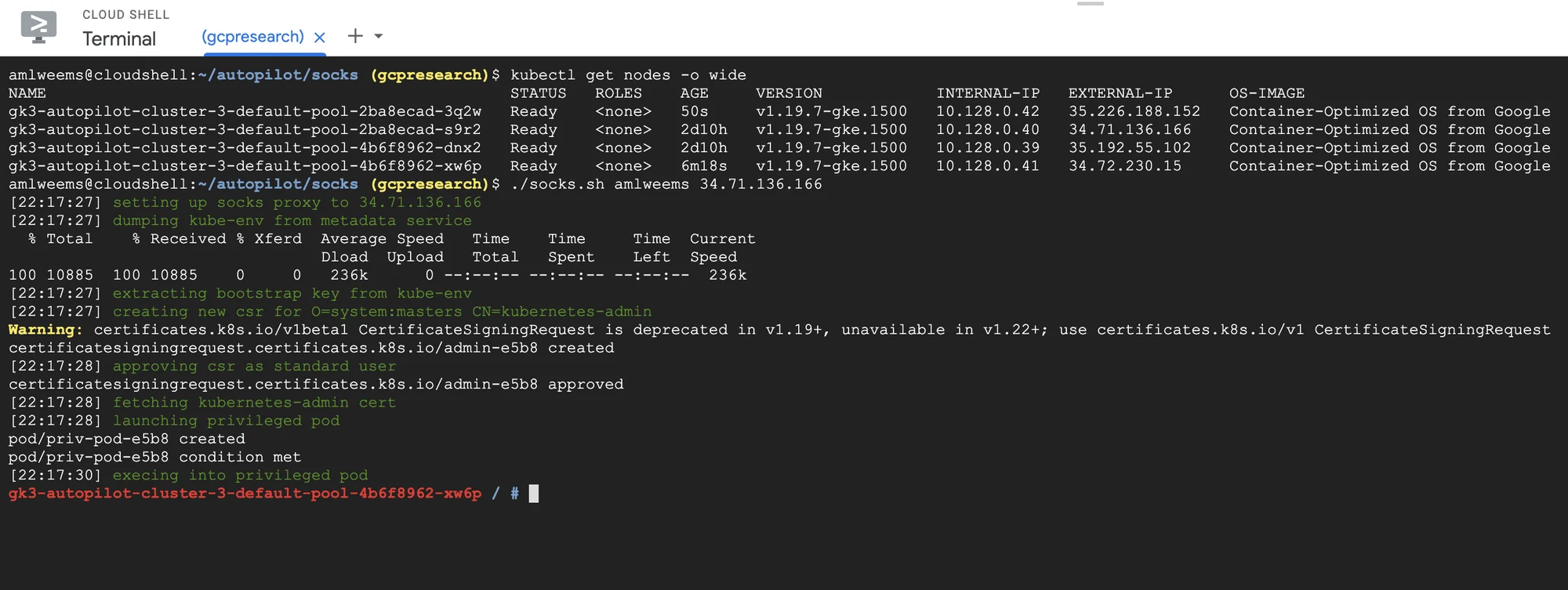
The screenshot is captioned as showing the working exploit.
Root cause
That assumption fails because the node's sshd accepts those keys and, while it forces /sbin/nologin as the shell, it leaves SSH tunnelling enabled. The tunnel gives a path to the node's compute metadata service that bypasses the GKE metadata server, which is the component meant to mediate access to that service. From there the kube-env attribute yields the TPM key and certificate, and the kubelet bootstrapping flow can be driven to obtain a system:masters identity. The Autopilot gatekeeper policies block privileged pods and restrict hostPath mounts, but the OU=system:masters CN=kubernetes-admin subject used for the CSR is exempt from them. The report does not describe any change to the sshd configuration or the metadata server as the fix; it only records that the issue was reported fixed and later partially verified.
Impact
A user with compute.projects.setCommonInstanceMetadata in the project could bypass the security controls in the cluster and gain privileged access to the managed Kubernetes nodes. With that access they could read all secrets in the cluster, including secrets outside their provisioned access, or explore the attack surface of the Autopilot control plane. The precondition is the metadata permission; without it the chain does not start.
Fix
The report records that the issue was reported fixed on 2021-06-07. On 2021-09-10 it was retested and only variant "a" was verified as fixed, and the issue was reopened on 2021-09-11. The report does not state which code or configuration change was made.
- Other managed node images that trust project metadata SSH keys. Add a key with
compute.projects.setCommonInstanceMetadataand attempt an SSH tunnel to the node's metadata service. A positive result is a working SOCKS proxy that returns metadata responses the managed metadata proxy would otherwise refuse. - sshd configurations that force
nologinbut allow forwarding. Tryssh -N -Dagainst the node. A positive result is a listening SOCKS port even though an interactive login is refused. - Bootstrap credentials exposed in metadata. Fetch
kube-envthrough the tunnel and look for a TPM key and certificate. A positive result is a key pair that the API server accepts for CSR submission. - CSR subjects exempt from admission policy. Submit a CSR with
OU=system:masters CN=kubernetes-adminand have a separate admin principal approve it. A positive result is a signed certificate that can create a privileged pod. - Approval separation. Check whether the principal that can approve CSRs is blocked from creating its own. A positive result is that the approval path works while direct CSR creation by the same principal is denied, which is the gap the report relies on.
What happened, in plain words
Google runs a service called GKE Autopilot. GKE stands for Google Kubernetes Engine, and Kubernetes is a system for running software in containers: small, sealed boxes that hold an application and everything it needs. Autopilot is the version where Google manages most of the machinery for you, including the computers (called nodes) that the containers actually run on.
Because Google manages those nodes, it puts safety locks on them. Two of the locks matter here: ordinary users are not allowed to run "privileged" pods (containers with extra powers, close to having full control of the machine), and they are limited in how they can mount parts of the node's own disk into a container (a feature called hostPath).
The report describes a chain that let someone with one particular Google Cloud permission slip past those locks and gain privileged access to a node. The permission is compute.projects.setCommonInstanceMetadata, which lets a user edit project-wide settings that every machine in the project reads at boot. The chain was reported to Google's bug bounty programme, paid at 1337 USD per variant, and recorded as fixed on 2021-06-07, though a later retest verified only variant "a" as fixed.
This article walks through the same steps as the technical write-up, explaining each concept from scratch.
The pieces you need to know
Before the attack makes sense, here are the building blocks, in the order they appear.
- Kubernetes: software that decides which computer runs which container, and keeps them running. You talk to it through an API (Application Programming Interface): a set of web addresses where you send requests and get answers back, usually in a structured text format such as JSON. Think of an API as a waiter: you order from a menu, the kitchen does the work, and the waiter brings back a plate. You never walk into the kitchen yourself.
- Node: one of the computers in a Kubernetes cluster. Containers run on nodes.
- Pod: the smallest unit Kubernetes schedules, usually one container plus its settings. A privileged pod is a pod with the safety catch off: it can touch the node's hardware and files almost as if it were running directly on the machine.
- Control plane: the part of Kubernetes that stores the cluster's configuration and makes decisions. In Autopilot, Google runs it for you.
- Metadata service: a small web service that every Google Cloud virtual machine can reach at a fixed internal address. Machines use it to ask "who am I, what is my configuration, what keys do I trust?". It is like the ID card and instruction folder that every employee finds on their desk on the first morning.
- SSH: a way to open a remote terminal on another computer over the network. An SSH key is a pair of files: a private one you keep, and a public one you hand out. If a machine has your public key on its list of trusted keys, you can log in with the matching private key, no password needed.
- sshd: the program on a machine that listens for SSH connections and decides whether to let them in.
- Shell: the text interface where you type commands.
/sbin/nologinis a fake shell that immediately refuses to run anything, which is a common way to say "this account may exist, but it may not log in interactively". - SSH tunnelling / SOCKS proxy: SSH can do more than give you a terminal. It can forward network traffic for you. A SOCKS proxy is a relay: your browser or tool sends its requests to the proxy, and the proxy makes the connection on your behalf. If the proxy runs on a node, requests sent through it appear to come from that node.
- Certificate, CSR and signing: a certificate is a digital ID card, cryptographically signed by someone trusted. A CSR (Certificate Signing Request) is an application form for one: you fill in who you claim to be, attach proof you hold the matching private key, and ask an authority to sign it. Once signed, the certificate can be used to prove your identity to a server.
- TPM key and certificate: a key pair stored in a machine's TPM (Trusted Platform Module, a small security chip). Kubernetes uses it so a node can prove to the cluster that it really is that node when it first joins.
- kube-env: a block of configuration text that the metadata service hands to a node, containing the settings and credentials the node needs to join the cluster.
- kubelet bootstrapping: the normal process where a new node introduces itself to the Kubernetes API, proves its identity, and receives permission to run workloads. If an attacker can borrow that identity, they can join the cluster as if they were a node.
- RBAC group
system:masters: Kubernetes groups users and grants permissions to groups.system:mastersis the built-in group with effectively unlimited power. Anything that belongs to it is not restricted by ordinary policy checks. - Gatekeeper policy: an extra rulebook that sits in front of the Kubernetes API and refuses requests that break the rules, such as "no privileged pods".
- Kubernetes Engine Admin: a Google Cloud role for people who administer a GKE cluster. It can approve certificate requests.
The vulnerability in detail
GKE Autopilot provides many default security controls to protect the node, including protections against privileged pods and limitations on hostPath volume mounts. Those are exactly the two controls the attack has to get around.
The nodes are configured to pull from the compute metadata SSH keys list. As Google's own documentation says, a user with compute.projects.setCommonInstanceMetadata can set project-wide SSH keys. That permission is the starting condition: without it, nothing else in the chain works.
To prevent users from simply logging in to the nodes directly, the nodes use an sshd configuration that sets all user shells to /sbin/nologin. In plain terms: even if your key is trusted and the SSH connection succeeds, the machine refuses to give you a usable terminal. That sounds like a full stop, but it is not, because the configuration does not restrict SSH tunnelling. The door opens, you just cannot walk through it into the room. You can still pass things through the doorway.
We can set up a SOCKS proxy and use this proxy to access the compute metadata service on the nodes, which is normally protected by the GKE metadata server. The GKE metadata server is the component that decides what a pod is allowed to learn from the metadata service. By relaying traffic through the node's own SSH connection, the attacker talks to the metadata service as the node itself, and that protection no longer applies.
This enables the standard kubelet bootstrapping attack, with one difference, described in the steps below.
Exploitation, step by step
Step 1: create the cluster and collect node IPs
Create an Autopilot cluster and use kubectl get node -o wide to view node IP addresses. kubectl is the command-line tool for talking to Kubernetes; get node asks for the list of nodes, and -o wide asks for the wider table, which includes network addresses.
kubectl get node -o wide
Line by line: kubectl is the program; get is the verb (fetch something); node is the kind of thing to fetch; -o wide means "output in the wide format". The result is a table of nodes with their IP addresses, which the later steps need.
Step 2: add a project-wide SSH key
Configure project-wide SSH keys in the Google Cloud console at this page:
https://console.cloud.google.com/compute/metadata/sshKeys
This is the metadata SSH keys page. Anything you add here is stored in the project's common instance metadata, and every machine in the project that is set up to read that list will trust the key. The username you choose here is the one you will pass to the script in step 4. Why this step: it is the only way to get a key the node will accept, given that the attacker has no other route onto the machine.
Step 3: download the helper script
The report provides socks.sh at the following address:
https://amlw.dev/assets/vrp/181521559b-socks.sh
A shell script is a text file of commands that the computer runs in order, like a recipe. This one automates the whole chain so it can be repeated reliably.
Step 4: run the script against a node
socks.sh <username> <node IP>
Line by line: socks.sh is the script; <username> is a placeholder for the username from step 2; <node IP> is a placeholder for one of the addresses from step 1. The angle brackets are not typed literally, they just mark where your values go.
The script automates the following steps:
- Set up a SOCKS proxy to a given node. This uses the SSH connection as a relay, so traffic sent through it appears to come from the node.
- Download the
kube-envattribute from the metadata service on the node. This is the node's own configuration folder, fetched through the relay. - Extract the TPM key and certificate from
kube-env. These are the credentials the node uses to prove its identity to the cluster. - Create a CSR for
OU=system:masters CN=kubernetes-admin, which is exempt from the Autopilot gatekeeper policies. In a certificate subject,CNis the common name (who you claim to be) andOUis the organisational unit (which group you claim to belong to). The report notes that this subject is exempt from the Autopilot gatekeeper policies. - Submit the CSR to the Kubernetes API using the TPM key and cert. The CSR is submitted to the Kubernetes API using the TPM key and cert.
- Approve the CSR with a "Kubernetes Engine Admin" user. A CSR is only a request until someone with authority signs it. The report notes that the Autopilot gatekeeper policy prohibits this user from simply creating their own CSR, which is why the request is submitted by one identity and approved by another.
- Use the newly signed cert to launch a privileged pod and compromise the node. The newly signed cert is used to launch a privileged pod and compromise the node.
Screenshot of working exploit:
The screenshot is captioned as showing the working exploit.
Attack scenario
The Autopilot documentation describes the motivation for its security controls as:
In order for GKE to offer management of the nodes and provide you with a more streamlined operational experience, there are a few restrictions and limitations when compared to GKE Standard. Some of these limitations are security best practices, while others allow Autopilot clusters to be safely managed.
In other words, the locks exist so Google can safely manage the machines on your behalf. The attack shows that one permission outside the cluster can undo them.
A user with compute.projects.setCommonInstanceMetadata permission in the project could bypass the security controls in the cluster and gain privileged access to the managed Kubernetes nodes. Using this access, they could read all secrets in the cluster, including those outside their provisioned access, or explore the attack surface of the Autopilot control plane. A secret in Kubernetes is a stored piece of sensitive data such as a password or API key; reading all of them means reading other teams' credentials too.
Timeline
- 2021-03-01: Initial report to Google VRP
- 2021-03-01: Issue triaged
- 2021-03-04: Internal bug report filed
- 2021-03-05: Additional variants reported (vrp/181521559b, vrp/181521559c)
- 2021-03-09: Internal bug report updated
- 2021-04-01: Additional variant reported (vrp/181521559d)
- 2021-04-06: Internal bug report updated
- 2021-04-08: VRP issued reward ($1337 per variant)
- 2021-06-07: Issue reported fixed
- 2021-09-10: Retested and verified only variant "a" is fixed
- 2021-09-11: Issue reopened
Root cause
That assumption fails because the node's sshd accepts those keys and, while it forces /sbin/nologin as the shell, it leaves SSH tunnelling enabled. The tunnel gives a path to the node's compute metadata service that bypasses the GKE metadata server, which is the component meant to mediate access to that service. From there the kube-env attribute yields the TPM key and certificate, and the kubelet bootstrapping flow can be driven to obtain a system:masters identity. The Autopilot gatekeeper policies block privileged pods and restrict hostPath mounts, but the OU=system:masters CN=kubernetes-admin subject used for the CSR is exempt from them. The report does not describe any change to the sshd configuration or the metadata server as the fix; it only records that the issue was reported fixed and later partially verified.
Impact
A user with compute.projects.setCommonInstanceMetadata in the project could bypass the security controls in the cluster and gain privileged access to the managed Kubernetes nodes. With that access they could read all secrets in the cluster, including secrets outside their provisioned access, or explore the attack surface of the Autopilot control plane. The precondition is the metadata permission; without it the chain does not start.
Fix
The report records that the issue was reported fixed on 2021-06-07. On 2021-09-10 it was retested and only variant "a" was verified as fixed, and the issue was reopened on 2021-09-11. The report does not state which code or configuration change was made.
- Other managed node images that trust project metadata SSH keys. Add a key with
compute.projects.setCommonInstanceMetadataand attempt an SSH tunnel to the node's metadata service. A positive result is a working SOCKS proxy that returns metadata responses the managed metadata proxy would otherwise refuse. - sshd configurations that force
nologinbut allow forwarding. Tryssh -N -Dagainst the node. Here-Nmeans "do not run a remote command, just set up the connection" and-Dmeans "act as a SOCKS proxy on this side". A positive result is a listening SOCKS port even though an interactive login is refused. - Bootstrap credentials exposed in metadata. Fetch
kube-envthrough the tunnel and look for a TPM key and certificate. A positive result is a key pair that the API server accepts for CSR submission. - CSR subjects exempt from admission policy. Submit a CSR with
OU=system:masters CN=kubernetes-adminand have a separate admin principal approve it. A positive result is a signed certificate that can create a privileged pod. - Approval separation. Check whether the principal that can approve CSRs is blocked from creating its own. A positive result is that the approval path works while direct CSR creation by the same principal is denied, which is the gap the report relies on.
Glossary
- API: a defined set of web addresses and formats through which one program asks another to do something and gets a structured answer.
- Autopilot: Google's managed mode of GKE where Google runs the control plane and the nodes for the customer.
- Certificate: a digital ID card, signed by a trusted authority, used to prove identity to a server.
- CN (Common Name): the field in a certificate subject that states who the certificate claims to belong to.
- Container: a sealed package holding an application and its dependencies, run in isolation on a machine.
- Control plane: the part of Kubernetes that stores configuration and makes scheduling decisions.
- CSR (Certificate Signing Request): an application form for a certificate, containing the claimed identity and proof of the matching private key.
- Gatekeeper policy: an extra rulebook in front of the Kubernetes API that refuses requests breaking the rules, such as privileged pods.
- GKE: Google Kubernetes Engine, Google's hosted Kubernetes service.
- hostPath: a Kubernetes feature that mounts a directory from the node's own filesystem into a container.
- kube-env: a block of configuration and credentials the metadata service gives a node so it can join the cluster.
- kubelet: the agent on each node that runs pods and talks to the Kubernetes API.
- kubelet bootstrapping: the process where a new node proves its identity to the cluster and receives permission to run workloads.
- Kubernetes: software that schedules and runs containers across a group of machines.
- Kubernetes Engine Admin: a Google Cloud role for administering a GKE cluster, including approving certificate requests.
- Metadata service: an internal web service every cloud machine can reach to learn its own configuration and identity.
- Node: one of the computers in a Kubernetes cluster on which containers run.
- OU (Organisational Unit): the field in a certificate subject that states which group the certificate claims to belong to.
- Privileged pod: a pod with extra powers, able to touch the node's hardware and files almost as if running directly on it.
- RBAC: Kubernetes' system for granting permissions to users and groups.
- Secret: a stored piece of sensitive data in Kubernetes, such as a password or API key.
- Shell: the text interface where commands are typed and run.
- SOCKS proxy: a relay that accepts network requests and makes the connections on your behalf, so they appear to come from the relay.
- SSH: a protocol for opening a secure remote terminal or tunnel to another computer.
- SSH key: a pair of files, one private and one public, used to prove identity to an SSH server without a password.
- sshd: the program on a machine that listens for and authorises SSH connections.
- system:masters: the built-in Kubernetes group with effectively unlimited permissions, exempt from ordinary policy checks.
- TPM (Trusted Platform Module): a small security chip in a machine that stores keys and can prove the machine's identity.
- Tunnelling: carrying other kinds of network traffic inside an SSH connection.
- VRP: Google's Vulnerability Reward Program, which pays researchers for reporting security bugs.



