Blind SQL Injection at fasteditor.hema.com
The orderby parameter of a photo project API was inserted into a SQL query without sanitisation, allowing an attacker to inject SQL commands. The author used time-based blind SQL injection to extract the database username and local IP address.
 Published on medium.com
But what if there is a flaw somewhere in this process that allows you tomanipulate the query that is send to the database? You may end up with thousands of school records, private financial data or a hacked firewall.
The full write-up lives on its author's site
It belongs to its author, so we link to it rather than copy it. The other two tabs are our own rewrites, checked against it.
Context
HEMA runs a Photo Project feature on the website: customers create photo projects (photo books, for instance) and use a service that prints a batch of photos, which can then be picked up a few hours later in a physical store. The services live on different subdomains, each with its own API. The photo project part that this report concerns is served from an external subdomain:
https://fasteditor.hema.com/
When a visitor opens that URL, one of the first requests the browser makes is to an endpoint that returns the list of previous photo projects, sorted in descending order on the ID:
https://fasteditor.hema.com/api/user/<userID>/products?offset=0&limit=8&orderby=id+DESC
That orderby parameter is the subject of the report.
Setup
The researcher browsed the photo project feature and captured the requests it made. The main tools were:
- Burp Suite Repeater, for handcrafting and iterating on payloads.
- Burp Suite Intruder, for automating the character-by-character extraction.
- SQLMap, for discovery and for attempting automated exploitation.
No specific versions are given.
Finding it
Query string and POST parameters are the first place the researcher looks, watching for anything that might be parsed directly into a SQL query. Words recognised from SQL are the trigger: from, where, order by, select, limit, offset, id. The orderby parameter in the products request is exactly that kind of name.

The screenshot shows the recon step: browsing the photo project feature and finding endpoints of interest, including the one carrying the orderby parameter.
The next step is to insert a single quote into the orderby value and see whether the query breaks:
orderby=id'DESC
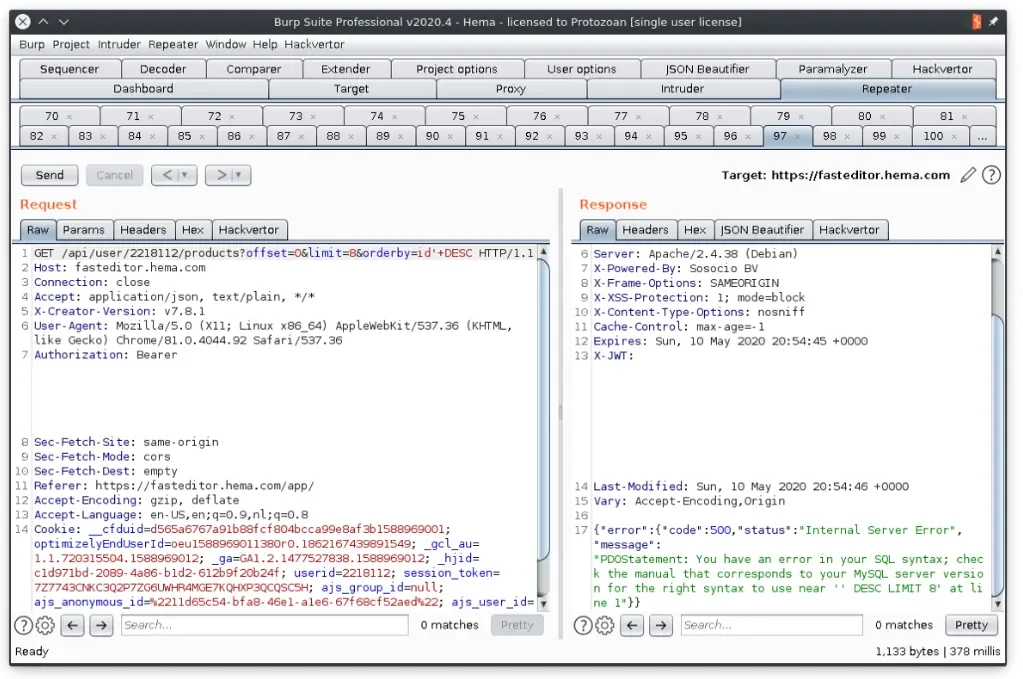
The server returned a SQL error. That error is informative in two ways: it shows that PDO (PHP Data Objects) is used, and it contains a piece of the SQL query itself. The fact that the injected ' is not escaped inside the error message is a big red flag.
Exploitation
Step 1: reconstruct the server code
While trying to exploit the bug, the researcher reconstructs the server code. Searching parts of the error message leads to a Stack Overflow post about PDO prepared statements and SQL injection, which hints at a possible mistake on the server side. The real cause is not confirmed, so the following is presented as pseudo code only:
$dbh = new PDO("photos");$orderToUse = $_GET['orderby'];$stmt = $dbh->prepare('SELECT * FROM photos where userId = :username ORDER BY '.$orderToUse.' LIMIT :limit');$stmt->execute( array(':username' => $_REQUEST['username'], ':limit' => $_REQUEST['limit']) );
The shape of the mistake is visible here: the userId and limit values are bound as parameters, but orderby is concatenated straight into the query string before prepare() is called, so it is never treated as data.
Step 2: run SQLMap against the saved request
The suspected vulnerable request is saved to a text file and handed to SQLMap. The options used are -r to load the request from the file, -p to specify the parameter to test, and -f for extensive database version fingerprinting.
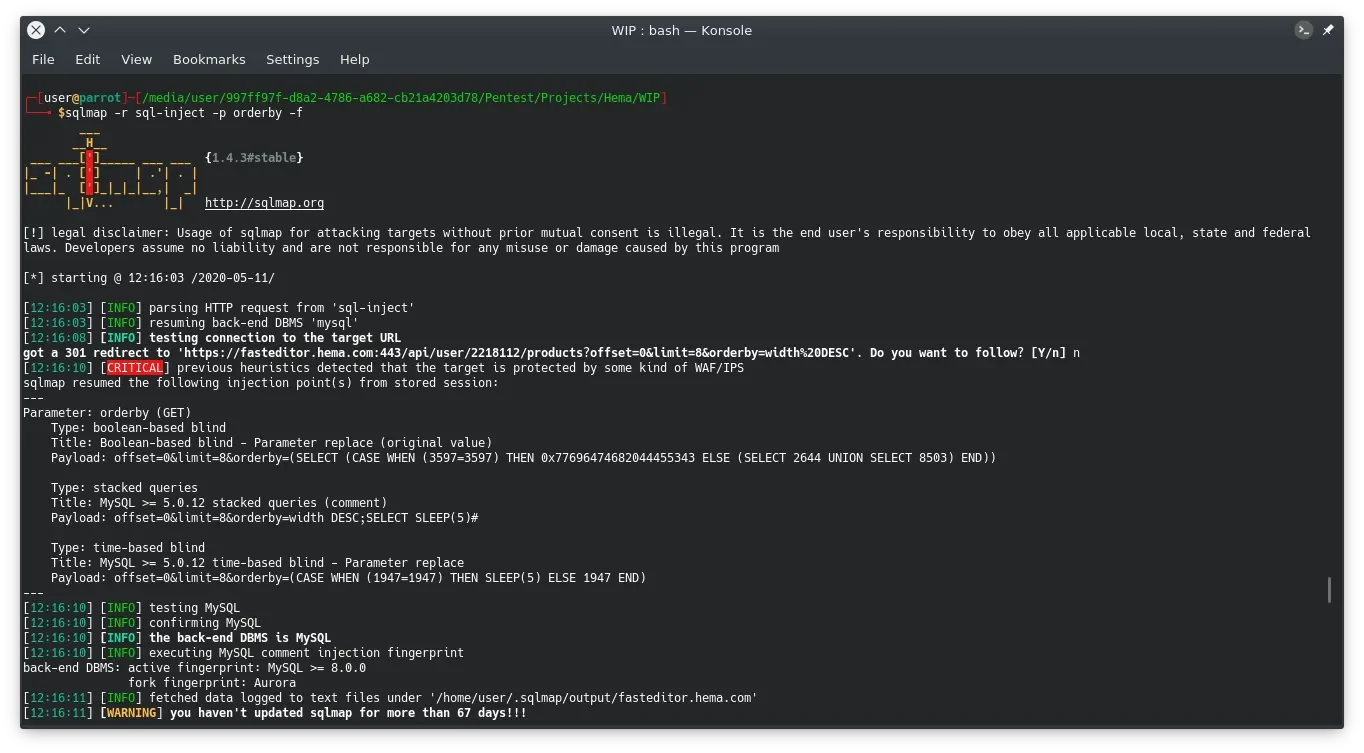
SQLMap reports that the orderby parameter is vulnerable to three different types of SQL injection attack:
- Boolean-based blind. The behaviour of the sort can be made to depend on internal data. For example, if the admin username starts with an
a, the IDs are sorted ascending; if not, descending. Every character of the username can then be enumerated by looking only at the sort direction of the output. - Stacked queries. New queries can be appended to the original one. This is described as tricky and quite dangerous: it may allow deleting database content, starting reverse shells, or creating time-based attacks to retrieve data.
- Time-based blind. Most databases support
SLEEP(), which pauses query execution for a number of seconds. Data can be exfiltrated by measuring how long the server takes to reply. For example, if the current database username starts withX, trigger a sleep of 2 seconds; if it starts withZ, sleep for 4 seconds, and repeat for every position in the string.
Step 3: hit the limits of SQLMap
Automated dumping does not work here. SQLMap struggles because of firewalls and other limitations, and the attempt to fetch the current database user with the --user option returns no data.
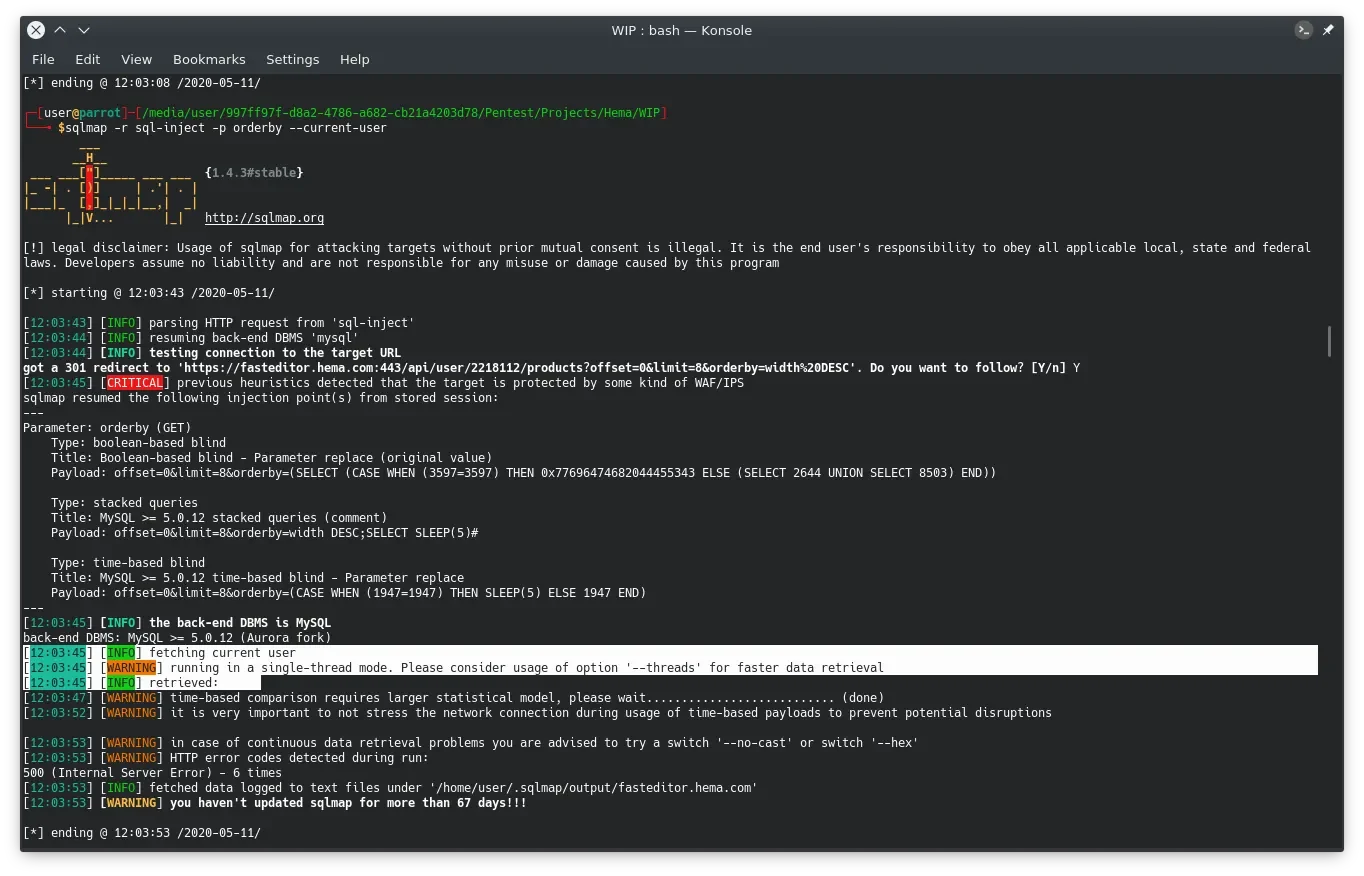
The screenshot shows the --user attempt producing no output. The researcher notes that a different command might have worked and invites suggestions.
Step 4: handcraft the payload
With SQLMap stuck, the approach switches to SQL injection cheat sheets and Burp Suite Repeater. The goal is to retrieve the current logged-in database username by running the USER() function and reading its output. The final payload is:
orderby=width+DESC;SELECT+(CASE+WHEN+(SUBSTRING((user())FROM(1)FOR(1))='§h§')+THEN+SLEEP(8)+ELSE+SLEEP(1)+END)
Dissected piece by piece:
width+DESC;replaces the originalidsort value. The change fromidtowidthhas no use in the payload. The important part is the;, which ends the original query.USER()returns a string, for example[redacted]. The idea is to compare every position of that string against all possible characters: on a match the server sleeps 8 seconds, otherwise it sleeps 1 second.SUBSTRING()selects a single character: its first argument is the input string, the second the position, the third how many characters to return.- Commas are not allowed in this payload. Every payload containing a
,came back without any sleep triggered, with all response times under 500ms. The workaround is to useFROMandFORinstead of commas, soSUBSTRING(user(),1,1)becomesSUBSTRING((user())FROM(1)FOR(1)). The researcher found the trick by searching forsubstring without comma sql injectionand reading a comment on a blog post. This bypassed whatever firewall or filter was breaking the payload. §h§is the Burp Suite Intruder injection spot where each candidate character is placed.CASE WHEN (<substring check>) THEN SLEEP(8) ELSE SLEEP(1) ENDmakes the server sleep 8 seconds on a hit and 1 second otherwise. The whole thing is wrapped inSELECT ()to make sure the database executes the query.
Step 5: automate the extraction with Intruder
Burp Suite Intruder is configured to replace §h§ with characters from a predefined list: all letters of the alphabet, all numbers, and common special signs such as _-.@.
The first four characters of the logged-in database username are recovered: hema.
After the attack runs, the results are sorted on the Response completed column, which shows how long each character took to return a response. Responses taking longer than 8 seconds are hits. Once the correct character for a position is found, the payload is changed from (SUBSTRING((user())FROM(1)FOR(1)) to (SUBSTRING((user())FROM(2)FOR(1)), the attack is re-run, and the next 8-second hit is recorded. The researcher keeps a notebook to write down each character.
The final string recovered is:
hema_live@[redacted]
This is the proof of concept: the server is vulnerable to blind SQL injection, and the logged-in database username and the local IP address of the database server were exfiltrated.
Step 6: the limitation
Manual exfiltration takes plenty of work. SQLMap can automate this kind of attack in general, but the researcher was not able to demonstrate that here and asks readers what they would do in this particular situation.
Root cause
The likely mistake is the one shown in the pseudo code: the orderby value is concatenated into the SQL string before the statement is prepared, so PDO's parameter binding never applies to it. In the pseudo code the userId and limit values are bound as parameters, while orderby is concatenated. The unescaped ' appearing in the PDO error message is a big red flag. The exact root cause was not confirmed by the researcher.
Impact
A SQL injection bug should be treated as a database compromise. Most applications enforce access levels in the application rather than in the database, so an injector has unrestricted read and write access to the database. In this case the researcher demonstrated extraction of the database username and the database server's local IP address. The report also notes that the bug might be usable for remote code execution on the operating system, and that SQLMap has features to assist with that, but for HEMA the testing stopped after proving the already critical bug because it was not known whether escalation would be acceptable to the program.
On detection, the vendor of the specific app detected the attack and deployed a hot fix within hours of discovery. The researcher contacted them to identify himself as the person who triggered the alarms.
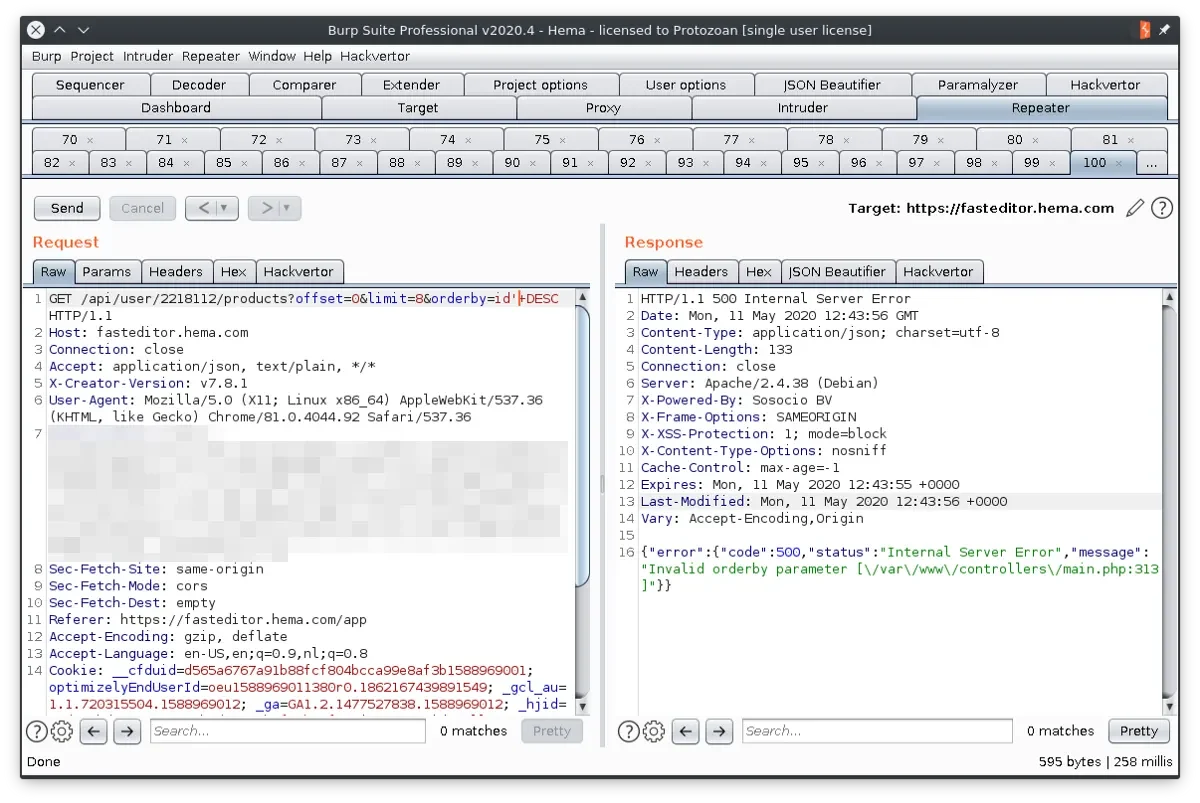
The screenshot shows the injection no longer working after the hot fix was deployed.
For incident response, the report stresses the importance of database query logs to check whether the bug was abused in the past. Web server logs are often not enough, since most web servers do not log POST parameters. Query logs themselves can sometimes be bypassed by including certain words in the payload.
Fix
The vendor deployed a hot fix within hours of discovery. HEMA later confirmed the bug and informed the researcher a fix was deployed, and the vendor confirmed that unit tests were written to avoid future SQL injection bugs. The report's general recommendation is to never trust client input: whenever client input is used in queries, apply proper checks and implement techniques that protect the queries.
Variants to test
- Sort and order parameters. Look for names such as
orderby,sort,order,direction,column. A single quote in the value that produces a SQL error containing part of the query is a positive result. - Comma-filtered targets. If payloads with
,return quickly with no delay, try theFROM/FORform ofSUBSTRING, for exampleSUBSTRING((user())FROM(1)FOR(1)). A positive result is a response that takes noticeably longer than the baseline when the guessed character matches. - Time-based confirmation. Use
CASE WHEN (<condition>) THEN SLEEP(8) ELSE SLEEP(1) ENDand compare response times across guesses. A consistent 8-second response for exactly one character per position confirms blind injection. - Stacked queries. Append a second statement after a
;and observe whether it executes. A positive result is a side effect from the appended statement rather than from the original query. - Boolean-based sort manipulation. Make the sort direction depend on a condition on internal data, then read the ordering of the returned rows. A positive result is the row order flipping according to the guessed character.
- Error-based leakage. Trigger errors and inspect whether the response contains query fragments or database technology details such as PDO. A positive result is an unescaped injected character reflected inside the error text.
What happened, in plain words
HEMA is a Dutch department store chain. On its website it offers a Photo Project feature: you can create photo projects such as photo books, and you can send a batch of photos to be printed and pick them up a few hours later in a physical shop. The different parts of this service live on different subdomains of hema.com, and each of those parts has its own API.
An API is the part of a website that a browser talks to behind the scenes. When you load a page, the page itself is only the visible shell; the actual data (your list of photo projects, for example) is fetched by the browser from a separate address, the API, usually in a compact machine-readable format. Think of a restaurant: the menu you read is the web page, and the kitchen that receives your order and sends back the dish is the API. You never walk into the kitchen yourself, but your browser does, many times per page.
A security researcher, Jonathan Bouman, was clicking around in the photo project part of the website. While clicking around, he noticed that one of the requests the browser makes contains a parameter called orderby. A parameter is a named value attached to the end of an address, after a question mark, that tells the server what you want: ?limit=8 means "give me eight items". The name orderby is interesting because it sounds exactly like something a database would understand.
A database is the place where a website keeps its data: customer records, photo projects, orders. The website's server talks to the database in a language called SQL (Structured Query Language). A single instruction in that language is called a query. A typical query says something like "give me all photos belonging to this user, sorted by ID, at most eight of them".
The bug the researcher found is called SQL injection. It means that a value the visitor controls (here, the orderby value) is pasted into a SQL query without being treated as harmless data, so the visitor can change the meaning of the query itself. The everyday comparison: imagine a form where you write your name, and the clerk reads it out loud to a colleague as part of an instruction. If you write "Anna, and also open the safe", a careless clerk reads the whole sentence and the safe gets opened. The input was supposed to be a name, but it became an instruction. SQL injection is exactly that, with a database on the other end.
SQL injection is considered a critical class of bug, because a database usually holds everything a company knows. If you can change the queries, you can often read and write data far beyond your own account.
This is what the researcher did, step by step: he spotted the suspicious parameter, broke the query with a single quote to confirm something was wrong, used an automated tool to confirm the bug, then hand-built a payload that made the server answer slowly or quickly depending on secret data, and finally automated that to read out the database username one character at a time. The vendor detected the attack and fixed it within hours.
Background: why this class of bug matters
Almost every website uses a database. When you ask a site for data, a server application formulates a query and sends it to the database. The application is also supposed to check what you are allowed to see: only data that belongs to you should come back. That check is called an access level check.
If there is a flaw that lets you manipulate the query itself, the access check can be bypassed entirely. The report points to real-world consequences: thousands of school records exposed, private financial data reachable, a hacked firewall. Data leaks are around the corner, which is why SQL injection bugs are treated as critical and often pay the highest bounties in bug bounty programmes.
A bug bounty programme is a scheme where a company invites outside researchers to look for security problems and pays them for reporting them responsibly, instead of suing them. HEMA allows the researcher to disclose the bug reports so others can learn from them.
Recon: clicking around the photo projects
The researcher started in the Photo Project part of the website. This is the feature where you create photo projects (photo books, for instance) and where you can order a batch of printed photos for pickup in a shop. The HEMA services sit on different subdomains, each with its own API.
The screenshot shows this recon step: browsing the photo project feature and finding endpoints that look interesting. An endpoint is simply a specific address on a server that does one thing, like "list my products". The caption points at the discovery: there is an orderby parameter in one of those addresses.
The vulnerable endpoint
The researcher pays close attention to two kinds of input: values in the query string (the part of the address after the question mark) and values sent in a POST request (data the browser submits in the background, for example when you save a form). He looks for anything that might be pasted directly into a SQL query.
The trigger words are ones he recognises from SQL: from, where, order by, select, limit, offset, id. If you know a little SQL, these names jump out at you. If you are new to it, a short free course is enough to recognise them.
HEMA uses an external subdomain for certain photo projects:
https://fasteditor.hema.com/
This line is just the address of that part of the service. https:// means the connection is encrypted. fasteditor.hema.com is a subdomain of hema.com, a separate host dedicated to this photo editor feature.
Whenever someone opens that URL, one of the first requests the browser makes is to this endpoint:
https://fasteditor.hema.com/api/user/<userID>/products?offset=0&limit=8&orderby=id+DESC
Line by line, in plain words:
https://fasteditor.hema.com/api/user/is the base address of the API for a specific user.<userID>is a placeholder for the number that identifies the logged-in customer. The real request carries the customer's own ID there./productssays which thing is being asked for: the list of products, here the photo projects.?starts the parameters.offset=0means "start at the first item".limit=8means "give me at most eight items".orderby=id+DESCmeans "sort by the ID column, in descending order". The+is how a space is written inside an address, so this readsorderby=id DESC.
This endpoint returns the list of previous photo projects, properly sorted, newest first because the ID is sorted descending. The orderby value is the part the researcher is interested in, because it looks like it is passed straight to the database as the sorting instruction.
The obvious next question: what happens if we insert a single quote into the orderby value? Can we break the query?
A single quote is the character that, in SQL, marks the beginning and end of a piece of text. If the application builds a query by gluing your input into it, a quote you supply can end the text early and let whatever follows be read as SQL code. It is the simplest test for this class of bug: put a quote in, and see whether the server complains in a way that reveals it was building a query around your input.
The server returned a SQL error. That is the first sign of a SQL injection bug. The error is informative in two ways: it shows that PDO (PHP Data Objects) is used, and it contains a piece of the SQL query itself. PDO is a standard way for PHP applications to talk to databases. The fact that the injected ' is not escaped inside the error message is a big red flag: it means the quote travelled into the query untouched.
Exploitation
Step 1: reconstruct the server code
While trying to exploit the bug, the researcher tries to reconstruct what the server code probably looks like. This is a common technique: you cannot see the server's source code, but the error message leaks fragments, and you search for those fragments online to understand how such code is usually written. Searching parts of the error led to a Stack Overflow post about PDO prepared statements and SQL injection, which hints at a possible mistake on the server side.
A prepared statement is the safe way to build a query: you write the query with placeholders, and the database treats the values you fill in strictly as data, never as code. The mistake hinted at is that one value is glued in before the statement is prepared, so the protection never applies to it.
The real cause was not confirmed, so the following is presented as pseudo code only. Pseudo code is code-shaped text that shows the idea without being runnable:
$dbh = new PDO("photos");$orderToUse = $_GET['orderby'];$stmt = $dbh->prepare('SELECT * FROM photos where userId = :username ORDER BY '.$orderToUse.' LIMIT :limit');$stmt->execute( array(':username' => $_REQUEST['username'], ':limit' => $_REQUEST['limit']) );
Line by line, in plain words:
$dbh = new PDO("photos");opens a connection to the database.$orderToUse = $_GET['orderby'];takes theorderbyvalue straight from the address bar.$_GETis how PHP exposes parameters that came in the URL.$stmt = $dbh->prepare('SELECT * FROM photos where userId = :username ORDER BY '.$orderToUse.' LIMIT :limit');builds the query. The:usernameand:limitparts are placeholders, which is the safe pattern. But$orderToUseis glued in with a dot (string concatenation) beforeprepare()is called, so it becomes part of the query text itself.$stmt->execute( array(':username' => $_REQUEST['username'], ':limit' => $_REQUEST['limit']) );fills in the two placeholders with the submitted values and runs the query.
In the pseudo code, userId and limit are bound as parameters, but orderby is concatenated straight into the query string.
Step 2: run SQLMap against the saved request
SQLMap is a free tool that automates discovering and exploiting SQL injection bugs. It can produce proof-of-concept payloads and can even dump whole databases.
The suspected vulnerable request is saved to a text file and handed to SQLMap. The options used are:
-rto load the request from the file.-pto specify which parameter to test.-ffor extensive database version fingerprinting, meaning SQLMap tries to work out exactly which database software and version is on the other side.
SQLMap reports that the orderby parameter is vulnerable to three different types of SQL injection attack. Each type is a different way of getting information out of the database:
- Boolean-based blind. The behaviour of the sort can be made to depend on internal data. For example, if the admin username starts with an
a, the IDs are sorted ascending; if not, descending. Every character of the username can then be enumerated by looking only at the sort direction of the output. "Blind" means you never see the data itself, only a yes/no difference in behaviour. The everyday comparison: you ask a locked room "is the first letter of the secret an A?" and the only answer you get is the order in which the photos come back. - Stacked queries. New queries can be appended to the original one. This is described as tricky and quite dangerous: it may allow deleting database content, starting reverse shells, or creating time-based attacks to retrieve data. A reverse shell is a connection the attacked server makes back to the attacker, giving the attacker a command line on that server.
- Time-based blind. Most databases support
SLEEP(), which pauses query execution for a number of seconds. Data can be exfiltrated by measuring how long the server takes to reply. For example, if the current database username starts withX, trigger a sleep of 2 seconds; if it starts withZ, sleep for 4 seconds, and repeat for every position in the string. The everyday comparison: you cannot see the secret, but you can ask the server to raise a hand for a while if your guess is right. The delay is the answer.
Step 3: hit the limits of SQLMap
Automated dumping does not work here. SQLMap struggles because of firewalls and other limitations, and the attempt to fetch the current database user with the --user option returns no data.
The screenshot shows the --user attempt producing no output. The researcher notes that a different command might have worked and invites suggestions from readers.
Step 4: handcraft the payload
With SQLMap stuck, the approach switches to SQL injection cheat sheets and Burp Suite Repeater. Burp Suite is a tool that sits between your browser and the server, letting you capture a request, edit it by hand, and send it again as many times as you like. Repeater is the part that does exactly that: one request, edited and resent manually.
The goal is to retrieve the current logged-in database username by running the USER() function and reading its output. USER() is a built-in database function that returns the name of the account the application is using to talk to the database, often in the form name@host.
The final payload is:
orderby=width+DESC;SELECT+(CASE+WHEN+(SUBSTRING((user())FROM(1)FOR(1))='§h§')+THEN+SLEEP(8)+ELSE+SLEEP(1)+END)
Dissected piece by piece:
width+DESC;replaces the originalidsort value. The change fromidtowidthhas no use in the payload. The important part is the;, which ends the original query. In SQL, a semicolon separates one statement from the next, so everything after it can be a new instruction.USER()returns a string, for example[redacted]. The idea is to compare every position of that string against all possible characters: on a match the server sleeps 8 seconds, otherwise it sleeps 1 second.SUBSTRING()selects a single character: its first argument is the input string, the second the position, the third how many characters to return. SoSUBSTRING(user(),1,1)means "take one character from the username, starting at position 1", which is the first character.- Commas are not allowed in this payload. Every payload containing a
,came back without any sleep triggered, with all response times under 500ms. Something on the way, a firewall or a filter, was blocking commas. The workaround is to useFROMandFORinstead of commas, soSUBSTRING(user(),1,1)becomesSUBSTRING((user())FROM(1)FOR(1)). The researcher found the trick by searching forsubstring without comma sql injectionand reading a comment on a blog post. This bypassed whatever firewall or filter was breaking the payload. A firewall here means a filter that inspects requests and blocks ones that look suspicious. §h§is the Burp Suite Intruder injection spot where each candidate character is placed. Intruder is the part of Burp Suite that takes one request and repeats it many times, each time with a different value in the marked spot. The§marks are just placeholders that Intruder recognises.CASE WHEN (<substring check>) THEN SLEEP(8) ELSE SLEEP(1) ENDmakes the server sleep 8 seconds on a hit and 1 second otherwise.CASE WHENis SQL's if-then-else. The whole thing is wrapped inSELECT ()to make sure the database executes the query.
Step 5: automate the extraction with Intruder
Burp Suite Intruder is configured to replace §h§ with characters from a predefined list: all letters of the alphabet, all numbers, and common special signs such as _-.@.
The first four characters of the logged-in database username are recovered: hema.
After the attack runs, the results are sorted on the Response completed column, which shows how long each character took to return a response. Responses taking longer than 8 seconds are hits. Once the correct character for a position is found, the payload is changed from (SUBSTRING((user())FROM(1)FOR(1)) to (SUBSTRING((user())FROM(2)FOR(1)), the attack is re-run, and the next 8-second hit is recorded. The researcher keeps a notebook to write down each character.
The final string recovered is:
hema_live@[redacted]
This is the proof of concept: the server is vulnerable to blind SQL injection, and the logged-in database username and the local IP address of the database server were exfiltrated. A proof of concept is the smallest demonstration that proves a bug is real, without going further than necessary.
Step 6: the limitation
Manual exfiltration takes plenty of work. SQLMap can automate this kind of attack in general, but the researcher was not able to demonstrate that here and asks readers what they would do in this particular situation.
Root cause
The likely mistake is the one shown in the pseudo code: the orderby value is concatenated into the SQL string before the statement is prepared, so PDO's parameter binding never applies to it. The userId and limit values are bound properly, which is why the query still works normally and only the sort clause is injectable. The unescaped ' appearing in the PDO error message is a big red flag. The exact root cause was not confirmed by the researcher.
Impact
A SQL injection bug should be treated as a database compromise. Most applications enforce access levels in the application rather than in the database, so an injector has unrestricted read and write access to the database. In this case the researcher demonstrated extraction of the database username and the database server's local IP address. The report also notes that the bug might be usable for remote code execution on the operating system, and that SQLMap has features to assist with that, but for HEMA the testing stopped after proving the already critical bug because it was not known whether escalation would be acceptable to the programme.
On detection, the vendor of the specific app detected the attack and deployed a hot fix within hours of discovery. A hot fix is an urgent patch applied directly to a live system, usually without the normal release process. The researcher contacted them to identify himself as the person who triggered the alarms.
The screenshot shows the injection no longer working after the hot fix was deployed.
For incident response, the report stresses the importance of database query logs to check whether the bug was abused in the past. Web server logs are often not enough, since most web servers do not log POST parameters. Query logs themselves can sometimes be bypassed by including certain words in the payload.
Fix
The vendor deployed a hot fix within hours of discovery. HEMA later confirmed the bug and informed the researcher a fix was deployed, and the vendor confirmed that unit tests were written to avoid future SQL injection bugs. A unit test is a small automated check that runs every time the code changes, so the same mistake cannot quietly come back. The report's general recommendation is to never trust client input: whenever client input is used in queries, apply proper checks and implement techniques that protect the queries.
Variants to test
- Sort and order parameters. Look for names such as
orderby,sort,order,direction,column. A single quote in the value that produces a SQL error containing part of the query is a positive result. - Comma-filtered targets. If payloads with
,return quickly with no delay, try theFROM/FORform ofSUBSTRING, for exampleSUBSTRING((user())FROM(1)FOR(1)). A positive result is a response that takes noticeably longer than the baseline when the guessed character matches. - Time-based confirmation. Use
CASE WHEN (<condition>) THEN SLEEP(8) ELSE SLEEP(1) ENDand compare response times across guesses. A consistent 8-second response for exactly one character per position confirms blind injection. - Stacked queries. Append a second statement after a
;and observe whether it executes. A positive result is a side effect from the appended statement rather than from the original query. - Boolean-based sort manipulation. Make the sort direction depend on a condition on internal data, then read the ordering of the returned rows. A positive result is the row order flipping according to the guessed character.
- Error-based leakage. Trigger errors and inspect whether the response contains query fragments or database technology details such as PDO. A positive result is an unescaped injected character reflected inside the error text.
Timeline and reward
The researcher received a €100 HEMA gift card plus a bonus, for reporting five reflected XSS bugs, a SQL injection bug and plenty of other bugs. Reflected XSS is a different class of bug where a value you send is echoed back into the page and runs as code in your browser.
The timeline as published:
- 11-05-20: bug discovered, hot fix deployed by the vendor, report written, HEMA informed.
- 11-05-20: telephone contact with the vendor to disclose the finding; the vendor asks for more time to check other endpoints.
- 15-05-20: HEMA confirms the bug and informs the researcher a fix is deployed, and rewards a €100 gift card for this bug and six reflected XSS bugs.
- 26-05-20: update requested from the vendor, who confirms it is fixed and that unit tests are now written to avoid future SQL injection bugs.
- 26-05-20: HEMA agrees with publication of the report.
- 05-06-20: HEMA rewards a bonus for all the efforts made.
- 06-08-20: report revised and published.
Glossary
- API: the machine-facing part of a website that the browser talks to in the background to fetch or send data.
- Parameter: a named value attached to a request, such as
limit=8, telling the server what you want. - Query string: the part of an address after the
?, made of parameters. - POST parameter: a value sent in the body of a request rather than in the address, typically when submitting a form.
- Endpoint: a specific address on a server that performs one function.
- Database: the system where a website stores its data.
- SQL: the language used to ask a database for data or to change it.
- Query: one instruction in SQL.
- SQL injection (SQLi): a bug where visitor input changes the meaning of a SQL query instead of being treated as data.
- Blind SQL injection: injection where you never see the data directly, only a yes/no difference in behaviour, such as sort order or response time.
- Boolean-based blind: blind injection where the yes/no answer shows up as a change in behaviour, for example the sort direction.
- Time-based blind: blind injection where the yes/no answer shows up as a delay in the response.
- Stacked queries: appending a second SQL statement after a semicolon so it runs as well.
- Payload: the crafted input that triggers the bug.
- Proof of concept: the smallest demonstration that proves a bug is real.
- Single quote: the
'character that marks text boundaries in SQL; injecting one is the classic test for SQL injection. - Escaping: marking characters in input so they are treated as plain text rather than as code.
- PDO (PHP Data Objects): a standard way for PHP applications to talk to databases.
- Prepared statement: a query written with placeholders, where the database treats filled-in values strictly as data.
- Parameter binding: filling placeholders in a prepared statement with values that are never interpreted as code.
- Concatenation: gluing strings together, here gluing user input into a query.
USER(): a database function returning the name of the account the application uses to connect.SUBSTRING(): a database function that returns part of a string, given a start position and a length.SLEEP(): a database function that pauses execution for a number of seconds.CASE WHEN: SQL's if-then-else construct.- Firewall / filter: something on the way that inspects requests and blocks ones that look suspicious.
- Burp Suite: a tool that sits between browser and server, letting you capture, edit and resend requests.
- Repeater: the Burp Suite part for editing and resending a single request by hand.
- Intruder: the Burp Suite part for repeating a request many times with different values in a marked spot.
- SQLMap: a free tool that automates discovering and exploiting SQL injection bugs.
- Fingerprinting: working out which software and version is running on the other side.
- Reverse shell: a connection the attacked server makes back to the attacker, giving a command line on that server.
- Remote code execution: running your own commands on the attacked machine.
- Exfiltration: getting data out of a system without permission.
- Hot fix: an urgent patch applied directly to a live system.
- Unit test: a small automated check that runs whenever code changes, to catch regressions.
- Incident response: the process of investigating and handling a security incident.
- Query logs: records of the queries a database received, useful to check whether a bug was abused.
- Bug bounty programme: a scheme where a company pays outside researchers for responsibly reported security bugs.
- Reflected XSS: a bug where a value you send is echoed back into a page and runs as code in your browser.
- Subdomain: a named part of a larger domain, such as
fasteditor.hema.comunderhema.com. - HTTPS: the encrypted version of the protocol used to load web pages.