Stored XSS in Email Templates via link
A stored cross-site scripting flaw existed in the email template editor of a Shopify app, where a link could be given a malicious payload. An attacker could save such a template and then trigger the script when the link text was clicked, potentially stealing session cookies.
 Originally disclosed on HackerOne
- Triaged in 20 days
- Fixed in 28 days
- Paid in 26 days
- Disclosed after 28 days
Summary:
Stored cross-site scripting (also known as second-order or persistent XSS) arises when an application receives data from an untrusted source and includes that data within its later HTTP responses in an unsafe way.
FYI:
I Install judge.me in Shopify E-Commerce
Steps To Reproduce:
- Go to
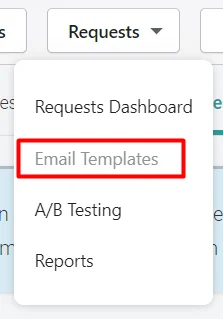
Requests > Email Templates
- Click
New Templates

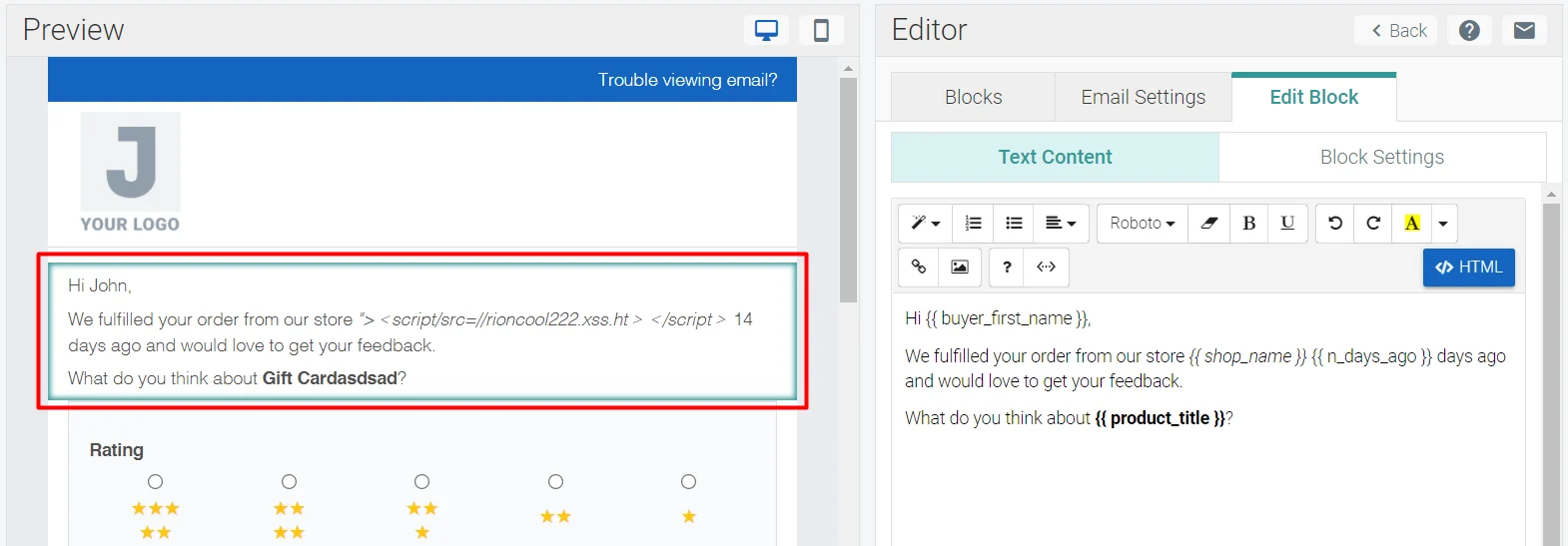
- Edit this block
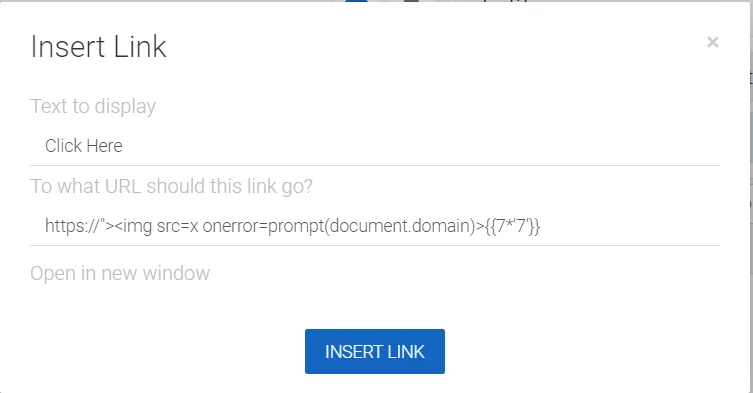
- Insert Link with XSS payload (See image below)
- Then save email
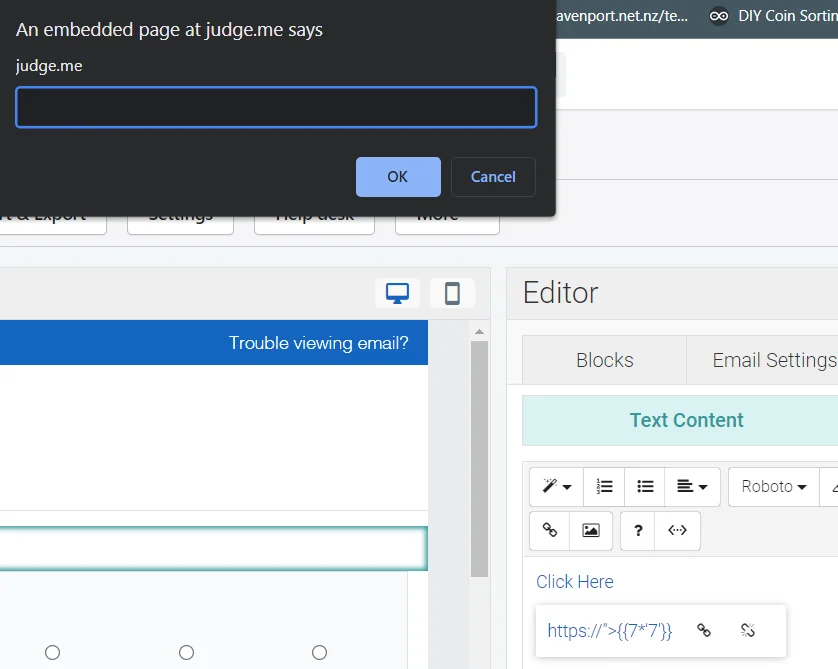
- To trigger the XSS, you can click
Click Heretext
Impact
Session Hijacking, Cookie Stealing
What the report shows
This is a stored cross-site scripting report against Judge.me, a review application that the researcher installed into a Shopify e-commerce store. The affected asset is judge.me, and the vulnerable feature is the email template editor. The report was rated medium severity with a CVSS score of 6.8, and a bounty of 500 USD was paid. It was disclosed on 18 November 2021.
The researcher's summary describes stored XSS (also called second-order or persistent XSS) as arising when an application receives data from an untrusted source and later includes that data in its HTTP responses in an unsafe way. The report notes up front that the researcher had installed Judge.me in a Shopify store, which is the context in which the steps below were carried out.
The reproduction steps are short and entirely within the email template editor:
- Go to
Requests > Email Templates.
- Click
New Templates.
- Edit a block in the template.
- Insert a link containing the XSS payload.
-
Save the email.
-
To trigger the XSS, click the
Click Heretext.
The report does not include the payload itself, the exact request or response, or the name of the block that was edited. The screenshots follow the flow from the email templates list, through creating a new template, editing a block, inserting the link, and finally the saved template with the Click Here link. The screenshots follow the flow from the email templates list, through creating a new template, editing a block, inserting the link, and the saved template with the Click Here link.
Root cause
The report does not explain the root cause.
Impact
The report lists session hijacking and cookie stealing as the impact. The report does not describe a specific victim scenario, an account takeover chain, or any data that was actually exfiltrated; the impact section is a statement of what the bug class allows, not a demonstrated exploit beyond triggering the payload.
How this kind of bug works
Stored XSS happens when an application accepts data from one request, keeps it, and later places it into an HTML response without context-appropriate encoding. The browser cannot tell developer-authored markup from attacker-authored markup, so any <script> element, event handler attribute, or javascript: URL that survives into the response executes with the origin of the application.
Email template editors are a classic home for this because they are rich-text builders. They let users compose HTML with links, images and formatting, and they often store the composed markup and re-render it in a preview or editing view. If the editor sanitises on input but not on output, or sanitises the visible text but not the URL attribute, the payload survives. Link fields are especially prone to this: a URL is placed into an href attribute, and a javascript: scheme or a quote that breaks out of the attribute turns a benign link into script execution.
The defences are output encoding matched to context (HTML body, attribute, URL, JavaScript, CSS), a strict allow-list sanitiser for rich-text content that validates URL schemes, and a Content Security Policy that blocks inline script. Server-side validation of the stored template on save is useful, but the decisive control is safe rendering at the point of output.
How to test for it
- Identify features that store rich content and render it later: email templates, notification templates, signature builders, CMS blocks, comment bodies, profile descriptions, support macros.
- Map every field that ends up in markup: the visible text, the link URL, image sources, alt text, and any style or class attributes.
- Submit a benign marker first, such as a unique string, and confirm where and when it is rendered back. This tells you which sink you are dealing with.
- Then submit payloads appropriate to the sink. For a link URL, try a
javascript:scheme and a value that breaks out of the attribute with a quote. For body text, try an element with an event handler. Keep payloads minimal so you can tell what executed. - Save, reload, and view the template the way a recipient or another user would. A positive result is your marker executing as script in the application's origin, visible in the browser console or through a callback to a listener you control.
- Test the second view path as well: previews, exports, and any admin view that renders the same stored content, since sanitisation often differs between them.
Common false positives: the payload appears in the response but is HTML-encoded, so it renders as text; the payload executes only in your own session because the editor renders unsanitised content client-side for the author but sanitises it for everyone else; the browser blocks the scheme or the CSP blocks inline script; or the value is reflected rather than stored, which is a different bug with different impact. Always confirm persistence by loading the page in a fresh session or as a second user.
How it is fixed
Apply context-aware output encoding wherever stored template content is rendered. Run rich-text content through an allow-list sanitiser that strips dangerous elements, attributes and URL schemes, and validate link URLs server-side so only expected schemes such as https are accepted. Add a Content Security Policy that disallows inline script as defence in depth. Re-save or migrate existing templates so previously stored payloads are neutralised.
Hunting notes
Template and notification editors are high-yield because they are built for HTML and are often less hardened than the main application. Look for features with a preview button, a WYSIWYG toolbar, or a link dialog; these usually have several sinks per screen. Recon signals include admin panels with template management, marketing or transactional email builders, and any endpoint that returns stored HTML fragments.
To get a report accepted, show persistence across sessions or users, name the exact field and the exact rendering point, and demonstrate execution with a minimal payload rather than a screenshot of encoded text. If the program cares about impact, describe what the script can reach in the victim's session, but keep it to what you can actually show.
What happened, in plain words
This report describes a stored cross-site scripting (XSS) bug in Judge.me, a review application that the researcher installed into a Shopify online store. The affected site is judge.me, and the feature involved is the email template editor, where a shop owner builds the emails that get sent to customers. The report was rated medium severity with a CVSS score of 6.8, a bounty of 500 USD was paid, and it was disclosed on 18 November 2021.
To understand the bug, you need two ideas. First, a web page is just text that a browser reads and turns into what you see. Some of that text is instructions, not content: for example, a piece of text can tell the browser "this is a link, and here is where it goes". Second, XSS means getting your own instructions into someone else's page, so the browser runs them as if the site's own developers had written them. The word stored means the bad instructions are saved on the server and handed back to every later visitor, rather than appearing only once.
The researcher's own summary explains stored XSS (also called second-order or persistent XSS) as arising when an application receives data from an untrusted source and later includes that data in its HTTP responses in an unsafe way. In everyday terms: the site takes something a user typed, keeps it, and later pastes it into a page without checking it, so the browser treats the user's text as instructions.
The report notes up front that the researcher had installed Judge.me in a Shopify store, which is the setting for the steps below. The reproduction steps stay entirely inside the email template editor:
- Go to
Requests > Email Templates.
- Click
New Templates.
- Edit a block in the template.
- Insert a link containing the XSS payload.
The editor has a feature for adding a link, and the researcher inserted a link with an XSS payload. The report does not include the payload itself, the exact request or response, or the name of the block that was edited.
-
Save the email.
-
To trigger the XSS, click the
Click Heretext.
The saved template is displayed with a link reading Click Here, and clicking that text triggers the XSS. The screenshots follow the whole flow: the email templates list, creating a new template, editing a block, inserting the link, and the saved template with the Click Here link.
Why it works
The report does not explain the root cause.
Impact
The report lists session hijacking and cookie stealing as the impact. A cookie is a small piece of data a site asks your browser to keep and send back with each request, and a session cookie is what tells the site that you are already logged in. If script runs inside the site's own page, it can read what the page can read, including that cookie, and then act as the victim. The report does not describe a specific victim scenario, an account takeover chain, or any data that was actually taken; the impact section states what this class of bug allows, not a demonstrated exploit beyond triggering the payload.
In general, how this kind of bug works
Stored XSS happens when an application accepts data from one request, keeps it, and later places it into an HTML response without encoding suited to where it lands. The browser cannot tell developer-written markup from attacker-written markup, so any <script> element, event handler attribute, or javascript: URL that survives into the response runs with the origin of the application. Origin here means the site's identity in the browser: script running on judge.me is trusted as judge.me.
Email template editors are a classic home for this because they are rich-text builders. They let users compose HTML with links, images and formatting, and they often store that markup and re-render it in a preview or editing view. If the editor cleans input but not output, or cleans the visible text but not the URL, the payload survives. Link fields are especially prone: a URL is placed into an href attribute, and a javascript: scheme, or a quote that breaks out of the attribute, turns a benign link into script execution.
The defences are output encoding matched to context (HTML body, attribute, URL, JavaScript, CSS), a strict allow-list sanitiser for rich-text content that validates URL schemes, and a Content Security Policy that blocks inline script. Server-side validation on save helps, but the decisive control is safe rendering at the point of output.
How to test for it
- Find features that store rich content and render it later: email templates, notification templates, signature builders, CMS blocks, comment bodies, profile descriptions, support macros.
- Map every field that ends up in markup: visible text, link URL, image sources, alt text, and any style or class attributes.
- Submit a harmless marker first, such as a unique string, and confirm where and when it comes back. That tells you which output you are dealing with.
- Then submit payloads suited to that output. For a link URL, try a
javascript:scheme and a value that breaks out of the attribute with a quote. For body text, try an element with an event handler. Keep payloads minimal so you can tell what ran. - Save, reload, and view the template the way a recipient or another user would. A positive result is your marker running as script in the application's origin, visible in the browser console or through a callback to a listener you control.
- Test the second view path too: previews, exports, and any admin view that renders the same stored content, since sanitisation often differs between them.
Common false positives: the payload appears in the response but is HTML-encoded, so it shows as text; it runs only in your own session because the editor renders unsanitised content for the author but cleans it for everyone else; the browser blocks the scheme or the CSP blocks inline script; or the value is reflected rather than stored, which is a different bug with different impact. Always confirm persistence by loading the page in a fresh session or as a second user.
How it is fixed
Apply context-aware output encoding wherever stored template content is rendered. Run rich-text content through an allow-list sanitiser that strips dangerous elements, attributes and URL schemes, and validate link URLs server-side so only expected schemes such as https are accepted. Add a Content Security Policy that disallows inline script as defence in depth. Re-save or migrate existing templates so previously stored payloads are neutralised.
Hunting notes
Template and notification editors are high-yield because they are built for HTML and are often less hardened than the main application. Look for features with a preview button, a WYSIWYG toolbar, or a link dialog; these usually have several outputs per screen. Recon signals include admin panels with template management, marketing or transactional email builders, and any endpoint that returns stored HTML fragments.
To get a report accepted, show persistence across sessions or users, name the exact field and the exact rendering point, and demonstrate execution with a minimal payload rather than a screenshot of encoded text. If the program cares about impact, describe what the script can reach in the victim's session, but keep it to what you can actually show.
Glossary
- XSS (cross-site scripting): getting your own instructions into someone else's web page so the browser runs them as if the site wrote them.
- Stored XSS: XSS where the bad value is saved on the server and served to later visitors, also called second-order or persistent XSS.
- Reflected XSS: XSS where the value comes back once in the same response and is not saved.
- Payload: the crafted value an attacker submits to try to make something happen.
- HTTP response: what a server sends back to a browser after a request.
- HTML: the text format that describes a web page, including links and other markup.
- Markup: the tags and attributes in HTML that tell the browser what to display and how.
- Attribute: a setting inside an HTML tag, such as the
hrefof a link that says where it points. href: the attribute of a link that holds its destination URL.javascript:URL: a link destination that runs script instead of going to a page.- Sanitisation: cleaning user-supplied content so dangerous parts are removed or neutralised.
- Output encoding: converting stored data so the browser displays it as text rather than running it.
- Allow-list: a rule that permits only known-good items and rejects everything else.
- Content Security Policy (CSP): a header a site sends to tell the browser which scripts are allowed to run.
- Cookie: a small piece of data a site asks the browser to keep and send back with later requests.
- Session cookie: the cookie that identifies you as logged in.
- Session hijacking: taking over someone's logged-in session, often by stealing their session cookie.
- Origin: the site's identity in the browser, made of scheme, host and port; script running there is trusted as that site.
- CVSS: a standard scoring system for the severity of a vulnerability.
- Bounty: a payment a company makes for a valid security report.
- False positive: a finding that looks like a bug but is not exploitable in practice.
- WYSIWYG: "what you see is what you get", an editor where you format content visually rather than typing markup.






