Stored XSS in "Create Groups"
A group name was stored and later rendered without proper escaping, so a script embedded in the name ran when the group page was opened. An attacker could run JavaScript in a victim's session, which the report says could be used to steal cookies.
 Originally disclosed on HackerOne
- Triaged in 4 hours
- Fixed in 7 months
- Paid in 4 months
- Disclosed after 13 months
NOTE! Thanks for submitting a report! Please replace all the (parenthesized) sections below with the pertinent details. Remember, the more detail you provide, the easier it is for us to triage and respond quickly, so be sure to take your time filling out the report!
Summary
Stored attacks are those where the injected script is permanently stored on the target servers, such as in a database, in a message forum, visitor log, comment field, etc. The victim then retrieves the malicious script from the server when it requests the stored information. Stored XSS is also sometimes referred to as Persistent or Type-I XSS.
Steps to reproduce
- Login to Gitlab
- Create a new group with xss payload
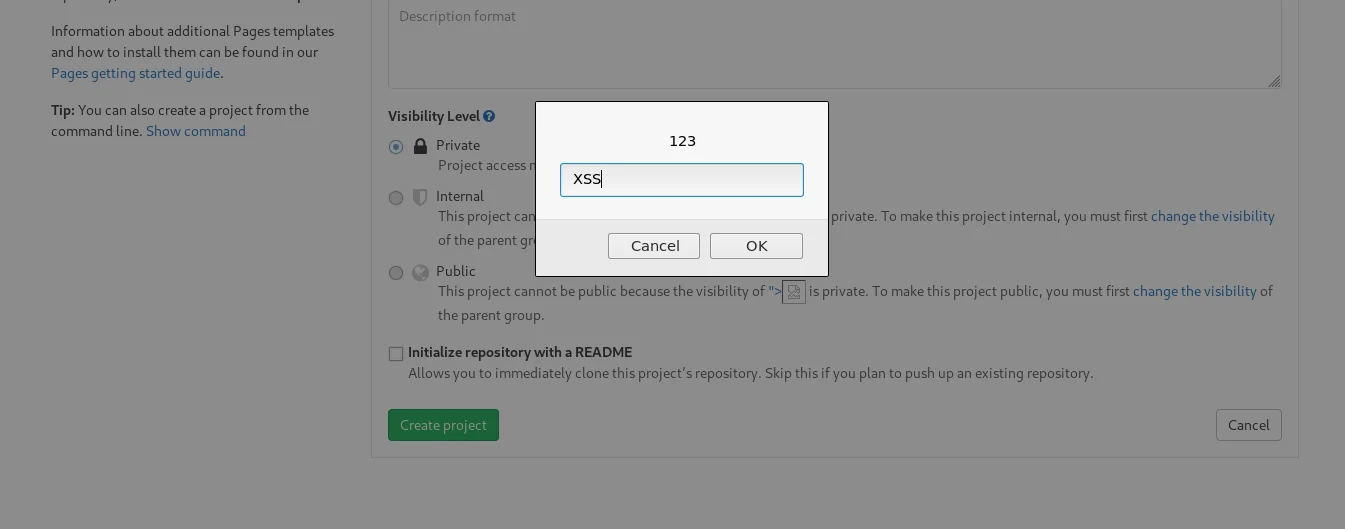
payload i use = "><img src=x onerror=prompt(123)> 3. Open Group 4. To trigger XSS you can click "NEW PROJECT" 5. XSS Trigger
Impact
Can steal Cookie, Can run javascript code, etc
Attachments
Context
GitLab is a web based DevOps platform, and the report concerns the hosted instance at gitlab.com. The feature involved is group creation: a user creates a new group, gives it a name, and the group then appears in the interface, including on pages where projects can be created inside it. The report is a stored cross-site scripting (XSS) finding in that group creation flow, rated high severity and rewarded with a 2,500 USD bounty.
The researcher's own summary explains the class of bug: stored attacks are those where the injected script is permanently stored on the target servers, such as in a database, in a message forum, visitor log, comment field, and so on. The victim then retrieves the malicious script from the server when it requests the stored information. Stored XSS is also sometimes referred to as Persistent or Type-I XSS.
Setup
The only precondition stated in the report is an account on GitLab, since step one is to log in to gitlab.com. No specific role, plan, browser, tool or version is mentioned. The payload is a plain HTML image tag with an onerror handler, so no special tooling is needed beyond a browser and the ability to create a group.
Finding it
The researcher does not describe how the input was first noticed as suspicious. The report goes straight to the reproduction: the group name field accepts a value containing HTML, and that value is later rendered back into pages in a context where the markup is interpreted rather than escaped. The payload chosen is deliberately simple, an image whose src does not resolve, so the onerror handler fires as soon as the browser tries to load it.
Exploitation
Step 1: Log in
- Login to Gitlab
A normal authenticated session is all that is required.
Step 2: Create a group with the payload as its name
- Create a new group with xss payload
payload i use =
"><img src=x onerror=prompt(123)>
The payload has two parts. The leading "> closes whatever attribute the group name is being placed into, so the following markup is parsed as HTML rather than as part of an attribute value. The <img src=x onerror=prompt(123)> then supplies an element whose load fails, which triggers the JavaScript prompt(123). The prompt call is only a proof of execution; any script could sit in the handler.
Step 3: Open the group
- Open Group
Opening the group page is where the stored value is rendered back to the viewer.
Step 4: Trigger the XSS
-
To trigger XSS you can click "NEW PROJECT"
-
XSS Trigger
The report lists clicking the "NEW PROJECT" control on the group page as a way to trigger the script. That means the group name is rendered into the page in the context of that action, and the injected onerror handler runs when the browser processes the injected image element. The screenshot attached to the report shows the result:
Root cause
The report does not include any code or describe the server side handling, so the exact mistake is not shown. What the behaviour implies is that the group name is stored and later output into an HTML context without adequate encoding, and that the value is placed inside an attribute, since the payload needs the leading "> to break out before the <img> tag is interpreted. The likely failure is missing or incorrect output encoding at the point where the group name is rendered on the group page, rather than a failure to store the value. The report does not say which defence, if any, was present and bypassed.
Impact
The report lists the impact briefly: can steal Cookie, can run javascript code, etc.
Fix
The appropriate remediation for this class of bug is to encode the group name for the output context in which it is rendered, so that characters such as ", < and > are escaped and the value cannot break out of its attribute or introduce new elements. Context-aware auto-escaping in the templating layer, plus a Content Security Policy that blocks inline handlers, would reduce the chance of recurrence.
Variants to test
- Try the same attribute-breakout payload in other name fields that are echoed back into pages, such as project names, subgroup names and descriptions. A positive result is the handler firing when the page is viewed.
- Try payloads that do not rely on
onerror, for example an SVGonloador ajavascript:URL in an attribute, to see whether only some sinks are filtered. - Try the payload in fields rendered in different contexts (page title, breadcrumb, dropdown, tooltip) since encoding may be correct in one place and missing in another.
- Try storing the payload with one account and viewing the page with a second account of a different role, to establish whether the script runs for other users and not only for the creator.
Hunting notes
This kind of bug tends to hide in user-controlled names that are reused across many views: group, project and subgroup names, labels, milestones and other objects whose titles appear in navigation, breadcrumbs and action menus. During recon, the signal is a name field that is reflected back verbatim in the HTML source, especially inside an attribute, which is exactly the condition the leading "> in this payload tests. The researcher used a minimal prompt(123) payload and attached a screenshot.
What happened, in plain words
GitLab is a website where teams keep their software projects. Among other things, it lets you create groups, which are like folders that hold several projects and the people who work on them. You give a group a name, and GitLab shows that name back to you in lots of places around the site.
The researcher found that a group name containing HTML was rendered as markup in GitLab's pages. If the name contained a piece of HTML (the language web pages are written in), the browser treated that piece as real page code instead of as plain text. Because the name is saved on GitLab's servers, the code is stored and runs when the page is triggered as described. This is called stored cross-site scripting, or stored XSS.
To prove it, the researcher used a harmless pop-up box as the code that runs. The report was rated high severity and paid a 2,500 USD bounty.
The idea behind the bug
The researcher's own summary explains the class of bug: stored attacks are those where the injected script is permanently stored on the target servers, such as in a database, in a message forum, visitor log, comment field, and so on. The victim then retrieves the malicious script from the server when it requests the stored information. Stored XSS is also sometimes referred to as Persistent or Type-I XSS.
A simple comparison: imagine a guest book at a hotel where guests write their names. If the hotel later prints every entry on a notice board exactly as written, a guest could write not just a name but an instruction like "tear down this notice board", and staff would follow it. A website that saves what you type and later shows it without checking is doing the same thing with code.
What you need before starting
The only precondition stated in the report is an account on GitLab, since step one is to log in to gitlab.com. No specific role, plan, browser, tool or version is mentioned. The payload is a plain HTML image tag with an onerror handler, so no special tooling is needed beyond a browser and the ability to create a group.
Finding it
The researcher does not describe how the input was first noticed as suspicious. The report goes straight to the reproduction: the group name field accepts a value containing HTML, and that value is later rendered back into pages in a context where the markup is interpreted rather than escaped. The payload chosen is deliberately simple, an image whose src does not resolve, so the onerror handler fires as soon as the browser tries to load it.
Exploitation
Step 1: Log in
- Login to Gitlab
A normal logged-in session is all that is required. Logging in matters because creating a group is something only a signed-in user can do, and the bug lives in that group creation flow.
Step 2: Create a group with the payload as its name
- Create a new group with xss payload
payload i use =
"><img src=x onerror=prompt(123)>
The payload has two parts. The leading "> closes whatever attribute the group name is being placed into, so the following markup is parsed as HTML rather than as part of an attribute value. The <img src=x onerror=prompt(123)> then supplies an element whose load fails, which triggers the JavaScript prompt(123). The prompt call is only a proof of execution; any script could sit in the handler.
In plain words, line by line:
">is two characters: a double quote and a greater-than sign. Web pages often place a value inside an attribute, something liketitle="here is the name". The quote ends the attribute early, and the>ends the surrounding tag. This is called breaking out.<img src=x onerror=prompt(123)>is an image tag.src=xtells the browser to load an image from a location calledx, which does not exist.onerror=prompt(123)is an instruction that says: if the image fails to load, run this JavaScript.prompt(123)opens a small pop-up box showing the number 123. The pop-up is harmless on purpose; it only proves that code ran.
Step 3: Open the group
- Open Group
Opening the group page is where the stored value is rendered back to the viewer. The name was saved earlier; now the site reads it from its database and puts it into the page.
Step 4: Trigger the XSS
-
To trigger XSS you can click "NEW PROJECT"
-
XSS Trigger
The report lists clicking the "NEW PROJECT" control on the group page as a way to trigger the script. That means the group name is rendered into the page in the context of that action, and the injected onerror handler runs when the browser processes the injected image element. The screenshot attached to the report shows the result:
Why it works
The report does not include any code or describe the server side handling, so the exact mistake is not shown. What the behaviour implies is that the group name is stored and later output into an HTML context without adequate encoding, and that the value is placed inside an attribute, since the payload needs the leading "> to break out before the <img> tag is interpreted. The likely failure is missing or incorrect output encoding at the point where the group name is rendered on the group page, rather than a failure to store the value. The report does not say which defence, if any, was present and bypassed.
Encoding here means turning special characters into safe stand-ins before showing them. If a double quote were shown as " and a less-than sign as <, the browser would display them as text and never treat them as code. The comparison is a form where you write your name and the clerk reads it out as letters, rather than following it as an instruction.
Impact
The report lists the impact briefly: can steal Cookie, Can run javascript code, etc.
A cookie is a small piece of data a website asks your browser to keep and send back with each request. One common kind is a session cookie, which acts like a wristband at an event: it tells the site who you are so you do not have to log in on every page. If someone can read that wristband, they may be able to act as you. That is why the report mentions cookie theft as a possible consequence.
Fix
The appropriate remediation for this class of bug is to encode the group name for the output context in which it is rendered, so that characters such as ", < and > are escaped and the value cannot break out of its attribute or introduce new elements. Context-aware auto-escaping in the templating layer, plus a Content Security Policy that blocks inline handlers, would reduce the chance of recurrence.
A Content Security Policy is a set of rules a site sends to the browser saying which sources of code are allowed. If inline handlers such as onerror are forbidden, an injected tag like the one in this report cannot run its code even if it reaches the page.
Variants to test
- Try the same attribute-breakout payload in other name fields that are echoed back into pages, such as project names, subgroup names and descriptions. A positive result is the handler firing when the page is viewed.
- Try payloads that do not rely on
onerror, for example an SVGonloador ajavascript:URL in an attribute, to see whether only some sinks are filtered. - Try the payload in fields rendered in different contexts (page title, breadcrumb, dropdown, tooltip) since encoding may be correct in one place and missing in another.
- Try storing the payload with one account and viewing the page with a second account of a different role, to establish whether the script runs for other users and not only for the creator.
A sink is simply a place where data ends up on a page. The same name might be shown in a heading, in a menu and in a tooltip, and each of those places is a separate sink that could handle the value differently.
Hunting notes
This kind of bug tends to hide in user-controlled names that are reused across many views: group, project and subgroup names, labels, milestones and other objects whose titles appear in navigation, breadcrumbs and action menus. During recon, the signal is a name field that is reflected back verbatim in the HTML source, especially inside an attribute, which is exactly the condition the leading "> in this payload tests. The researcher used a minimal prompt(123) payload and attached a screenshot.
Recon means the early looking-around phase, before any attack: browsing the site, creating objects, and checking what the page source shows. The HTML source is what you see with the browser's "view source" option, the raw text the browser received before it drew the page.
Glossary
- XSS (cross-site scripting): a bug where a site lets someone else's code run inside its pages in a visitor's browser.
- Stored XSS: XSS where the malicious value is saved on the server and runs later for anyone who views the affected page. Also called persistent or Type-I XSS.
- Payload: the specific piece of text or code an attacker submits to try to trigger a bug.
- HTML: the language web pages are written in, made of tags such as
<img>that describe elements. - Tag: a piece of HTML such as
<img ...>that tells the browser to create an element. - Attribute: a setting inside a tag, such as
srcoronerror, written asname=value. - Attribute breakout: ending an attribute early with a quote so that following text is treated as new HTML instead of part of the value.
onerror: an HTML event handler that runs JavaScript when an element, such as an image, fails to load.prompt(): a JavaScript function that opens a small pop-up box asking for input; here used only to prove code ran.- JavaScript: the programming language browsers run to make pages interactive.
- Encoding (output encoding): converting special characters into safe stand-ins so the browser shows them as text rather than treating them as code.
- Escaping: another word for encoding special characters so they lose their special meaning.
- Context: the place in a page where a value is inserted, such as inside an attribute, in text, or in a URL; safe handling depends on it.
- Sink: a place where data ends up on a page and could be interpreted as code.
- Cookie: a small piece of data a site asks the browser to store and send back with requests.
- Session cookie: a cookie that identifies your logged-in session, like a wristband at an event.
- Content Security Policy (CSP): rules a site sends to the browser saying which code sources are allowed, used to block injected scripts.
- Templating layer: the part of a web application that builds pages from stored values and templates.
- Recon: the early exploration phase of looking for weaknesses, before attempting an attack.
- HTML source: the raw page text the browser received, visible with "view source".
- SVG: an image format written in HTML-like markup, which can carry event handlers such as
onload. javascript:URL: a link whose target is JavaScript code rather than a web address.- Bounty: a reward paid by a company for a valid security report.
- Severity: a rating of how serious a bug is, here high.
- DevOps platform: a website that helps teams build, test and ship software in one place.