Site configured improperly at subdomain of lyst.co.uk
A subdomain of lyst.co.uk served a certificate that did not match the hostname, so Firefox showed a security warning instead of the site. An attacker could send the link to a user and the alarming browser warning would damage trust in the brand.
 Originally disclosed on HackerOne
- Fixed in 4 days
- Paid in 4 days
- Disclosed after 34 days
Steps to reproduce the issue:
Go to : "https://w.lyst.co.uk/"
It will give you message
The owner of w.lyst.co.uk has configured their website improperly.
To protect your information from being stolen,
Firefox has not connected to this website.
Image:
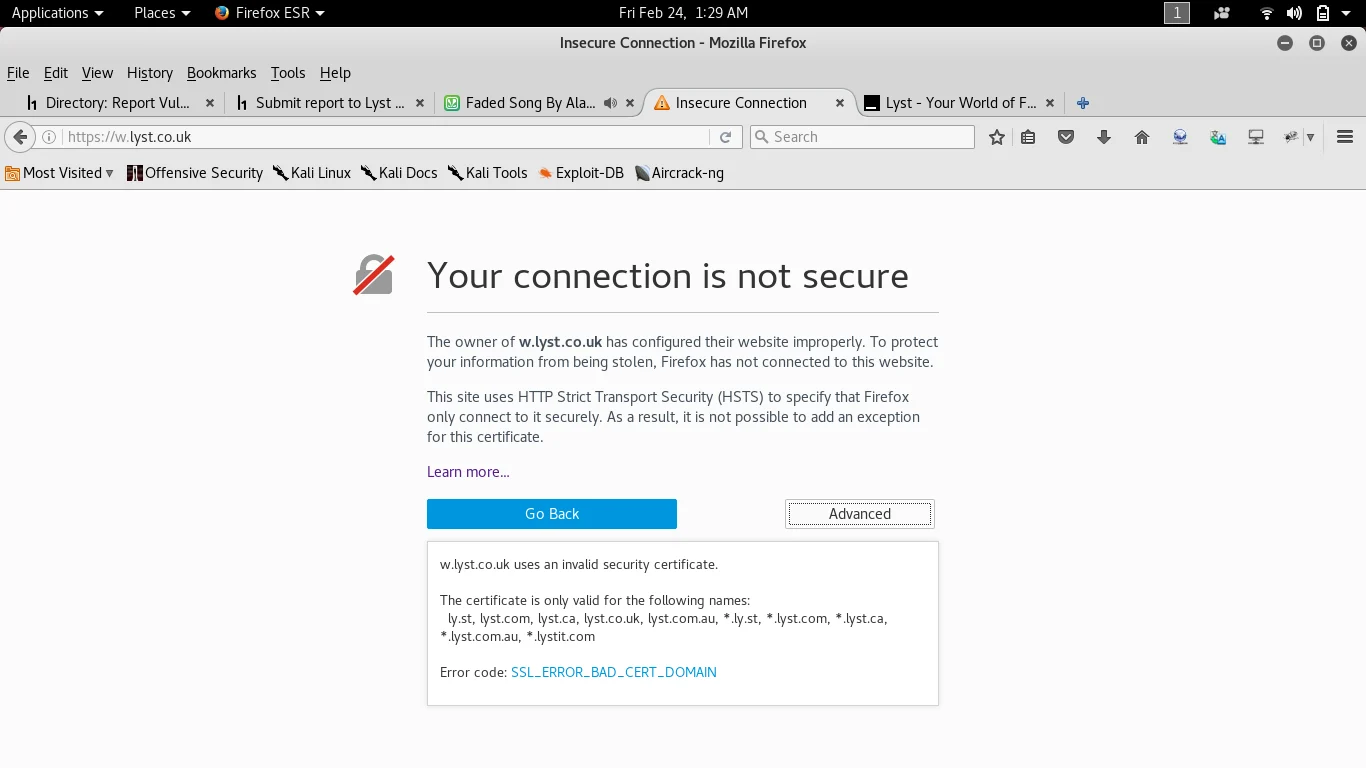
A attacker will send this link to user, where he will be shown this message, will break her/his trust from lyst.
Tested in Firefox latest version.
Thanks
What the report shows
The target is a subdomain of lyst.co.uk, specifically w.lyst.co.uk. The researcher's steps are short and direct: open the host in a browser and observe the error page returned instead of the site.
The reproduction step is given as a single URL:
https://w.lyst.co.uk/
Loading it in Firefox produced the following browser warning, quoted verbatim in the report:
The owner of w.lyst.co.uk has configured their website improperly.
To protect your information from being stolen,
Firefox has not connected to this website.
The screenshot shows the Firefox warning page that replaces the requested site. The researcher notes the test was done on the latest version of Firefox at the time.
The report frames the problem as a trust issue: an attacker who sends this link to a user will show that user a security warning, which breaks the user's trust. No exploitation beyond link distribution is described, and no data, credentials or internal systems are shown to be exposed.
The platform records the weakness as a violation of secure design principles, with a bounty of 100.00 USD, disclosed on 29 March 2017. No severity rating or CVSS score is given, and the report does not describe a fix.
Root cause
The message is Firefox's TLS error page, which it shows when it cannot establish a trusted connection to the host. The report does not include the certificate details, so the exact cause is not stated.
Impact
The report's own framing is reputational: a victim who follows the link sees a warning attributed to Lyst and loses confidence in the brand. Because the browser blocks the connection before any content is loaded, the report does not claim that an attacker can read or modify traffic here.
How this kind of bug works
HTTPS relies on the server presenting a certificate that (a) chains to a trust anchor the client accepts, (b) is within its validity period, and (c) matches the name the client requested, either exactly or through a wildcard or subject alternative name entry. When any of these checks fails, the browser refuses to treat the connection as secure and shows an interstitial instead of the page.
Misconfiguration usually arises when a host is added to DNS and to a web server or load balancer without the certificate being updated to cover the new name. Wildcard certificates cover only one label (*.lyst.co.uk does not cover a.w.lyst.co.uk), so deeper subdomains are a common source of mismatch. Expired certificates, certificates installed on the wrong listener, and internal or self-signed certificates exposed on a public host produce the same warning.
The defences are straightforward: certificate inventory and automation that issues and renews certificates for every public name, monitoring that alerts on expiry and on name mismatch, and HSTS once a host is known to serve valid TLS so that downgrade attempts fail.
How to test for it
This is a configuration check rather than an injection test, so the method is enumeration plus verification.
- Collect hostnames from certificate transparency logs, DNS records, search engine results and the application's own links, paying attention to deep subdomains and hosts that look like staging or legacy services.
- For each host, request the HTTPS URL and record the certificate chain, the names in the subject and subject alternative name fields, the validity dates and the issuer.
- Compare the requested host name against the certificate names, remembering that a wildcard matches exactly one label.
- Check whether plain HTTP on the same host redirects to HTTPS, and whether the redirect target itself presents a valid certificate.
- Confirm the result in a clean browser profile so that cached exceptions or previously accepted certificates do not mask the warning.
A positive result is a host that serves a certificate the browser rejects for that name, with the interstitial naming the host. Common false positives are corporate proxies or interception appliances that re-sign traffic, a local clock that is wrong (which produces an expiry error that is not the server's fault), and hosts that are intentionally internal and not meant to be reachable from the internet. Verify from an external network before reporting.
How it is fixed
Issue or install a certificate whose subject alternative names include the exact host, or move the host under a name covered by an existing wildcard. Automate issuance and renewal so that new hosts cannot go live without a matching certificate. Where a host should not be public at all, remove the DNS record or restrict access instead of leaving a broken TLS endpoint exposed. Once valid TLS is in place, enable HSTS so clients refuse to fall back to plain HTTP.
Hunting notes
Certificate problems cluster around names that were added quickly: marketing landing pages, regional subdomains, API gateways, and hosts left behind after a migration. Certificate transparency logs are the best recon signal because they reveal names the organisation has issued certificates for, and gaps between those names and the hosts actually served are where mismatches appear. A host that answers on HTTPS but returns a browser warning is easy to spot at scale with a scripted check of the certificate against the requested name.
What happened, in plain words
Every website you visit has an address, and some addresses have extra words in front of the main name. Lyst's main site is lyst.co.uk, and this report is about a smaller address underneath it: w.lyst.co.uk. Think of the main site as a building and the subdomain as a side door with its own sign.
When a website uses HTTPS (the padlock in your browser), the server has to show the browser a certificate. A certificate is like an ID card for a website: it says who the site is, and a trusted authority has signed it. The browser checks the ID card before it shows you the page. If the card does not match the address you asked for, or the browser does not trust the signature, the browser stops and shows a warning instead of the page.
That is exactly what the researcher found. The steps to reproduce the issue are one line:
https://w.lyst.co.uk/
This is just the address of the subdomain, opened over HTTPS. Opening it in Firefox did not show a Lyst page. It showed this message, quoted word for word in the report:
The owner of w.lyst.co.uk has configured their website improperly.
To protect your information from being stolen,
Firefox has not connected to this website.
The screenshot shows the Firefox warning page that replaces the requested site, with the address w.lyst.co.uk in the message. The researcher notes the test was done on the latest version of Firefox at the time.
Why does this matter? The report does not describe stolen data or a broken login. It describes a trust problem. An attacker can send this link to a user. The user clicks, sees a security warning, and loses trust. The report does not go further than that: it does not show that anyone can read or change traffic, and it does not show any data, password or internal system being exposed.
The platform records the weakness as a violation of secure design principles, with a bounty of 100.00 USD, disclosed on 29 March 2017.
In general, how this kind of bug works
This is a certificate misconfiguration. The browser warning is Firefox's way of saying it could not set up a trusted connection to that host. The report does not include the certificate details, so the exact cause is not stated.
To understand the checks, it helps to know what the browser verifies when it receives a certificate:
- The certificate must be signed by an authority the browser already trusts, either directly or through a chain of signatures. This is like checking that an ID card was issued by a real government office and not printed at home.
- The certificate must be within its validity dates. An expired certificate is rejected even if everything else is correct.
- The certificate must match the name you asked for, either exactly or through a wildcard or a list of alternative names.
A wildcard is a shorthand: a certificate for *.lyst.co.uk covers w.lyst.co.uk but only one level deep. It does not cover a.w.lyst.co.uk, because that is two levels down. Deeper subdomains are therefore a common source of mismatch.
How does a host end up in this state? Usually someone adds a new name to DNS (the internet's address book) and to a web server, but forgets to update the certificate to include the new name. Expired certificates, certificates installed on the wrong server, and internal or self-signed certificates exposed to the public internet all produce the same warning.
The defences are simple in principle: keep an inventory of every public name, automate issuing and renewal so no host goes live without a matching certificate, monitor for expiry and name mismatch, and enable HSTS once a host serves valid HTTPS. HSTS is a setting that tells browsers to refuse plain HTTP for that site, so a downgrade attempt fails.
In general, how to test for it
This is a configuration check, not an attack on the application. The method is to find hostnames and then verify each one.
- Collect hostnames from certificate transparency logs (public records of certificates issued), DNS records, search engine results and the application's own links. Pay attention to deep subdomains and hosts that look like staging or legacy services.
- For each host, request the HTTPS address and record the certificate chain, the names in the subject and subject alternative name fields, the validity dates and the issuer.
- Compare the requested host name against the certificate names, remembering that a wildcard matches exactly one label.
- Check whether plain HTTP on the same host redirects to HTTPS, and whether the redirect target itself presents a valid certificate.
- Confirm the result in a clean browser profile, so cached exceptions or previously accepted certificates do not hide the warning.
A positive result is a host that serves a certificate the browser rejects for that name, with the warning page naming the host. Watch for false positives: corporate proxies or interception appliances that re-sign traffic, a local clock that is wrong (which produces an expiry error that is not the server's fault), and hosts that are intentionally internal and not meant to be reachable from the internet. Verify from an external network before reporting.
In general, how it is fixed
Issue or install a certificate whose subject alternative names include the exact host, or move the host under a name covered by an existing wildcard. Automate issuance and renewal so new hosts cannot go live without a matching certificate. Where a host should not be public at all, remove the DNS record or restrict access instead of leaving a broken HTTPS endpoint exposed. Once valid HTTPS is in place, enable HSTS so clients refuse to fall back to plain HTTP.
In general, hunting notes
Certificate problems cluster around names that were added quickly: marketing landing pages, regional subdomains, API gateways, and hosts left behind after a migration. Certificate transparency logs are the best starting signal because they reveal names the organisation has issued certificates for, and gaps between those names and the hosts actually served are where mismatches appear. A host that answers on HTTPS but returns a browser warning is easy to spot at scale with a scripted check of the certificate against the requested name.
Glossary
- Subdomain: a name placed in front of a main domain, such as
w.lyst.co.ukunderlyst.co.uk, often used for a separate service or side door. - HTTPS: the secure version of the web protocol, where traffic is encrypted and the server proves its identity with a certificate.
- Certificate: a signed digital ID card for a website, containing the site's name and the signature of a trusted authority.
- Certificate authority: an organisation whose signature browsers already trust, used to vouch for certificates.
- Certificate chain: the sequence of signatures linking a website's certificate back to a trusted authority.
- Subject alternative name: a field in a certificate listing the host names it is valid for.
- Wildcard certificate: a certificate covering one level of subdomain, such as
*.lyst.co.uk, but not deeper names. - Validity period: the start and end dates during which a certificate is accepted.
- TLS: the encryption protocol behind HTTPS that protects traffic between browser and server.
- Browser interstitial: the warning page a browser shows instead of a site when it refuses the connection.
- DNS: the internet's address book, mapping names like
w.lyst.co.ukto servers. - HSTS: a setting that tells browsers to refuse plain HTTP for a site, preventing downgrade attempts.
- Downgrade: an attempt to push a connection from secure HTTPS to insecure HTTP.
- Certificate transparency logs: public records of certificates that have been issued, useful for finding hostnames.
- False positive: a finding that looks like a problem but is caused by something else, such as a proxy or a wrong local clock.
- CVSS: a standard scoring system for rating the severity of a vulnerability.
- Violation of secure design principles: a weakness category for problems in how a system is set up or designed, rather than a flaw in its code.






