Confirming any new Email Address
A Facebook endpoint that confirms an email address for a new account returned a different HTTP status code depending on whether the submitted five-digit confirmation code was correct, letting an attacker tell a valid code from an invalid one. By rotating both IP addresses and test-user accounts to get around the rate limit, an attacker could brute-force the code and confirm an email address they did not own.
 Published on lokeshdlk77.medium.com
This post is about an bug that I found on Facebook which used to Confirming any email address in new Facebook account by using IP and Account Rotation brute force attack. this post is bypass of my previous write-up → Disable Any Unconfirmed Account in Facebook
The full write-up lives on its author's site
It belongs to its author, so we link to it rather than copy it. The other two tabs are our own rewrites, checked against it.
Context
Facebook's account sign-up flow lets a new account be created with an email address that has not yet been verified. The account stays unconfirmed until the owner of that address enters a five-digit confirmation code. The endpoint that handles this confirmation is on the mobile site:
https://m.facebook.com/confirmemail.php?e=[redacted]@&c=15579&report=1&message=1
The e parameter carries the email address and c carries the five-digit code; report and message are also present in the URL. This write-up is a bypass of an earlier finding by the same researcher, Disable Any Unconfirmed Account in Facebook, after Facebook applied a permanent fix to that earlier bug.
Setup
The work was done with Burp Suite, using Intruder in Pitchfork mode, an upstream proxy for IP rotation, and a Python script to automate creation of test accounts. The researcher's own blog post on rotating the IP address for each request in Burp Suite is referenced as the method for IP rotation. The attack needs two rotating resources at once: a fresh source IP address and a fresh Facebook account (with its cookies) for every guess.
Finding it
To bypass the previous fix, the researcher first looked at what had changed. Sending a wrong five-digit code produced a response with status code 200 and the message Invalid Confirmation code.

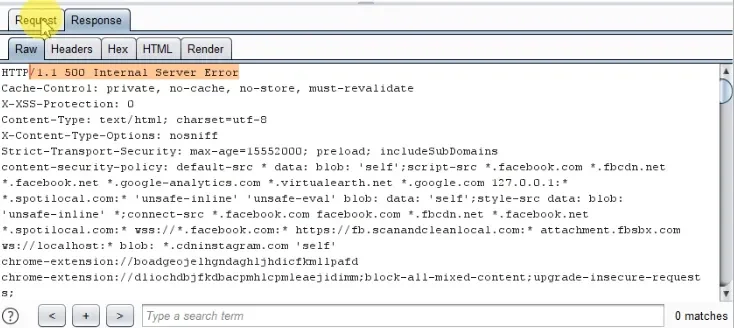
When the five-digit code matched, the server instead responded with status code 500 (Internal Server Error). That difference is the oracle: an attacker can tell the exact confirmation code from the status code alone.
The real obstacle was rate limiting. After 20 wrong attempts, all requests were blocked. IP rotation on its own could not get past this, because Facebook had already fixed that method in the previous finding. The researcher then noticed that the endpoint works both with and without a login session, and tried the same URL in another account, which returned the same error message.
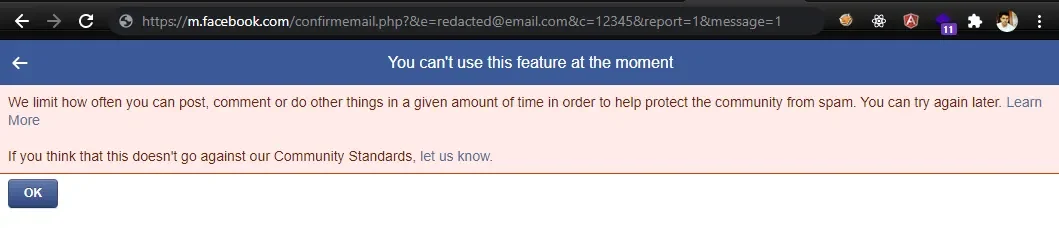
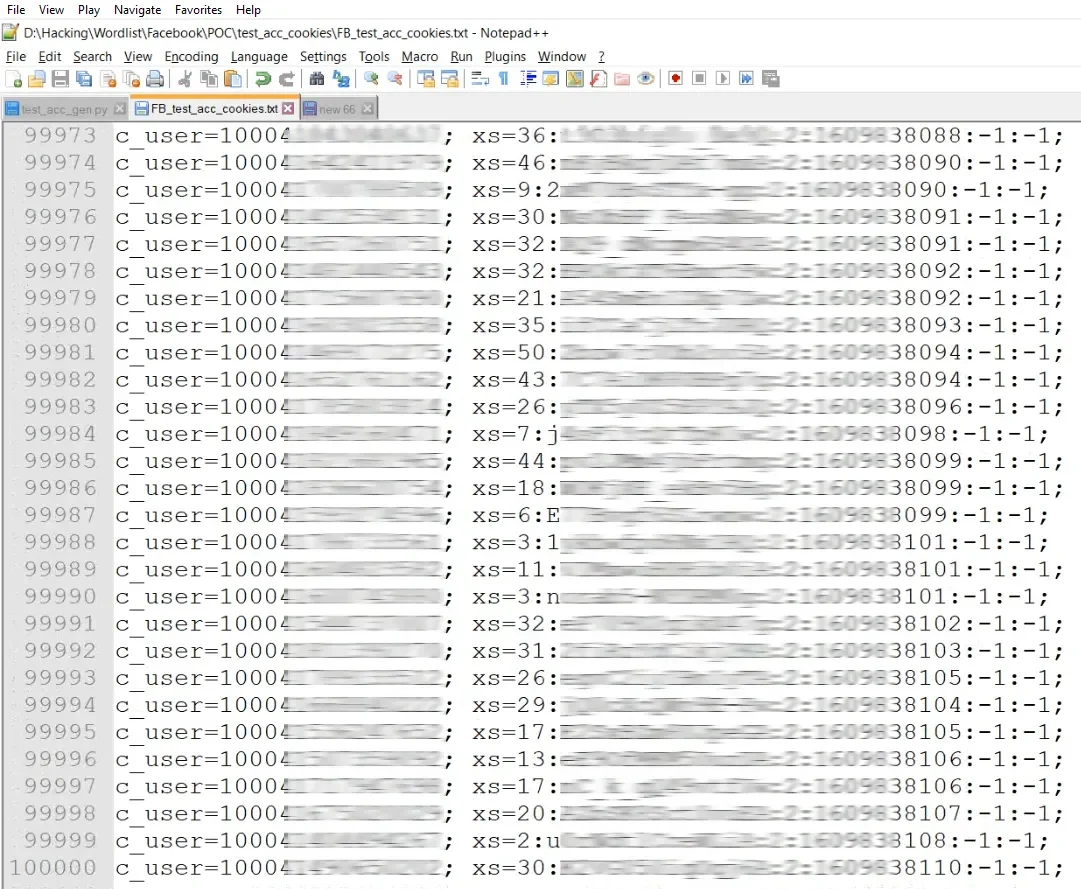
Trying the URL on a mobile phone in the Chrome browser returned 500 (Internal Server Error). From this the researcher concluded that the rate limit can be bypassed by using a different account together with a different IP address. IP addresses can be rotated per request using the Burp Suite upstream proxy method. Account rotation is harder: the code space is 00000 to 99999, so 100000 accounts are needed. Facebook Apps allow 2000 test users per app, so 2000 x 50 = 100000 accounts can be created. A simple Python script automated the account creation and extracted the cookies.
Exploitation
Step 1: Create the target account
Create a new Facebook account using the victim's email address. This is the account whose confirmation code is being guessed.
Step 2: Prepare the request in Intruder
Open Burp Suite and paste the following request into Intruder:
GET /confirmemail.php?e=[redacted]&c=12345&report=1&message=1 HTTP/1.1Host: m.facebook.comConnection: closeUpgrade-Insecure-Requests: 1User-Agent: Mozilla/5.0 (Windows NT 10.0; Win64; x64) AppleWebKit/537.36 (KHTML, like Gecko) Chrome/87.0.4280.88 Safari/537.36Accept: text/html,application/xhtml+xml,application/xml;q=0.9,image/avif,image/webp,image/apng,*/*;q=0.8,application/signed-exchange;v=b3;q=0.9Sec-Fetch-Site: noneSec-Fetch-Mode: navigateSec-Fetch-User: ?1Sec-Fetch-Dest: documentAccept-Encoding: gzip, deflateAccept-Language: en-US,en;q=0.9Cookie: c_user=0; xs=0;
The e parameter holds the victim's email address, c=12345 is the placeholder for the code to be guessed, and the Cookie header carries the session of the test account. The c_user=0; xs=0 values are placeholders that will be replaced by the test account cookies.
Step 3: Choose the attack type
Choose Attack type as Pitchfork, so that one payload list supplies the code and the other supplies the account cookies, paired per request.
Step 4: Set payload 1 to the code range
Set payload 1 as the five-digit code range, for example 00000 to 99999, with the payload marker placed on 12345.
Step 5: Set payload 2 to the account cookies
Set payload 2 as the test account cookies, and uncheck the payload Encoding option (c_user=0; xs=0).
Step 6: Enable IP rotation
Enable the IP rotation service in the Burp Upstream Proxy server, so each request leaves from a different address.
Step 7: Start the attack
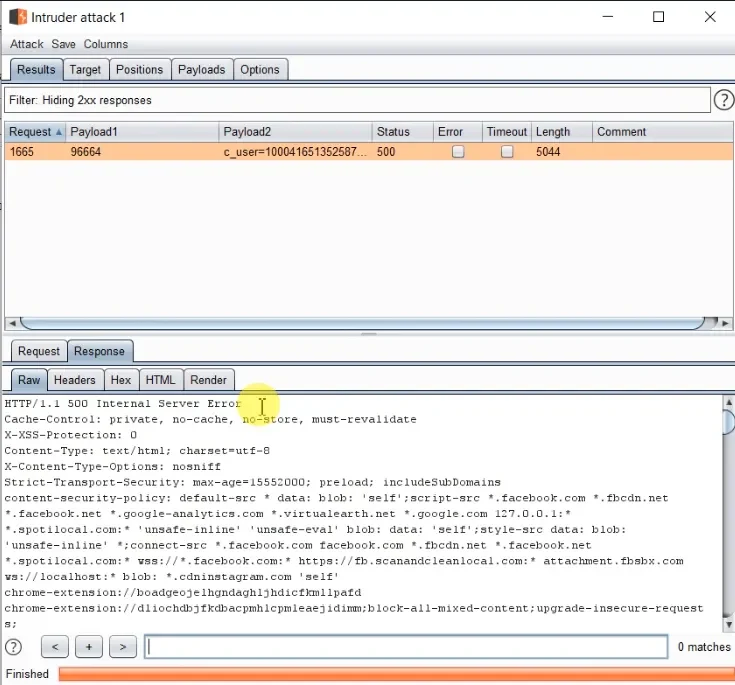
Start the attack. If the correct code is matched, the server response will be 500 Internal Server Error. That status code identifies the valid code among the guesses.
A video proof of concept is linked in the report: https://www.youtube.com/watch?v=cqmdyja9YQQ.
Root cause
The confirmation endpoint leaks whether a guessed code is correct through the HTTP status code: 200 with Invalid Confirmation code for a wrong code, 500 for a correct one. That turns a five-digit secret into something an attacker can test one guess at a time. After 20 wrong attempts all requests were blocked, and the researcher found the limit could be bypassed with a different account and a different IP address. The researcher noticed the endpoint works with and without a login session and returned the same error message in another account.
Impact
An attacker who can create the target account with a victim's email address and run the rotation attack can determine the exact confirmation code. The attack requires 100000 accounts and per-request IP rotation, and it depends on the endpoint continuing to answer with the distinguishing status codes. The report does not describe any further consequences beyond confirming the email address.
Fix
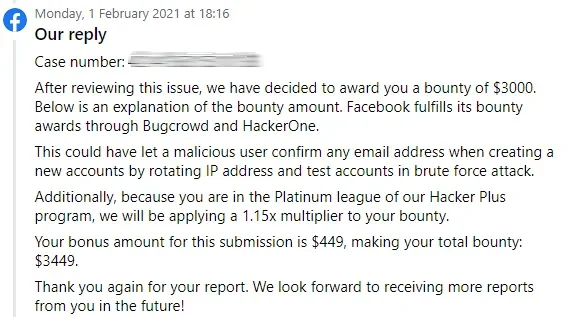
Facebook confirmed the fix on 01-Feb-2021, and the researcher confirmed it as well. The report does not describe the specific code change. The bounty was 3449 USD, awarded with a bonus.
Timeline:
| Date | Event |
|---|---|
| 07-jan-2021 | Report sent |
| 21-Jan-2021 | Further investigation by Facebook |
| 01-Feb-2021 | Fixed confirmed by Facebook and me |
| 01-Feb-2021 | 3449 USD bounty awarded by Facebook (with bonus) |
Variants to test
- Status-code or message oracles on other confirmation and verification endpoints: send a wrong value and a correct value and compare status codes, response lengths and error text. A positive result is any reliable difference that reveals correctness.
- Rate limits keyed only on IP or only on session: repeat a limited request from a new IP with the same session, and from the same IP with a new session. A positive result is the limit resetting when only one of the two changes.
- Endpoints that work with and without a login session: try the same request unauthenticated and authenticated across several accounts. A positive result is identical behaviour and error messages, which makes account rotation cheap.
- Small secret spaces (five-digit codes, short tokens) behind a per-context limit: estimate the number of contexts an attacker can obtain (for example test users per app) and compare it with the size of the secret space. A positive result is a context supply at least as large as the space.
- Error handling that returns 500 on a valid input: watch for 5xx responses that correlate with correct values rather than with malformed input. A positive result is a 500 that appears only for the correct guess.
What happened, in plain words
When you sign up for Facebook, you can give an email address that you do not own yet. The account stays unconfirmed until the five-digit confirmation code is entered. The code in this story is five digits long, so it looks like 00000, 00001, up to 99999. That is 100,000 possible codes.
The researcher found a way to guess that code without the victim ever telling anyone. The trick was not a clever password cracker. It was noticing that Facebook's confirmation page answers differently depending on whether the guess is right or wrong. A wrong guess gets one kind of reply, a right guess gets another. If you can tell the two replies apart, you can try every code in turn until one of them gives the "right" reply.
The obvious defence is a rate limit: after a few wrong tries, Facebook stops answering you. The researcher found that the limit could be bypassed by using a different account together with a different IP address. That needs a lot of accounts, and the report explains how 100,000 of them could be created using test users.
This write-up is a follow-up. The same researcher had earlier reported a bug called Disable Any Unconfirmed Account in Facebook, Facebook fixed it permanently, and this report is about getting around that fix.
The page being attacked
The confirmation step happens on Facebook's mobile website, at this address:
https://m.facebook.com/confirmemail.php?e=[redacted]@&c=15579&report=1&message=1
A URL like this has two parts worth knowing. The part before the ? is the page. The part after the ? is a list of settings, called parameters, separated by &. Each parameter has a name, an =, and a value. Think of it like a form you fill in before handing it over: the page reads the form and decides what to do.
eis the email address being confirmed. Here it is[redacted]@, with an extra@on the end.cis the five-digit code. Here it is15579.reportandmessageare two more parameters, both set to1.
The page takes the code and responds differently depending on whether it matched. The whole bug lives in how it tells them.
Looking at what the previous fix changed
Before trying to get around a fix, you need to know what the fix did. So the researcher sent a wrong five-digit code and watched the reply.
The reply came back with status code 200 and the message Invalid Confirmation code. A status code is a number a web server attaches to every reply. 200 is the everyday "here is your page, all fine" number. So a wrong code looked like a normal, successful page load that happened to say the code was invalid.
Then the researcher sent a code that matched. This time the server replied with status code 500, which is labelled Internal Server Error. 500 normally means "something broke on our side". Here it appeared exactly when the guess was correct.
That difference is the heart of the bug. Security people call it an oracle: any observable difference that answers a question you are not supposed to be able to ask. You do not need the page to say "correct". You only need the page to behave differently when it is correct. The status code alone tells the attacker whether the guess was right.
The obstacle: rate limiting
Guessing 100,000 codes one by one would be easy if nothing stopped you. Something did. After 20 wrong attempts, all requests were blocked. That is rate limiting: a cap on how often you may do something in a period of time. It is the same idea as a cash machine refusing your card after three wrong PINs.
The researcher had already used a trick in the earlier report: changing the internet address (the IP address) for each request, so the server sees each attempt as coming from a different place. Facebook had fixed that method in the previous finding, so IP rotation alone no longer worked.
Then the researcher noticed something about the confirmation page: it works both with and without a login session. A session is the state of being logged in, carried in a small piece of data called a cookie that your browser sends with every request. The researcher tried the same URL from a different account and got the same error message.
Next, the researcher opened the URL on a mobile phone in the Chrome browser and got 500 (Internal Server Error). Putting the pieces together, the conclusion was that the rate limit could be bypassed by using a different account together with a different IP address. In other words, changing both the account and the IP address got around the limit.
Getting 100,000 accounts and 100,000 addresses
Changing the IP address for every request is the easier half. The researcher points to a blog post, How to Rotate IP ADDRESS For Each Request in Burp Suite, for the method.
Changing the account for every request is harder, because you need a lot of accounts. The code space runs from 00000 to 99999, so the attacker needs 100,000 accounts to cover every possible code once. Facebook Apps allow 2000 test users per app. So 2000 x 50 = 100000 accounts can be created. A simple Python script automated the account creation and extracted the cookies.
A test user is a throwaway account that developers create inside a Facebook app to try things out. Fifty apps, each with its full allowance of 2000 test users, gives the 100,000 accounts the attack needs. The Python script did the boring part: create each account, then pull out the cookie that identifies it, so the attack could use each account once.
The tools
The work was done with Burp Suite, a program that sits between your browser and a website so you can look at and change requests. Three of its features matter here:
- Intruder sends the same request many times with different values filled in, which is exactly what guessing a code is.
- Pitchfork is one of Intruder's modes. It takes several lists of values and walks through them side by side, one entry from each list per request. Here, one list is the codes and the other is the account cookies.
- Upstream proxy lets Burp send its traffic through another service. The researcher used it with an IP rotation service, so each request left from a different address.
The attack needs two rotating resources at once: a fresh source IP address and a fresh Facebook account, with its cookies, for every guess.
Step by step
Step 1: Create the target account
Create a new Facebook account using the victim's email address. This is the account whose confirmation code is being guessed. The account exists but is unconfirmed.
Step 2: Prepare the request in Intruder
Open Burp Suite and paste the following request into Intruder:
GET /confirmemail.php?e=[redacted]&c=12345&report=1&message=1 HTTP/1.1Host: m.facebook.comConnection: closeUpgrade-Insecure-Requests: 1User-Agent: Mozilla/5.0 (Windows NT 10.0; Win64; x64) AppleWebKit/537.36 (KHTML, like Gecko) Chrome/87.0.4280.88 Safari/537.36Accept: text/html,application/xhtml+xml,application/xml;q=0.9,image/avif,image/webp,image/apng,*/*;q=0.8,application/signed-exchange;v=b3;q=0.9Sec-Fetch-Site: noneSec-Fetch-Mode: navigateSec-Fetch-User: ?1Sec-Fetch-Dest: documentAccept-Encoding: gzip, deflateAccept-Language: en-US,en;q=0.9Cookie: c_user=0; xs=0;
This is a raw HTTP request, the text your browser normally writes for you and hides. Line by line:
GET /confirmemail.php?e=[redacted]&c=12345&report=1&message=1 HTTP/1.1is the request line.GETmeans "give me this page". The path is the confirmation page with the same parameters as before.eholds the victim's email address,c=12345is a placeholder for the code to be guessed, andreportandmessageare carried along as before.HTTP/1.1is the version of the language being spoken.Host: m.facebook.comsays which website this request is for. One server can host many sites, so the request has to name the one it wants.Connection: closeasks the server to close the connection after replying, rather than keeping it open for more requests.Upgrade-Insecure-Requests: 1tells the server the browser is willing to be upgraded to a secure connection.User-Agent: Mozilla/5.0 (Windows NT 10.0; Win64; x64) AppleWebKit/537.36 (KHTML, like Gecko) Chrome/87.0.4280.88 Safari/537.36identifies the browser and operating system. Here it claims to be Chrome on 64-bit Windows.Accept: text/html,application/xhtml+xml,application/xml;q=0.9,image/avif,image/webp,image/apng,*/*;q=0.8,application/signed-exchange;v=b3;q=0.9lists the kinds of content the client will accept, with preference weights.Sec-Fetch-Site: none,Sec-Fetch-Mode: navigate,Sec-Fetch-User: ?1andSec-Fetch-Dest: documentare hints the browser adds about how the request was started.navigateanddocumentmean the user is opening a page rather than a script fetching data in the background.Accept-Encoding: gzip, deflatesays the client can accept compressed replies.Accept-Language: en-US,en;q=0.9asks for English, with a slight preference for US English.Cookie: c_user=0; xs=0;is the session. A cookie is a small label the server gave the browser earlier, and the browser shows it on every later request so the server knows who is asking.c_userandxsare the names of two Facebook cookies. The values0here are placeholders that will be replaced by the test account cookies.
Step 3: Choose the attack type
Choose Attack type as Pitchfork, so that one payload list supplies the code and the other supplies the account cookies, paired per request. A payload is just a value you want to try. Pitchfork means request one uses code number one with account number one, request two uses code number two with account number two, and so on. That pairing is what makes each guess come from a fresh account.
Step 4: Set payload 1 to the code range
Set payload 1 as the five-digit code range, for example 00000 to 99999, with the payload marker placed on 12345. The payload marker is the little tag Burp puts around the part of the request it will swap out. Putting it on 12345 means each request carries a different code in the c parameter.
Step 5: Set payload 2 to the account cookies
Set payload 2 as the test account cookies, and uncheck the payload Encoding option (c_user=0; xs=0). Encoding is Burp's habit of converting special characters into safe codes before sending them. Cookies contain characters like = and ;, and if Burp rewrote them the server would not recognise the session, so encoding has to be off here.
Step 6: Enable IP rotation
Enable the IP rotation service in the Burp Upstream Proxy server, so each request leaves from a different address. This is the second half of the bypass: a different account together with a different IP address got around the limit.
Step 7: Start the attack
Start the attack. If the correct code is matched, the server response will be 500 Internal Server Error. That status code identifies the valid code among the guesses. Every wrong guess comes back as 200 with Invalid Confirmation code, so the one reply that looks like a server error is the one that matters.
A video proof of concept is linked in the report: https://www.youtube.com/watch?v=cqmdyja9YQQ.
Why it worked
The confirmation page leaks whether a guessed code is correct through the HTTP status code: 200 with Invalid Confirmation code for a wrong code, 500 for a correct one. That turns a five-digit secret into something an attacker can test one guess at a time. After 20 wrong attempts all requests were blocked, and the researcher found the limit could be bypassed with a different account and a different IP address. The researcher noticed the endpoint works with and without a login session and returned the same error message in another account. Facebook Apps allow 2000 test users per app, so 2000 x 50 = 100000 accounts can be created.
What an attacker could do with it
An attacker who can create the target account with a victim's email address and run the rotation attack can determine the exact confirmation code. The attack requires 100000 accounts and per-request IP rotation, and it depends on the endpoint continuing to answer with the distinguishing status codes. The report does not describe any further consequences beyond confirming the email address.
The fix and the reward
Facebook confirmed the fix on 01-Feb-2021, and the researcher confirmed it as well. The report does not describe the specific code change. The bounty was 3449 USD, awarded with a bonus.
Timeline:
| Date | Event |
|---|---|
| 07-jan-2021 | Report sent |
| 21-Jan-2021 | Further investigation by Facebook |
| 01-Feb-2021 | Fixed confirmed by Facebook and me |
| 01-Feb-2021 | 3449 USD bounty awarded by Facebook (with bonus) |
Things to try on other sites
- Status-code or message oracles on other confirmation and verification endpoints: send a wrong value and a correct value and compare status codes, response lengths and error text. A positive result is any reliable difference that reveals correctness.
- Rate limits keyed only on IP or only on session: repeat a limited request from a new IP with the same session, and from the same IP with a new session. A positive result is the limit resetting when only one of the two changes.
- Endpoints that work with and without a login session: try the same request unauthenticated and authenticated across several accounts. A positive result is identical behaviour and error messages, which makes account rotation cheap.
- Small secret spaces (five-digit codes, short tokens) behind a per-context limit: estimate the number of contexts an attacker can obtain (for example test users per app) and compare it with the size of the secret space. A positive result is a context supply at least as large as the space.
- Error handling that returns 500 on a valid input: watch for 5xx responses that correlate with correct values rather than with malformed input. A positive result is a 500 that appears only for the correct guess.
Glossary
- API: a way for one program to talk to another, usually by sending requests to specific addresses and getting structured replies.
- Bounty: money a company pays a researcher for reporting a security bug responsibly.
- Burp Suite: a program that sits between your browser and a website so you can inspect and modify requests.
- Cookie: a small piece of data a website stores in your browser and asks for on every later request, often used to remember who you are.
- Endpoint: a specific address on a website that performs a specific action, such as confirming an email address.
- GET: the HTTP method used to ask a server for a page or resource.
- HTTP: the language browsers and web servers use to exchange requests and replies.
- HTTP status code: a number in every reply saying how it went, such as 200 for success and 500 for a server error.
- Intruder: the part of Burp Suite that repeats a request many times with different values.
- IP address: the number that identifies a device or network on the internet, roughly like a postal address for traffic.
- IP rotation: changing the IP address a request comes from, often by routing it through a service.
- Oracle: any observable difference in a system's behaviour that reveals an answer the system was not meant to give away.
- Parameter: a named value attached to a URL after a
?, separated by&, that the page reads. - Payload: in Intruder, a value to be inserted into a request for each attempt.
- Payload marker: the tag in Burp that marks which part of the request will be replaced by a payload.
- Pitchfork: an Intruder mode that walks several payload lists side by side, one entry from each per request.
- Python: a programming language often used for small automation scripts.
- Rate limiting: a cap on how many times something may be done in a period, used to slow down guessing and abuse.
- Request: the message a browser or tool sends to a server asking for something.
- Response: the message a server sends back.
- Session: the state of being logged in, usually carried by a cookie.
- Status code: see HTTP status code.
- Test user: a throwaway account created inside a Facebook app for development and testing.
- Upstream proxy: a setting that makes Burp send its traffic through another service before it reaches the internet.
- URL: the address of a page or resource on the web.
- User-Agent: a header in which the browser describes itself, such as its name and version.
- Vulnerability: a weakness in a system that lets someone make it behave in a way its owners did not intend.



